
Product Icon

Google Sheet Connector for WooCommerce

Sync WooCommerce orders and products with Google Sheets in real time. Supports two-way sync, scheduled updates, status-based sheets, custom field mapping, and secure Google API integration.
Escolha uma opção de cobrança
USD $49
Save 20%
USD $98 USD $78.40

A assinatura inclui

  • Melhorias e atualizações de produtos
  • Suporte ao cliente
  • Garantia de 30 dias para reembolso

  • WooCommerce orders synced into Google Sheets in real time
  • Manage all orders in one single Google Sheet
  • Automatic Order ID–based data mapping
  • Two-way sync – update orders directly from Google Sheets
  • Sync 7 WooCommerce order statuses in one place
    (Pending, Processing, On-Hold, Completed, Cancelled, Refunded, Failed)
  • Option to create separate sheets for each order status
  • Orders automatically organized in sheets based on order status & ID
  • Scheduled & real-time order sync (15 min, hourly, daily, twice daily)
  • Sync WooCommerce products, price, stock & status to Google Sheets
  • Enable / Disable sheet headers and freeze header rows
  • Customize sheet column names (field mapping)
  • Background row colors based on order status
  • One-click Create, Rename, Clear & Open Google Sheets
  • Secure connection using latest Google API libraries
  • Live connection status indicator with one-click disconnect
  • Detailed sync logs with order status, amount & sync time

Manage your WooCommerce store data smarter with Google Sheet Connector for WooCommerce.
This powerful plugin lets you sync orders and products directly with Google Sheets in real time—making reporting, order management, inventory updates, and team collaboration effortless.

No manual exports. No outdated spreadsheets. Just live WooCommerce data inside Google Sheets.

Order Sync with Google Sheet Overview

Connect WooCommerce with Google Sheets to automatically sync all essential order data in one place. The plugin sends complete order details to Google Sheets in real time, making it easy to manage, track, and analyze your orders.

Synced data includes: Order ID, order date, customer details, billing and shipping information, order status, totals (tax, shipping, discounts), payment method, product names, SKUs, quantities, and customer notes.
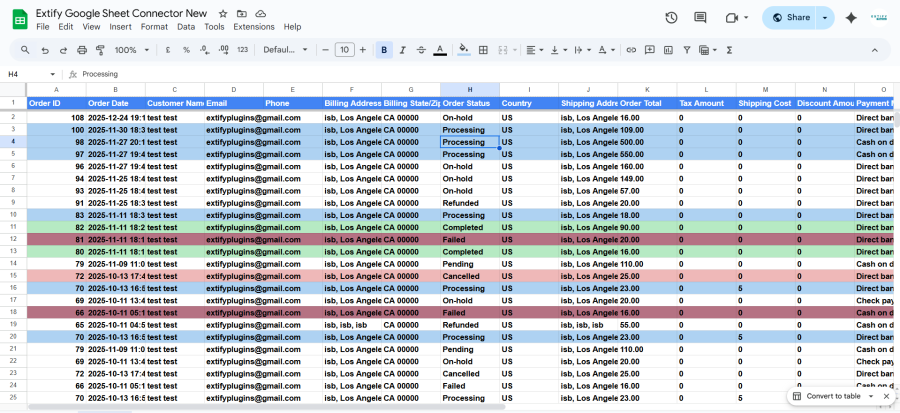
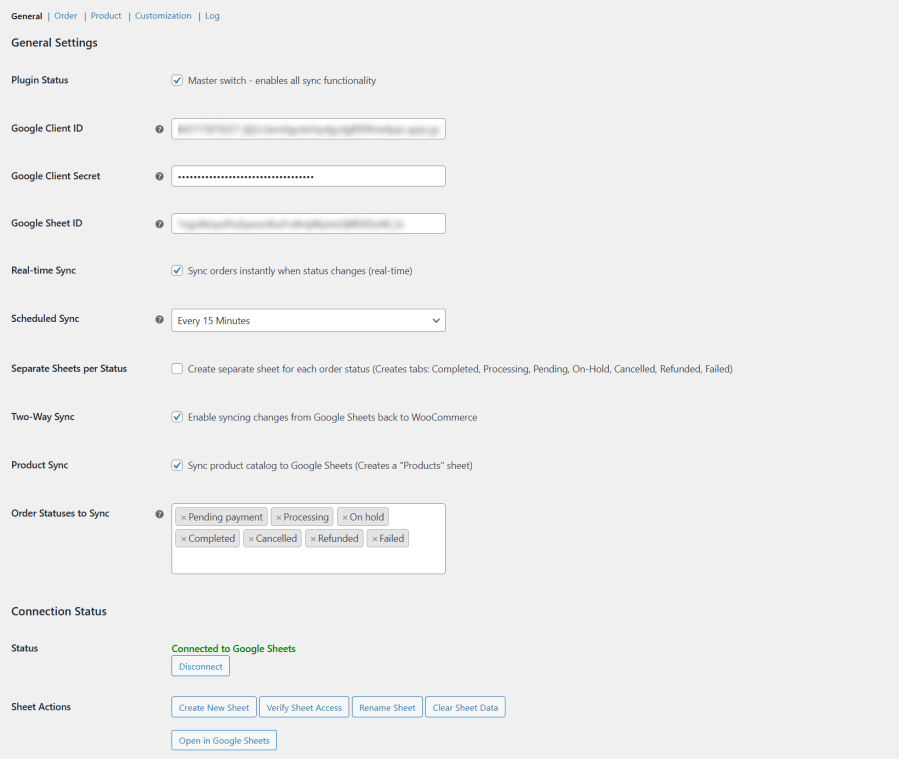
Google Sheet Connector for WooCommerce

General Settings

Google Sheet Integration for WooCommerce

Real-Time & Scheduled Sync

Whether you need instant updates or automated background syncing, the plugin adapts to your workflow.
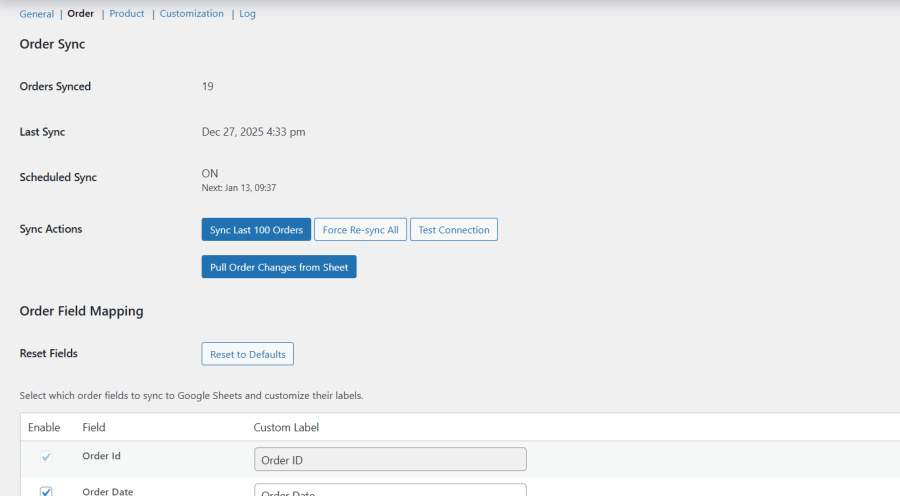
  • Real-time sync when order status changes
  • Scheduled sync every 15 minutes, hourly, twice daily, or daily
  • Manual sync options for last 100 orders or full re-sync

Order Sync WooCommerce Google Sheet 1

Two-Way Sync: Edit in Sheets, Update in WooCommerce

Make changes directly in Google Sheets and sync them back to WooCommerce with confidence.

  • Update order details from the sheet
  • Modify product price, stock, and status
  • Reduce admin work and speed up operations

Sync Products

Sync your entire WooCommerce product catalog into a dedicated Products sheet.
Keep pricing, stock levels, and product statuses aligned between WooCommerce and Google Sheets—without switching dashboards.
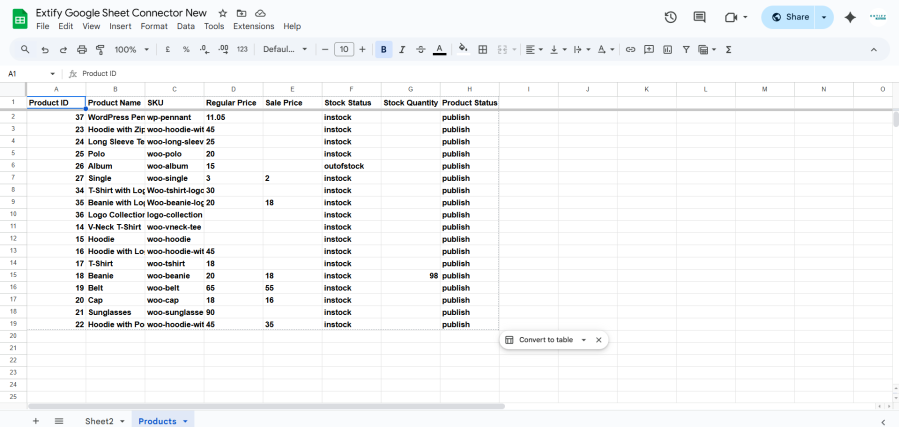
Products in Google Sheet for WooCommerce

Customizable Google Sheet

Turn messy spreadsheets into clear, actionable data:
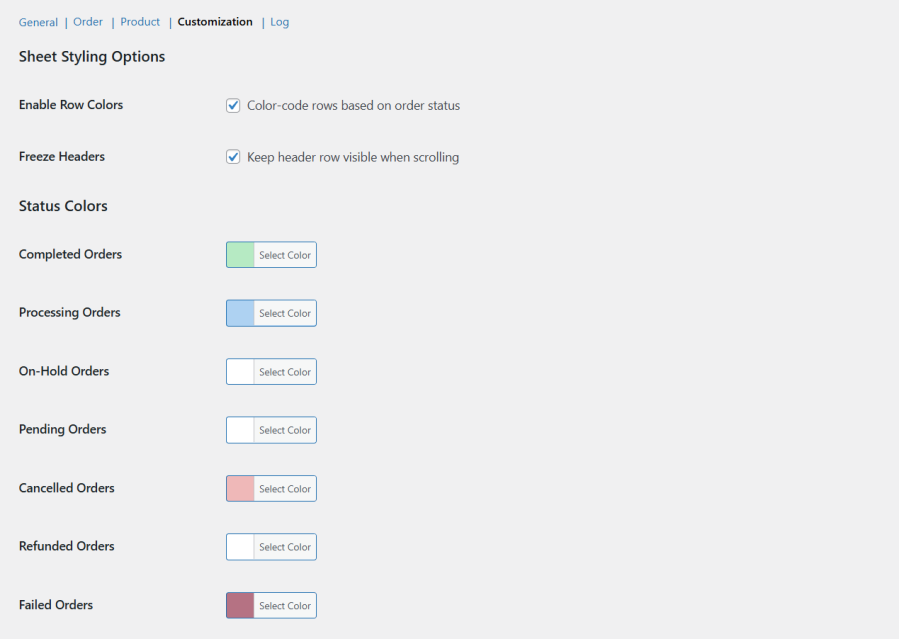
  • Enable or disable sheet headers
  • Freeze header rows for easy scrolling
  • Customize column labels with field mapping
  • Color-code rows based on order status

Google Sheet for WooCommerce Customization

Detailed Sync Logs & Tracking

Track every sync action with complete transparency:
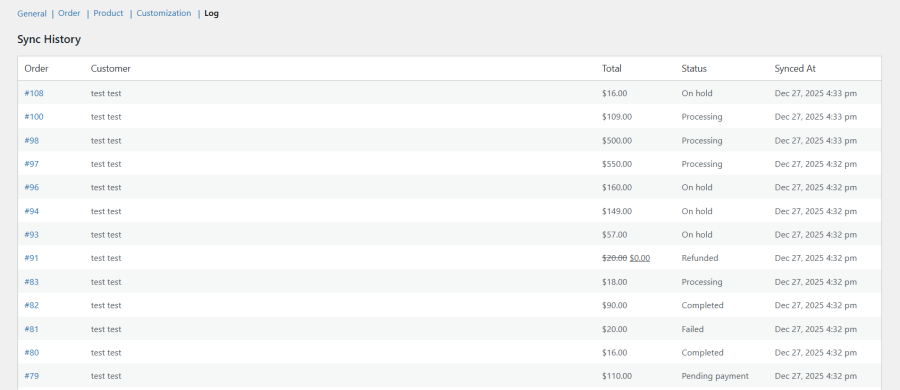
  • Order ID
  • Customer name
  • Order total
  • Order status
  • Sync date & time

Order Sync WooCommerce Google Sheet

Secure, Reliable & Built for Performance

The plugin uses the latest Google API libraries and secure OAuth authentication to ensure reliable and safe data synchronization—without slowing down your store.

Check our detailed Documentation to easily configure and use the plugin step by step.

Ideal For:

  • Store owners & managers
  • Accounting & finance teams
  • Inventory & warehouse management
  • Order fulfillment teams
  • Businesses relying on Google Sheets for reporting

Perguntas frequentes

What does Google Sheet Connector for WooCommerce do?

The plugin syncs your WooCommerce orders and products directly with Google Sheets. You can view, manage, and update store data in real time without exporting CSV files.

Does the plugin support real-time order syncing?

Yes. Orders are synced instantly to Google Sheets whenever the order status changes. You can also use scheduled syncing if preferred.

Which order statuses can be synced?

You can sync the following WooCommerce order statuses:

  • Pending Payment
  • Processing
  • On Hold
  • Completed
  • Cancelled
  • Refunded
  • Failed
  • Draft

You can choose which statuses to sync from the settings.

Can I sync all orders into one Google Sheet?

Yes. You can manage all orders in a single Google Sheet or enable the option to create separate sheets for each order status.

Does the plugin support two-way sync?

Yes. You can update order and product data directly from Google Sheets and sync those changes back to WooCommerce.

Can I sync WooCommerce products to Google Sheets?

Yes. The plugin syncs your entire product catalog to a dedicated Products sheet and supports two-way syncing for price, stock quantity, and product status.

How often does scheduled syncing run?

You can choose from multiple scheduled sync intervals:

  • Every 15 minutes
  • Hourly
  • Twice daily
  • Daily
Can I customize which fields are synced?

Absolutely. You can select which order and product fields to sync and customize column labels using the field mapping options.

Can I change the appearance of the Google Sheet?

Yes. You can:

  • Enable or disable sheet headers
  • Freeze header rows
  • Color-code rows based on order status
Is my data secure?

Yes. The plugin uses secure Google OAuth authentication and the latest Google API libraries to ensure safe and reliable data syncing.

Does the plugin create Google Sheets automatically?

Yes. With one click, you can create a new Google Sheet, verify access, rename sheets, or clear existing sheet data.

Can I disconnect Google Sheets at any time?

Yes. The plugin includes a one-click disconnect option, and the connection status is always visible in the dashboard.

Avaliações de clientes

Related Products

Preço: USD $79 Anualmente
Classificado com 3.4 de 5 estrelas
Preço: USD $59 Anualmente
Classificado com 3.1 de 5 estrelas
Preço: USD $109 Anualmente
Classificado com 3.1 de 5 estrelas
Preço: USD $49 Anualmente
Classificado com 4.1 de 5 estrelas
Preço: USD $109 Anualmente
Classificado com 2 de 5 estrelas
Preço: USD $109 Anualmente
Classificado com 2.3 de 5 estrelas
Preço: USD $39 Anualmente
Classificado com 2.8 de 5 estrelas
Preço: USD $109 Anualmente
Classificado com 2.6 de 5 estrelas
Preço: USD $109 Anualmente
Classificado com 2 de 5 estrelas




