
Das Abonnement beinhaltet
Support
Customers care about when their order arrives, not just how much shipping costs. But letting them pick delivery dates without validation often leads to missed expectations, support tickets, and rushed fulfillment.
Checkout Delivery Intent solves this problem at the source.
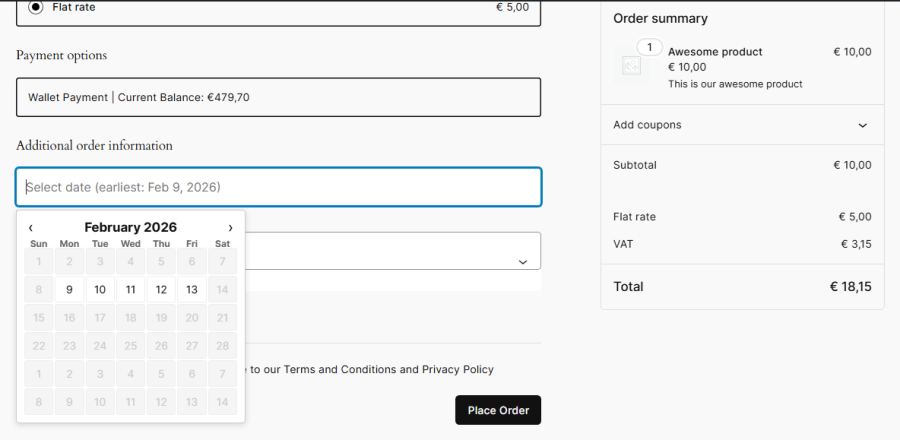
It adds a smart, validated delivery date field (with optional time selection) to your WooCommerce checkout and automatically evaluates whether each order can realistically be fulfilled based on your actual handling capacity.
Unlike basic delivery date pickers, Checkout Delivery Intent doesn’t blindly accept customer selections.
At checkout, delivery dates are validated against:
Unrealistic delivery expectations are stopped before the order is placed.
Every order is automatically categorized into one of three clear fulfillment states:
No manual tagging. No guesswork. Just instant visibility into what needs attention now versus later.
Checkout Delivery Intent is intentionally non-disruptive:
You stay in control—this plugin simply ensures expectations are realistic and planning is clear.
No carrier API is required. It captures "delivery intent" and validates it against your capacity, working alongside any shipping method you already use.
No. Validation happens server-side only when the checkout form is submitted, ensuring zero impact on frontend performance.
The plugin assigns a "Needs Review" label, allowing you to proactively contact the customer to adjust expectations.
You can define specific Blackout Dates in the settings. These dates will be automatically disabled on the checkout calendar, and the dispatch logic will skip them when calculating the "Prepare Today" vs. "Dispatch Later" labels.
This version focuses on feasibility validation (based on your handling time) rather than volume capping. It ensures you have enough time to prepare an order, but it does not currently "lock" a date once a specific order count is reached.
Yes. The selected delivery date and time slot are saved as order metadata. They are automatically displayed in the Order Confirmation email, the "My Account" order view, and on the admin Order Edit screen for your team.
Quality Checks
Länder







