

Das Abonnement beinhaltet
Support
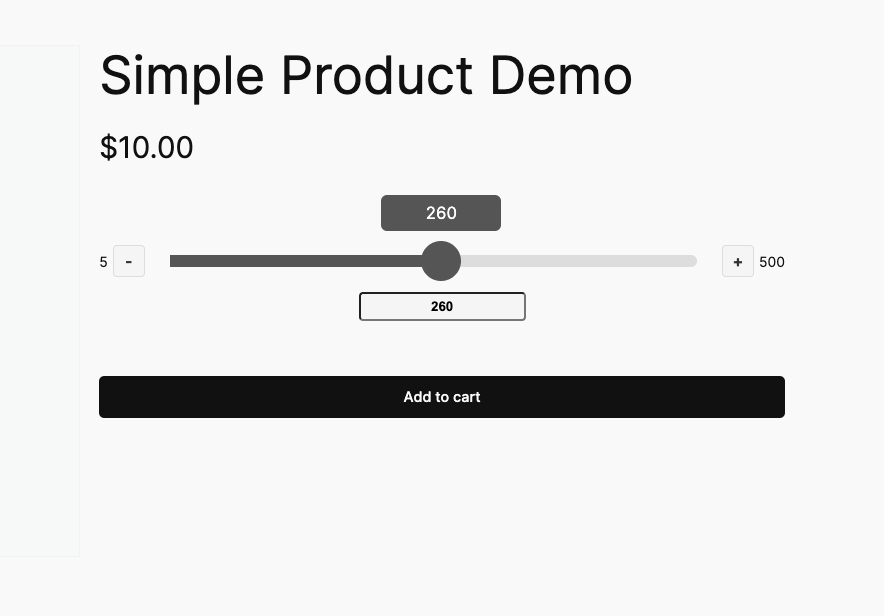
Quantity Slider for WooCommerce transforms the standard quantity input field on your product pages into an interactive slider. Instead of customers typing numbers into a small box, they can drag a slider handle or click plus/minus buttons to select quantities.
This simple change makes shopping faster, especially on mobile devices, and helps prevent errors from typing incorrect quantities.
When customers visit a product page, they’ll see a slider instead of the traditional quantity input field. They can:
Store owners can configure the slider for each product individually. Set minimum quantities to encourage bulk purchases, maximum quantities to manage inventory, and step values to control how quantities increase (for example, selling items in packs of three).
Per-Product Control – Configure minimum, maximum, and step values for each product individually. For variable products, set different limits for each variation.
Smart Defaults – The slider automatically uses sensible defaults (minimum 1, maximum 1000, step 1), so it works immediately without configuration.
Variable Product Support – Works with WooCommerce variable products. The slider appears after customers select a variation, using that variation’s specific quantity settings.
Visual Feedback – An optional tooltip shows the current quantity as customers drag the slider, and an optional quantity display shows the value below the slider.
Mobile Optimized – Built with touch devices in mind, making quantity selection smooth and natural on phones and tablets.
No Code Required – Configure everything through the WordPress admin interface. No technical knowledge needed.
Replaces the standard quantity input field with an interactive slider on product pages. Customers drag a handle or click buttons to select quantities instead of typing numbers. This makes quantity selection faster and easier, especially on mobile devices.
Replaces the standard quantity input field with an interactive slider on product pages. Customers drag a handle or click buttons to select quantities instead of typing numbers. This makes quantity selection faster and easier, especially on mobile devices.
Customers can select quantities more quickly and accurately. The visual slider reduces errors from typing wrong numbers and provides a better mobile shopping experience. This can lead to fewer abandoned carts and higher conversion rates.
Yes. Set the step value to match your requirement. For example, if you sell items in packs of 6, set the step to 6 and minimum to 6. Customers can then only select 6, 12, 18, and so on.
Yes. Set the minimum quantity value for any product. This is useful for bulk items, wholesale products, or items with minimum order requirements.
Each variation can have its own quantity settings. When a customer selects a variation, the slider appears with that variation's specific minimum, maximum, and step values. For example, a small t-shirt might have a max of 5, while a large t-shirt might have a max of 10.
Yes. Each product has independent settings. You might set a minimum of 10 for bulk items, a maximum of 2 for limited stock items, and step values of 3 for items sold in packs.
No. The plugin is lightweight and only loads on product pages where it's enabled. It uses minimal JavaScript and CSS, so it has negligible impact on page load times.
Yes. While the plugin works out of the box, we can provide guidance on customizing the CSS to match your theme. Contact support for assistance with styling options.
Quality Checks
Länder







