

Aktive Installationen
1K+
Das Abonnement beinhaltet
Support
Conditional Content gives you a simple way to show targeted messages, promotions, reminders, notices, and other content throughout your WooCommerce store based on what is happening with a product, the cart, or the current customer.
Use it to create a more dynamic shopping experience by displaying the right content at the right time. You can show messages when a product belongs to a certain category, falls within a specific price range, is low in stock, is currently on sale, has related items in the cart, or when a customer matches a specific user role or account.
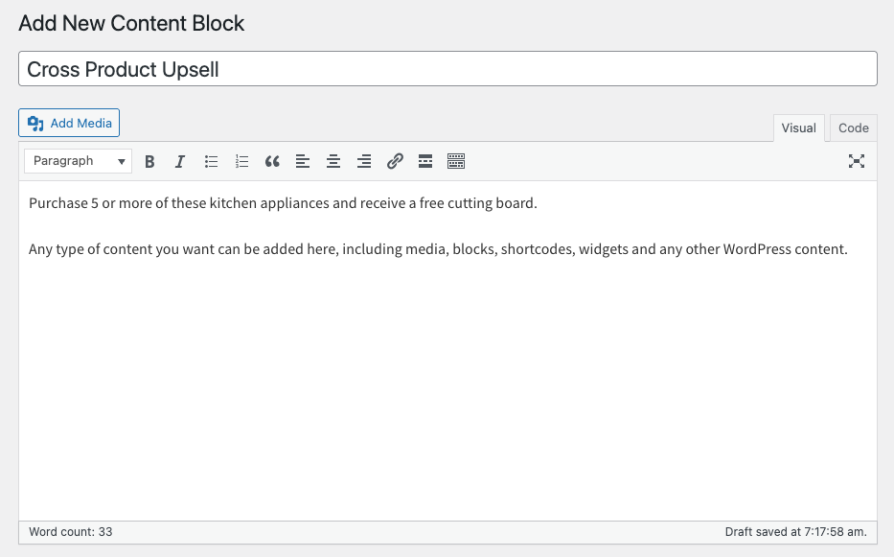
At the heart of the extension is a flexible rule builder that allows you to define exactly where and when your content should appear. You can create simple content rules in just a few clicks, or combine multiple conditions together for more advanced scenarios.
Conditional Content also includes a wide range of output locations. Common WooCommerce display hooks are available directly in the interface so you can place content without needing to look up hook names manually. For more advanced use cases, you can also enter your own hook or output the content directly in your theme with a template tag.
Promote category-specific offers
Display a message on all products in a specific category, such as highlighting a seasonal promotion, shipping notice, or buying guide.
Create urgency for low stock items
Show a message when inventory reaches a certain threshold to encourage customers to act before the item sells out.
Support sale campaigns
Display sale notices on products that are on sale now, about to go on sale, or only on sale during a defined date range.
Show messages based on cart contents
Display reminders, promotions, or cross-sell messaging when specific products or categories have been added to the cart.
Target specific customers
Show special content only to logged-in users, specific users, or selected user roles such as wholesale customers, members, or VIP accounts.
Explain pricing incentives
Use Conditional Content alongside Dynamic Pricing to display pricing tables, discount explanations, or quantity break messaging exactly where customers need to see it.
Conditional Content includes a broad selection of rules that can be combined to create powerful, targeted displays throughout your store.
Single Product Output Rules are used to control content shown on individual product pages and product-based locations.
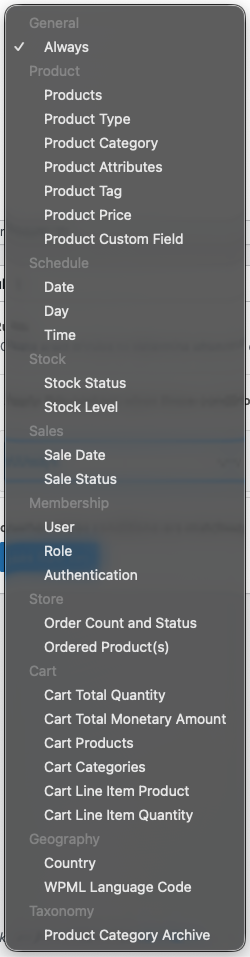
General Output Rules can be used to refine product-based conditions or control content shown elsewhere in the store.
Conditional Content works especially well with Dynamic Pricing.
You can create content that mirrors your pricing rules and place it directly on the product page, in the cart, or elsewhere in the customer journey. This makes it easier to explain quantity discounts, special offers, or purchase incentives before the customer checks out.
For stores using advanced pricing strategies, Conditional Content helps make those offers easier to understand and more visible to shoppers.
Kategorien
Extension information
Quality Checks
Länder






