


Installations actives
3K+
L’abonnement comprend
Assistance

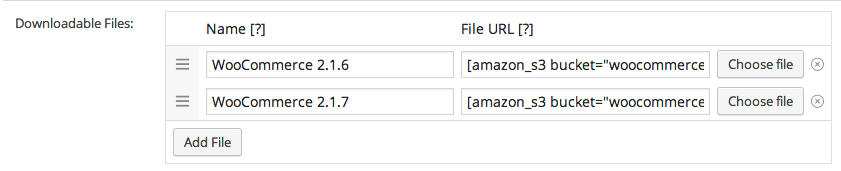
L’extension Stockage Amazon S3 pour WooCommerce vous permet de servir des produits numériques via votre service Amazon AWS S3. Stockage Amazon S3 est entièrement automatisé. Ainsi, vous pouvez simplement spécifier le nom du compartiment et de l’objet de votre fichier à l’aide de codes courts dans les chemins du fichier de téléchargement et, lorsqu’un client télécharge son achat, l’extension le traduit en une URL Amazon S3 et sert ce fichier comme téléchargement.
L’utilisation du stockage Amazon S3 pour servir vos produits numériques vous offre une meilleure évolutivité, offre plus de fiabilité, en particulier lors de la diffusion de gros fichiers, et des vitesses de téléchargement supérieures pour vos clients.
L’extension Amazon S3 pour WooCommerce prend également en charge plusieurs compartiments dans un même produit, afin que vous puissiez facilement fournir un accès de téléchargement aux fichiers stockés dans différents compartiments lors de l’achat d’un produit.
Développée par 
Only if you want to use Amazon S3. If you'd rather use Cloudflare R2 — which has no egress fees — you'll need a Cloudflare account with R2 enabled instead. Alternatively, you can use a provider like Wasabi or Backblaze, as long as they support the S3 API.
Amazon S3 and Cloudflare R2 are supported natively, with first-class settings in the extension. Wasabi, Backblaze B2, DigitalOcean Spaces, and other S3-compatible providers are supported experimentally through a configuration snippet — support can walk you through it if needed. You don't need both AWS and R2; pick whichever fits your goals.
There's no practical ceiling imposed by the extension itself — Amazon S3 supports objects up to 5 TB, and Cloudflare R2 up to 4.995 TB. WooCommerce's built-in Force Download method tops out around 500 MB on most shared hosts; Amazon S3 Storage replaces that streaming path with a direct cloud redirect, so the host's PHP limits stop mattering.
Every download is delivered through a signed URL that expires after a configurable period. Customers can't share a working link with others past the expiry, and the underlying file path is never exposed. WooCommerce's existing download permissions, download count limits, and expiry dates continue to apply on top of the signed URL layer.
Yes — uploads run through Action Scheduler in the background, so you can offload existing products without any issue. Add an existing file to a product and let it queue. This also allows files to be uploaded from behind basic auth and staging sites without issue.
Yes. Subscription products with downloadable files deliver through S3 or R2 the same way one-time products do. Memberships' access gating runs before the signed URL is generated, so members get their files and non-members don't. The three extensions complement each other when you're building a digital subscription or membership store.
Catégories
Informations sur l'extension
Vérifications qualité
Compatibilité
Pays








