

L’abonnement comprend
Assistance
Flexi BOGO helps store owners easily create special offers like « Buy One, Get One Free » and other discounts. It makes it simple to set up promotions that grab customers’ attention and boost sales.
Key Features:
Let’s face it. Getting discount sales related custom data from Google Analytics is not straightforward. You have to spend hours on it. We want to simplify this fro you with our Flexi BOGO plugin.
Flexi BOGO for WooCommerce lets you easily set the type of discount sales you want and track the revenue generated by each discount sale in real-time. You can see the revenue data in the Flexi BOGO dashboard at a glance and promote the sales if it is working or simply turn off the discounts that are not working. It’s that easy.
Buy X Get Y Product (or) Buy X Get X Product:
Whether you want to provide discounts within the same product/category or with different product/category, you can set it easily.
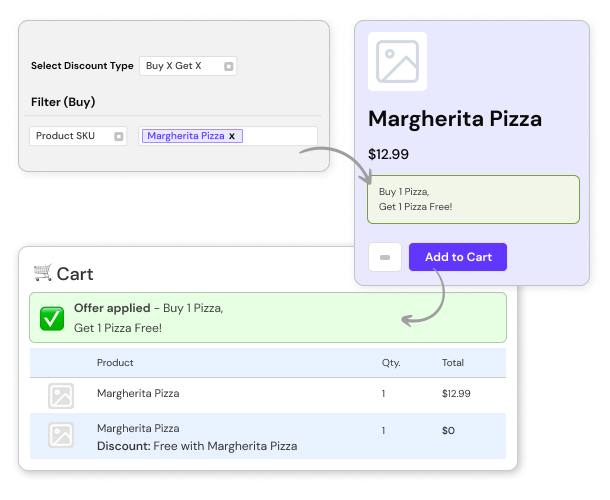
Product & SKU-Based Offers:
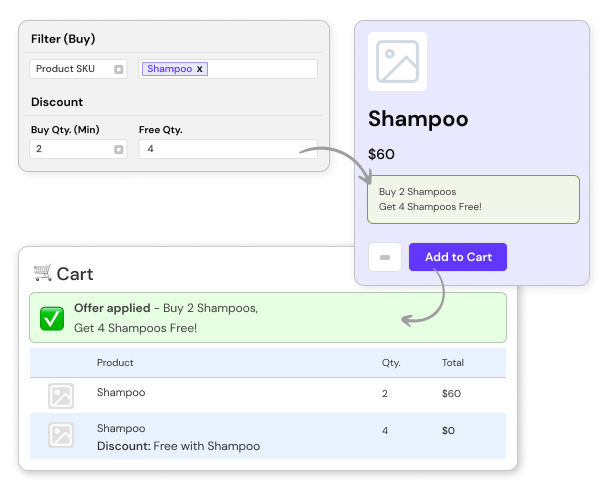
Clear excess stock with targeted offers like Buy 2 Shampoos, Get 4 Free.
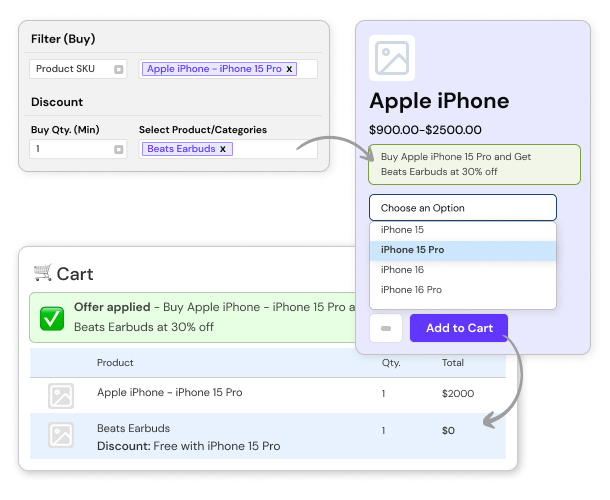
Product Attribute Discounts:
Boost sales on specific variations such as brand, color, or model. Example: Buy an iPhone 15 Pro, Get Beats Earbuds at 30% Off.
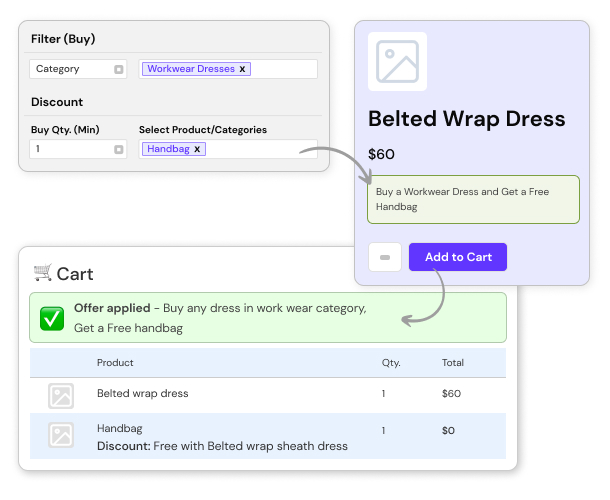
Category-Based Discounts:
Cross-sell products from slow-moving categories with popular ones. Example: Buy any workwear dress, Get a free handbag.
Tag-Based Discounts:
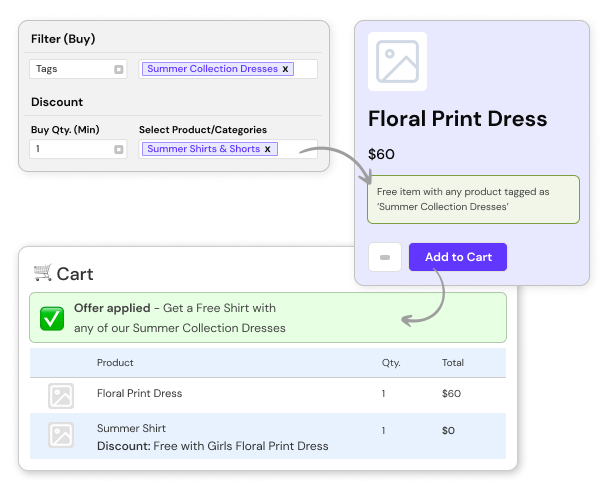
Give special discounts on collections, such as a BOGO for summer dresses.
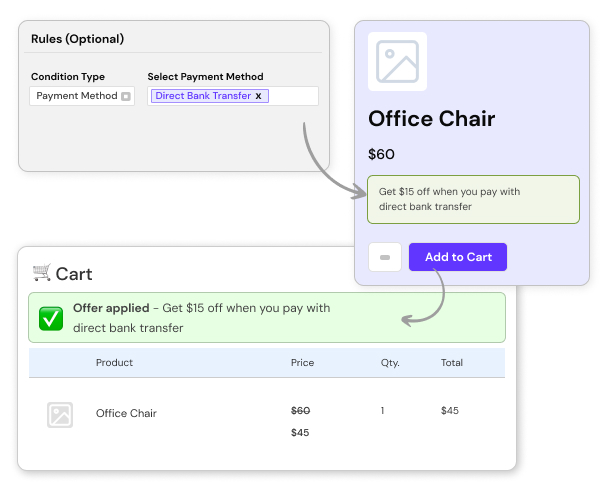
Payment Method-Based Discounts:
Encourage preferred payment methods. Example: Get $15 Off with a direct bank transfer.
Ready-to-Use Rule Templates
Use pre-made discount templates to quickly set up common discount scenarios like Buy X Get Y free for products or categories. Customize them to fit your needs.

Encourage More Spending with Cart Total Based Discounts
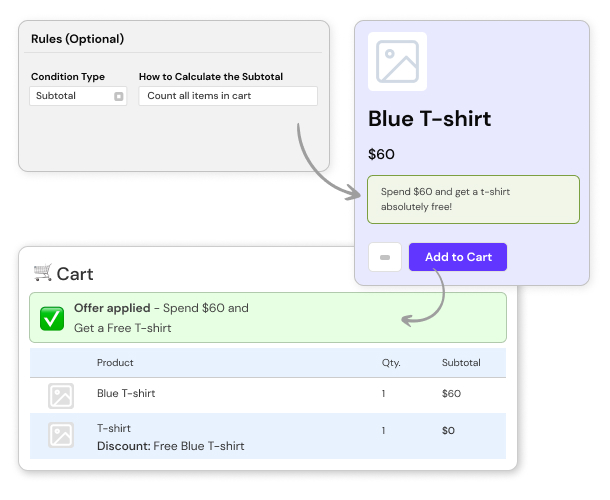
Offer free products or discounts when a customer’s cart value exceeds a set threshold. For example, Spend $60 and Get a Free T-Shirt.
Provide Discounts Based on Cart Items
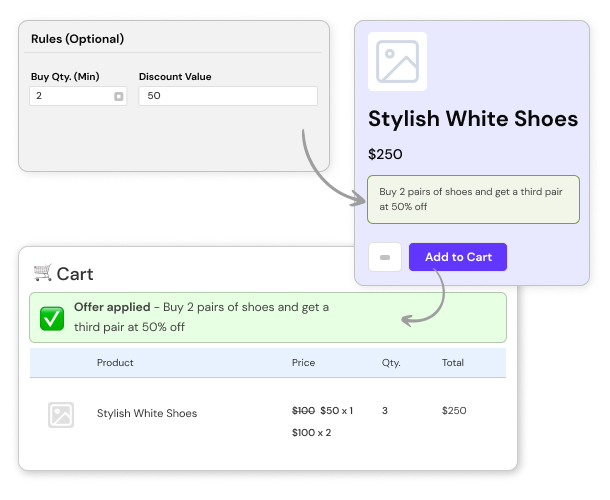
Incentivize customers to buy more of the same item with offers like Buy 2 Pairs of Shoes and Get a Third Pair at 50% off.
Discounts for Free Products
Provide free products as rewards, encouraging customers to buy higher-value items. For example, Buy a Thanksgiving Bundle and Get a Free Roasting Pan.
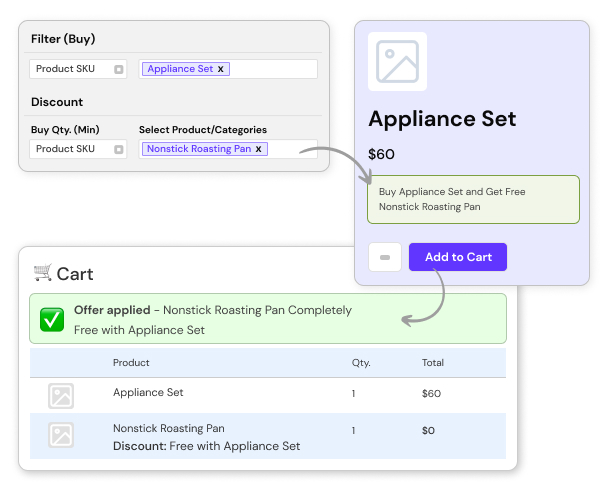
With Flexi BOGO, it’s simple to turn visitors into loyal customers with easy-to-manage discounts you can track!
You can create a BOGO deal in 2 ways – Navigate to WooCommerce > Flexi BOGO > Rules > Create Rule or create a rule directly from WooCommerce > Flexi BOGO > Ready to use templates.
Yes, you can restrict BOGO offers to specific products or categories. When creating a BOGO deal, you can select the products or categories in the Filter section on which the rule should be applied.
Yes. Flexi BOGO can automatically add the free gift to the cart as soon as the offer conditions are met. If the customer later updates the cart (for example, removes a required product or reduces quantity), the free gift is automatically removed as well.
Yes. A clear offer badge (for example, “Buy One Get One”) appears on the product page, so customers can easily see and understand the promotion before adding items to their cart.
Yes. You can set up rules that apply only to the products, SKUs, or categories you choose, and exclude brands you don’t want the promotion to affect.
Yes, it is possible to run multiple BOGO promotions simultaneously. Customers can benefit from different BOGO deals in a single order if the conditions for each deal are met.
If multiple rules apply to the same product, the rule with higher priority will be applied. You can adjust the priority of rules in the plugin settings.
Yes. Flexi BOGO lets you control exactly how many free items are added by setting the Free Quantity in the rule. This ensures the offer applies only the number of free products you want, even if customers add more qualifying items to the cart.
When a customer adds a qualifying product to their cart, the BOGO deal will automatically apply. They will see the discount or free product in their cart and at checkout.
Yes, you can set start and end dates for your BOGO deals. This is useful for running limited-time promotions.
Yes, you can set additional conditions for BOGO deals based on the order subtotal, payment method, quantity of items in the cart, and whether a specific coupon is applied.
Yes. You can set up separate BOGO rules so that different trigger products add different free gifts automatically. For example, if a customer adds Product A, Gift X is added, while adding Product B triggers Gift Y. The correct gift is applied automatically based on the product added to the cart.
Yes. Flexi BOGO allows you to apply BOGO rules using product attributes, such as size or color. The offer is applied when the selected products or variations meet the attribute condition defined in the rule.
Yes. Flexi BOGO can be used to create bundle-style conditional discounts. You can configure rules where purchasing a specific combination of products or categories triggers the offer on another item, even when the products are different.
Yes, the discount bar is fully customizable. You can change its color, text, and background on the product page.
The BOGO plugin is designed to be compatible with most WooCommerce extensions. However, we recommend testing the plugin with other extensions to ensure full compatibility.
Yes, the BOGO plugin is compatible with most themes and popular page builders like Gutenberg, Elementor, WPBakery, and others. However, we recommend testing the plugin with the page builders to ensure full compatibility.
If you encounter any issues, please check our documentation and support forum. If you cannot find a solution, contact our support team with detailed information about the issue.
Flexi BOGO continuously re-evaluates the cart. If customers increase or decrease quantities, the plugin automatically recalculates discounts and free gifts in real time. This ensures that the correct offer is always applied based on the current cart contents.
Yes. You can set up a rule where a free product is automatically added only when the cart subtotal reaches a defined minimum amount. If the cart value falls below the threshold, the free product is removed automatically, ensuring the offer is applied correctly.
Yes. Flexi BOGO supports two types of countdown timers. You can run a fixed timer that follows the start and end dates of your promotion, or a dynamic timer that runs for a set duration (for example, a limited-time offer that starts when the deal becomes active). This helps create urgency and encourages customers to complete their purchase faster.
The plugin settings will be accessible once the license is activated. If you have activated your license & you are still unable to access the plugin settings, please contact our Support Team via our website.
You can continue using the Flexi BOGO for WooCommerce plugin on your site. However, you will lose access to future plugin updates, security fixes and you will no longer have access to our fantastic support team.
We offer a 30-day money-back guarantee on our products. If you are not satisfied with your purchase, you can request a full refund within 30 days of the purchase date.
Please fill out this pre-sales form.
Catégories
Extension information
Quality Checks
Pays








