Key Benefits
- Save hours of manual work
Edit multiple WooCommerce orders at once instead of repeating the same changes order by order.
- Reduce mistakes and inconsistencies
Apply updates uniformly across selected orders and avoid human errors caused by repetitive editing.
- Stay efficient as order volume grows
Manage small or large stores with the same speed and clarity, even during busy periods.
- Simple and beginner-friendly
No technical knowledge required. The interface is clear, visual, and easy to understand from the first use.
- More control over daily operations
Make quick, confident updates to orders without disrupting your workflow.
How Bulk Orders Editing Helps You
- Full Access to WooCommerce Order Fields
Bulk Orders Editing gives you access to standard WooCommerce order fields, allowing you to manage and update order data without limitations.
- Bulk Edit WooCommerce Orders Effortlessly
Select multiple orders and apply changes in seconds. This makes routine order management faster and far less repetitive.
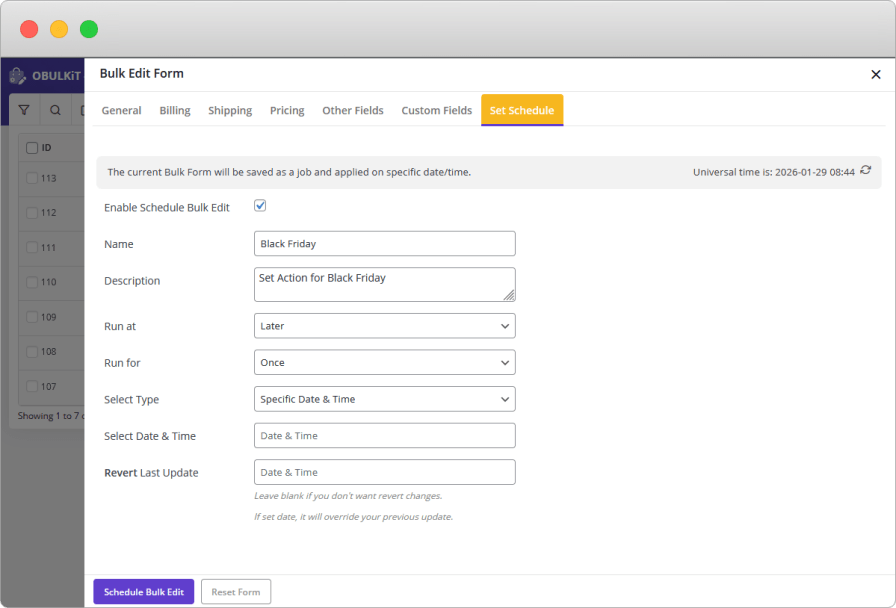
- Schedule Bulk Edits on Orders
Plan bulk updates in advance and let them run automatically. This is useful for planned status changes or operational workflows.
- Powerful Order Filtering
Filter orders by different criteria to target exactly the orders you want to edit—nothing more, nothing less.
- Bulk Edit Billing and Shipping Information
Quickly update billing and shipping details across multiple orders when corrections or adjustments are needed.
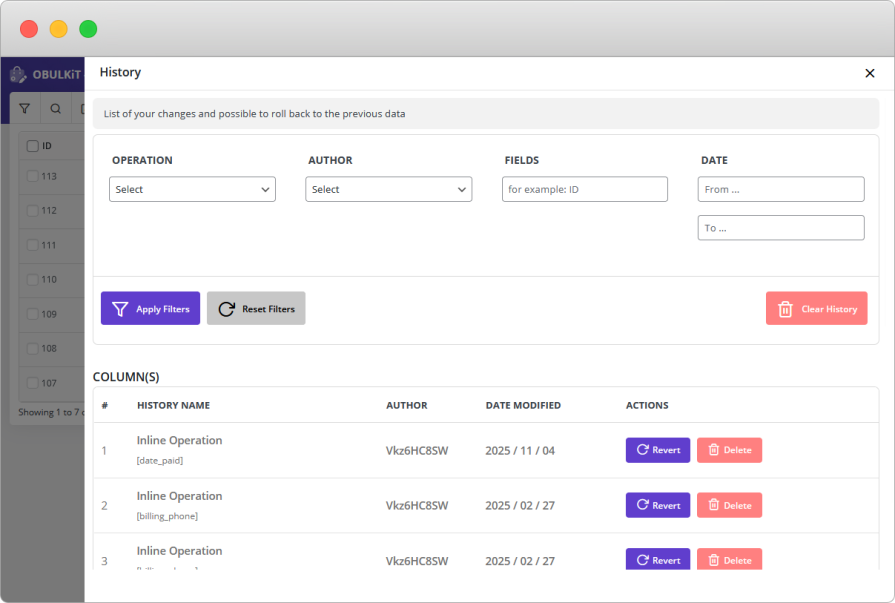
- Order History and Undo Support
Every bulk action is logged, giving you visibility into what changed. If needed, you can undo changes and restore previous values with confidence.
What you can do with Bulk Orders Editing?
- Select and target multiple orders using flexible filters
- Update order status, payment method, and order fields in bulk
- Apply changes consistently across all selected orders
- Manage large volumes of orders with confidence
Everything is designed to be clear and predictable — you always know what will change before applying it.
Bulk Orders Editing is ideal for:
- Store owners managing daily order operations
- Teams handling high order volumes
- Agencies maintaining WooCommerce stores for clients
- Anyone who wants faster and more structured order management
Why choose Bulk Orders Editing
If you regularly update orders and feel slowed down by repetitive tasks, this plugin gives you a faster, safer way to work.
Instead of spending hours editing orders one by one, you stay focused, efficient, and in control — even as your store grows.








