

Installazioni attive
2K+
L'abbonamento include
Supporto
Note: AutomateWoo Refer A Friend requires AutomateWoo to be installed and active on your store.
Adding a referral program to your WooCommerce store is a great way to increase your word-of-mouth sales and numerous studies show that people trust recommendations from people they know.
With AutomateWoo Refer A Friend you can quickly set up a referral program that is customized for your store.
Run a ‘coupon based’ campaign where advocates can share a unique coupon, giving the friend a discount and the advocate store credit for each successful referral. If you don’t wish to offer coupon discounts you can run purely ‘link based’ campaigns where advocates can refer their friends by sharing a unique link to your store.
Easily create and manage a WooCommerce customer referral program all from your WordPress admin area. You can choose between either an automatic or manual referral approval process. Selecting automatic approval means that any referral that does not appear to be fraudulent will be automatically approved once its corresponding order is marked as complete.

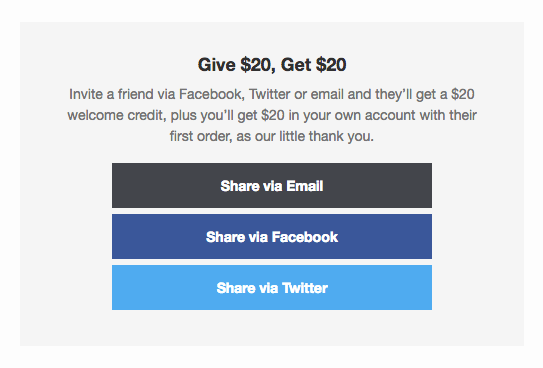
The customer referral process is easy and flexible for advocates, allowing sharing via Email, Facebook, Twitter and WhatsApp.
For the advocate’s friend the process is just as simple, all they need to do it use a coupon to gain their referral discount.

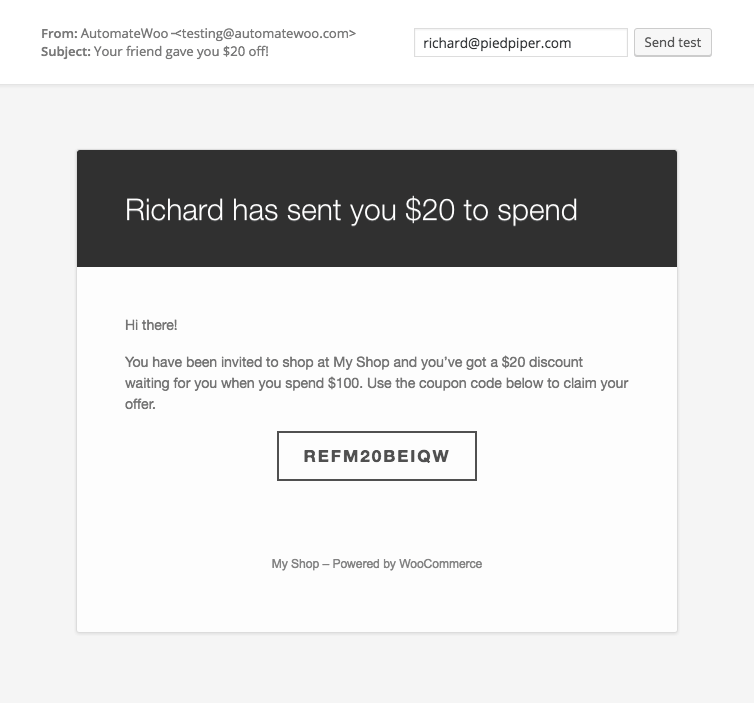
Encourage referral sharing by including the post-purchase share widget on the order confirmation page and by creating order follow-up emails using the email version of the widget.

It’s important for your customer referral program to include fraud prevention methods. Our WooCommerce Refer A Friend add-on has a few fraud rules out of the box:

Evaluate the success of your customer referral program by using reports that show the number of referral orders placed.

Advocates can view their successful referrals from their account area.

The Refer A Friend add-on integrates with AutomateWoo workflows adding new triggers and variables. This lets you set up automation for your customer referral program and also gives you complete control over any email notifications that you want to be sent to admins or advocates.

AutomateWoo Refer A Friend is a customer referral program add-on for WooCommerce. It lets your existing customers, known as advocates, invite their friends to your store and earn a reward when those friends make a purchase. You can run a coupon-based campaign that rewards both the advocate and the friend, or a link-based campaign that rewards only the advocate. It runs on top of AutomateWoo, so it plugs into your existing marketing automation.
Refer A Friend gives you a guided way to launch a referral program directly from your WordPress admin area. You choose your campaign type, set your reward and coupon offer, pick an approval process, and share the referral form through a dedicated share page and post-purchase widget. Recent versions create a "Refer a friend" share page for you automatically on install, so advocates have somewhere to send invitations without extra setup on your part.
The two campaign types decide who gets rewarded. A coupon-based campaign rewards both sides: the friend receives a discount coupon, and the advocate earns store credit for each successful referral. A link-based campaign rewards only the advocate, who shares a unique link rather than offering the friend a discount. Coupon-based campaigns suit stores that want to give new customers an incentive to buy, while link-based campaigns suit stores that prefer to reward advocates without discounting first orders. You can also enable both approaches together.
Yes, that is the core purpose of Refer A Friend. It is designed to help you grow word-of-mouth sales by turning satisfied customers into advocates who recommend your store to people they know. By offering a reward for each successful referral and, optionally, a discount for the friend, it gives customers a reason to share and gives new shoppers a reason to buy. Results depend on your offer and audience, but the add-on gives you the tools to run and track the program.
Advocates are rewarded with store credit by default, which they can apply at checkout on a future order. You can set the reward as a fixed amount, for example $20, or as a percentage of the friend's order total, for example 20 percent. If you prefer not to give store credit, you can set the reward type to none and use an AutomateWoo workflow to send a unique coupon or free gift instead. This flexibility lets you match the reward to how your store likes to say thank you.
Advocates can share your store through Email, Facebook, X (formerly Twitter), and WhatsApp. Sharing happens from a dedicated share page and from a post-purchase share widget that can appear on the order confirmation page and inside order emails. This gives customers several straightforward ways to spread the word right after they buy, when they are most engaged.
Yes. Refer A Friend includes several fraud rules out of the box to help keep your program fair. It can flag referrals where the advocate's IP address matches the customer's, block coupon reuse through browser cookies, and check the billing email against previous orders when a referral coupon is used. Flagged referrals are held back from automatic approval so you can review them. You can also restrict a referral coupon to the invited email address only, so codes cannot be passed around beyond the intended recipient.
You can do either. By default, referrals are auto-approved once the related order is marked complete, as long as they are not flagged as potentially fraudulent. If you prefer more oversight, you can switch to manual approval and review every referral yourself before the advocate receives their reward. This lets you balance a hands-off program against tighter control.
Yes. Refer A Friend includes reporting that shows the number of referral orders placed, plus a referrals analytics view and a referred orders dashboard widget so you can gauge results at a glance. Recent versions also add a read-only program summary in the Referrals admin area. Together these give you a clear picture of how your advocates and campaigns are contributing to sales.
Yes. Refer A Friend is an add-on for AutomateWoo, so you need AutomateWoo installed and active on your store for it to work. Because it connects to AutomateWoo workflows, you also gain referral-specific triggers and variables that let you automate the emails and notifications sent to advocates and admins. If you are not already using AutomateWoo, factor that into your plan when setting up your referral program.
Yes. You can combine Refer A Friend with WooCommerce Subscriptions to reward advocates with free subscription time when their referrals are approved. Store credit can be applied to subscription renewal payments when that option is enabled, which is a helpful way to encourage referrals in a subscription business. This setup does depend on using a payment gateway that supports recurring amount changes.
Refer A Friend is a good fit for WooCommerce stores that already have happy customers and want to turn that goodwill into new sales. It suits stores looking to grow through word-of-mouth rather than paid advertising, and it works well for both one-time product stores and subscription businesses. Because it builds on AutomateWoo, it is especially useful for merchants who already use, or plan to use, marketing automation in their store.
Refer A Friend is built specifically for customer referral programs, so it may not be the right tool if your goal is broader marketing automation like abandoned cart recovery, follow-up emails, or win-back campaigns. Those jobs are handled by AutomateWoo itself, which Refer A Friend depends on. It is also worth noting that referral rewards rely on WooCommerce coupons being enabled, so if you have coupons switched off store-wide, you will need to turn them back on for rewards to work.
Yes. Advocates have a referrals tab in their WooCommerce account area where they can view their successful referrals and their store credit balance. You can also choose to hide referred customer names from this view for privacy. This keeps the program transparent for advocates while giving you control over what personal information is shown.
Yes. You can set a minimum purchase amount for a referral to count, place a limit on how many referrals a single advocate can make, and block specific advocates if needed. You can also restrict or exclude certain products or categories from referrals. These controls help you keep the program aligned with your margins and campaign goals.
Categorie
Informazioni sull'estensione
Controlli di qualità
Compatibilità
Paesi
Requisiti