


Instalações ativas
900+
Comparação de produtos
A assinatura inclui
Suporte
WooCommerce Subscriptions lets a customer cancel the moment their first payment clears. Minimum Periods for WooCommerce Subscriptions closes that gap. You set the number of paid periods a subscriber has to complete, and the Cancel button stays hidden on their My Account page until they get there. Set one number for the whole store, or a different number on each product, variation, or subscription plan.
The initial order counts as the first paid period. Set the minimum to 2 and the subscription has to renew once before the customer can cancel. Set it to 6 and you have a six-month commitment on a monthly plan.
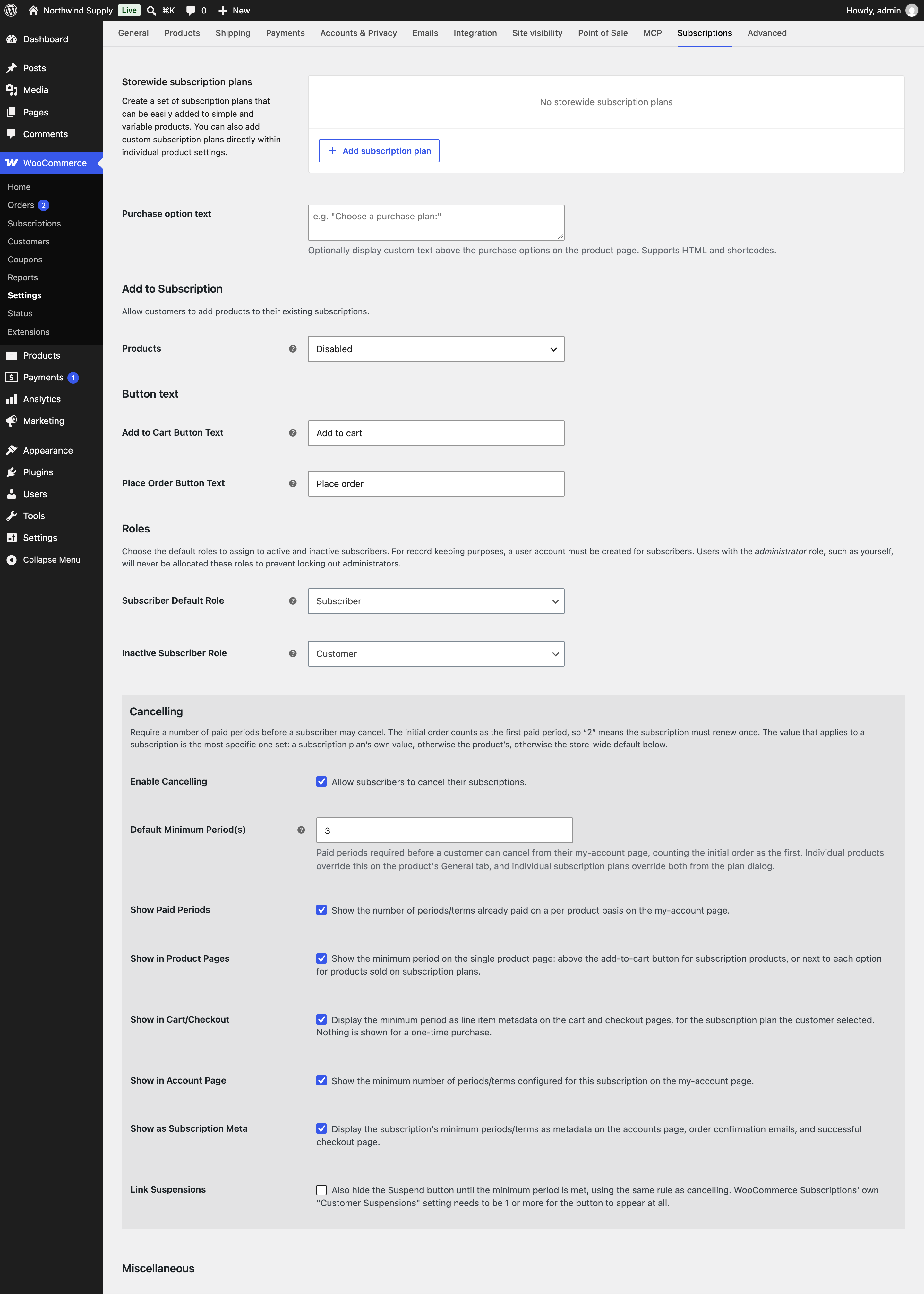
A store-wide minimum period. One number under WooCommerce > Settings > Subscriptions applies to every subscription product that does not set its own. Change it once and the whole catalog follows.
Per-product and per-variation overrides. Any product can override the store-wide number from its General tab. Each variation of a variable subscription can carry its own value, so Basic, Plus, and Pro can commit for different lengths. A variation with nothing set falls back to the parent product, then to the store.
Per-plan minimum periods. On WooCommerce Subscriptions 9.0 and higher, each subscription plan gets its own Minimum period field in the same dialog you add the plan in. This works on a product’s own plans and on store-wide plans. The plan’s value wins over the product’s, and the product’s wins over the store’s, so a monthly plan can stay cancel-anytime while the discounted annual plan commits for two periods.
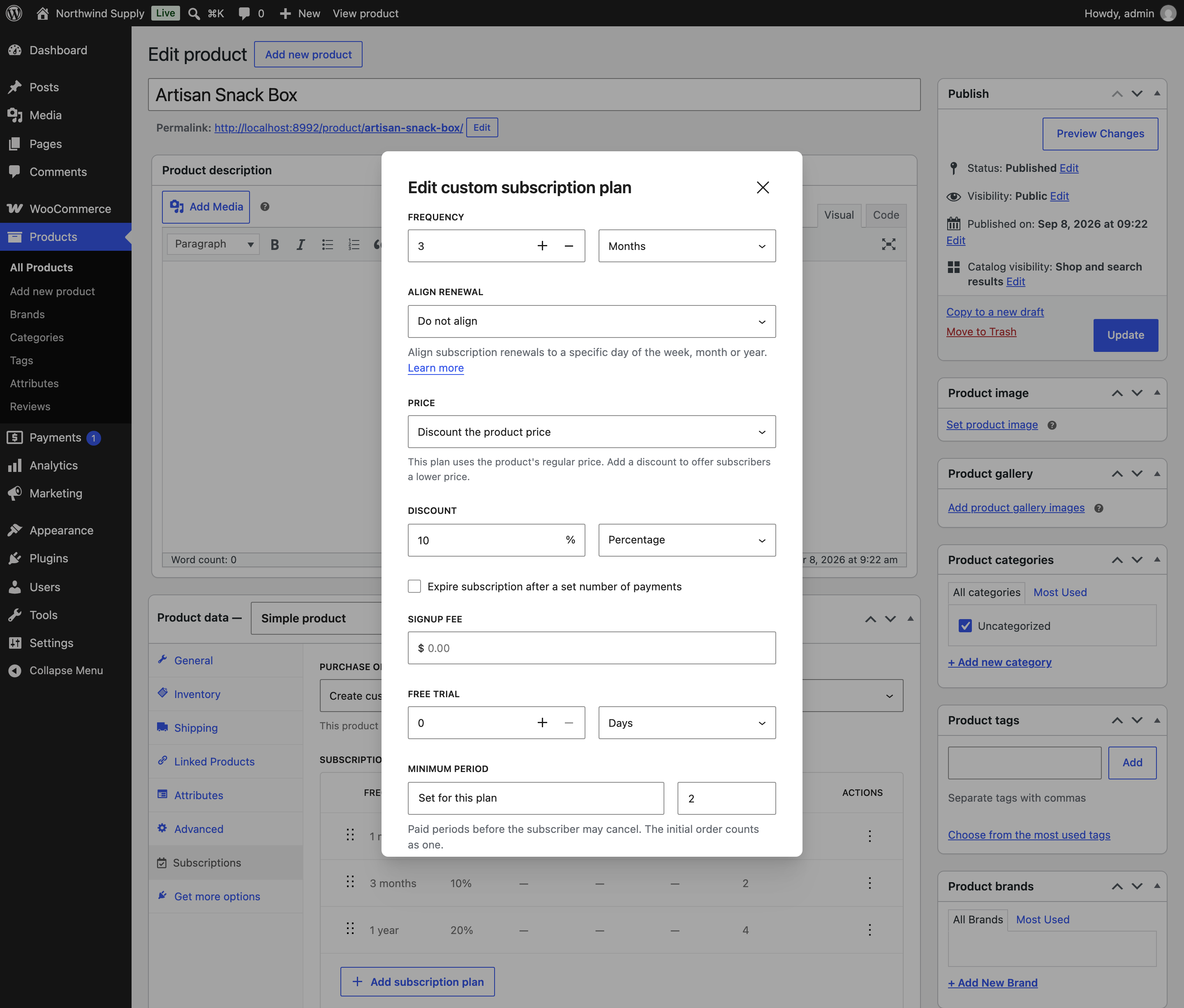
Cancel and suspend gating. The extension removes the Cancel action from the customer’s subscription page until the minimum is met. Turn on Link Suspensions and it removes Suspend on the same rule. Customers in a free trial can still cancel, and you as the store owner can always cancel or change any subscription from WP Admin.
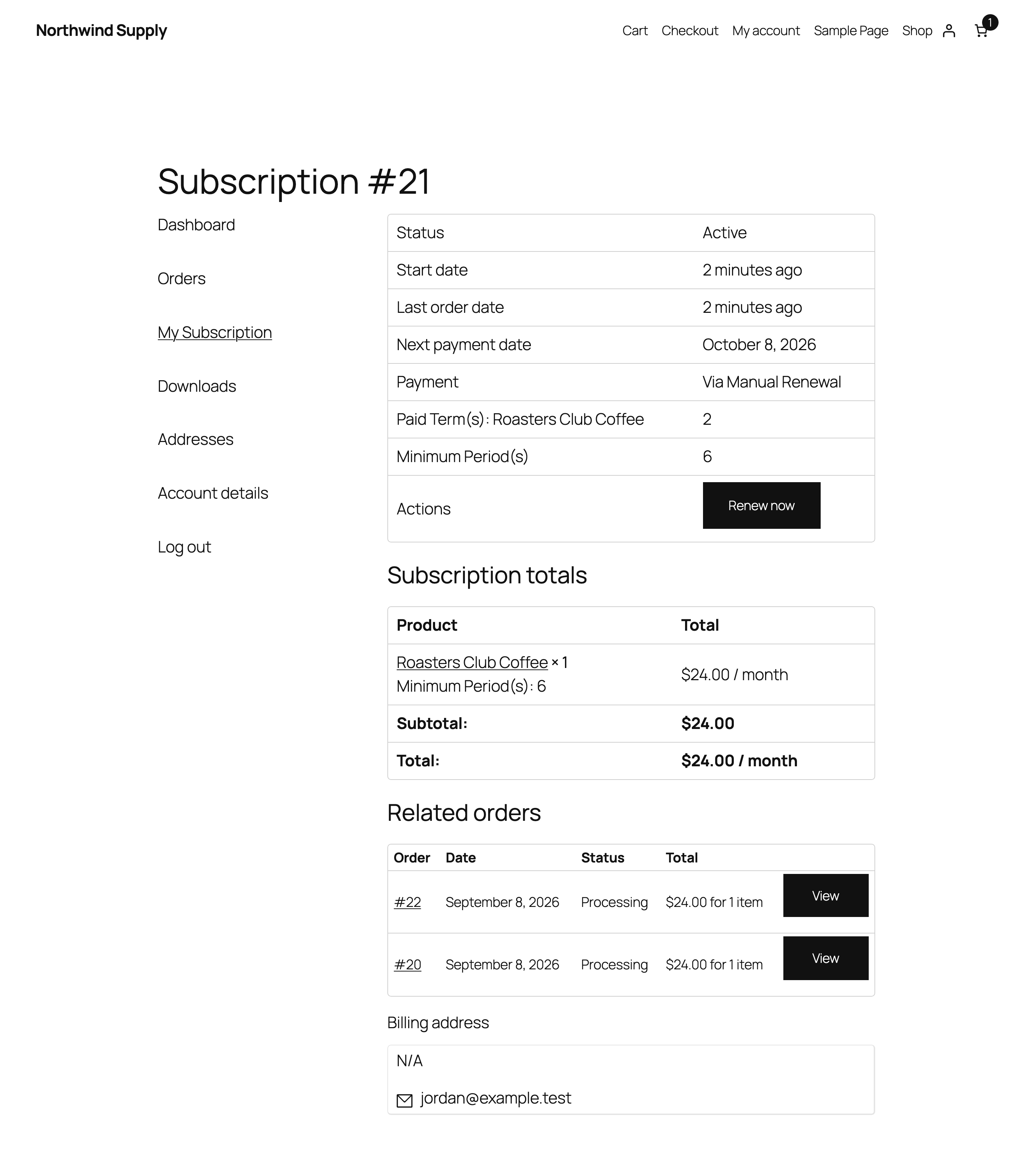
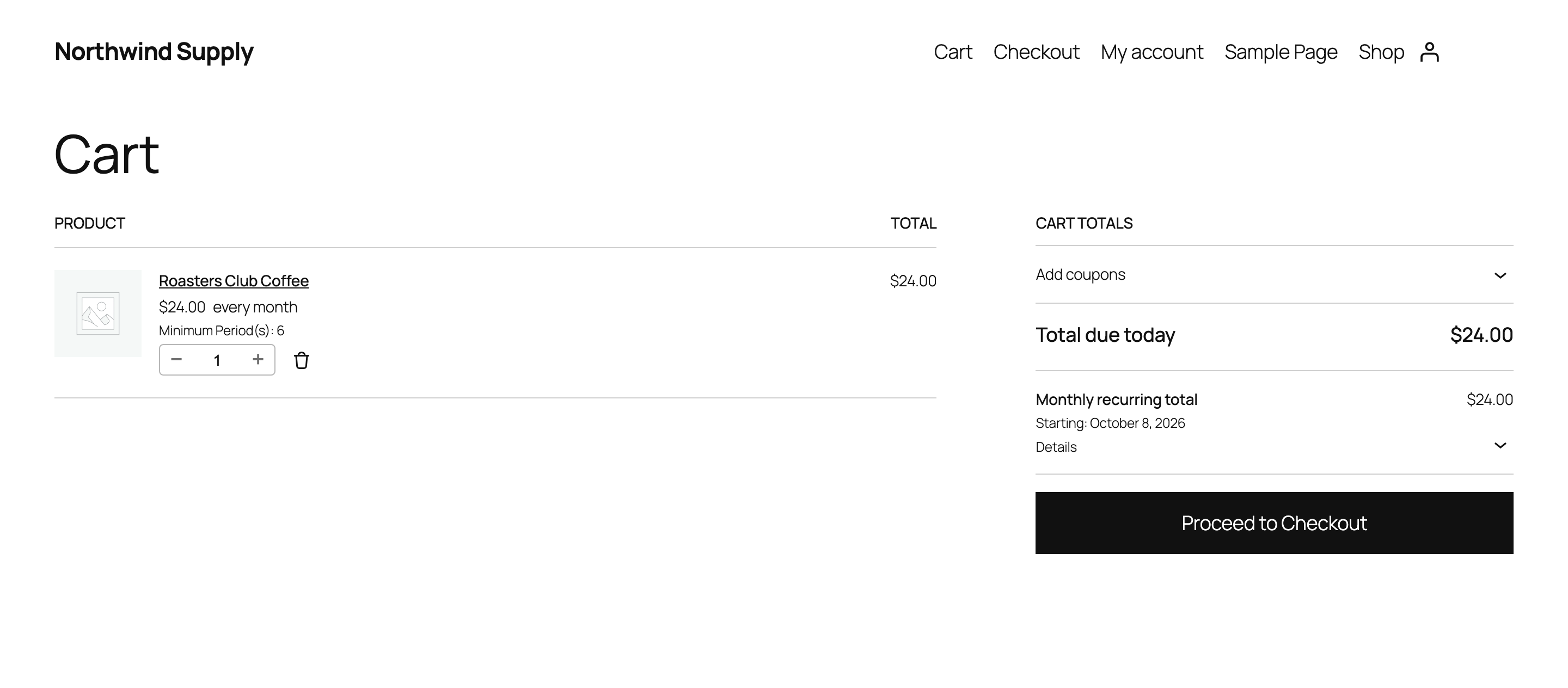
Customer-facing messaging, on switches you control. Five separate toggles decide where the minimum period appears: above the Add to cart button or next to each plan option on the product page, as line item data in the cart and at checkout, as order line item meta in confirmation emails and on the order received page, and as rows on the My Account subscription page showing both the minimum required and the periods already paid. All five are off by default.
Two shortcodes for your own layouts. [mpws_minimum_period] prints the minimum for one product. [mpws_minimum_period_table] prints a table of a product’s plans or variations with the minimum for each. Both accept an id attribute, so you can drop them into a landing page or a comparison block.
A Min. Period column in the Products list. Products > All Products gains a column after Price showing the effective minimum for each subscription product, as a range when a product’s plans differ. You can audit the whole catalog without opening a single product.
AI assistant access. On WordPress 6.9 and higher, the extension registers eight abilities with the WordPress Abilities API: read and update the store-wide settings, read and set product and plan values, list every product that overrides the default, and evaluate whether a given subscription may be cancelled yet. Any plugin that consumes the Abilities API can expose them to an assistant. Every ability requires the manage_woocommerce capability.
Subscription boxes and meal kits. You take a loss on the first box to win the customer. A minimum of 2 or 3 means the customer stays long enough for the economics to work, and the term is printed in the cart before they commit.
Gyms, studios, and membership sites. A three-month or twelve-month membership is a normal contract in this industry, and this is the setting that enforces it on a monthly billing cycle.
Rentals, equipment hire, and coworking. A minimum term protects your stock planning. The subscriber cannot hand the item back after one payment.
Stores discounting for commitment. If your annual plan is cheaper per month than your monthly plan, per-plan minimum periods let you attach the commitment only to the discounted plan. Monthly subscribers keep the freedom they are paying extra for.
Install the extension, then set one number. That is the whole setup.
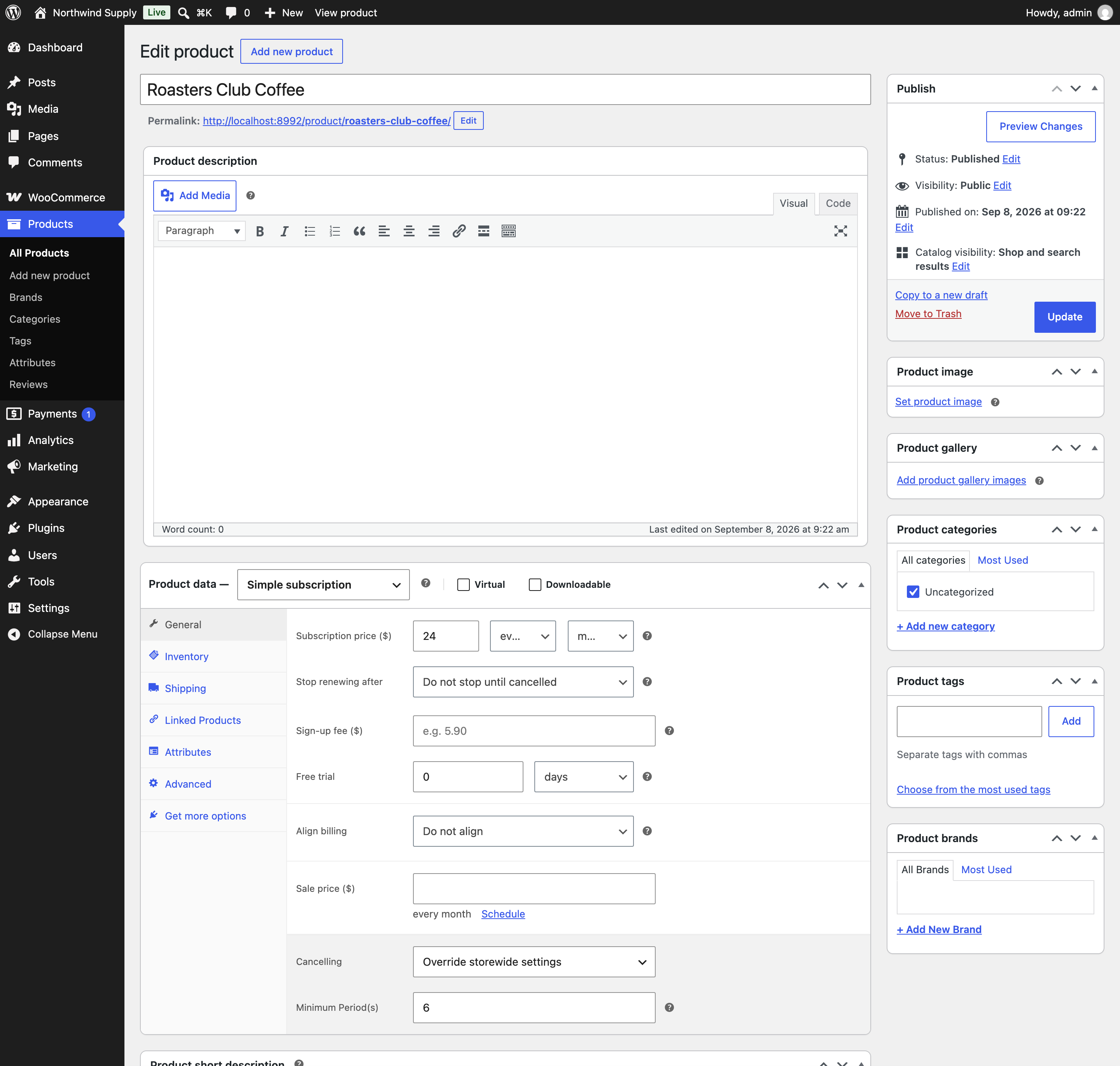
There is nothing to migrate. Existing subscriptions are measured on the payments they have already completed, so a subscriber who has paid enough periods keeps their Cancel button and one who has not loses it.
Three products cover this ground, and they sit at different points on the range from one setting to a full cancellation rules engine. Choose by how much of that range you actually need.
| Minimum Periods for WooCommerce Subscriptions | Custom Cancelation Rules for WooCommerce Subscriptions | WooCommerce Subscriptions Custom Cancellation Rules | WooCommerce Subscriptions on its own | |
|---|---|---|---|---|
| Minimum term before cancelling | Yes, store-wide, per product, per variation, and per plan | Yes, per product and variation, with rolling commitments | Yes, per product, with rolling cycles | No |
| Per-plan values on WooCommerce Subscriptions 9.0+ plans | Yes | No | No | N/A |
| Also gates the Suspend button | Yes, optional | Yes | Yes | No |
| Also gates Switch, upgrade, and downgrade | Planned | Yes | Yes | No |
| Notice periods, cancellation windows, cooling-off | Planned | Yes | Cooling-off and windows, no notice period | No |
| Cancellation fees or early settlement | No | Yes | No | No |
| Shows the term to customers before purchase | Yes | Yes | Custom text replaces the cancel button | N/A |
| AI assistant abilities (WordPress Abilities API) | Yes, eight abilities | No | No | No |
| Where you buy it | WooCommerce.com Marketplace | WooCommerce.com Marketplace | CodeCanyon | WooCommerce.com Marketplace |
| Pricing model | Annual subscription, currently $39 for one year | Annual subscription, currently $89 for one year | One-time $29 regular license, 6 months of support | Annual subscription, currently $279 for one year |
Where this extension excels: It is the only one of the three built for WooCommerce Subscriptions 9.0 subscription plans, so you can attach a different commitment to each plan on the same product. It is the only one that shows the term to the customer before they buy, across the product page, cart, checkout, and confirmation email. It is the only one with AI assistant abilities. And it is the simplest to run, because the whole thing is one number with optional overrides.
A single extension, no external service, no API key, and no account to connect. Installation is the standard WooCommerce.com upload and activate, and the settings appear under WooCommerce > Settings > Subscriptions straight away.
Your purchase includes product updates and improvements, customer support, and the WooCommerce.com 30-day money-back guarantee.
Before you buy, check these:
Yes. The initial order is the first paid period. If you want a customer to renew once before they can cancel, set the minimum period to 2.
Informações da extensão
Verificações de qualidade
Compatibilidade
Países
Idiomas








