Product Icon

Rental & Transport Booking for WooCommerce

A perfect car rental and booking service with flexible pricing models such as point-to-point, hourly, daily, and kilometer-based.
Escolha uma opção de cobrança
$59
Save 20%
$118 $94.40

A assinatura inclui

  • Melhorias e atualizações de produtos
  • Suporte ao cliente
  • Garantia de 30 dias para reembolso

Rental & Transport Booking Plugin is a complete solution designed for vehicle rental and other rental service businesses, helping streamline the entire rental process from start to finish.

Powered by WooCommerce, Rental & Transport Booking Plugin guarantees secure payments, compatibility with a wide range of plugins, and an intuitive, user-friendly interface. More importantly, it introduces advanced features tailored to the vehicle rental industry, including:

  • Flexible pricing models: fixed price (point-to-point), kilometer-based pricing, hourly packages, and Progressive Day-Based Pricing.
  • Promotions and discounts: round-trip discounts, seasonal offers, and special time-based discounts.
  • Comprehensive management tools: manage vehicles, track bookings, and view detailed reservations directly on the calendar.

This makes Rental & Transport Booking Plugin an all-in-one platform for businesses looking to simplify operations and maximize efficiency in the rental service industry.

1: One Plugin – Three Rental Options

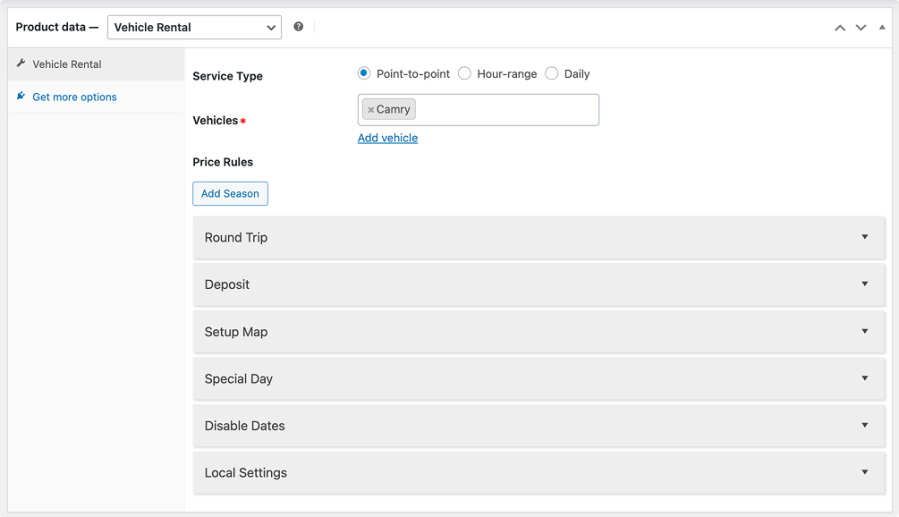
  • Point-to-point: A point-to-point service type is a transportation option in which the journey starts from a defined pickup location and concludes at a specified drop-off location.
  • Hour-range : A rental service type where the price is calculated based on blocks of hours instead of charging for each individual hour.
  • Daily: A rental service type where the price is charged based on day – ranges. with this rental type, customers can instantly see the total cost based on their selected number of rental days.

2: Smart Pricing Tailored to Your Rental Business

  • Fixed Price (per route): A flat rate for a specific pickup and drop-off route, regardless of distance or travel time.
  • Kilometer-Based Price: Charge per kilometer, or Set price per Km for initial distance and set price per km for additional distance.
  • Hourly Packages: Set prices for defined time blocks (e.g., 2 hours, 4 hours, 6 hours), giving customers flexible rental options.
  • Progressive Day-Based Pricing: Set rate for Each day range, and each range is charged cumulatively, not replaced by the next range.

This slideshow requires JavaScript.

3: Boost Bookings with Round-trip and Seasonal Deals

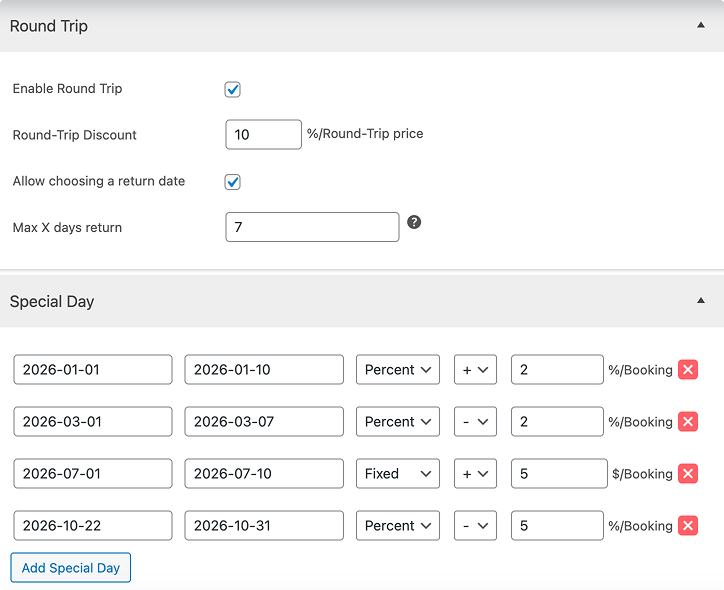
  • Round-trip discount: Encourage customers to book a return trip by offering special discounts for round-trip rentals.
  • Price for Special Time: Adjust your rates based on demand — set higher prices during peak seasons and offer lower fees during off-peak periods.

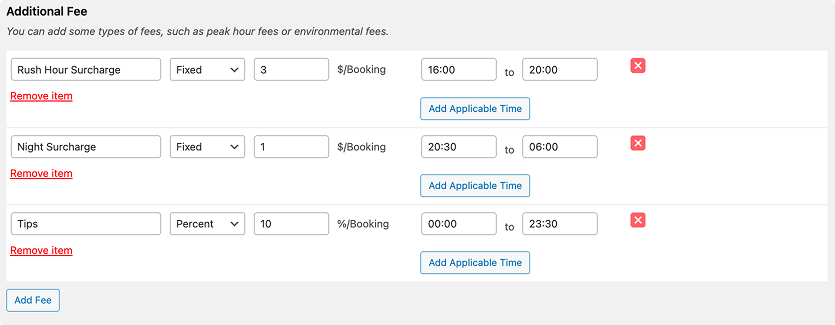
4: Easily Add Extra Fees with Flexibility

Charging extra fees helps ensure fair pricing while covering operational costs. Examples of additional services include a peak-hour fee, late return fee, and service or cleaning fee.
5: Expand Your Fleet with an Ease

This feature lets you build a detailed profile for each vehicle, including its name, images, description, seating & luggage capacity, and availability. It helps streamline your operations while ensuring customers always see up-to-date options.
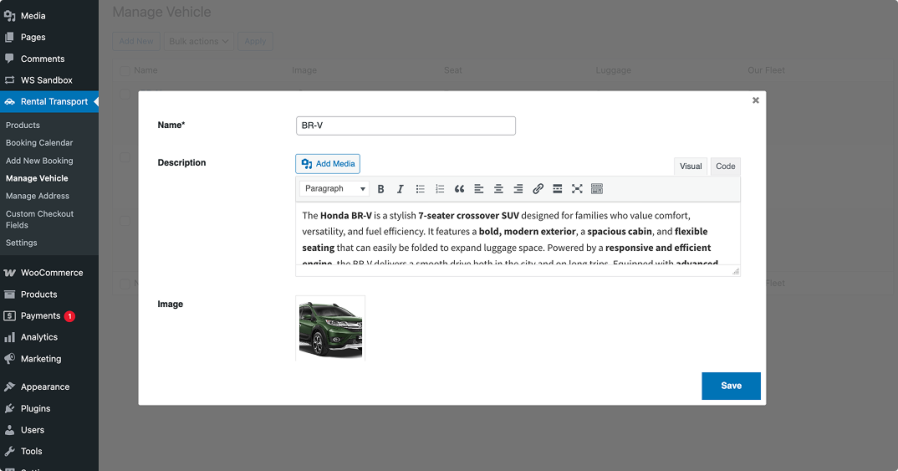
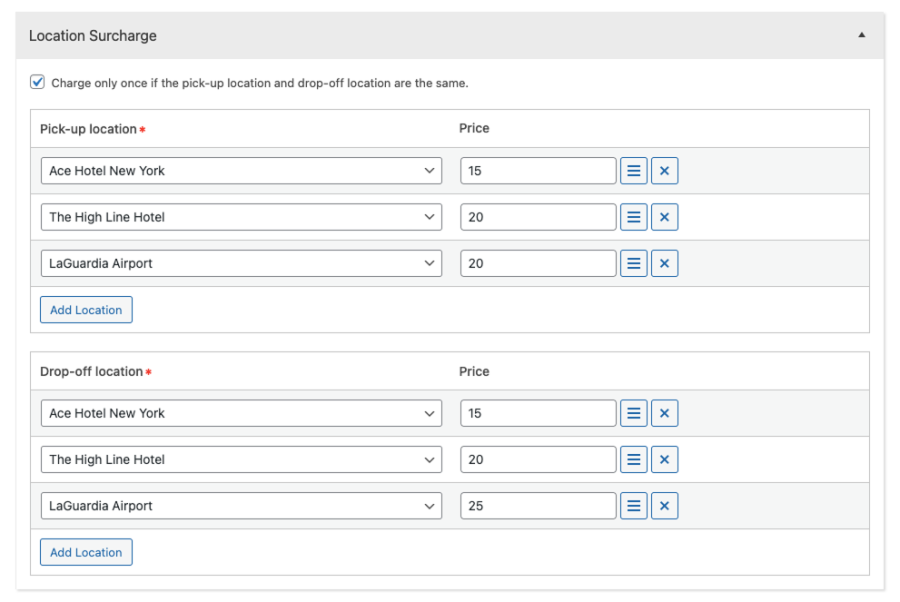
6: Set Exact Pickup and Drop-off Points

This feature allows you to define pickup and drop-off addresses. This helps you set fixed price for each specific route, ensuring clear and consistent pricing for point-to-point rentals.

This slideshow requires JavaScript.

7: Seamless Booking with Map Integration

This feature helps customers clearly see the distance between their chosen pickup location and drop-off location. By knowing the exact distance, customers can better estimate travel time and understand pricing (if distance-based pricing is applied).

This slideshow requires JavaScript.

8: Secure Bookings with Flexible Deposits

This feature gives customers the option to either pay the full amount upfront or make a partial payment as a deposit. A deposit will reduces risk of last-minute cancellations.
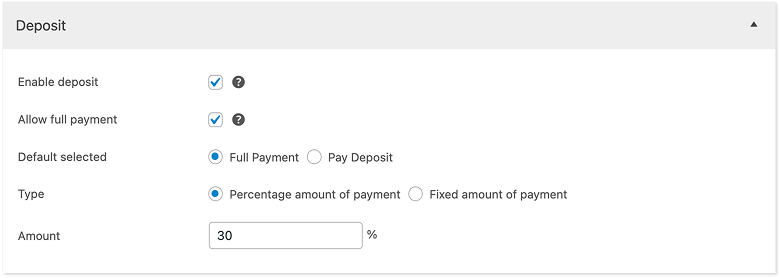
9: Smart Date Blocking for Smoother Operations

The feature allows you to block out certain days when bookings are not available. These could be holidays, maintenance periods, or any other days when your rental service is temporarily unavailable.
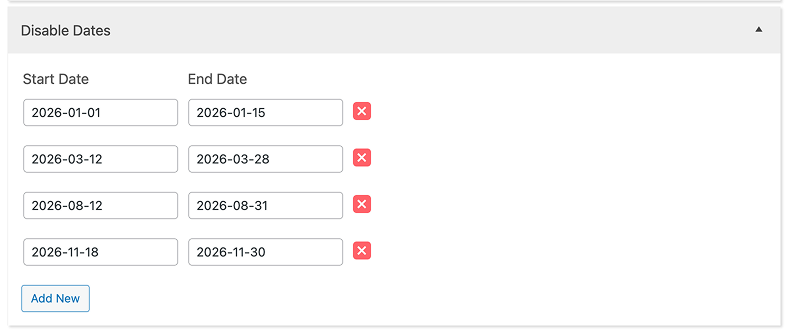
10: Plan Ahead with Smart Booking Rules

  • Preparation Time: Set a preparation time if you need extra time to get a vehicle or service ready before it begins. Example: If you set 1 hour of preparation time, this allows you to check the vehicle one last time before providing the service.
  • Minimal Advance Booking Days: Enter the minimum number of days required for a booking to be made in advance. Example: If you set to 2 days, today is 19/09/2025, 19/09/2025 and 20/09/2025 will be blocked, the earliest booking day is 21/09/2025

11: Full Control Over Rental Hours

This allows you to require customers to select their desired rental period within the start and end times you have previously set. This way, you can manage your service schedule more effectively.

12: Smart Rental Control with Private Settings & Common Settings

These advanced features make setup more convenient. You can define common settings that apply to all rental products, and also configure private settings tailored for a specific rental product only.
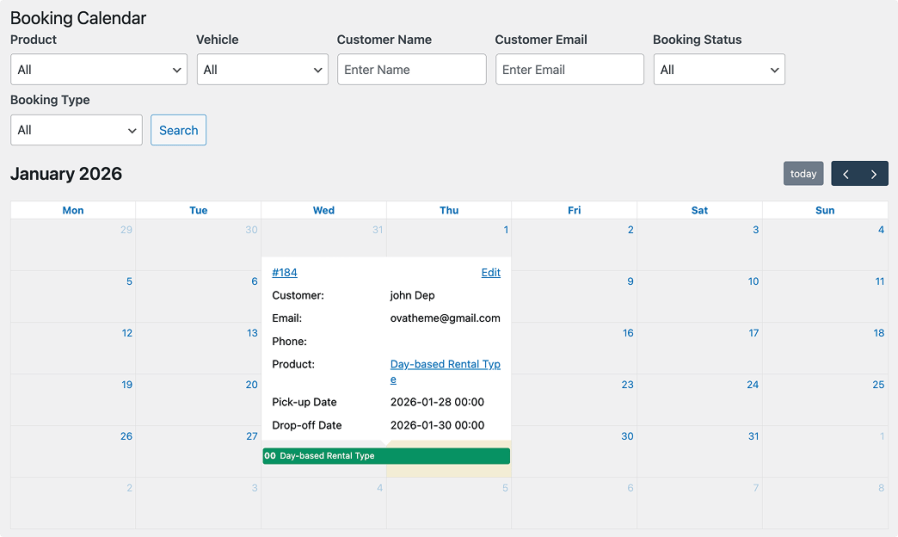
13: Stay Organized with a Smart Calendar in the Backend

  • View Bookings: Display all bookings across all products, or view bookings for a specific product, directly on the calendar for easier management.
  • Search Bookings: Use the filter bar to quickly locate specific bookings with various search criteria. The search results will appear instantly on the calendar, helping admins manage reservations more efficiently.

14: Personalize Checkout with Custom Fields

You can collect detailed and specific customer information during checkout by adding any custom fields you need to the booking and enquiry forms. The plugin supports 11 field types including text, number, tell, email, password, textarea, radio, checkbox, select, date and file.

This slideshow requires JavaScript.

15: Set Clear Cancelation Policies to Reduce No-shows

You can establish cancellation policies such as the minimum time required before canceling (e.g., 24 hours in advance) and apply specific conditions for orders below a certain value.

16: Protect Your Forms with reCAPTCHA

reCAPTCHA is a free security service from Google that protects your website from spam and abuse by verifying whether the user is human or a bot. You can choose either reCAPTCHA V2 or reCAPTCHA V3 and apply it to the booking form and request form for safer, more reliable submissions.

17: Right-time Reminders for Every Guest

Keep guests informed with pre-check-in and cancellation reminders. Send automatic emails before arrival, with the option for recurring reminders at set intervals. Reduce no-shows, build trust, and save time with proactive communication.

18: Easy Operation with Front-end & Back-end Calendar

  • Front-end Calendar: Allows customers to easily select check-in dates and view unavailable dates, improving their booking experience.

  • Back-end Calendar: Simplifies date management for administrators, making it easier to configure and control availability settings.
19: Streamline Reservations with Booking & Request Forms
Whether your guests are ready to confirm instantly or want to send a request first, you can provide both options in a simple, user-friendly way
  • Booking Form – Let customers fill in the booking form, then complete their reservation with secure payment.
  • Request Form – Give guests the flexibility to submit special requests before confirming a booking.

This slideshow requires JavaScript.

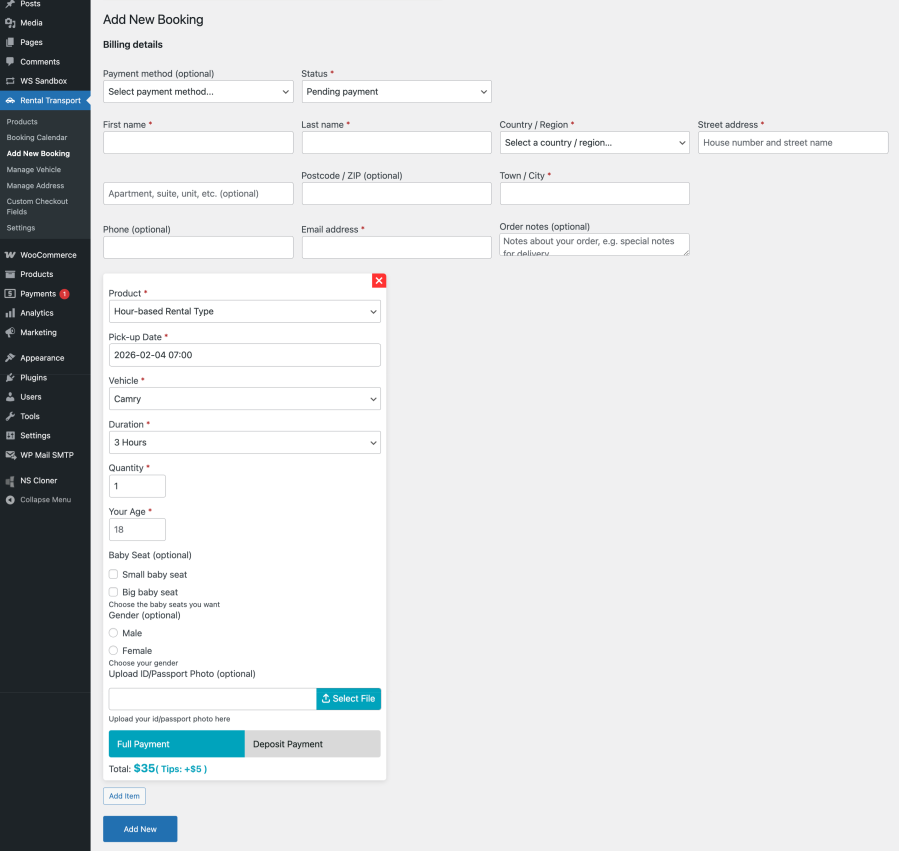
20: Create Manual Bookings with Auto-filled Details

Create and manage phone, email, or in-person reservations in one place. Quickly add repeat customers with auto-filled details to save time and reduce manual work.
21: Boost Trust with Clear Booking Details

Show all information customers entered in the booking form, along with any additional fees applied. The cart and checkout will also display the subtotal and total amount, including taxes, to ensure full transparency before payment.

22: Style Your Site with Typography & Color Control

Allows you to customize colors, font size, weight, and line height for headings, text, borders, buttons, and labels.

23: Create a sandbox

Try our plugin in a free sandbox — explore all features and see how it works for your business, risk-free. Click here to create a sandbox.


Avaliações de clientes

Related Products

Preço: $79 Anualmente
Classificado com 3.4 de 5 estrelas
Preço: $59 Anualmente
Classificado com 3.1 de 5 estrelas
Preço: $49 Anualmente
Classificado com 4.1 de 5 estrelas
Preço: $109 Anualmente
Classificado com 3 de 5 estrelas
Preço: $109 Anualmente
Classificado com 2 de 5 estrelas
Preço: $109 Anualmente
Classificado com 2.3 de 5 estrelas
Preço: $109 Anualmente
Classificado com 2.6 de 5 estrelas
Preço: $109 Anualmente
Classificado com 2 de 5 estrelas
Preço: $109 Anualmente
Classificado com 2.3 de 5 estrelas