
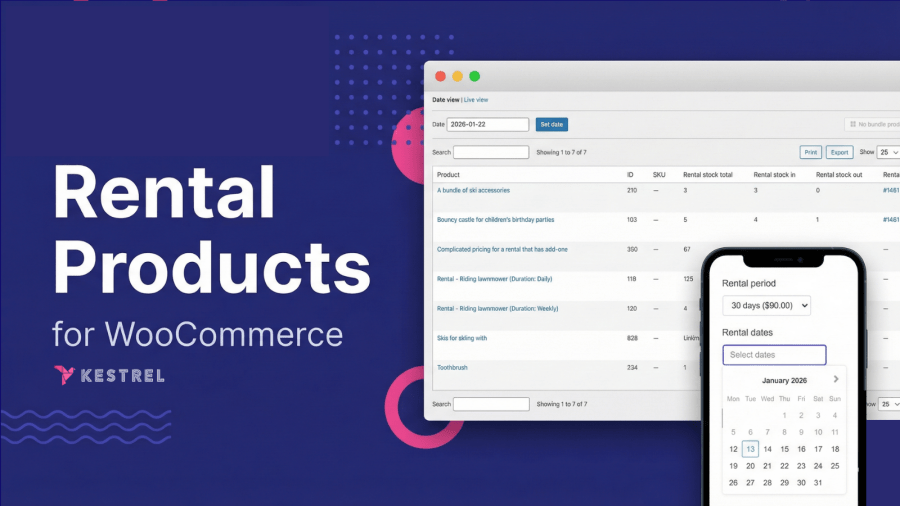
Product Icon

Rental Products for WooCommerce

Turn any WooCommerce product into a rental. Flexible pricing, real-time inventory, zero double-bookings. Ship it, deliver it, or let them pick it up.
Choose a billing option
USD $199
Save 20%
USD $398 USD $318.40

A assinatura inclui

  • Melhorias e atualizações de produtos
  • Suporte ao cliente
  • Garantia de 30 dias para reembolso

Start renting products in minutes with built-in pricing, deposits, and inventory control.

The WooCommerce rental plugin built for physical items. Rental Products for WooCommerce handles deposits, bundles, and inventory tracking so you can rent equipment, party supplies, costumes, or anything else that goes out and needs to come back.

  • Flexible rules: set tiered pricing, security deposits, stock limits, and blockout dates in just a few clicks.
  • Friction-free booking: shoppers pick dates on a live calendar on your product page. Their total cost updates automatically for them to checkout.
  • Command-center dashboard: see every pickup and return, get late-return alerts, and manage your inventory at a glance.

Launch, track, and grow your rental business without spreadsheets or add-on clutter. 30-day money-back guarantee.
Get Started

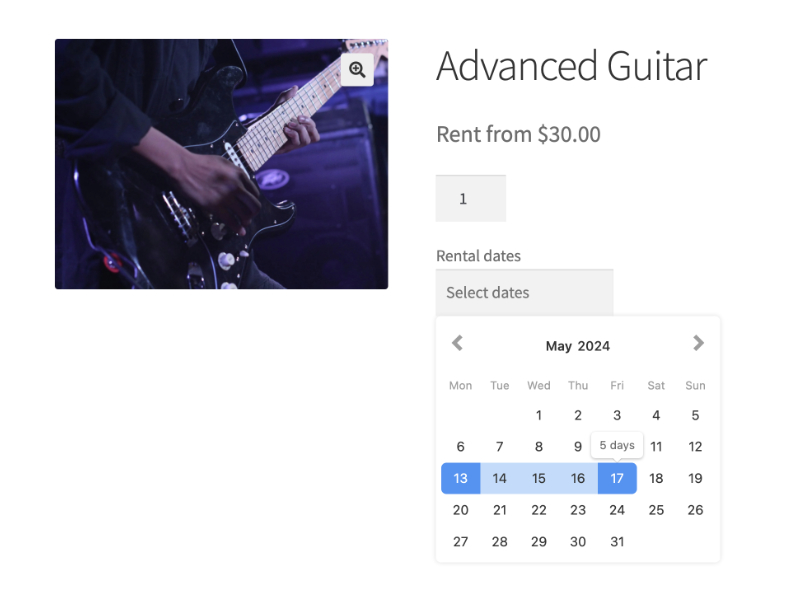
WooCommerce rental plugin calendar showing product availability and date selection

Carla, an eCommerce store owner said:
“We can easily create rental products, customers choose dates and we ship them out, customers get a return reminder email and we get the products sent back to us ready for the next rental.”

Complete WooCommerce booking and rental system features

Full feature list – everything in our WooCommerce booking & rental plugin (expand for more)

1. Fast rental product setup

  • Start selling rental products with WooCommerce in minutes
  • Create rental-only products or flexible, unified “rent-or-buy” product listings
  • Create rental bundles, allows multiple products to be rented together via a single product listing
  • Convert any existing product to a rental (no need to start over)
  • Offer shipped rentals or in-store / on-site pickups and returns
  • Add pickup / drop-off time slots and optional fees

2. Advanced pricing & deposits

  • Fixed, tiered, period-based, or custom formulas
  • Security deposits or partial-payment deposits on checkout
  • Perfect for equipment rental WooCommerce or car-rental WooCommerce pricing rules

3. Live booking & availability tools

  • Responsive calendar on every product page
  • Global availability-checker block / shortcode
  • Min/max days, blockout dates, start-day rules, auto-populate dates

4. Dashboard & admin controls

  • Rental dashboard: summary, calendar (6 views), inventory date / live views
  • Flags late returns, lets you mark items returned or cancelled
  • Clone rental settings, bulk edit, import/export, debug tools
  • Product & order lists include rental filters and bulk actions

5. Automation & emails

  • Automatic return-reminder emails to customers
  • Archive completed rentals for faster store performance
  • Hooks, filters, and JS events for custom workflows

6. Compatibility & developer love

  • Works with simple, variable, and grouped products
  • Customize the WooCommerce Rental Products calendars with your own styling
  • Integrates with WooCommerce Product Add-Ons and Deposits & Partial Payments by Acowebs
  • Built for all types of WooCommerce checkout – use with blocks, legacy checkout, or CheckoutWC by Kestrel

Note on hourly bookings: Rental Products currently supports daily rentals with pickup/return times. If you need hour-by-hour scheduling, let us know—we’re gathering feedback to shape this feature.

Buy Rental Products for WooCommerce

30-day money-back guarantee. Try it and keep it only if you love it.


WooCommerce rental plugin: key features

Everything you need in a booking and rental system for WooCommerce—from the live calendar to the inventory dashboard:

We’ve added Rental Bundles: Create a one-click bundle product that includes the rental products you configure, with stock availability based on the bundled items – built in, no extra plugins needed!

Mobile-friendly WooCommerce rental form

Shoppers pick start and end dates in a responsive calendar, see live pricing and availability, and add the rental to cart from any device.

WooCommerce rental form with calendar date picker

Instant rental pricing

After customers select their start and end dates, WooCommerce Rental Products recalculates the total in real-time (no page reload) so they can add the rental to cart immediately.
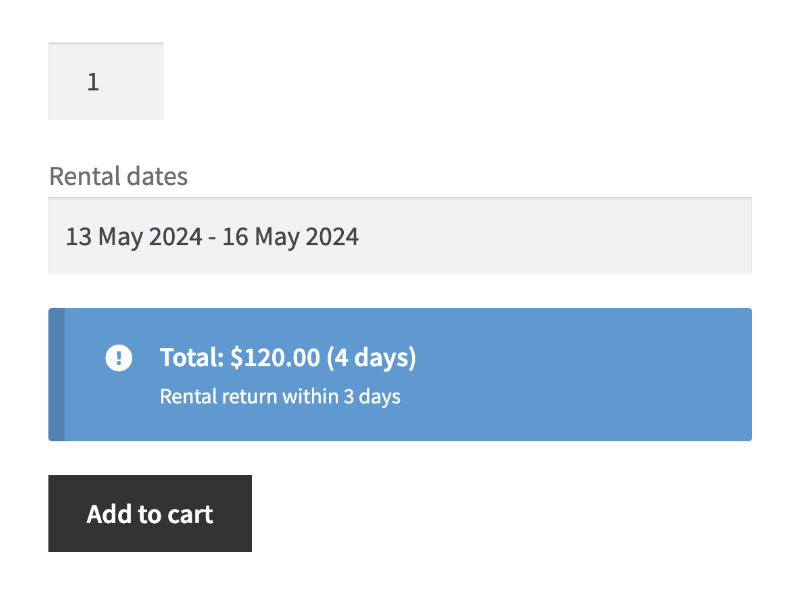
Rental Products for WooCommerce showing real-time price calculation

Shipped rentals made easy

Perfect for WooCommerce stores that mail equipment or garments. Set a “return-days” grace period so customers have a predefined window to ship items back, and the system handles pricing and availability automatically.
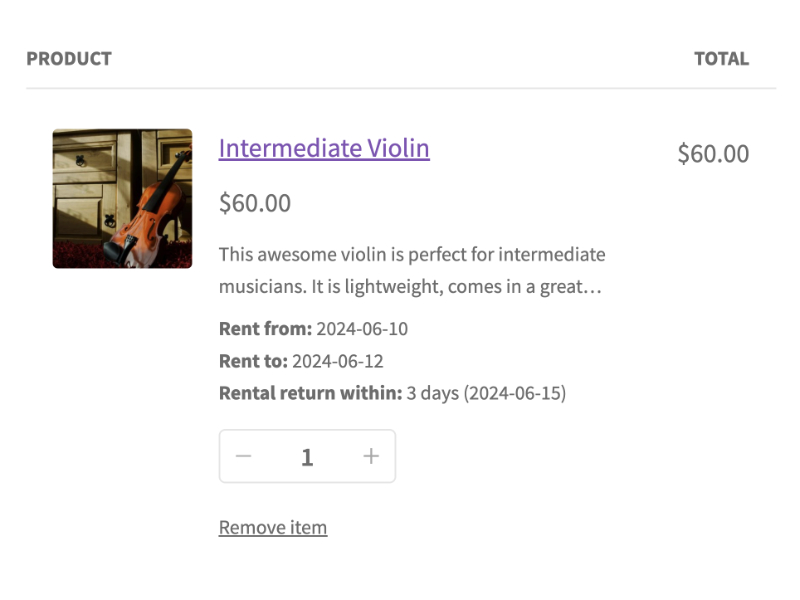
Shipped rental configuration in WooCommerce rental plugin

In-store pickup & return scheduling

Set specific pickup/return time slots (and optional fees) for rentals collected on-site; customers pick the times before adding the product to their WooCommerce cart.
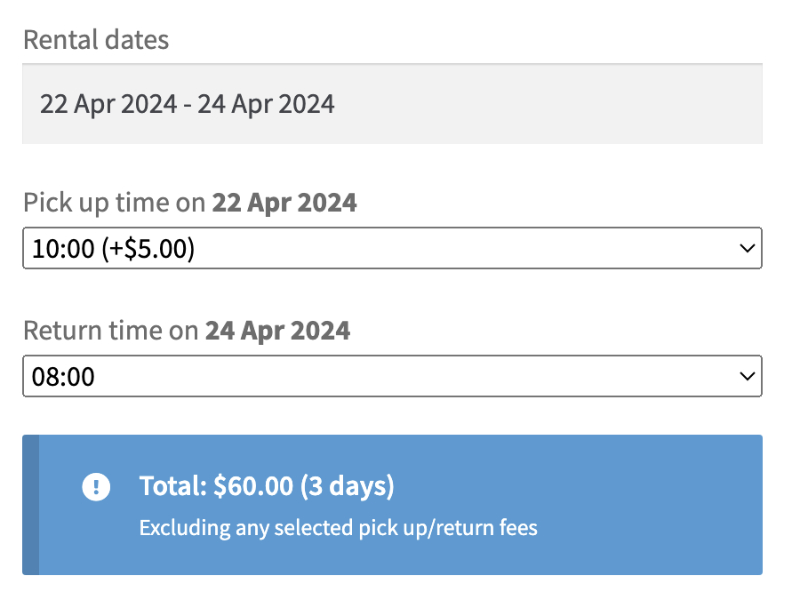
In-store pickup and return scheduling for WooCommerce rentals

Store-wide availability checker

Drop our calendar block / shortcode anywhere in your WooCommerce shop so customers choose their dates and instantly filter all rental products by what’s available.
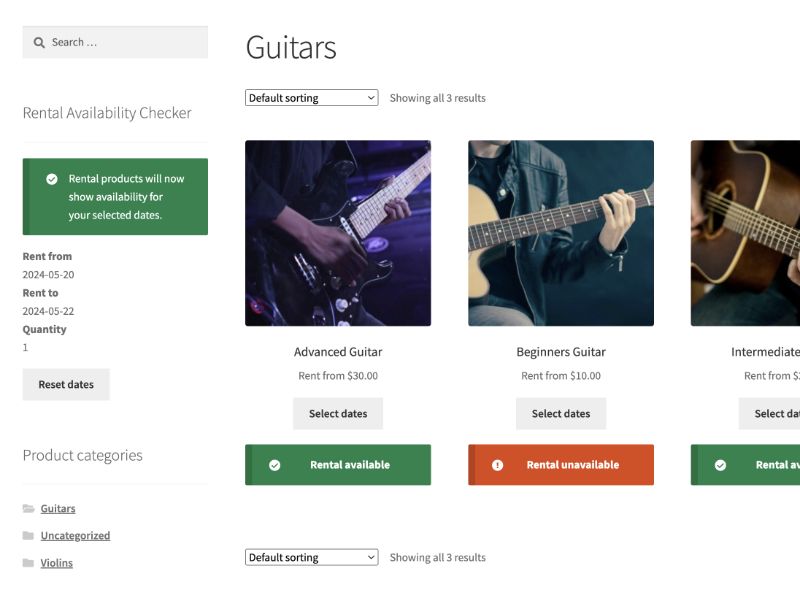
WooCommerce rental availability checker filtering products by date

Rental-only, rent-or-buy, or bundle listings

Flag an item as exclusive rental or let shoppers choose to rent or purchase the same product from one page, no duplicate listings needed. You can also bundle rentals together in a single product listing.
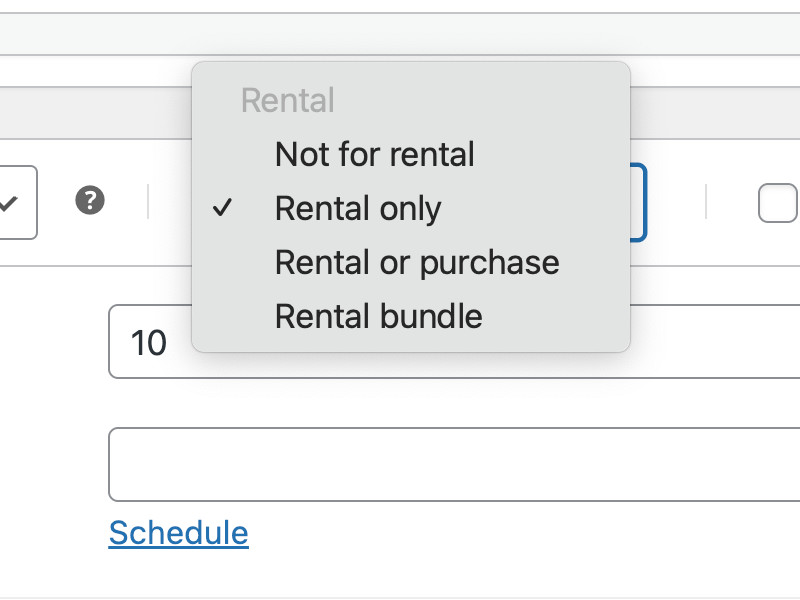
Configuring rental product types in WooCommerce

Advanced WooCommerce rental pricing engine

Everything you need for granular rental pricing control. Set fixed, tiered, or period-based rates; add percentage surcharges for extra days; create pricing tiers; override totals or price displays.
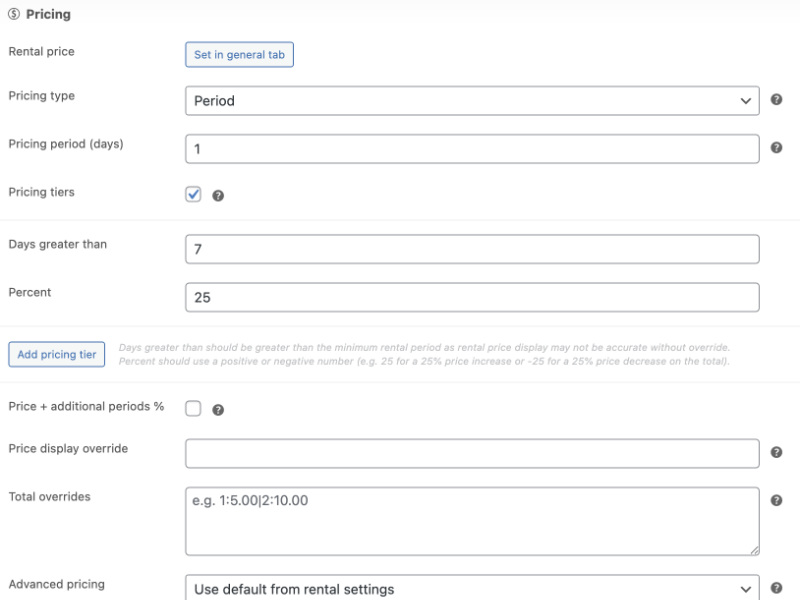
WooCommerce rental plugin pricing configuration options

Flexible availability rules

Full rental & booking availability control inside WooCommerce. Manage rental stock, set minimum/maximum days, control the start-day-of-week, apply pickup/return buffers, and block specific dates or weekdays.

Rental availability rules and inventory management in WooCommerce

Built-in rental deposits

Collect refundable security deposits (or partial payments) at checkout, then refund or apply the balance when the rental is returned.
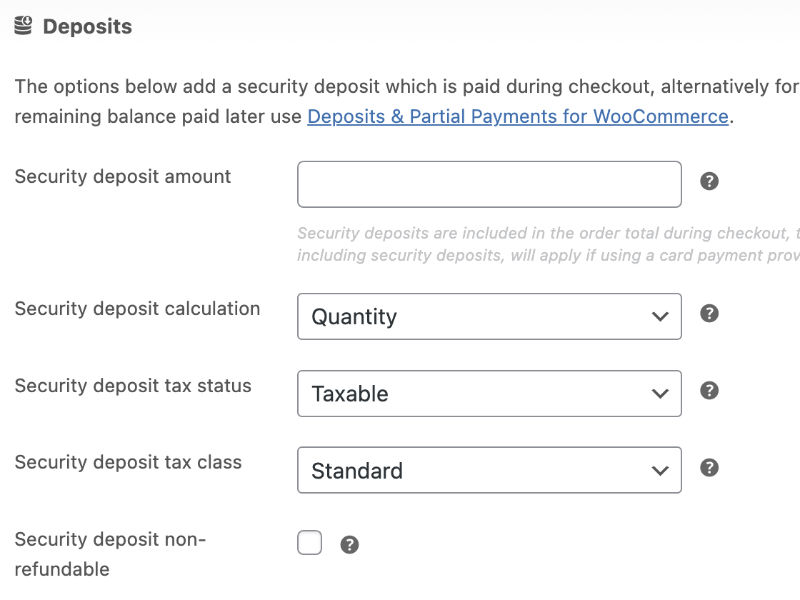
Security deposit configuration for WooCommerce rentals

Seamless add-ons support through Product Add-ons for WooCommerce

Upsell accessories, insurance, services, and more on any rental item through full compatibility with the WooCommerce Product Add-Ons extension.
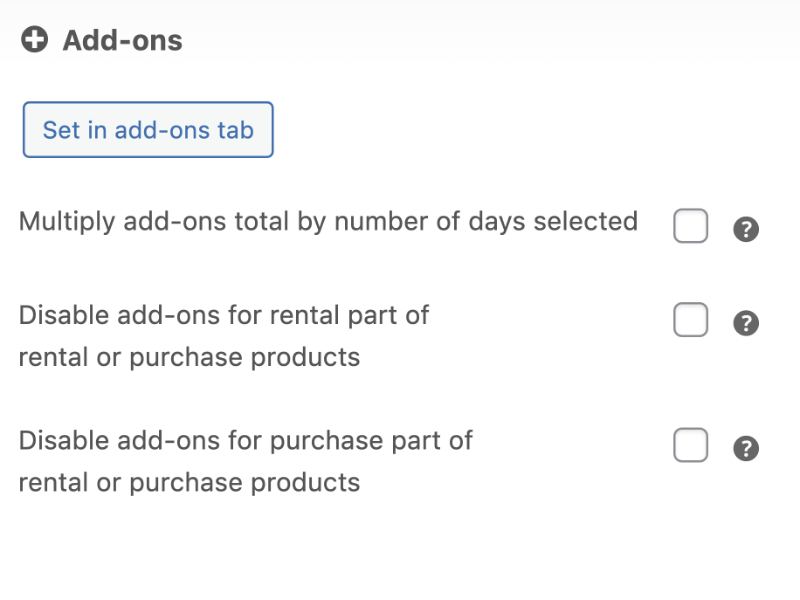
Product Add-Ons compatibility with WooCommerce rental products

Configurable rental calendar settings

Show the rental date-picker inline or behind a click, choose how many months and columns to display, and tailor the calendar’s look to match your WooCommerce theme.
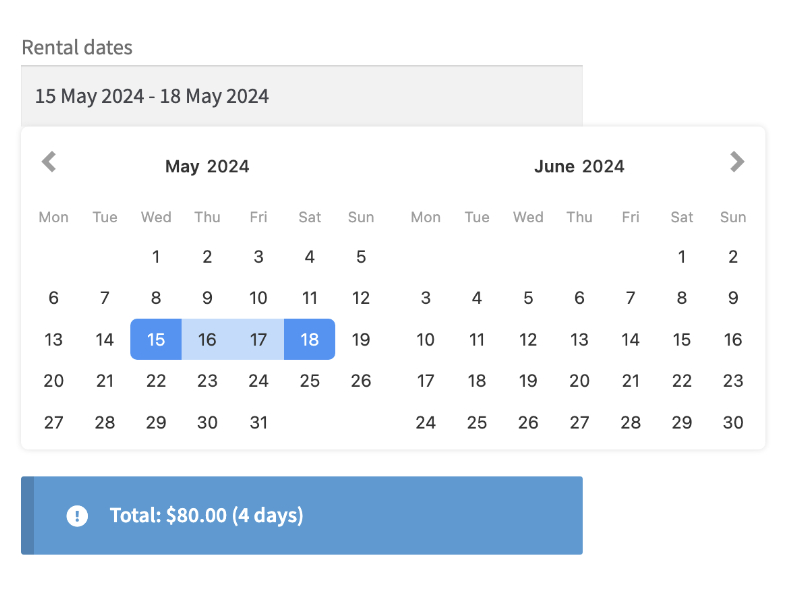
WooCommerce rental calendar display settings

Custom rental info tab

Add a dedicated tab to every WooCommerce rental product for pickup instructions, policies, or FAQs. You can also set global content that auto-applies across all listings.
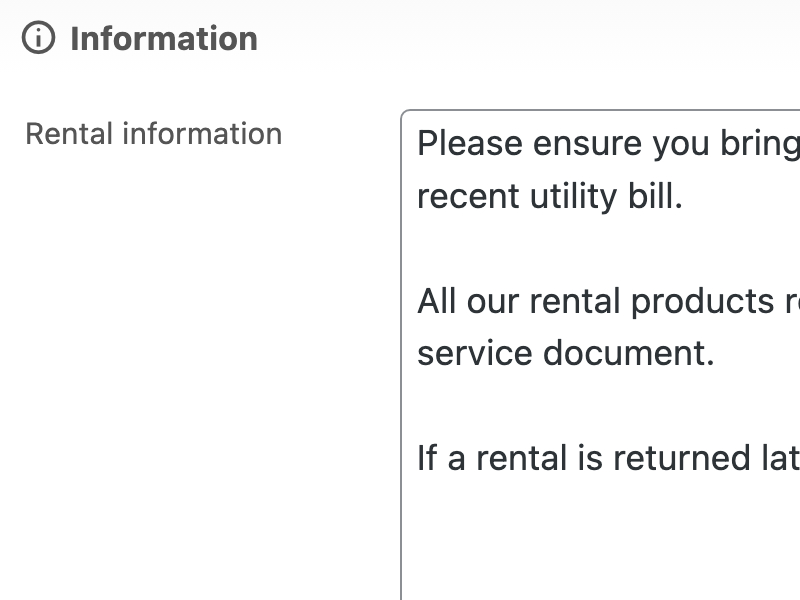
Custom rental information tab in WooCommerce product page

Rental product catalog management & filters

See both sale and rental prices plus live stock counts in the WooCommerce Products list, filter by “rentable” items.
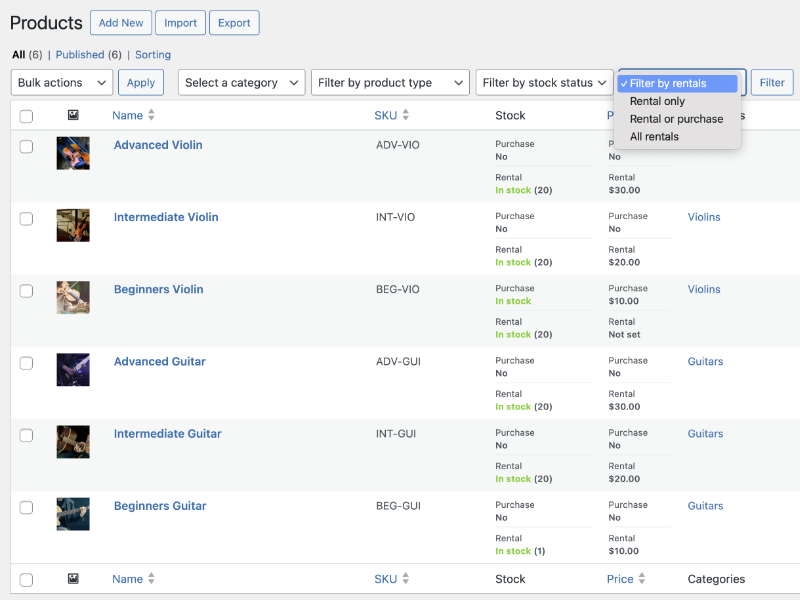
Managing rental products in WooCommerce admin product list

End-to-end rental order control

Create new WooCommerce orders with rentals, edit or swap rental dates inside existing orders, mark items returned, and filter your Orders list to view “rental orders” only.
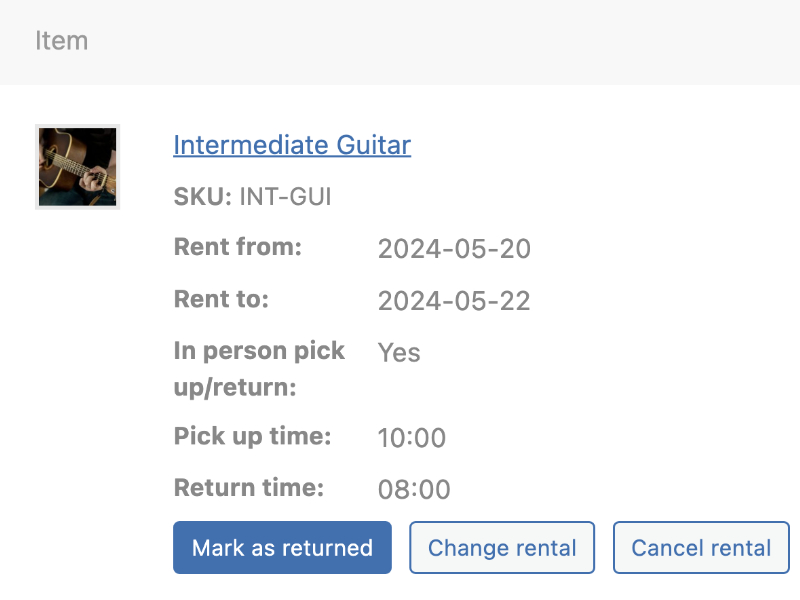
WooCommerce rental order management and editing

Central rental dashboard

Track every booking from one screen: newest orders, overdue returns, live search, plus one-click print and CSV exports.
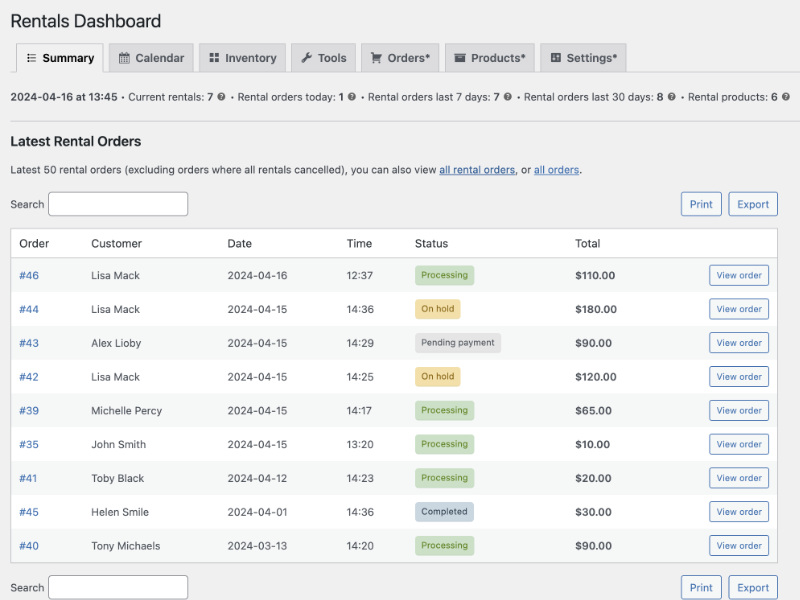
Rental Products dashboard showing bookings and overdue returns

Admin booking calendar

View every rental in a color-coded calendar, filter or search by product or customer, toggle views, and sync to Google Calendar or Outlook via an iCal feed.
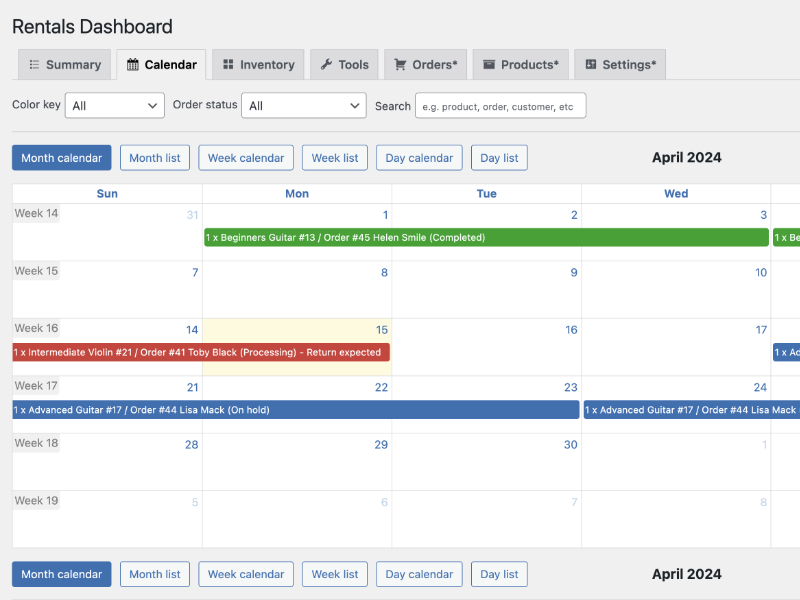
WooCommerce rental booking calendar with Google Calendar sync

Real-time rental inventory dashboard

See date-based or live views of every rental product, with total stock, in/out counts, and a quick summary of orders consuming each item.
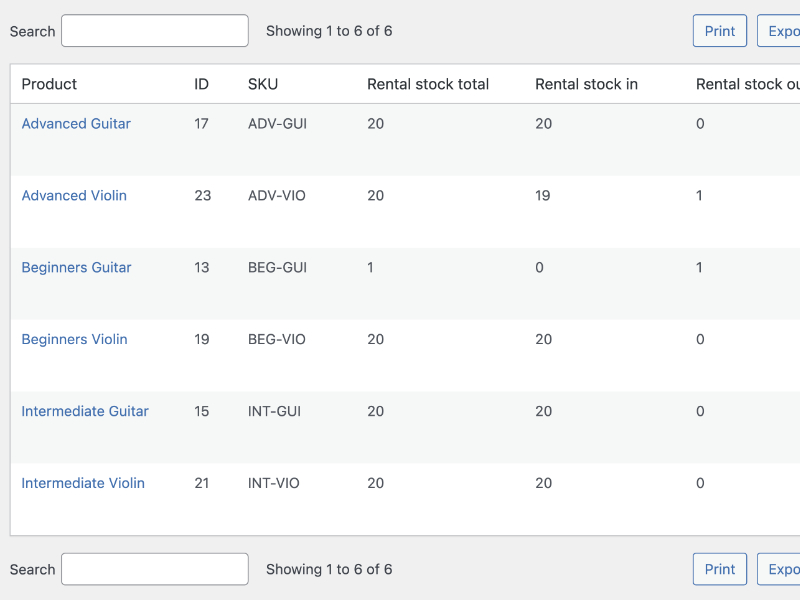
WooCommerce rental inventory tracking dashboard

Admin power tools

Bulk-clone rental settings between products, import or export data for fast setup, and more.
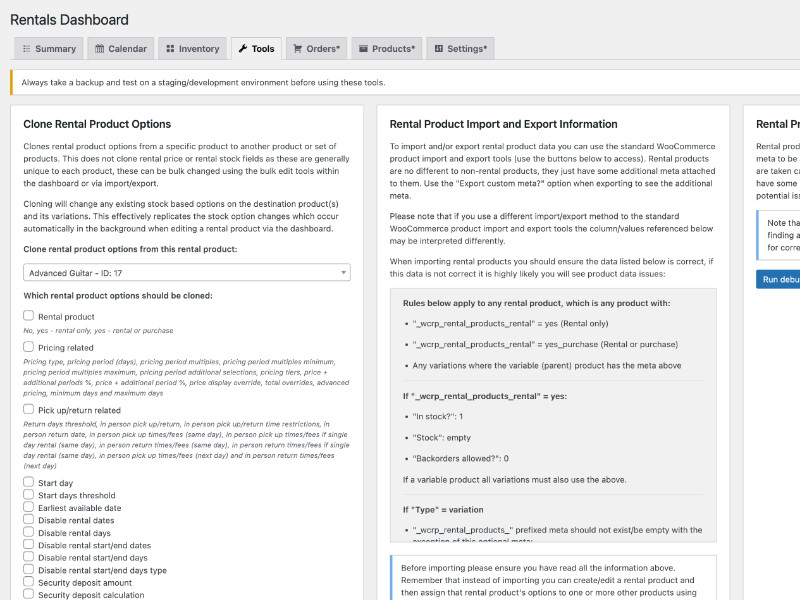
Rental Products bulk tools for WooCommerce

At-a-glance rentals widget

Your WordPress dashboard shows live WooCommerce rental stats, latest orders, overdue returns, and quick-access links the moment you log in.
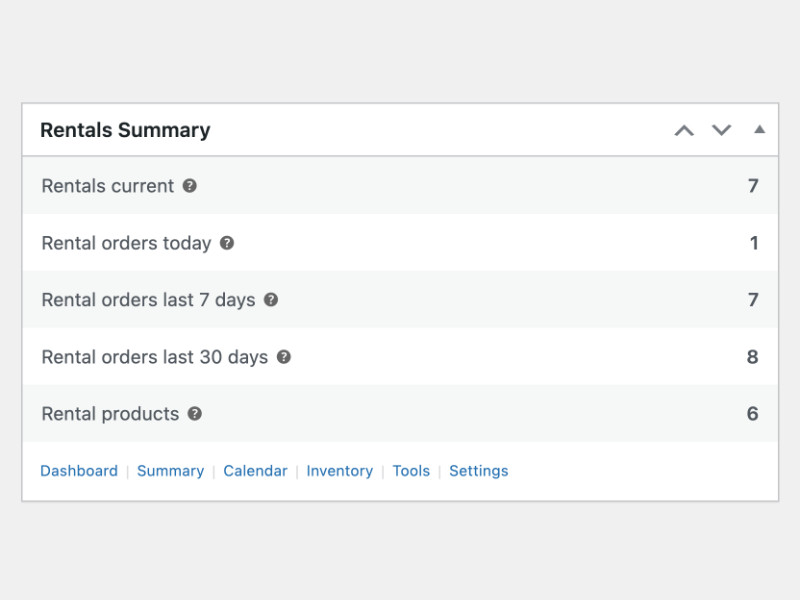
WordPress dashboard widget for WooCommerce rentals

Rental management and confirmation emails

Every WooCommerce rental order email includes rental dates and details, and customers get an automatic return-reminder message before their items are due back.
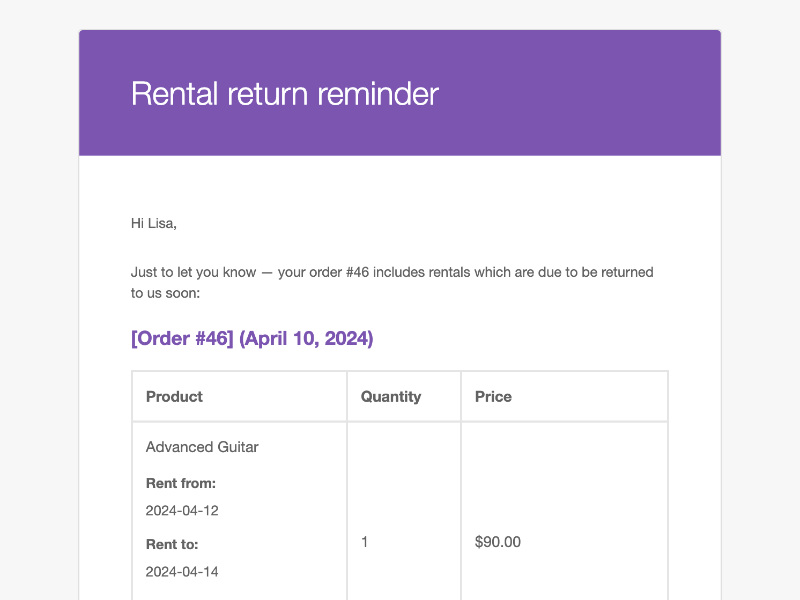
WooCommerce rental return reminder email

Transparent cart & checkout details

Rental dates and pickup/return times appear in the cart, at checkout, and inside the customer’s My Account area, so shoppers always know exactly what they’ve booked.
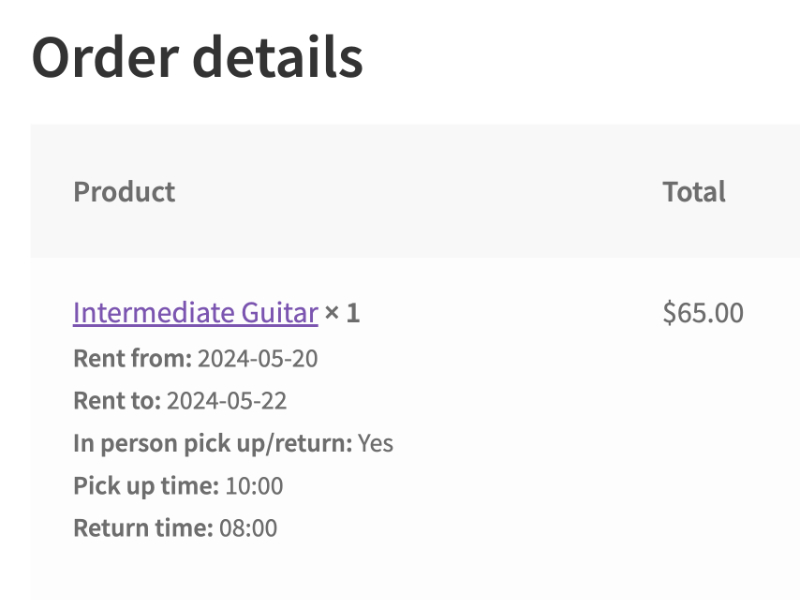
Rental details displayed in WooCommerce cart and checkout

Fully configurable, sensible by default

Out-of-the-box settings let you start renting immediately, while deep options for date formats, pricing rules, pickup/return windows, blockout dates, and more mean you can customize every detail whenever you’re ready.
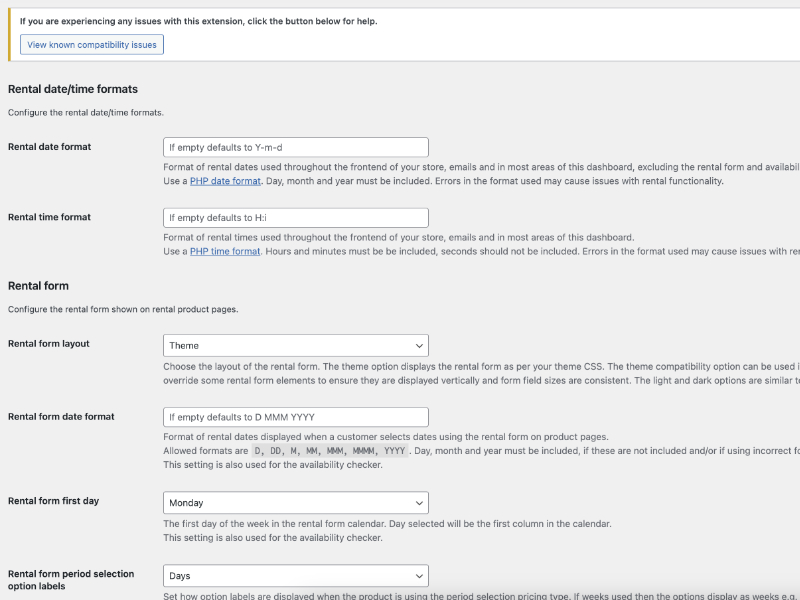
Rental Products for WooCommerce settings page


Real-world example: turning baby clothes into rentals

Meet Trisha, a WooCommerce merchant who turns her best-selling baby outfits into rentals.

Trisha has learned which of her products are the most popular with her customers and decided to purchase several sets of those to make available for rent. She maintains a small inventory season-to-season to provide a unique offering to her rental customers.

  1. She adds Rental Products for WooCommerce in minutes – and then converts her best-selling outfits to “rent-or-buy.”
  2. Shoppers self-serve – parents choose sizes and rental dates on the product calendar; pricing updates instantly before checkout.
  3. Automation kicks in – order emails list rental dates, and a return-reminder email fires three days before items are due back.
  4. Dashboard keeps her on track – Trisha sees upcoming pickups, late-return alerts, and real-time stock so she never overbooks.

Result: extra revenue from the same inventory, minimal manual work, and most importantly: happier customers.

Real-world example: scaling a party rental operation

Meet Marcus, who rents tables, chairs, and tents for weddings and events.

Before Rental Products, Marcus tracked inventory in spreadsheets and fielded constant “is this available?” calls. Double-bookings happened more often than he’d admit.

  1. He sets up rental bundles—a “Wedding Package” combines 10 tables, 80 chairs, and a tent with unified pricing. If any item is unavailable, the whole bundle shows as booked.
  2. Customers book online—they pick event dates, see the total, and check out without phone tag.
  3. The dashboard keeps him organized—he sees pickups and returns at a glance, gets late-return alerts, and exports manifests for his delivery crew.

Result: fewer double-bookings, less phone time, and weekends back.


Choosing the right WooCommerce booking & rental plugin

The WooCommerce ecosystem has several booking and rental options. Here’s a quick guide to help you pick the right tool:

WooCommerce Bookings is a great fit for service appointments, hotel reservations, and time-slot scheduling—anything where customers book your time or a space.

Rental Products for WooCommerce is built for businesses that rent physical items—equipment, party supplies, camera gear, costumes, tools. It includes deposits, bundles, and an inventory dashboard designed for tracking what’s out and what’s due back.

Use case Best fit
Appointments, consultations, classes WooCommerce Bookings
Hotel rooms, vacation rentals WooCommerce Bookings
Equipment rental (tools, cameras, AV gear) Rental Products
Party supplies (tables, chairs, tents) Rental Products
Costume or dress rental Rental Products
Vehicle or car rental Rental Products

Not sure which fits? Reach out—we’re happy to help you figure it out.


Rental Products: see it in action with demo screenshots

This slideshow requires JavaScript.


More information

Ready to start your WooCommerce rental business? Get Rental Products today with our 30-day money-back guarantee. If it’s not the right fit, we’ll refund you—no questions asked.

Get Started

Built and supported by the team at:

Kestrel logo


Perguntas frequentes

How easily can I set up my first rental product?

About five minutes. Install the plugin, go to any WooCommerce product, check the "Rental" box, set your pricing period and stock quantity. That's it. Your product now has a date picker and rental pricing.

How is this different from WooCommerce Bookings?

WooCommerce Bookings is built for appointments and services (think: spa sessions, consultations, tours). It schedules time slots for things that don't leave your location.
Rental Products is built for physical items that leave and come back: equipment, costumes, vehicles, party supplies. It tracks real inventory: what's out, what's returned, what's available. If you're renting things, not scheduling services, this is the plugin for that.

Can I prevent double-bookings on limited inventory?

Yes, automatically. Set your stock quantity (say, 5 bouncy castles), and the calendar blocks dates once all units are reserved. Customers only see what's actually available. No spreadsheets, no manual checking, no "sorry, we're actually booked" emails.

Does the plugin handle hourly rentals or same-day bookings?

Same-day bookings, yes. Customers can pick up and return on the same date.

Hourly time slots, not yet. Currently, the minimum rental period is one day. We're gathering feedback to shape hourly functionality. If that's critical for your business, let us know what you need.

Can I collect and refund security deposits?

Yes. You can require a deposit at checkout that's held until the item comes back. When the rental returns in good condition, refund the deposit with a couple clicks. Works with any WooCommerce payment gateway that supports refunds.

Does Rental Products work for shipped rentals and local pickups?

Both, plus delivery. Use it for:

  • Shipped rentals: Customer receives via mail, ships back when done
  • Local pickup: Customer grabs it from your shop
  • On-site delivery: You deliver to their location (events, parties)

Works with WooCommerce's built-in shipping and local pickup options and most shipping provider extensions.

What do my customers see during checkout and in emails?

Everything they need, nothing confusing. The cart shows rental dates, duration, and pricing. Order confirmation emails include pickup/return dates and any rental-specific info you've added.

Customers can also view their active rentals and return dates in their My Account dashboard.

Avaliações de clientes

Extension information

  • Versão do WordPress obrigatória: 6.3
  • Versão do WooCommerce obrigatória: 8.5.0
  • PHP version required: 7.4
  • Tested with WordPress: 6.9
  • Tested with WooCommerce: 10.4.3
  • Requires at least WordPress: 6.3.0
  • Requires at least WooCommerce: 8.5.0

Funciona com

Compatibilidade

  • Cart & checkout blocks
  • High performance order storage (HPOS)

Países

  • Em todo o mundo

Idiomas

English (United States)

Related Products

Preço: USD $99 Anualmente
Classificado com 2 de 5 estrelas
Preço: USD $59 Anualmente
Classificado com 1.9 de 5 estrelas
Preço: USD $49 Anualmente
Preço: USD $99 Anualmente
Classificado com 1.7 de 5 estrelas
Preço: USD $119 Anualmente
Classificado com 2.9 de 5 estrelas
Preço: USD $249 Anualmente
Classificado com 2.7 de 5 estrelas
Preço: USD $219 Anualmente
Classificado com 1.9 de 5 estrelas
Preço: USD $59 Anualmente
Classificado com 2.1 de 5 estrelas