
Instalações ativas
3K+
A assinatura inclui
Suporte
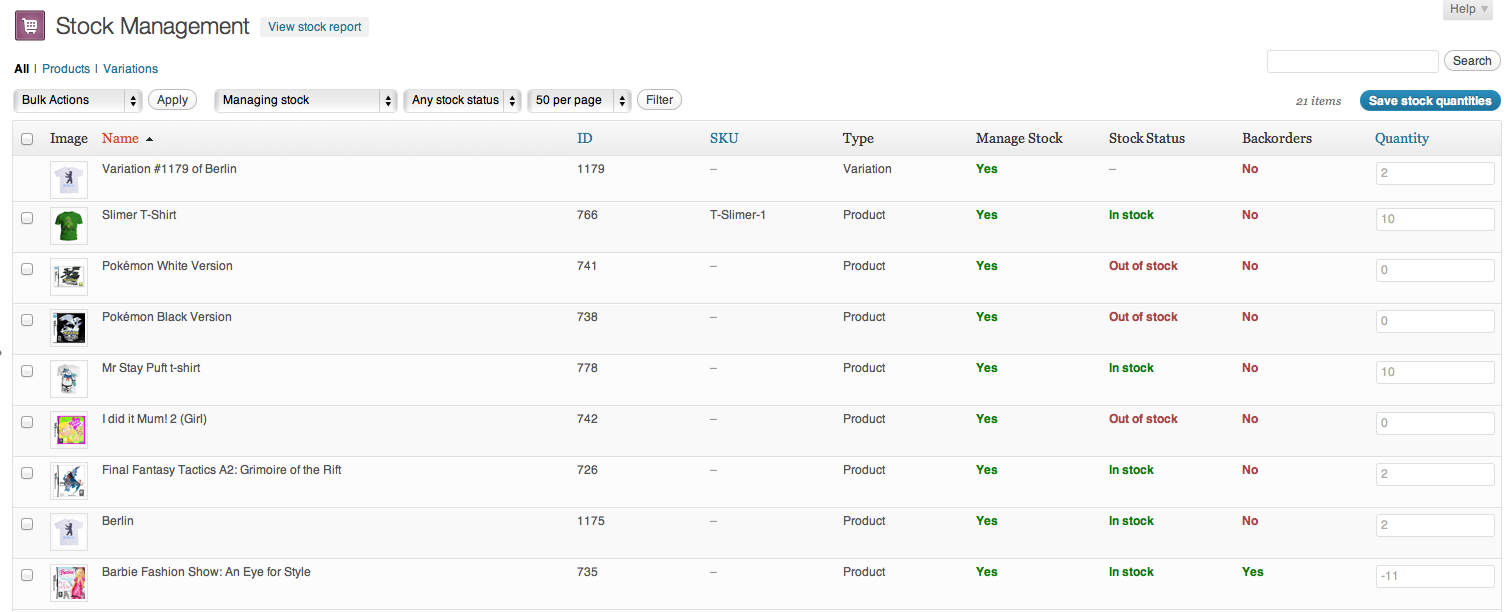
The bulk stock management extension gives you a new interface (found in Products > Stock management) which lists your products and variations along with their stock properties.
Products can be filtered by product type, stock management status and stock status, and ordered by name, ID, SKU or stock quantity.
Via the input field you can easily set the stock quantity for multiple products at once. There are bulk actions for setting the stock status too.
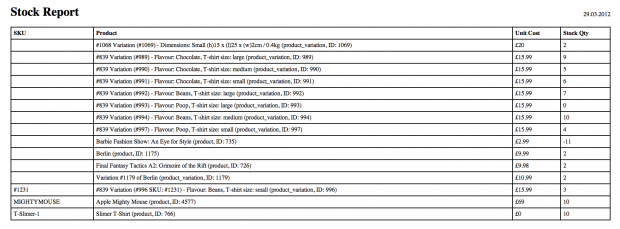
Finally, there is a ‘View stock report’ button which lets you print a report of all stock levels in your store:
Bulk Stock Management is a WooCommerce inventory extension that adds a dedicated screen (under Products > Stock Management) listing your products and variations alongside their stock properties. From this one interface you can set stock quantities for multiple products at once, apply bulk actions to change stock status, and print a full stock report. It is built for store owners who want to update inventory across many items without opening each product page individually.
Yes. Bulk Stock Management gives you an input field at the end of each row so you can set stock quantities for multiple products in a single view. You can also select products with checkboxes and apply bulk actions together, which streamlines inventory updates after a delivery, a stock count, or a busy sales period.
Yes. The Stock Management screen lists both products and their variations, so you can view and update stock for individual variations from the same interface. This is helpful for stores selling items in multiple sizes, colors, or other options, where the core WooCommerce bulk editor on the All Products page is more limited for variations.
Yes. You can filter the list by product type, stock management status, stock status, and category, then order the results by name, ID, SKU, or stock quantity. These filters help you focus on a specific set of products, such as a single category, before making changes.
You can select products and apply bulk actions to set their stock status, including Mark "In stock," Mark "Out of stock," Allow backorders, Allow backorders but notify the customer, and Do not allow backorders. This gives you a straightforward way to manage availability and backorder rules across many products at once.
Yes. Bulk Stock Management includes bulk actions to allow backorders, allow backorders but notify the customer, or disallow backorders. You can apply these rules to many products or variations at the same time, which is useful when you want consistent backorder handling across a category or product type.
Yes. The screen includes a View stock report option that generates a printable report of stock levels for products that have inventory management enabled. Each product and each variation appears on its own line, which is useful for stock takes, warehouse checks, or sharing inventory levels with your team.
It is designed to help. Instead of opening each product to adjust stock, Bulk Stock Management brings your products and variations into a single, filterable screen where you can set quantities and change stock status in bulk. For stores with large catalogs or frequent restocks, this can save considerable time and reduce the risk of missed updates.
Core WooCommerce lets you bulk edit products from the All Products list, but that approach is more limited and less convenient for variable and grouped products, especially when you want a single, stock-focused view of products and variations. Bulk Stock Management adds a purpose-built Stock Management screen that lists both products and variations together, with stock-focused filters, an inline quantity field, stock status bulk actions, and a printable stock report. If you mainly need broader field editing rather than stock-focused control, review the core bulk editing options first.
Bulk Stock Management is a WooCommerce inventory extension for store owners who manage stock across many products or variations from a single screen. It fits stores that need to set stock quantities in bulk, apply stock status and backorder actions to multiple items, and print a stock report of managed products. Because it focuses on stock quantities, status, and reporting rather than broader product editing or inventory forecasting, it suits merchants who want a stock-focused workflow inside the WooCommerce admin.
Bulk Stock Management focuses on updating stock quantities and status and generating stock reports. If you need to bulk edit a wider range of product fields (such as prices, attributes, categories, and SKUs across 40+ fields), Advanced Bulk Edit for WooCommerce is built for that. If you want stock tooling with a stock change log and a single-screen editing dashboard, consider Smart Stock & Inventory Manager. For advanced needs like suppliers, purchase orders, or demand forecasting, look at a dedicated inventory management extension in the WooCommerce Marketplace.
Managing inventory from a single screen is more efficient than editing products one by one. Bulk Stock Management is a WooCommerce inventory extension built for this: it lists your products and variations on one screen, filters them by stock management status, stock status, and category, and lets you order results by name, ID, SKU, or stock quantity, sets stock quantities in bulk through an inline field, applies stock status and backorder actions to multiple items, and prints a stock report of managed products. Stores that also need suppliers, purchase orders, or demand forecasting may want a more comprehensive inventory extension from the WooCommerce Marketplace.
Informações da extensão
Verificações de qualidade
Compatibilidade
Países