Product Icon

Auctions for WooCommerce

A professional Auction solution for your WooCommerce - Build a premier auction website dedicated to timeless antiques, rare memorabilia, collectibles or iconic classic automobiles.
Choose a billing option
$149
Save 20%
$298 $238.40

Das Abonnement beinhaltet

  • Product updates and improvements
  • Kundensupport
  • 30-tage geld-zurück-garantie

Auctions for WooCommerce is professional auction plugin that extends your WooCommerce store with a new custom product type: auction – you can have normal, reverse, silent, or proxy auctions. Auctions can be used in conjunction with the Product Vendors plugin to create an eBay-style website where users can auction off their own items.

Auctions for WooCommerce is customizable via templates and Elementor, and supports hooks, shortcodes, widgets, notifications, translations, and WPML. It also includes auction-specific features like anti-sniping, variable bid increments, live ajax bid refreshing, and live bid browser notifications, different types of sorting. Auctions for WooCommerce is a fast, secure, efficient auction plugin that is optimized for high traffic and can handle hundreds of concurrent bidders.
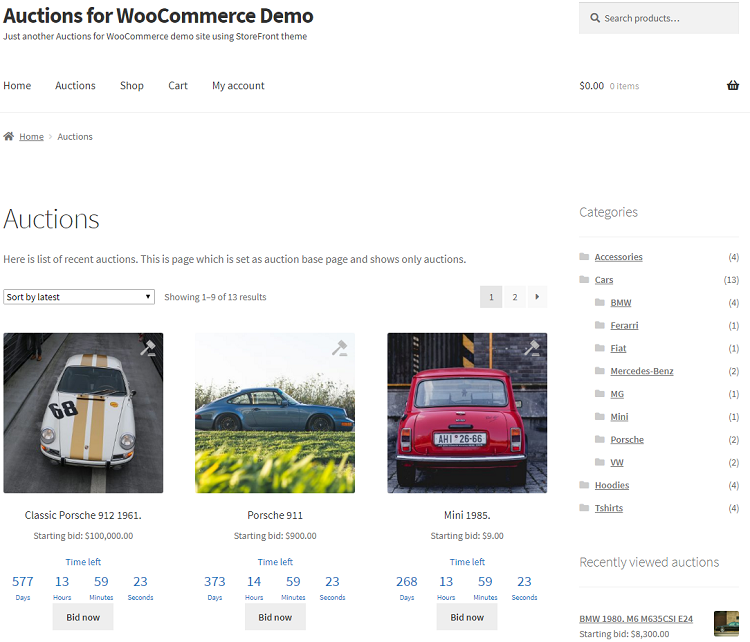
auctions for woocommerce list of auctions


Auctions for WooCommerce Features

  • Completely integrated with WooCommerce, HPOS support, WooCommerce REST API support – tutorial
  • Supports auction types: normal, reverse, silent, and proxy.
  • Seated auctions (bidders can purchase seat in order to participate in auction).
  • Auto charge for won auctions (if user has stored card number – works only with Stripe payment gateway).
  • Allow bidding only for users that have stored card (works only with Stripe payment gateway).
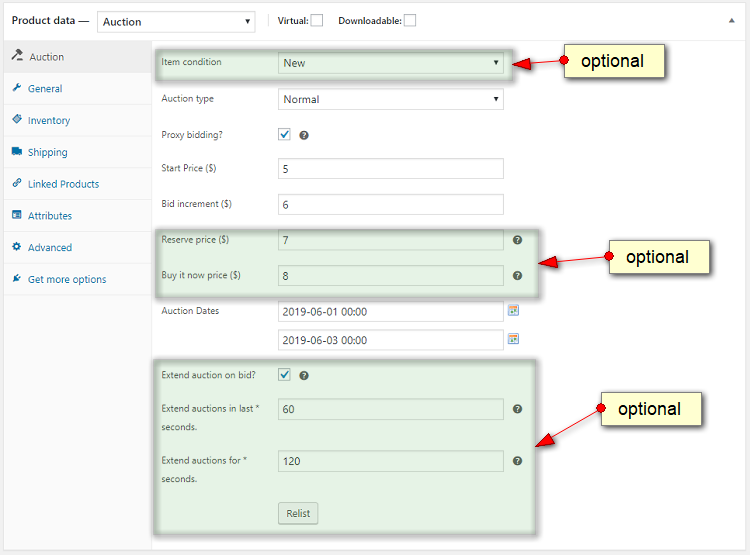
  • Lets you specify the starting bid, bid increments, the reserve price, the “buy it now” price,  auction start and end times, and the item condition.
  • An anti-sniping (soft close) feature extends an auction’s duration for a predetermined number of seconds if a last-minute bid is placed.
  • Variable Bid Increment (example $10 for current bid $50, $15 for current bid $100) or by percentage of current bid
  • Elementor support (from version 2.0) – tutorial here – works with any visual builder with Shortcode that displays every part of the template
  • Bidders can add auctions to a watchlist and see all auctions they’re participating on a My Auctions page.
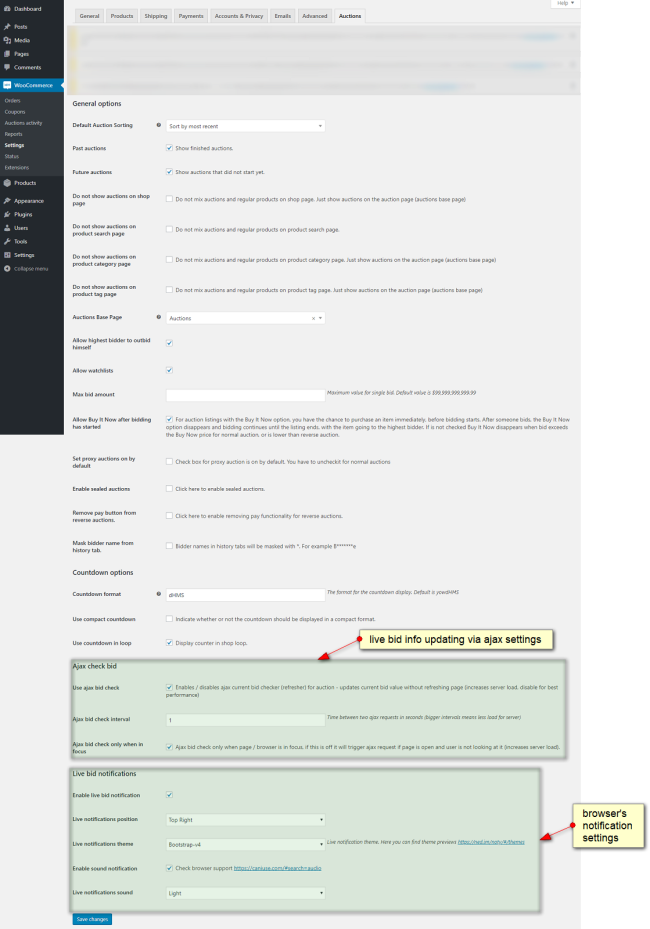
  • Option to display auctions alongside regular products or on auction-only page, and whether to show completed and upcoming auctions.
  • Includes widgets for ending soon, future, recent / latest, featured, recently viewed auctions, My Auctions, random auctions, auction search, and My Auction watchlist.
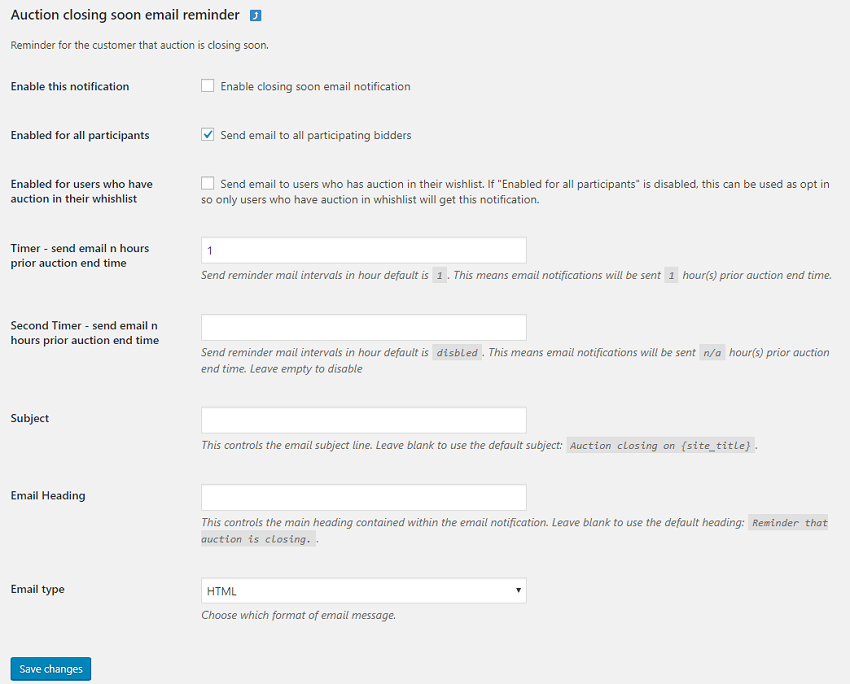
  • Sends automated email notifications — with editable email templates — when a customer is outbid, an auction is ending soon, a customer wins an auction, and many more.
  • Displays browser notifications when a bid is placed, a new auction is starting, and an auction closes.
  • Includes badges for auction products and for winning an auction (shown to winning bidder only).
  • Gives each customer a “My Auctions” page with a list of auctions in which user has placed a bid (both active and won auctions).
  • Lets customers sort by current bid, date, buy now price, activity, ending date, start date, or auction activity.
  • Includes ajax live current bid and auction history updating.
  • Lets you choose from a compact or extended countdown format.
  • Shortcodes for [auctions_watchlist], [my_auctions_activity], [ending_soon_auctions], [recent_auctions], [featured_auctions], [auctions ids=”1,2,3,4,5″], [auctions_for_woocommerce_my_auctions], [future_auctions], [past_auctions], [all_user_auctions] – see plugin documentation for details, scroll to List of Shortcodes
  • Shortcode to display parts of the template – you can use any visual builder that supports shortcodes to design your auction templates – [auctions_templates template=”add-to-cart|pay|bid-form|dates|condition|countdown|max-bid|reserve|auction-sealed|ajax-conteiner-start|ajax-conteiner-end|auctions_seated_progressbar_template”]
  • Adds administrator features to wp-admin, including:
    • Filter auctions in the WooCommerce product list by status (active, finished, failed).
    • Icons to describe different auction statuses: active, finished, finished and paid, failed.
    • Ability to create an auction from any type of WooCommerce product – simple, virtual or downloadable.
    • Ability to manually delete any bid, and to manually or automatically re-list auctions.
  • WPML compatible (note: does not support multiple currencies).

Please check screenshots below taken from actual Auctions for WooCommerce demo website:
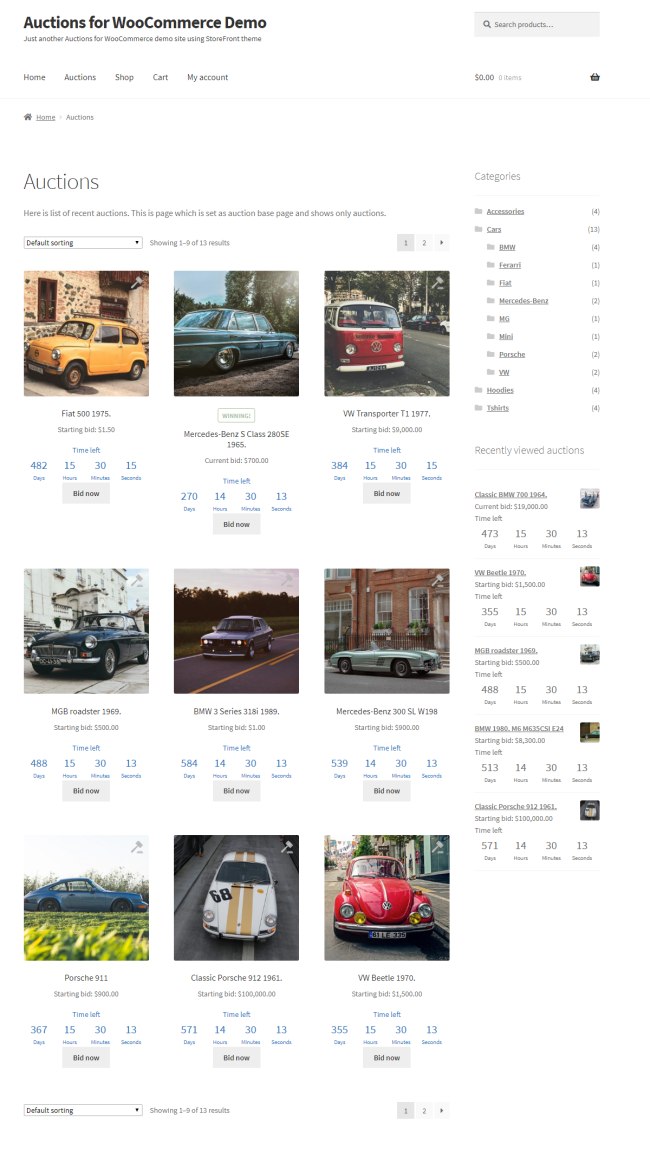
 

Take a look at the complete documentation to learn more about all these features and how to use them.


Häufig gestellte Fragen

Do you have anti snipping feature?

Yes, go to edit auction then check "Extend auction on bid" option and set "Extend auctions in last seconds" and "Extend auctions for seconds" values.

What are seated auctions (and seats)? Does this plugin support seated auctions?

Those are auctions which require seat to be purchased in order to bid - bidders have to purchase seat in order to participate in auction. Auctions for WooCommerce support this feature. You define simple product called "Buy Seat" and check option "Seated auction?" on edit auction page. Then in dropdown you need to select simple product called "Buy Seat" which you defined earlier. Number of seats is defined by stock of simple product "Buy Seat".

Can I charge buyers fee on auctions?

Yes, you can use this code snippet for that.

Can I delete fake bid?

Yes, go to item details, section Auction where auction log is and click on delete.

Do you have list of hooks and filters?
Does this plugin work with WooCommerce REST API?

Yes, check this tutorial -  working code example is included.

What are custom meta fields for CSV Product Import?
Is it possible to set proxy auctions on by default for all auctions?

Yes, this can be enabled in auction settings.

The bidder has to be logged in to be able to bid - why?

User has to be logged in because we don’t have reliable way to track its bid(s) otherwise. If you have real auction site at one moment user(s) will have to enter details for shipping, payment etc, it’s also a way to filter serious bidders and block fake accounts more easily.

How can I hide usernames in auction history list?

There is option in auction settings for that called “Mask bidder name from history tab”.

What happens if winner does not want to pay for auction?

You can delete that winning bid and next highest bidder will be winner and will see pay now button for auction. There is auto relist option that can relist auction: “Relist if not paid after n hours”.

How can I prevent user role from bidding?

Please check this sample code snippet.

I’m using object cache plugin like Redis Object Cache – how should I setup it?

If you use persistent like Redis / Memcache object cache you will need to add group to a list of non presistent groups in your wp-config.php, see line below:

define( 'WP_REDIS_IGNORED_GROUPS', ['afw'] );

Kundenbewertungen

Extension information

  • Tested with WordPress: 7.0
  • Tested with WooCommerce: 10.0
  • Requires at least WordPress: 5.0
  • Requires at least WooCommerce: 4.0

Länder

  • Worldwide

Anforderungen

  • WooCommerce

Related Products

Price $279 Jährlich
Rated 3.2 out of 5 stars
Price $199 Jährlich
Rated 4 out of 5 stars
Price $79 Jährlich
Rated 3.4 out of 5 stars
Price $59 Jährlich
Rated 3.1 out of 5 stars
Price $109 Jährlich
Rated 2.9 out of 5 stars
Price $49 Jährlich
Rated 4.1 out of 5 stars
Price $109 Jährlich
Rated 2 out of 5 stars
Price $109 Jährlich
Rated 2.3 out of 5 stars
Price $109 Jährlich
Rated 2.6 out of 5 stars