Product Icon

Automatic Order Printing for WooCommerce

Automatic Order Printing for WooCommerce allows you to print your order invoices, packing slips automatically using PrintNode.
Choose a billing option
$119
Save 20%
$238 $190.40

Das Abonnement beinhaltet

  • Product updates and improvements
  • Kundensupport
  • 30-tage geld-zurück-garantie

  • Automatically prints invoices and packing slips
  • Bulk print option available from the admin orders page
  • Customizable page size options, including 80mm size
  • Compatible with High Performance Order Storage (HPOS)
  • Advanced template options, including HTML template preview
  • Custom CSS options for templates

Advantages

  • Install the plugin, configure settings and relax.
    The invoices and packaging slips will be printed automatically for every order.
  • No need to log into a dashboard to find your orders
  • No delays between placed orders and fulfillment
  • Send orders to any number of printers at the same time with PrintNode
  • Create your own templates for labels, invoices, and packing slips

Automatically Print Packing Labels, Slips, and Invoices for Every Order

Manually printing packing labels, slips, and invoices is a time-consuming and tedious chore for busy shops.

The Automatic Order Printing for WooCommerce plugin automates the process.

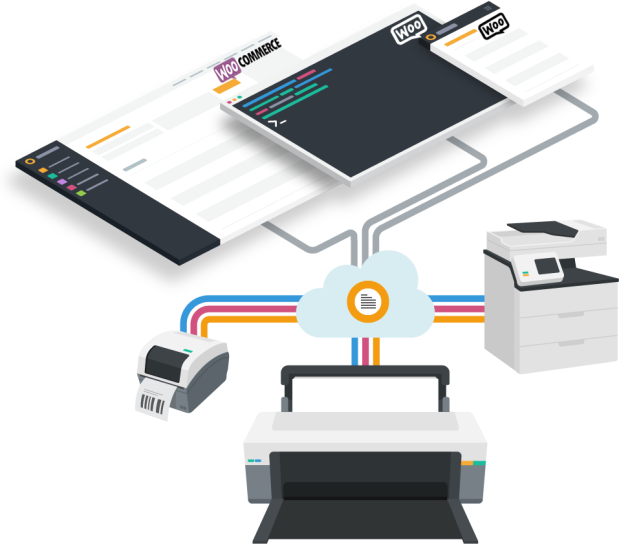
The Automatic Order Printing for WooCommerce plugin is built with a combination of WooCommerce and PrintNode technology.

You can configure your store to work with any number of printers and print any number of documents with the help of this plugin. You can also build custom templates for the sales and shipping documents you print.

Features

Unlimited printers connectivity

With the help of PrintNode, this plugin allows you to connect your store with any number of printers you want to print your labels, packaging slips & invoices.
Customizable labels, invoices & package slips

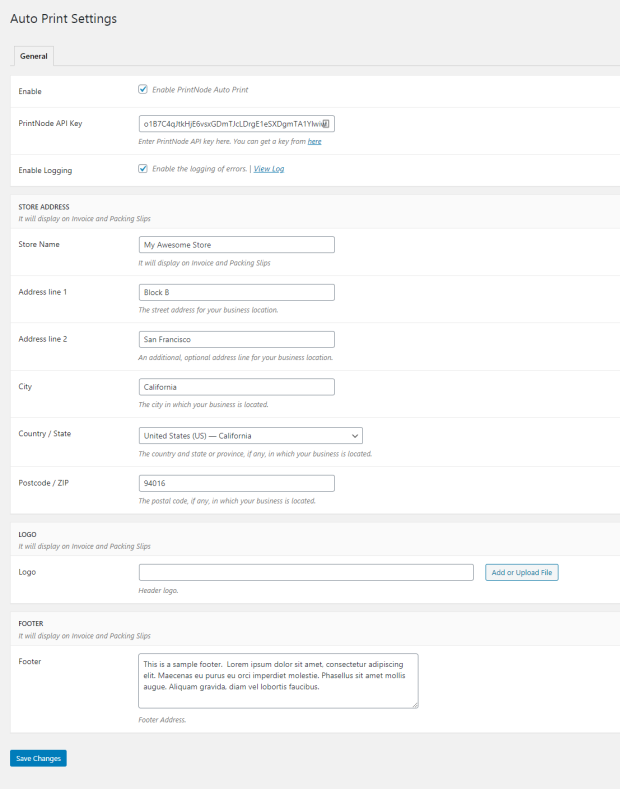
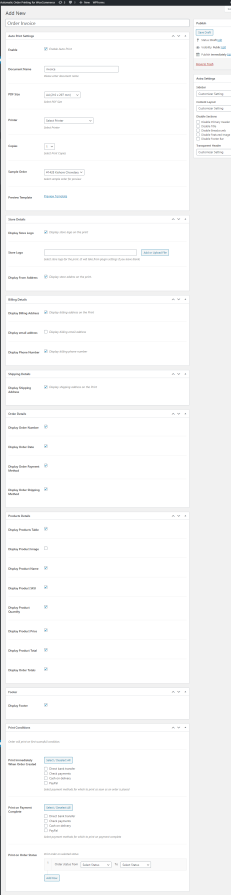
You can create and customize the labels, invoice & packaging slips like how you want. You can also add your own logo, footer text on the invoices.
Requirements

  • Minimum PHP version: 5.2
  • You must have an account with printnode.com to use this plugin.
  • Supported printers are listed here.

FAQs

How to get PrintNode API key?

To get the PrintNode API key, first you need to register at PrintNode. Post registration, login to PrintNode and navigate to Api Keys. Give description for API key and create the keys.

Can I create custom templates for Invoices, Packing slips etc… ?

Yes, you can create multiple custom templates by navigating to Woocommerce > Auto Print Templates > Add New

Can I send the invoice/packing slips prints to PrintNode manually?

Yes of course. You can print them manually from Order Details page. You can also download them.

What printers does it support?

It supports all major brands of printers including

  • Epson
  • HP
  • Canon
  • Dymo
  • Brother
  • Mettler Toledo
  • Stamps
  • Zebra
  • Oki
  • and many more listed here

Kundenbewertungen

Average rating 4.2
31 reviews
5 stars, 74% of reviews
4 stars, 6% of reviews
3 stars, 3% of reviews
2 stars, 0% of reviews
1 star, 16% of reviews
31 reviews
  • Alina
    Bewertet mit 5 von 5
    Support
    Feb 12, 2026
    Support
    We had an incredible experience with the support for our website comparability. We had few jock ups and those were fixed with lightning speed and competence. Irreplaceable plugin for reliable printing your weborders. Highly recommend.
    • ProcomLtd
      Feb 18, 2026
      Thank you so much for your kind words and for your recommendation! 😊 We’re really happy to hear that you had a great experience with our support and that everything was resolved quickly. Your feedback means a lot to us and motivates us to keep improving.
  • KONSTANTINOS LYKOGEORGOS
    Bewertet mit 5 von 5
    Support
    Dec 18, 2025
    Support
    Plugin itself is very straightforward and does what says on the box. It was what we were looking for, almost from day one. But what really made a difference in our case, was the support we got from the dev team. They trully went the extra mile to help us set up the plugin to accomodate our specific needs and to get the full value out of their product. If we could add a sixth star for the suppor we got, we would definetely do it.
    • ProcomLtd
      Dec 19, 2025
      Thank you so much for the wonderful review and kind words! We’re really happy to hear that the plugin met your expectations and did exactly what you were looking for. It’s especially rewarding for our team to know that our support made a meaningful difference and helped you get the most value out of the plugin for your specific needs. Your feedback truly motivates us to keep improving both the product and our support. Thanks again for choosing our plugin and for taking the time to share your experience!
  • countdavid
    Bewertet mit 3 von 5
    Functionality
    Nov 18, 2025
    Functionality
    When it works, it's great. However, whenever Chrome or Automatic Order Printing updates, you have to reload PrintNode to get it working with your printer. Randomly, it will skip printing an order. It could be a great product if they made a few changes to make it totally dependable.
  • floradooradmin
    Bewertet mit 5 von 5
    Functionality
    Jan 9, 2025
    Functionality
    This plugin works great, I'm using it to print order receipts automatically, and I can customize the fields and what appears on these documents so I can customize it to be used for Admins and for customers. I also contacted the support to help with changing fonts and make the documents support foreign languages, and they did a great job in a short time. Thanks Babu and ProcomLtd for their work and support.
  • designb218913c1f
    Bewertet mit 1 von 5
    Support
    Dec 18, 2024
    Support
    The issue with the 80mm Thermal Printer is that it never prints, though I added all possible conditions. It works fine on A4 but never worked on a thermal printer. Now looking at all 1-star reviews, they are all related to thermal printers. Perhaps, the developer should look into this, or at least highlight this issue on the product description.

Extension information

  • WordPress version required: 4.6
  • WooCommerce version required: 2.6.0
  • PHP version required: 7.4
  • Tested with WordPress: 6.8
  • Tested with WooCommerce: 10.1
  • Requires at least WordPress: 4.6
  • Requires at least WooCommerce: 5.0.0

Länder

  • Worldwide

Sprachen

English (United States)

Related Products

Price $79 Jährlich
Rated 3.4 out of 5 stars
Price $59 Jährlich
Rated 3.1 out of 5 stars
Price $109 Jährlich
Rated 2.8 out of 5 stars
Price $49 Jährlich
Rated 4.1 out of 5 stars
Price $109 Jährlich
Rated 2 out of 5 stars
Price $109 Jährlich
Rated 2.3 out of 5 stars
Price $109 Jährlich
Rated 2.6 out of 5 stars
Price $109 Jährlich
Rated 2 out of 5 stars
Price $109 Jährlich
Rated 2.3 out of 5 stars





