

Das Abonnement beinhaltet
Support
Managing appointments manually can quickly turn chaotic; missed slots, double bookings, and back-and-forth communication often lead to lost revenue. Businesses that switch to online scheduling see a 27% increase in revenue simply by letting customers book anytime.
Flexi Booking & Appointment Plugin for WooCommerce lets you —
Unlike external booking tools that require extra setup or integrations, the Flexi Booking & Appointment Plugin works natively within WooCommerce. You can effortlessly turn any WooCommerce product into a bookable product using the same product, order, and payment flow you already rely on. No disconnected systems, no sync issues, just seamless, automated bookings managed entirely from your store.
The Flexi Booking & Appointment Plugin for WooCommerce includes over 30+ premium features that help you create and manage bookings with precision. From flexible time slots to resource allocation and calendar sync, everything you need for smooth appointment management is built in. Here are some of its key features.
Offer any WooCommerce product as a bookable item. Enable bookings for:
All managed within your store.
Example: A fitness studio can let customers book single yoga sessions, recurring classes through subscriptions, or bundled wellness packages directly from its WooCommerce store.
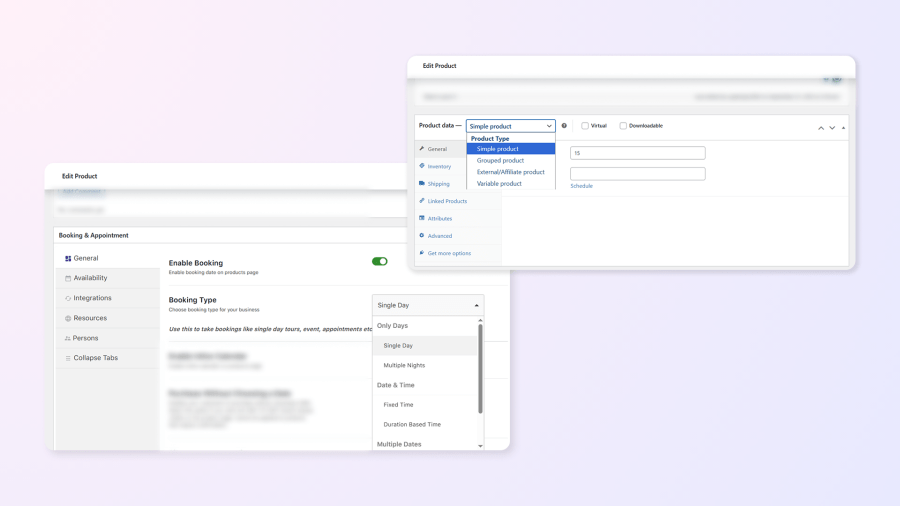
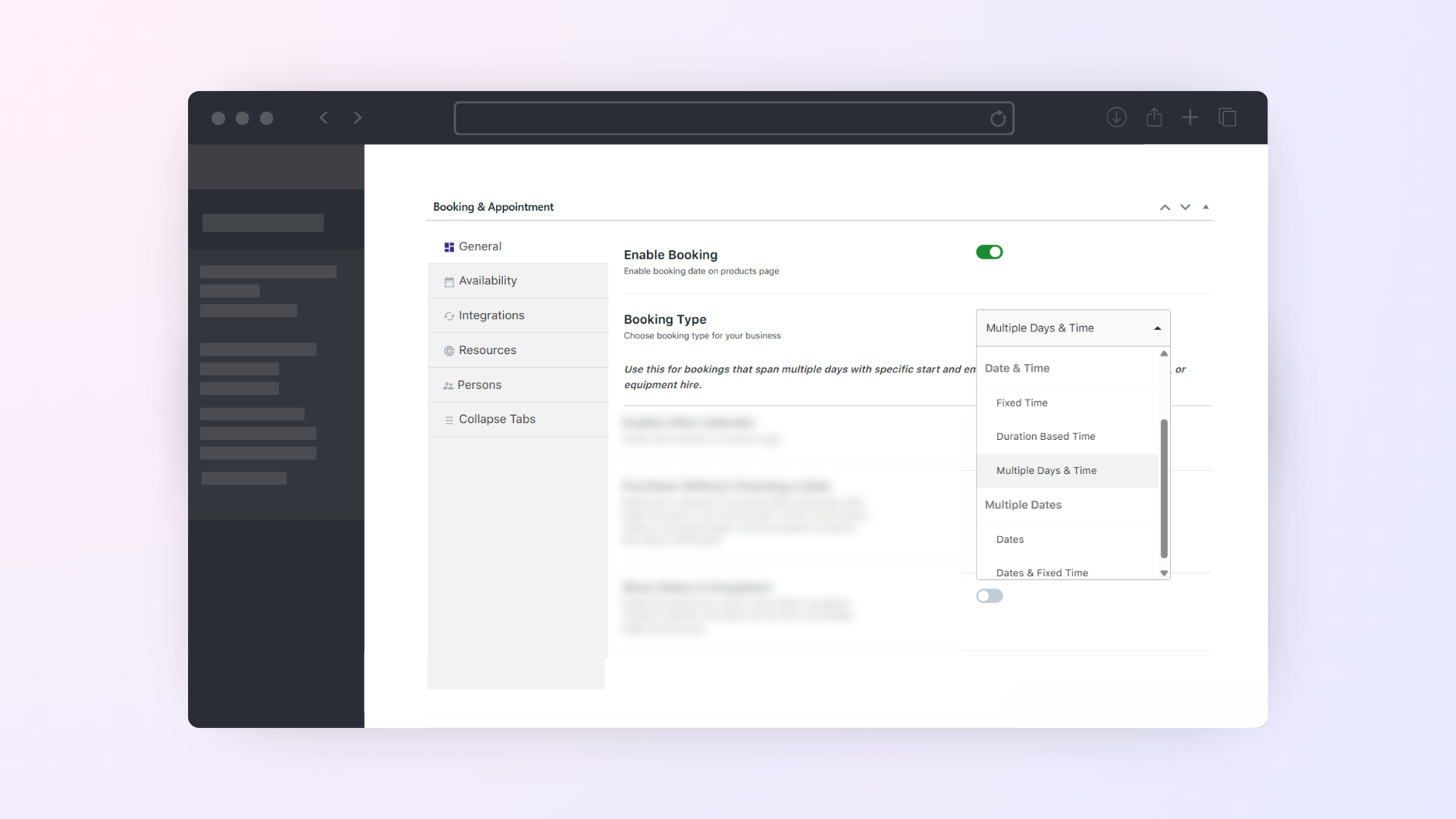
Support different booking styles to match your business needs — from single-day appointments to multi-day rentals or recurring sessions.
Choose from:
Example: A wellness center can let customers book a single 60-minute massage, schedule weekly therapy sessions, or reserve a multi-day retreat with flexible start and end times, blocking either full days or specific time slots as needed.
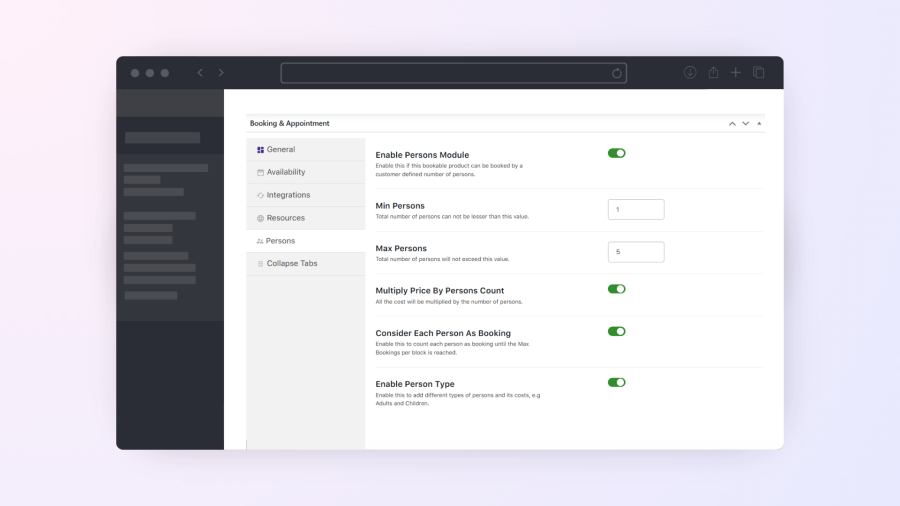
Let customers book for individuals or groups while maintaining full control over pricing, limits, and person types. Set the minimum and maximum number of persons per booking, create person types like adults, children, or infants, assign different prices for each, and automatically reserve one slot per person added.
Example: A life coach can let clients book one-on-one sessions or group workshops, apply different rates per participant, and automatically reserve one slot per person.
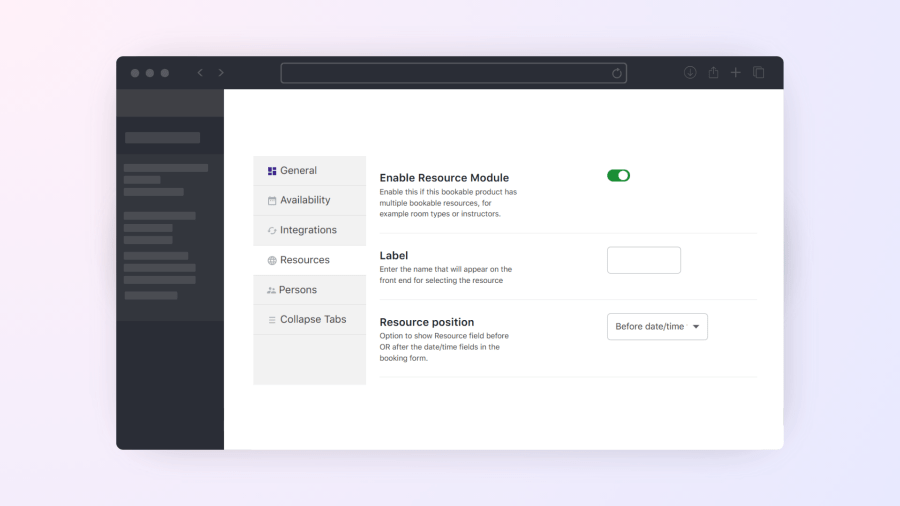
Let customers choose a resource or auto-assign one based on availability. Resources can be staff, rooms, or equipment, each with its own custom schedules and pricing.
Example: A travel agency can let customers select their preferred tour guide or vehicle for a trip, or automatically assign one based on availability.
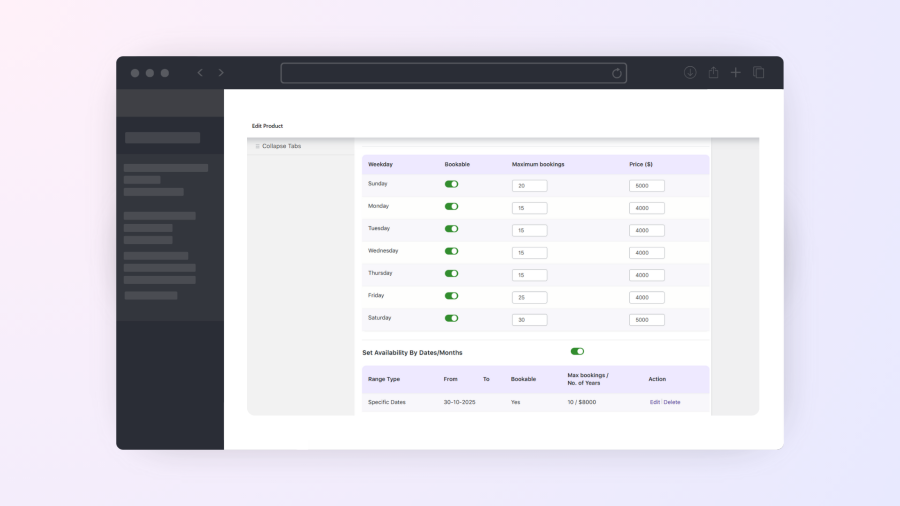
Offer custom pricing for weekdays, weekends, or special occasions. Apply different rates for holidays, festivals, or peak seasons without using coupon codes or extra products.
Example: A resort can charge higher rates during holiday weekends and offer discounted prices on weekdays to balance occupancy.
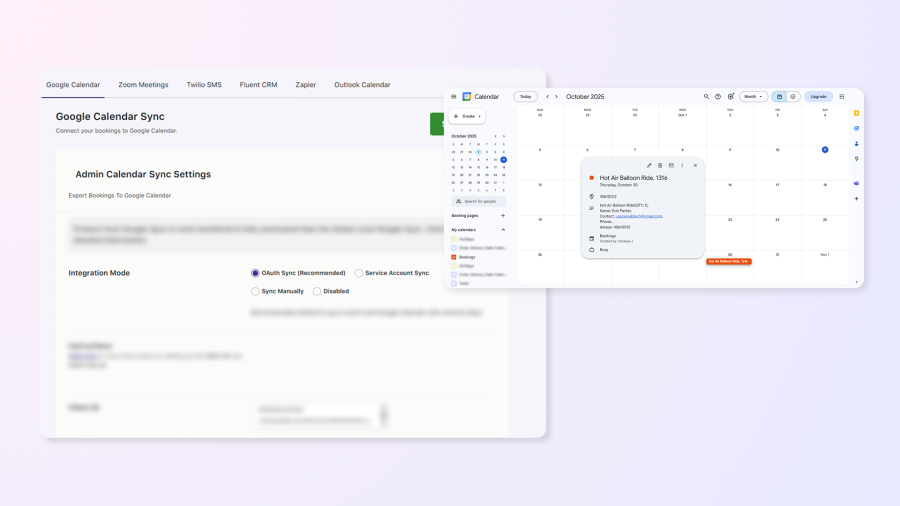
Automatically sync bookings between your store and Google Calendar using secure OAuth integration. Keep schedules updated for both you and your customers.
Example: A consultant’s confirmed sessions appear automatically in his/her Google Calendar, while clients can add the same booking to their own calendar from the confirmation email, order page, or My Account.
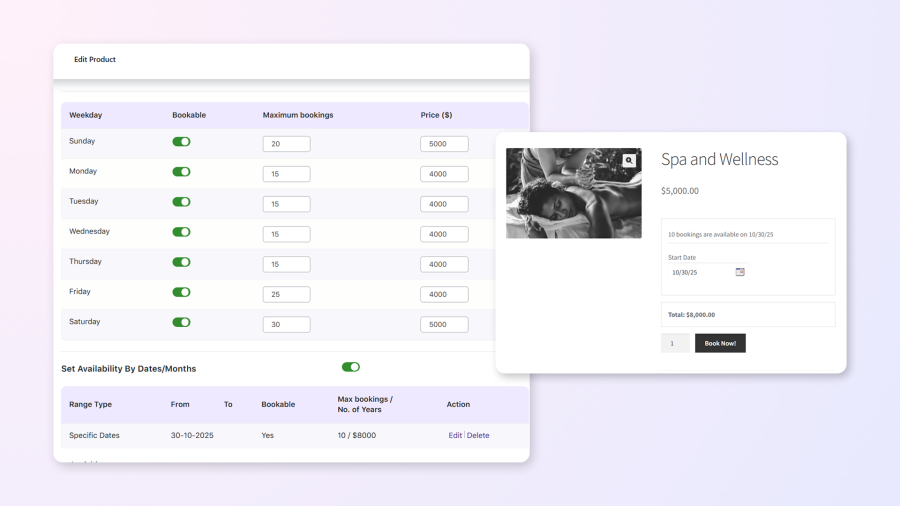
Set booking limits by date, weekday, or specific time slot, and even control grouped capacities using attributes like Adults and Children. Once the set limit is reached, the date or slot is automatically blocked.
Example: A fitness center can allow up to 10 bookings per yoga class or limit family sessions by adult and child participants, ensuring no overbookings.
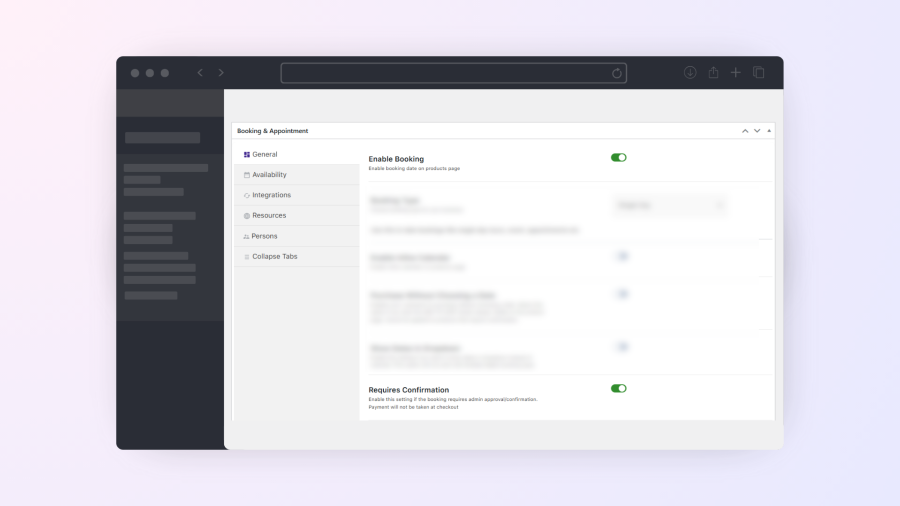
Approve bookings before accepting payments, ideal for limited or high-demand services. Manage approvals from the admin panel, with automatic confirmation or rejection emails sent to customers.
Example: A party bus rental service can manually approve birthday bookings to verify availability and event details before confirming payment.
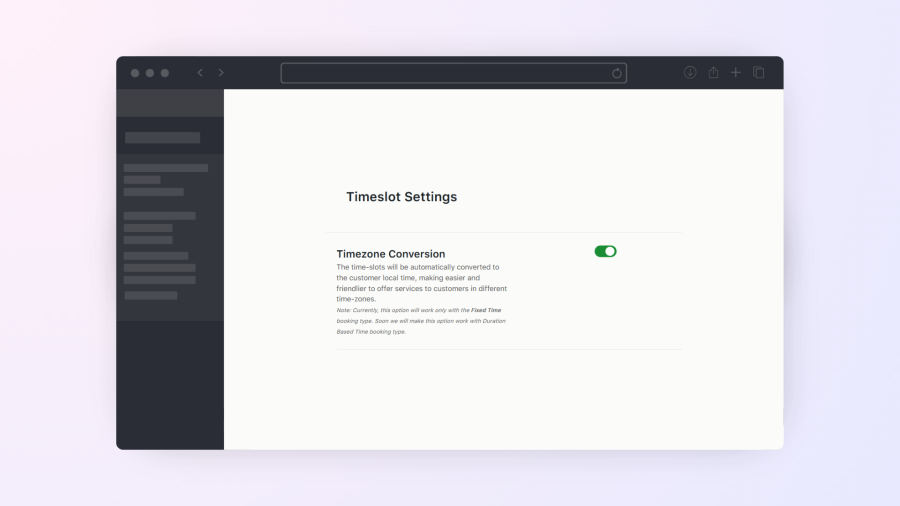
Automatically adjust booking time slots to match each customer’s local timezone for a seamless international booking experience. Display store time on hover for added clarity.
Example: An online coaching service can let a client in the U.S. and another in Australia view and book the same session in their own local times, avoiding timezone confusion.
With our one unified booking and appointment plugin, our customers have replaced multiple third-party tools, from email automation platforms and scheduling apps to integration services. The Flexi Booking & Appointment Plugin for WooCommerce helps them automate bookings, reminders, and time-zone conversions right inside their store, saving hours of setup time and ongoing management every week.
With our Flexi Booking & Appointment Plugin’s single unified solution, our customers have replaced multiple third-party tools, from email automation platforms and scheduling apps to integration services. It helps them automate bookings, reminders, and time-zone conversions right inside their store, saving hours of setup and ongoing management every week.
There are six different bookings types for which products can be set up:
1. Single day bookings 2. Multiple night bookings 3. Single date with fixed time 4. Single date with duration based time bookings 5. Bookings with multiple dates 6. Multiple dates with fixed time
Our Booking plugin is compatible with all default product types that come with WooCommerce. Also, we have made it compatible with Bundle, Composite, bundled and Subscriptions product type.
Yes. Customers can see real-time availability on the product page, while admins can manage all bookings in a calendar or list view from the dashboard.
Yes, the plugin works seamlessly with major page builders like Elementor, Gutenberg, and others. Your bookable products and booking features will display correctly regardless of the builder used.
Yes, by setting up the value in ‘Max Bookings’ option you can restrict the number of bookings for each date. For Single Day and Date & Time booking type we have ‘Max Bookings’ option and for multiple nights we have ‘Maximum Bookings On Any Date’ option in the Availability tab of Booking meta box.
Yes, we have Edit Bookings feature which allows editing the booking details on Cart and Checkout page. You can enable option from Booking-> Settings-> Global Booking Settings-> Allow Bookings to be editable.
Yes, we have View Bookings page where one can view, search and sort the bookings.
Yes. Using the Bulk Booking Settings feature, you can apply the same booking rules to multiple products, categories, or even all products at once. This is ideal when your products share similar booking settings.
Yes, customers can cancel their bookings up to a specified number of hours before the booking time.
Yes, the plugin can be used to make any product bookable, including physical spaces like meeting rooms, conference halls, or event venues.
Yes. By setting up Google API for products, you can import and export the bookings automatically to the Google Calendar. Product-level settings are in ‘Google Calendar Sync’ tab of Booking meta box on Edit Product page.
You can create manual booking from Booking-> Create Booking page. You can create new order when manually creating the booking or you can add the booking to already existing order.
Yes, by enabling ‘Enable Inline Calendar’ option the General tab of Booking meta box, the Booking calendar will be always visible.
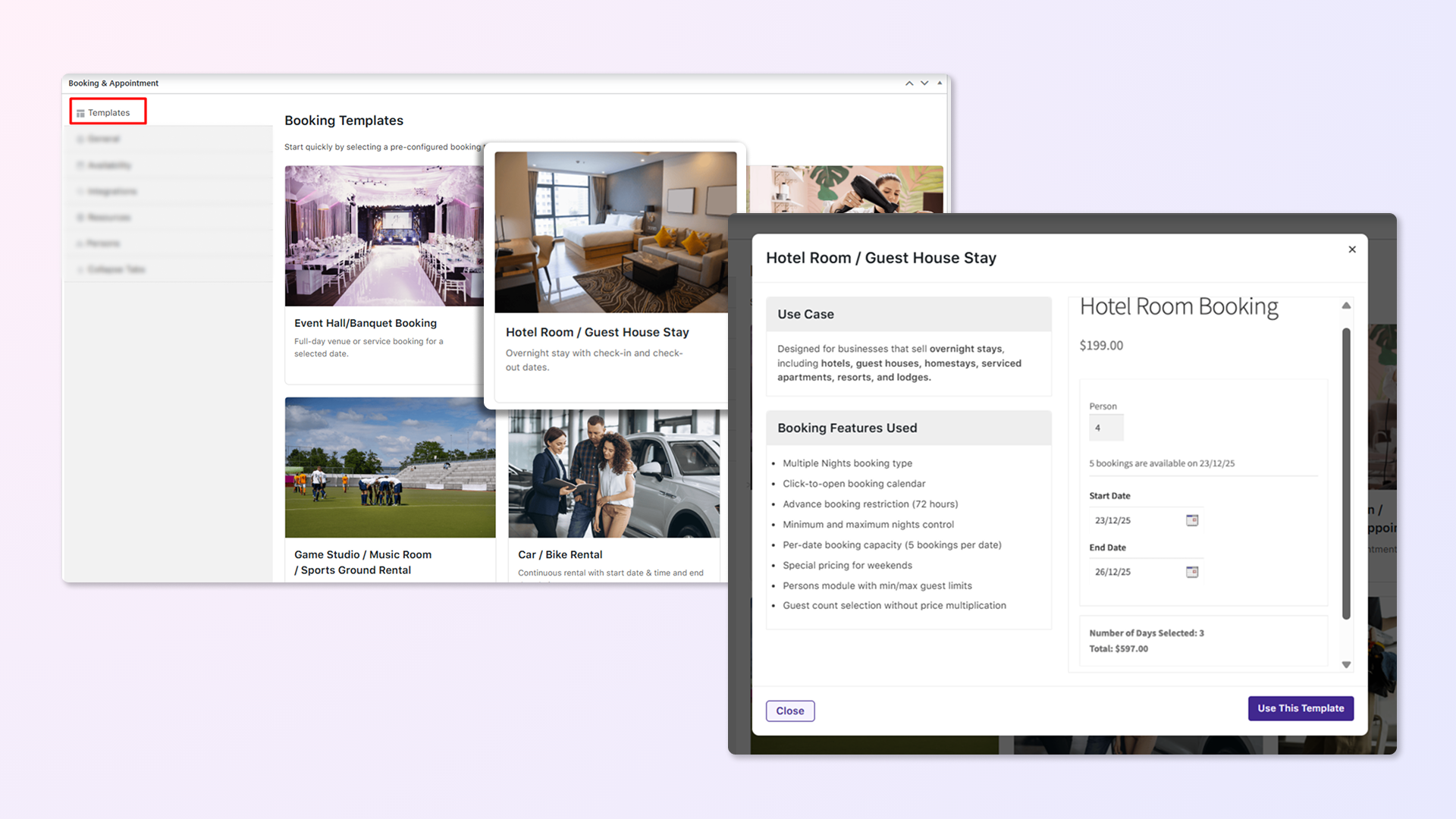
Yes. The plugin includes pre-built booking templates for common use cases like rentals, appointments, events, and stays. You can use a template to create a bookable product instantly, then customize the settings to match your business needs.
Yes. Customers can complete a purchase without selecting booking details. After payment, they can log in to their account and choose their preferred booking dates and time slots.
Yes, we have ‘Purchase without choosing a date’ option in the General tab of Booking meta box which allows the customer to purchase the product without selecting the booking details.
You can use .po file of the plugin for translating the plugin strings. Or you can use WPML plugin for translating strings as we have made our plugin compatible with WPML plugin.
Yes. By enabling the “Requires Confirmation” option in the General tab of the Booking meta box, the site admin can manually approve or decline bookings before the customer makes the payment.
Yes. You can charge different rates based on how long a customer books — for example, 1 day at one price, 2–5 days at another, and longer stays at discounted rates.
Yes. You can use the Fixed Block Booking feature, which allows you to create booking blocks of a fixed number of days — for example, 1-week (7 days) or 2-week (14 days) blocks. You can assign different pricing for each block and configure which days are available, such as weekdays only.
Yes. Customers can book multi-day bookings with fixed time slots using its Multiple Dates booking type. This allows customers to select a set number of dates along with predefined time slots in a single booking. This is ideal for classes, training programs, and recurring services.
Yes. Using the Rental System add-on, you can block a specific number of days before the start date and after the end date of a booking. Once the booking reaches its lockout limit, the selected buffer days are automatically blocked in the booking calendar.
Yes, you can block certain time slots on any given date without affecting the availability of other slots on the same day. This is useful for businesses offering appointments, classes, or rentals that run multiple time slots per day.
Yes, you can exclude the weekends by disabling Saturday & Sunday (or any weekdays) in the Weekdays table in the Availability tab of our Booking meta box.
Yes. Using the Duration-Based Time booking type, pricing can be set on an hourly basis, and the total cost is calculated automatically based on the selected duration. For example, if the hourly rate is 1000 and a customer selects 3 hours, the total price will be 3000.
Yes. The Persons feature allows you to set up person types (such as Adults and Children) with different pricing. You can also define fixed time slots and set a maximum capacity for each slot.
Yes. Using the Fixed Time booking type, you can create different time slots (such as hourly, half-day, and full-day) and assign separate prices to each slot. This lets you offer flexible pricing based on booking duration.
The plugin is made compatible with WPML. We do have a certificate of compatibility from the WPML.
Yes. Our Booking & Appointment plugin is compatible with both WCFM and Dokan multi-vendor marketplaces.
Yes, we have Reschedule Bookings feature which allows to reschedule the bookings from My Account page.
You can set it for all the bookable product by setting value to ‘Minimum number of days to choose’ on Booking-> Global Booking Settings page. Also, yo can enable minimum numbers of nights for particular product by setting value to ‘Minimum number of nights to book’ option in the Availability tab of Booking metabox.
Yes. we have ‘Price By Range Of Nights’ feature which allows store owner to create ranges for the product. Range price can be set per day basis or a fixed price.
Yes. You can configure bookings so that once a customer books a product or service for a specific date or time slot, other overlapping bookings are automatically blocked.
Yes. You can assign resources—such as rooms, equipment, or tables—to a product and show how many are available on the product page. Customers won’t be able to book more than the available quantity, helping you avoid overbooking.
Yes. Using the Available Bookings Block, you can display your products’ availability in a list or calendar view, helping customers easily see what’s available and book directly. You can also filter by products, categories, or resources.
Yes. Admins can block specific dates at the global level to apply to all products, or at the product level for individual items. This makes it easy to disable bookings on holidays, festivals, or non-working days.
Yes, on View Bookings page, we provide two buttons, one is for Printing the bookings and another is for download the CSV of the bookings.
Kategorien
Extension information
Quality Checks
Länder







