Product Icon

Magento Migration for WooCommerce

Migrate products, customers, and orders from Magento 2 to WooCommerce.
Choose a billing option
$129
Save 20%
$258 $206.40

Das Abonnement beinhaltet

  • Product updates and improvements
  • Kundensupport
  • 30-tage geld-zurück-garantie

Note: This extension requires substantial server resources due to intensive data processing operations. Please ensure your hosting environment has adequate CPU, memory, and processing capacity to handle the migration workload effectively.
This extension only works for migrations from Magento 2 to WooCommerce.
  • Move 3 types of data from Magento to WooCommerce:
    • Orders
    • Products
    • Customers
  • Import products based on various filters such as name, SKU, short description, full description, and status.
  • Migrate customers using filters including names, emails, and IDs.
  • Import order data based on filters such as order ID, st
    Note:This plugin requires substantial server resources due to intensive data processing operations. Ensure your hosting environment has adequate CPU, memory, and processing capacity to handle the migration workload effectively.
    atus, and date.
  • Monitor the migration process with a progress bar.
  • This extension is only for Magento 2.

Seamless Magento to WooCommerce Migration

Migrate your Magento products, orders, and customers to WooCommerce with no technical expertise needed. A hassle-free migration ensures your store stays online during the complete Magento to WooCommerce migration process.

Magento Migration helps you move your Magento store to WooCommerce automatically, accurately, and securely without any risk of data loss.


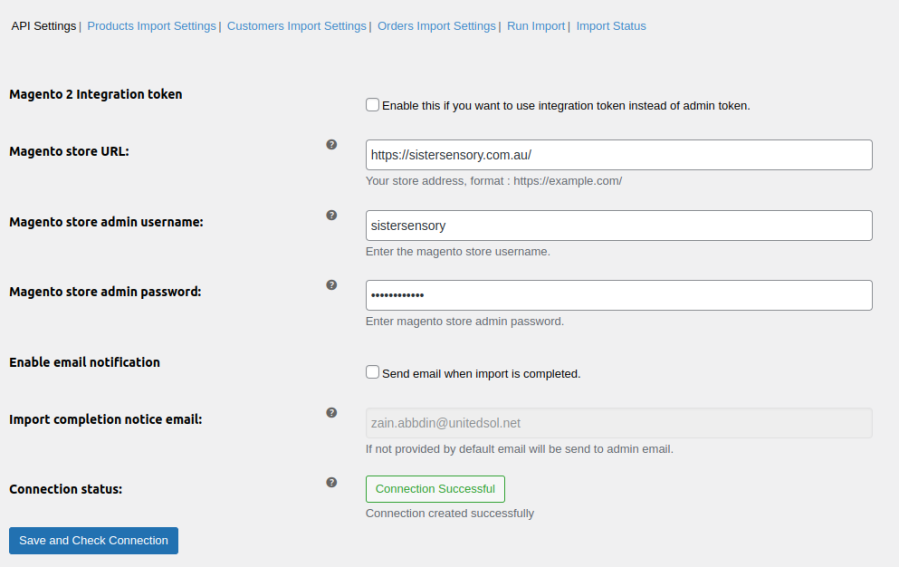
Migrate from Magento to WooCommerce using an API

Carry out a secure and risk-free migration process with the Magento to WooCommerce migration plugin. You can add the URL and the API key of your Magento store and securely transfer data.
Import products from Magento to WooCommerce

Move all or specific products from your Magento to the WooCommerce store. The plugin allows you to import products by selecting different filters such as title, manufacturer, product ID, category, publishing date, and product status.
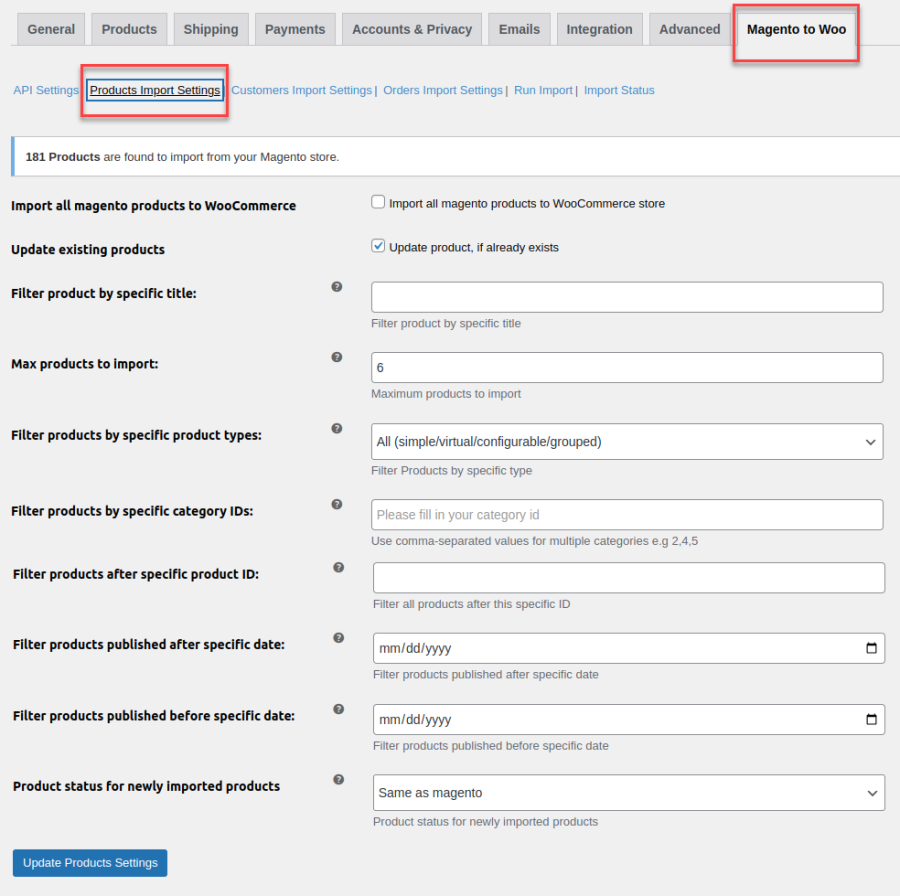
Import Products from Magento to WooCommerce

Move customers from Magento to WooCommerce

Migrate customer data to your store by selecting multiple filters. Choose customer data based on their specified date, customer ID, group ID, first and last name, and email address of the customer. This extension allows you to import all customer data or only selected customer data.
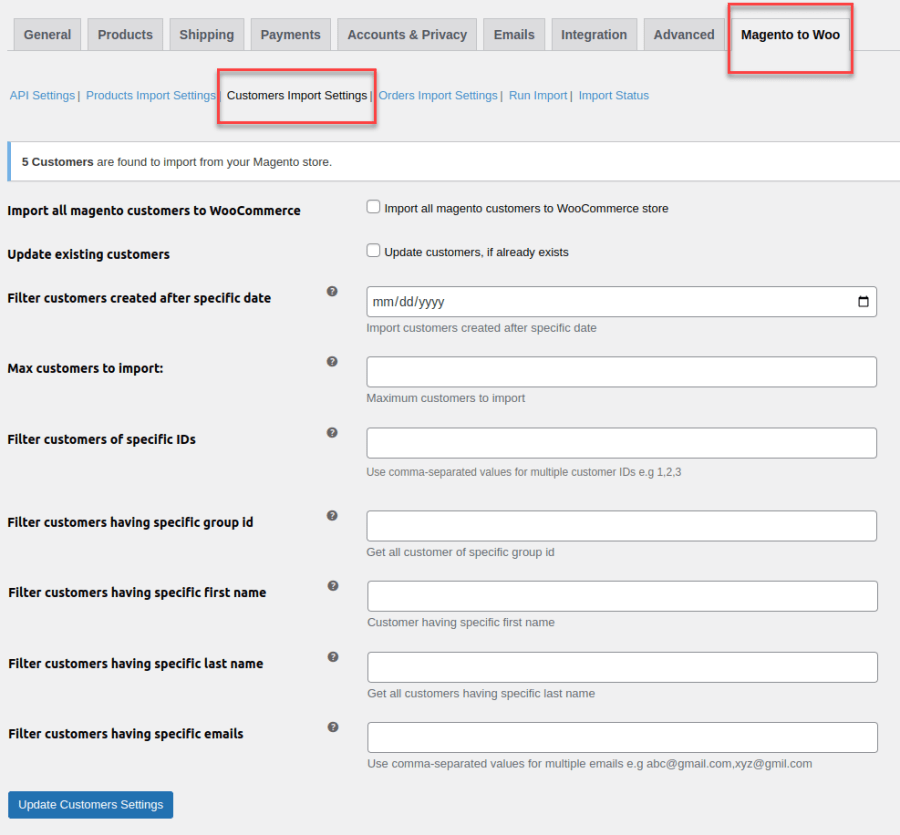
Move Customers from Magneto to WooCommerce

Migrate order data from Magento to WooCommerce>

The extension enables you to import all or specific order data with filters. You can also choose to update the already existing order data. This extension allows you to filter orders based on order ID, created before or after the date and order status ID. You can also change the Magento order status while migrating to WooCommerce.
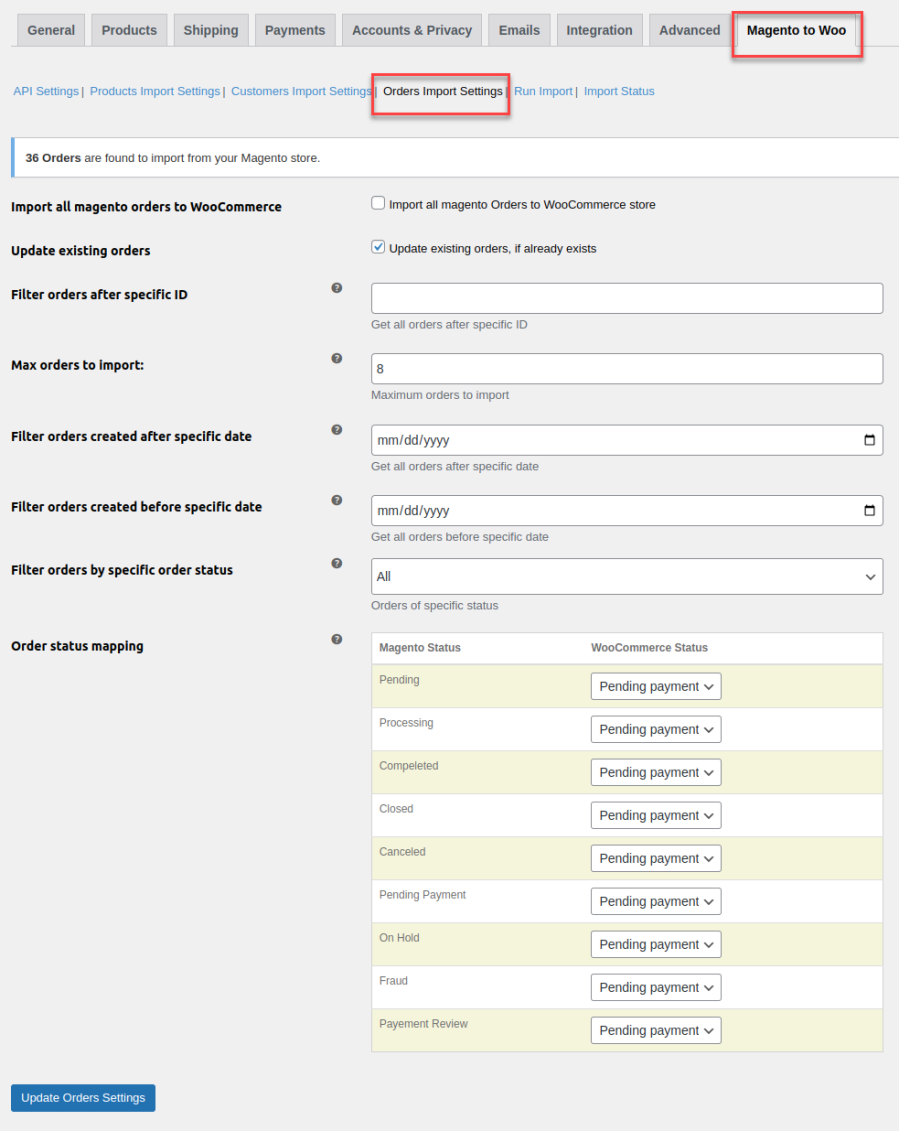
Migrate Order Data from Magento to WooCommerce

Import data in bulk

Make the migration process easy and swift by importing data in bulk. You can either import all store data or select to migrate either the products, orders, or customers. This way you can import only the required data without much hassle and confusion.
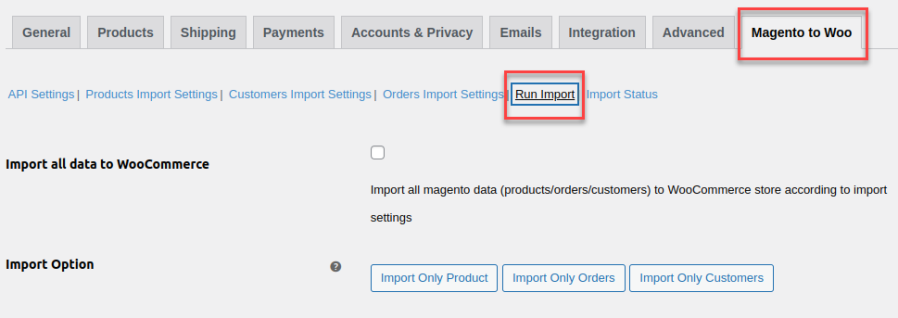
Import Data in Bulk from Magento to WooCommerce

Monitor data migration with a progress bar

The extension keeps you updated with the migration process with the help of a progress bar. You can track the progress of both individual data types such as orders customers, or products and all data.
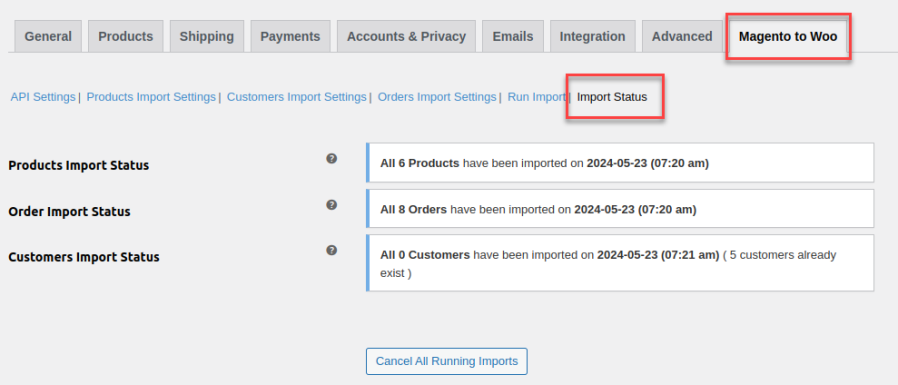
Monitor Data Migration with the Progress Bar


Häufig gestellte Fragen

What data can I migrate from Magento to WooCommerce?

You can migrate three types of data: Products, Customers, and Orders. The extension allows you to filter and select specific data for migration, ensuring flexibility and control over the process.

Can I migrate only specific products instead of all of them?

Yes, you can filter products based on various attributes such as Product ID, Type, Category allowing you to import only the required products.

How does the extension handle customer migration?

You can migrate customer data using multiple filters, including customer ID, name, email, and group ID. This helps in selecting only the relevant customer records for migration.

Can I migrate orders selectively?

Yes, you can filter and migrate orders based on order ID, order status, and date. This extension also allows you to update existing order data if needed.

How does the migration process work?

The migration is carried out using an API. You need to enter your Magento store’s URL and API key, and the extension securely transfers the selected data to WooCommerce.

Kundenbewertungen

Average rating 4.5
8 reviews
5 stars, 88% of reviews
4 stars, 0% of reviews
3 stars, 0% of reviews
2 stars, 0% of reviews
1 star, 13% of reviews
8 reviews
  • emediag
    Bewertet mit 5 von 5
    Support
    Feb 11, 2026
    Support
    Small issue but their support was right there to solve the issue and was fast to respond. Would for sure use them again for moving sites.
    • FmeAddons
      Feb 12, 2026
      Thank you for your feedback !!
  • rachelhill7
    Bewertet mit 1 von 5
    Support
    Oct 31, 2025
    Support
    ****UPDATE*** I'm in shock, showed up to work this morning, noticed ALL of my products I had manually gone in and fixed have been overwritten. The support team logged into our WordPress site and REIMPORTED the products, importing everything again, causing all of the changes I made to products and ALL THE VARIABLE PRODUCTS I CREATED to be overwritten and now completely gone. HOURS of work gone... This is going to cost our team $1,000 in more coding time to fix this boneheaded move by their support team. I am absolutely in shock right now. They made NO BACKUP and did NOT ask if it was ok to do this. This has caused thousands of dollars in damage do to the amount of hours wasted originally and...
    • FmeAddons
      Oct 28, 2025
      Dear Customer, Thank you for your feedback. Our plugin does support importing variations correctly, and we haven’t received similar complaints from other customers. It’s possible there might be a configuration or setup issue specific to your site. We’d be happy to take a closer look and help you get it working as expected. Could you please share temporary admin access or a screenshot of your import settings so we can assist you further? We’ve also reached out to you from our support email support@fmeaddons.com, so please get back to us at your earliest convenience. Your satisfaction is important to us, and we’d love the opportunity to resolve this for you. Best regards, Customer Support Team...
  • rick3fa745ad0e0
    Bewertet mit 5 von 5
    Support
    Apr 23, 2025
    Support
    Updated: I was contacted by support and after a little back and forth they fixed the issue and the plugin is working. I will say I still think the documentation needs to be better specifically in the "help" question marks but the plugin seems to be doing what I need it to do.
    • FmeAddons
      Apr 21, 2025
      Dear User, Thank you for choosing FMEAddons as your trusted provider of the WooCommerce plugin. We sincerely apologize for any inconvenience caused. We have not received such a complaint before, but we are confident that we can fix this for you as soon as possible. Please reach out to us at support@fmeaddons.com, and we’ll work on resolving your issue promptly. Looking forward to your response so we can assist you further. Best regards, Customer Support Team.
  • Monica
    Bewertet mit 5 von 5
    Functionality
    Feb 26, 2025
    Functionality
    The plugin worked perfectly, I just kept the setting to limit to 50 at a time, but I believe you can do more if you're confident you have the server resources. This plugin save me a LOT of time, and I found it easy to use after playing around with it a bit. Plus the documentation is very helpful. For any issues, the support team are really fast to respond. I've only had to submit 1 support request so far and the response and solution were very fast. I was thinking I'd have to start from scratch, but the developer was able to just sort it painlessly.
    • FmeAddons
      Feb 27, 2025
      Thank you for your feedback !!
    • FmeAddons
      Feb 27, 2025
      Thank you for your feedback !!
  • WaterBearMarketing
    Bewertet mit 5 von 5
    Support
    Jan 29, 2025
    Support
    I was a little apprehensive about using their plugin because there are not a ton of reviews. Then, I remembered that not a lot of people have Magento. So, in the big picture, they have a lot. I am glad I purchased the plugin. Their plugin worked very well and was fast. Support was very helpful, knowledgeable, and responsive. I am very satisfied with their support efforts as well. I actually went through their Woocommerce plugins to see what else they offered for future reference. They seem to have a lot of good stuff that I will try out on current & future customers.
    • FmeAddons
      Jan 30, 2025
      Thank you for your feedback !!

Related Products

Price $79 Jährlich
Rated 3.4 out of 5 stars
Price $59 Jährlich
Rated 3.1 out of 5 stars
Price $109 Jährlich
Rated 2.8 out of 5 stars
Price $49 Jährlich
Rated 4.1 out of 5 stars
Price $109 Jährlich
Rated 2 out of 5 stars
Price $109 Jährlich
Rated 2.3 out of 5 stars
Price $109 Jährlich
Rated 2.6 out of 5 stars
Price $109 Jährlich
Rated 2 out of 5 stars
Price $109 Jährlich
Rated 2.3 out of 5 stars




