Icono del producto

Abandoned Cart Pro para WooCommerce

Wondering HOW to recover abandoned cart sales using reminders, discount coupons, and pops on Woo? Abandoned Cart Pro for WooCommerce helps you send periodic reminders and personalized offers via email, text, & messenger to recover lost sales from abandoned carts.
Elige una opción de facturación
$119
Ahorra un 20 %
$238 $190.40

La suscripción incluye

  • Actualizaciones y mejoras del producto
  • Atención al cliente
  • Garantía de devolución de 30 días

  • 1. Recover lost sales by timely reminders and popups
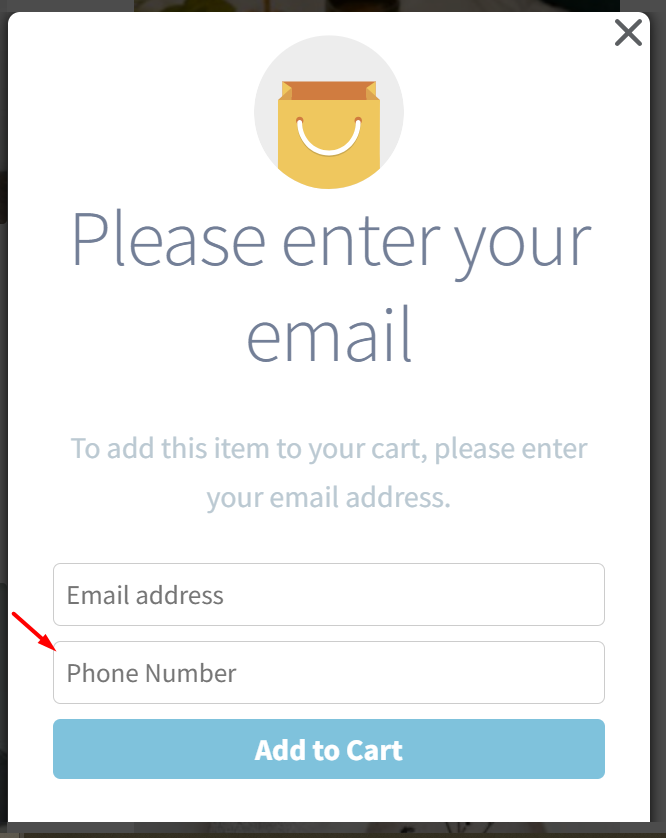
  • 2. Add to cart & exit intent popups to capture customer’s email address
  • 3. Send Abandoned Cart reminder notifications via emails, WhatsApp messages, SMS, and Facebook notifications
  • 4. Ready to use pre designed email templates for reminder emails
  • 5. Offer discounts in abandoned cart emails
 

Key Features

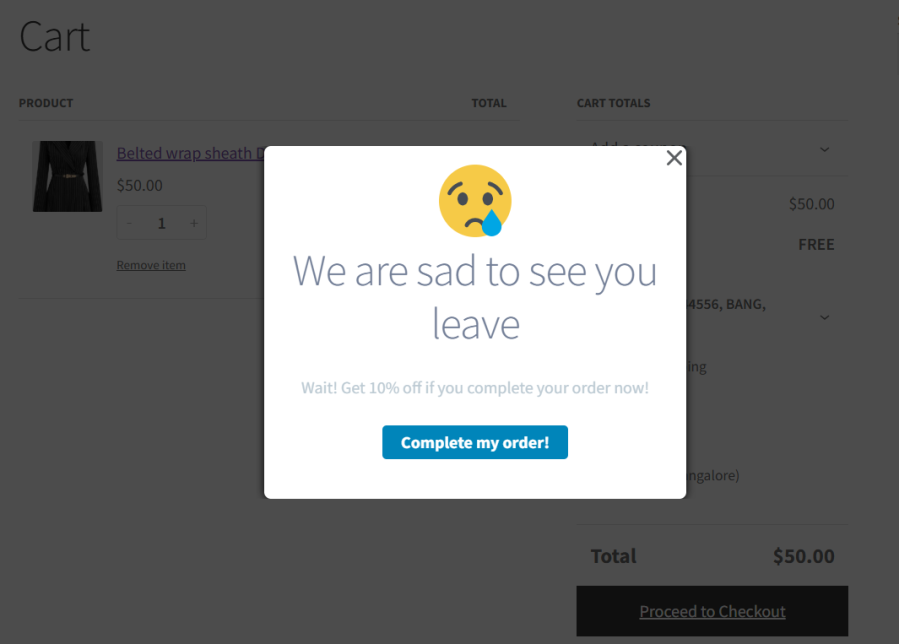
  • Stop Customers Before They Leave with Exit-Intent Popups Example: When a shopper with items in their cart tries to exit the website — stop them with a discount popup “Wait! Get 10% off if you complete your order now!»
  • Auto-apply discount codes for seamless checkout. Instead of forcing customers to enter a discount code manually, the coupon is applied automatically at checkout—making the process frictionless.
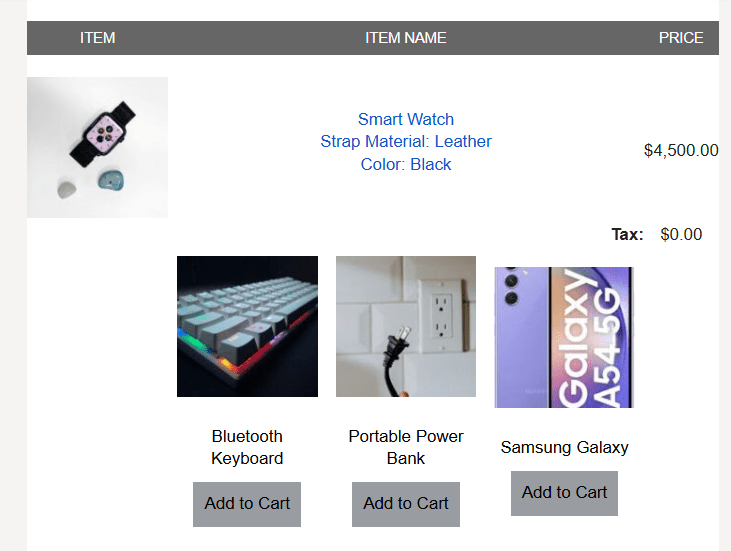
  • Upsell related products in reminder emails and encourage customers to buy more Example: When a customer adds a laptop to their cart. Before they leave, show a related product popup like: «Complete your purchase & get a laptop bag at 50% off!»
  • Collect online shoppers’ email or phone numbers on your Woo store before they exit so you can follow up with recovery reminders.
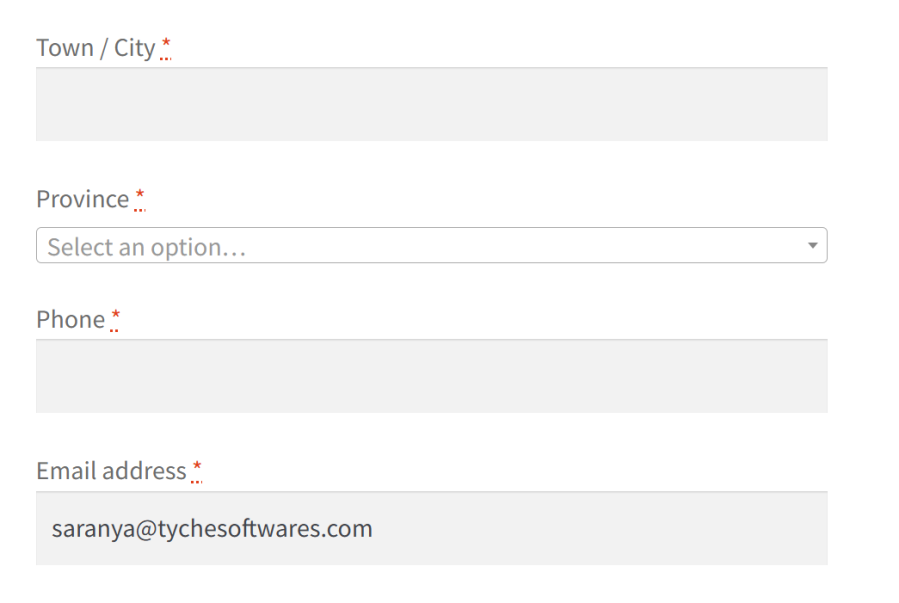
  • Capture emails from the checkout page in real time Example: A shopper starts entering their details but doesn’t complete checkout. The system saves their email, so you can send an abandoned cart reminder later.
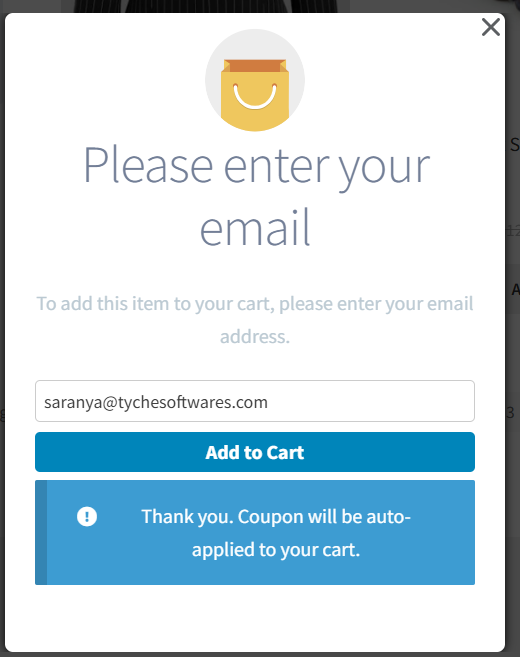
  • Ask for an email before adding an item to the cart Example: A shopper sees a «Sign up & Get 10% Off» and signup for the offer before adding an item to their cart. If they abandon later, you can email them a reminder.
  • Automate recovery with perfectly timed messages sent via email, Facebook Messenger, and SMS.
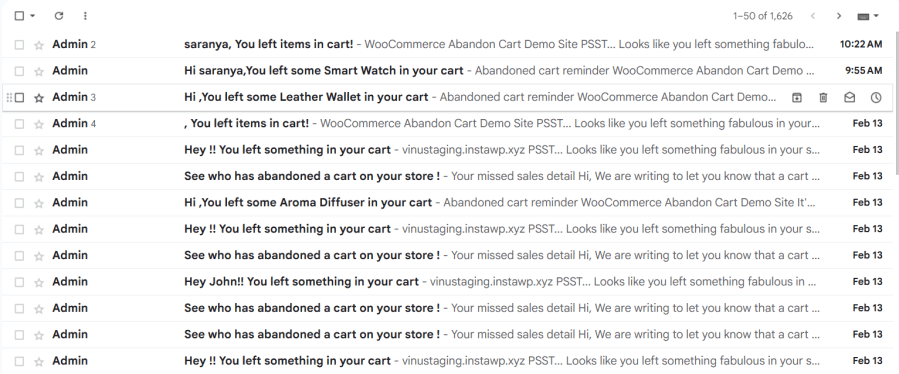
  • Send abandoned cart emails to remind customers. Example: When a shopper forgets their $200 order. An email lands in their inbox automatically in the time interval set by you, for instance after one hour of cart abandonment.
  • Send a single, timely WhatsApp message with a Resume Checkout button that reopens the shopper’s cart so they can finish in one tap. Example: 30 minutes after abandonment, the shopper receives: “You left something behind. Tap to complete your order.” One tap takes them straight to checkout.
  • Send Facebook Messenger reminders about the abandoned cart items Example: A customer abandons their cart. Later, they get a Facebook message: «You left something behind! Tap here to complete your purchase,» after 3 hours of the cart abandonment.
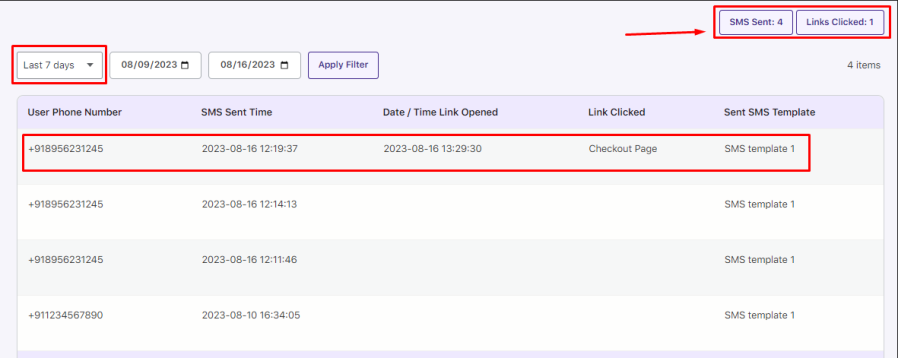
  • Send text message reminders via Twilio Example: A shopper abandons their cart, and 30 minutes later, they receive an SMS: «Still want your new sneakers? Complete your order now & enjoy free shipping!»
  • Set Smart Rules for Targeted Abandoned Cart Recovery. Use 11 pre-defined conditions to segment and personalize recovery efforts.
  • Exclude customers based on conditions and avoid sending abandoned cart recovery emails to customers who just received a promo or have already purchased. Example: A shopper abandoned a cart but came back and bought the item later. The system detects this and stops sending reminders
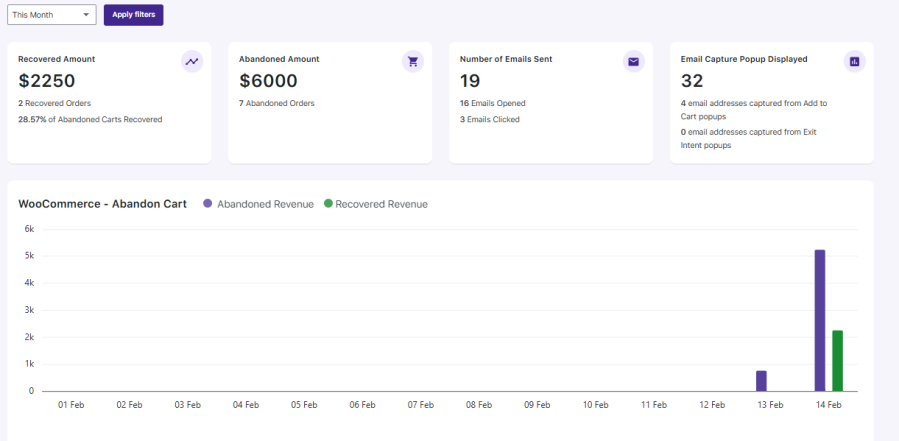
  • Track Your Abandoned Cart Recovery Performance. Get detailed analytics on abandoned carts, recovered orders, and campaign effectiveness.
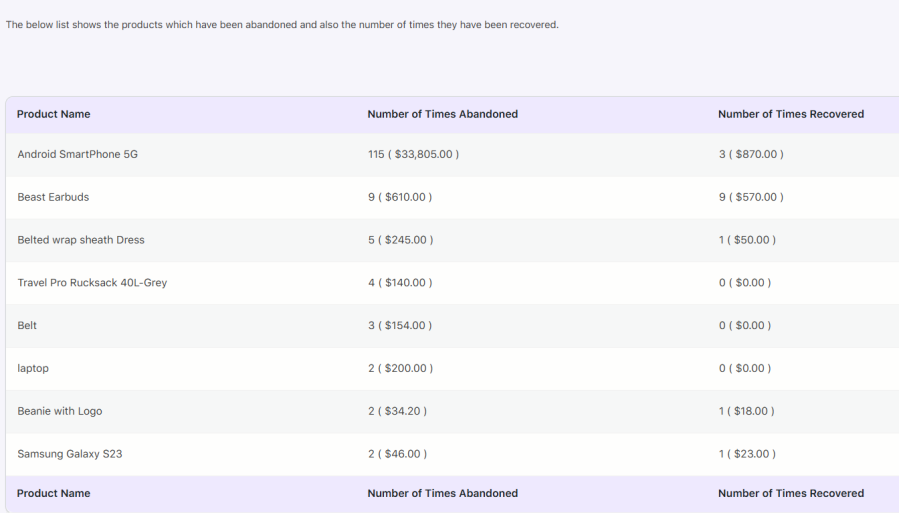
  • Identify which items customers frequently leave behind so you can adjust pricing or promotions. Example: Your stats show that 60% of abandoned carts contain a specific product. You can offer a 10% discount on that product and see if the abandoned cart recovery increases
  • Measure how many people use recovery discounts to fine-tune your offers. Example: You see that only 20% of customers use a 5% discount, but 40% use a 10% discount. You switch to a 10% offer and boost sales.
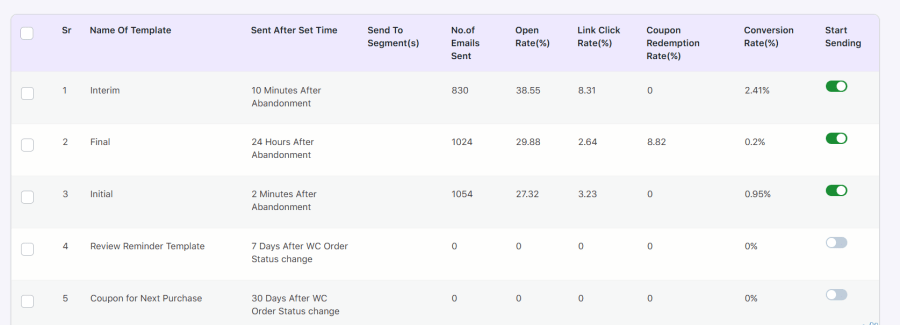
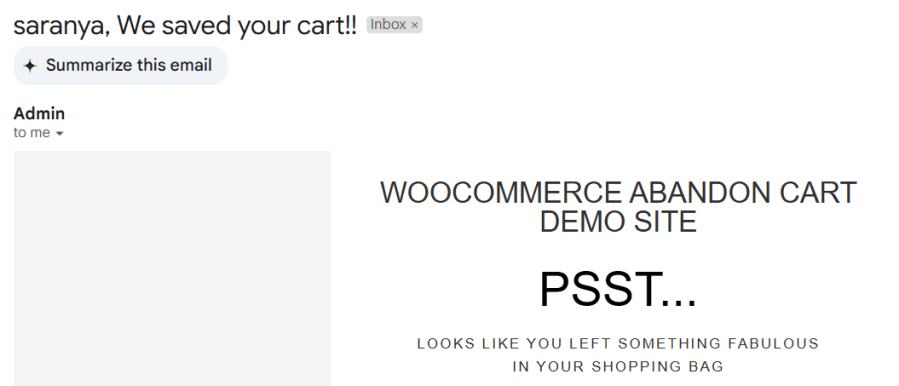
  • Find out which emails perform best and optimize your messaging. Example: A subject line with «We saved your cart!» gets more clicks than “Reminder: Your cart is waiting.” You update your templates accordingly.
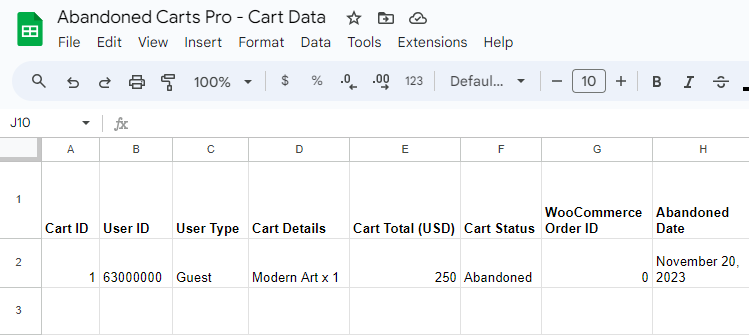
  • Export abandoned cart details and recovery to Google Sheets for advanced tracking. Use it to analyze trends to improve recovery campaigns or share it with your sales team to follow up with high-value abandoned cart users. Example: You notice high-value carts ($500+) are abandoned often. By exporting the data to Google Sheets, your team calls customers directly to offer a concierge checkout service—boosting conversion rates.

Additional Features

  • Pre-designed mobile-responsive email & popup templates – no coding needed
  • View logs of recovered orders – track successful conversions
  • Countdown timers for deals – create urgency & increase FOMO
  • GDPR Compliant- Get user consent before sending reminder messages and emails
  • Multilingual support – reach customers in different languages
  • Cart status labels – manage abandoned carts efficiently
  • Manually mark carts as recovered – stay in control of your data

Stop Customers Before They Leave with Exit-Intent Popups


Auto-apply discount codes for seamless checkout

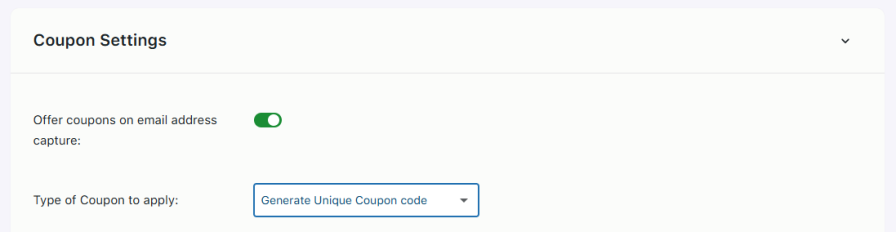
Generate unique coupon codes and ensure the discounts aren’t shared or misused


Upsell related products in reminder emails and encourage customers to buy more


Collect online shoppers’ email or phone numbers on your Woo store before they exit so you can follow up with recovery reminders

Capture emails from the checkout page in real time

Send abandoned cart emails to remind customers

Send text message reminders via Twilio

Set Smart Rules for Targeted Abandoned Cart Recovery

Track Your Abandoned Cart Recovery Performance

Identify which items customers frequently leave behind so you can adjust pricing or promotions

Measure how many people use recovery discounts to fine-tune your offers

Find out which emails perform best and optimize your messaging

Export abandoned cart details and recovery to Google Sheets for advanced tracking


No Additional Email Marketing Tool Needed. Send Unlimited WooCommerce Abandoned Cart Recovery Emails with Built-in Email Feature at $0 Cost.

Abandoned Cart Pro for WooCommerce is loaded with useful features that help you send an effective volume of reminders via text, email, and messenger. You don’t need additional email marketing tools, third-party tools, or automation tools for the recovery emails. Edit the readymade email templates and schedule the emails as per your requirements. The discount coupon details, Woo product details, order details, and much more relevant data get fully synchronized with the built-in email system, saving you time and money. Deliver personalized abandoned cart recovery emails to your shoppers and track insightful data like open rate, click rate, and discount usage rate to optimize your recovery strategy.

Abandoned Cart Pro for WooCommerce Free Vs Premium – Full Feature Comparison


Preguntas frecuentes

When would a customer’s cart be considered as abandoned?

For all users, the cart is considered as abandoned after the set cut-off time has passed. The default value for this is X minutes.

Will reminder emails stop if a customer completes the purchase?

Yes. Once a customer completes their purchase, the plugin automatically stops sending reminder emails.

Can I send multiple abandoned cart reminder emails to the same customer at different intervals?

Yes! You can schedule multiple reminder emails for a single abandoned cart. For example, you can send the first email 1 hour after abandonment, the second after 6 hours, and the third after 12 hours. Each email can have its own template and timing.

Can I manually send abandoned cart reminder emails to customers?

Yes, Store owners can choose a specific abandoned cart order and send a follow-up email to a customer whenever needed, without waiting for the automatic schedule.

Can I send personalized discount offers based on cart contents in abandoned cart emails?

Yes. The plugin lets you send different recovery emails and coupons depending on the products or categories in the abandoned cart.

Can I send abandoned cart reminders only for certain products or categories?

Yes! You can include or exclude specific products, categories, or other conditions when sending abandoned cart reminders, so you can target only the items you want to focus on.

Can I send abandoned cart reminder emails to multiple customers at once?

Yes! In Email Templates, create a new rule and choose to send emails by user role or select specific email addresses. This lets you follow up with multiple abandoned carts in bulk.

How does the Add to Cart pop-up help recover abandoned carts?

The plugin shows a smart pop-up when customers add products to their cart, allowing you to collect their email address early. This helps you send recovery emails even if the customer doesn’t reach checkout.

How does the plugin capture emails for guest users to send abandoned cart reminders?

The plugin captures guest emails from multiple sources: Add To Cart popups, Exit Intent popups, product page, checkout page, custom forms, and URL parameters. Once captured, it can send abandoned cart reminders to help recover lost sales.

Can I capture customer emails using custom forms?

Yes, the plugin captures the email address from all popular form plugins like Contact Forms 7, Gravity Forms, Ninja Forms and others. It will also capture the email address from any custom input field from other plugins or from other pages too.

Does the plugin let me customize popups that appear when visitors try to leave my store?

Yes! You can customize the Exit Intent popup that appears when a visitor is about to leave your store. You can change the image, heading, text, link text, and colors to match your store’s style and branding.

Why does the Add to cart popup modal not show when I click on Add to Cart? I have all the settings done correctly.

In most cases, the pop-up works automatically with standard WooCommerce Add to Cart buttons and with the default pages. If you’re using a custom theme or custom Add to Cart buttons, a small adjustment may be needed. Our support team is always available to get this resolved, as each custom button needs a different solution.get this resolved as each custom button needs a different solution.

Can admin see which carts were abandoned and which ones were recovered in my WooCommerce store?

Yes. The plugin shows all abandoned and recovered carts with customer details, products in the cart, cart totals, item counts, abandoned date/time, recovery status, and any related email activity. This helps you track cart recovery performance effectively.

Can I track which customers receive and open recovery emails?

Yes. You can easily monitor sent emails, open rates, and customer activity from the plugin’s dashboard.

Can I export the abandoned cart data?

Yes. You can export abandoned cart details using the Print option or download them in a CSV file. The plugin also supports real-time syncing of abandoned carts with Google Sheets and integrates with popular email marketing platforms using Connectors.

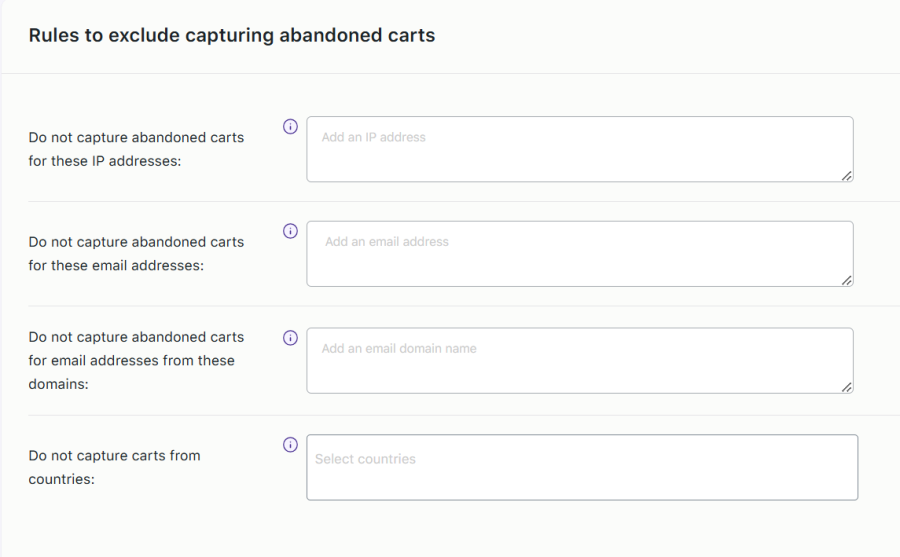
Can I stop tracking abandoned carts for certain users or IP address ?

Yes! You can exclude abandoned cart tracking for specific IP addresses, email addresses, user roles, email domains, or countries.

For multilingual websites, can I send abandoned cart emails in different languages?

Yes. Our plugin works with popular multilingual plugins like WPML, Polylang, and Loco Translate. You can translate your email templates and automatically send abandoned cart reminder emails in the same language your customer used while browsing your website.

Can I connect this plugin with 3rd party email marketing apps or CRM tools?

Yes. The plugin allows you to connect with popular email marketing and CRM tools such as Mailchimp, Klaviyo, ActiveCampaign, HubSpot, Brevo (Sendinblue), Drip, Mailjet, FluentCRM, Salesforce CRM, WP Fusion, Google Sheets, and Custom SMTP.

Does this plugin work with multi-currency WooCommerce stores?

Yes. The plugin is compatible with multi-currency plugins such as Aelia multicurrency Switcher, so customers receive recovery emails in the same currency they used on your store.

How do I configure the plugin for WordPress multisite?

You have to just upload the plugin and in network settings, check the option to enable plugin management, and then from each individual site you need to activate it.

Does your plugin comply with the GDPR guidelines ?

We have made every effort to make our plugin compliant to the GDPR guidelines. As a part of compliance, we do not capture any personal customer data without consent.

I have another question.

Please fill out this pre-sales form.

Opiniones de clientes

Información de la extensión

  • Se requiere una versión de PHP: 7.0
  • Se ha probado con WordPress: 6.9
  • Se ha probado con WooCommerce: 10.4.3
  • Se necesita al menos WordPress: 6.3 or higher
  • Se necesita al menos WooCommerce: 4.0.0

Países

  • Todo el mundo

Related Products

Precio: $79/anualmente
Valoración: 3.4 sobre 5 estrellas
Precio: $59/anualmente
Valoración: 3.1 sobre 5 estrellas
Precio: $109/anualmente
Valoración: 2.8 sobre 5 estrellas
Precio: $49/anualmente
Valoración: 4.1 sobre 5 estrellas
Precio: $109/anualmente
Valoración: 2 sobre 5 estrellas
Precio: $109/anualmente
Valoración: 2.3 sobre 5 estrellas
Precio: $109/anualmente
Valoración: 2.6 sobre 5 estrellas
Precio: $109/anualmente
Valoración: 2 sobre 5 estrellas
Precio: $109/anualmente
Valoración: 2.3 sobre 5 estrellas