

Icono del producto

Advanced Cancel Order para WooCommerce

Advanced Cancel Order for WooCommerce allows your users to submit cancellation requests/cancel their orders directly from their account.
Elige una opción de facturación
$49
Ahorra un 20 %
$98 $78.40

La suscripción incluye

  • Actualizaciones y mejoras del producto
  • Atención al cliente
  • Garantía de devolución de 30 días

Give Shoppers An Easy Way To Cancel Orders

Give users the ability to cancel orders and avoid costly and time-consuming product returns.

Advanced Cancel Order for WooCommerce allows users to offer the following features,

Order cancellation eligibility for users

Users submit cancellation requests or directly cancel their orders from their account pages (when configured for this option).

Guest User Support

Option for the guest users to cancel their order on the Order Thank You page.

Display Cancel Order button in Orders page

Users can cancel their order in Orders section on the My Account page.

Option to charge cancellation fees

Charge users a cancellation fee if they cancel orders (not available for cash on delivery).

Customizable Cancellation Period

Option for the site admin to set the time period(in days) within which the users can cancel their orders.

Revoke Accidentally Cancelled Orders

Users can revoke accidentally cancelled orders directly from their account page. This works only in Manual Approval mode.

Automatic refund support

Refund users directly from your site when they cancel their orders (for payment gateways with this option).

Upload Files in Cancel Order Form

Allow users to upload images & videos in cancel order form. Uploaded files will be displayed on the admin cancel order post table.

Benefits

Increase shopper trust and loyalty

Offering a convenient way to cancel orders increases your user’s trust and brand loyalty.

Avoid unwanted returns and refunds

If customers change their minds after ordering a product, they may return it after receiving it. If they can cancel instead, you and the customer can avoid the hassle of managing product returns and manual refunds.

How does Advanced Cancel Order for WooCommerce Work?

Manual Cancellation

1) A user cancels an order

The user submits a cancellation request from their account page.
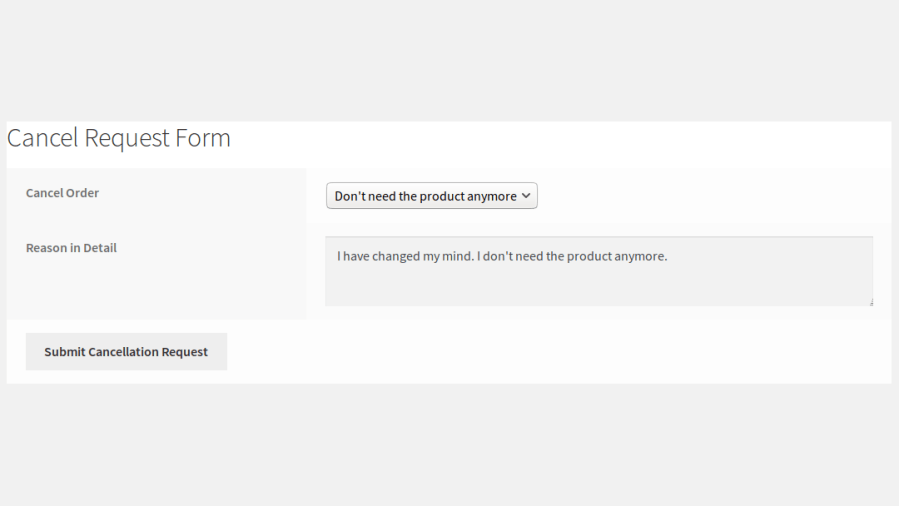
Order Cancellation Form for User

2) The admin receives an order cancellation request

Admins are notified of cancellation requests by email. Admins approve or decline requests.
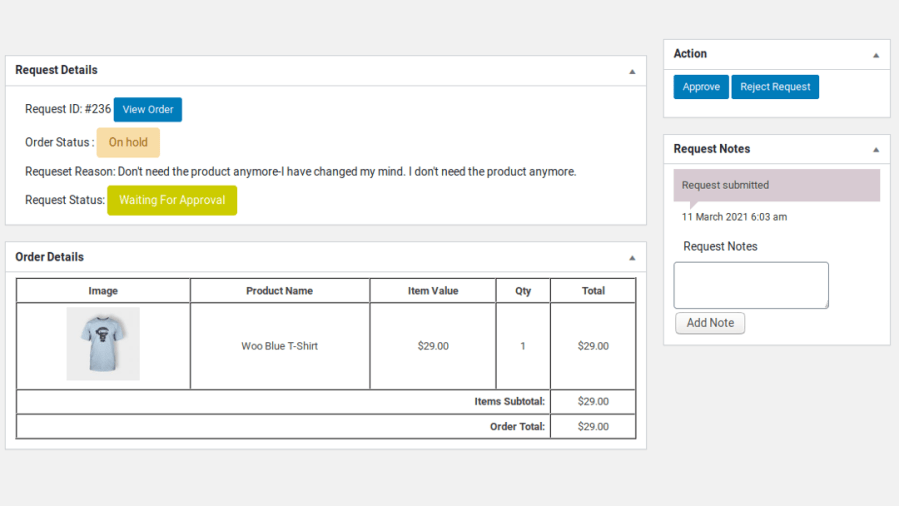
Admin Reviews the Order Cancellation Request

3) Manual order cancellation request approved
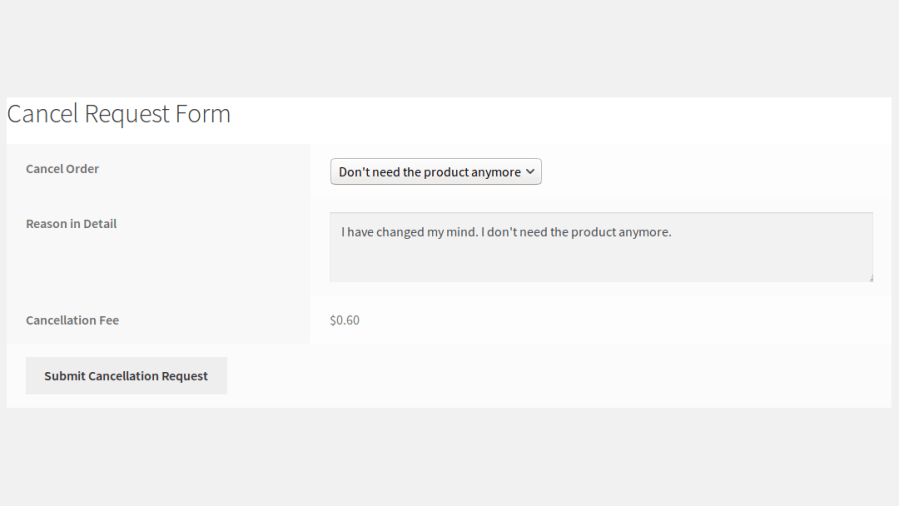
  • Paid orders are refunded for payment gateways where instant refunds are possible. For other payment gateways, the amount has to be refunded beyond the site.
  • Users can also be optionally charged a cancellation fee (not available for cash on delivery) for paid orders. The cancellation fee can only be added to paid orders.

Order Cancellation Form with Fee – Manual Approval

Automatic Approval Order Cancellation

1) A user cancels an order

The user submits a cancellation request from their account page.
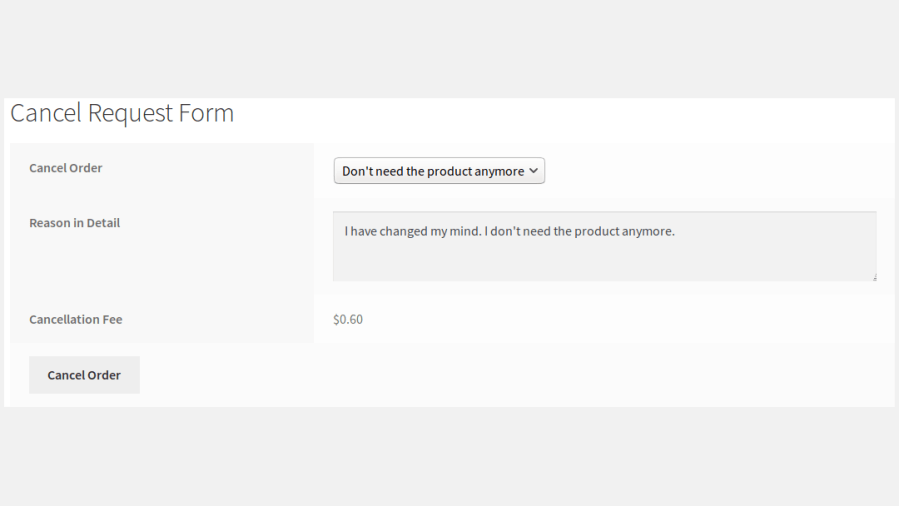
Order Cancellation Form – Automatic Approval

2) Automatic order cancellation

Once the request is submitted, it is automatically approved. The amount paid to the site is automatically refunded to the user (for payment gateways with this option).
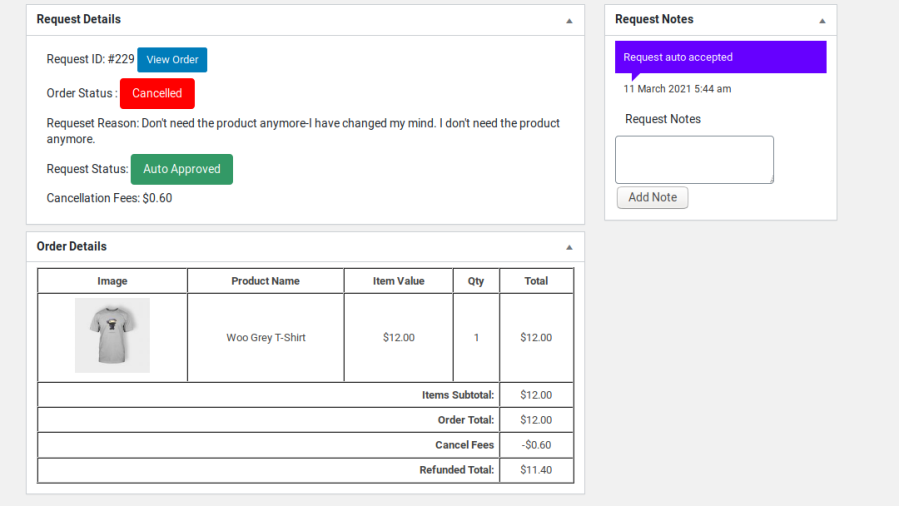
Order Automatically Cancelled

3) Automatic order cancellation with a fee added

Automatically charges users a cancellation fee for paid orders (not available for cash on delivery). The cancellation fee can only be added to paid orders.

Requirements

Minimum PHP version: 5.6


Opiniones de clientes

Promedio de valoraciones 4.0
3 reseñas
5 estrellas, 50 % de valoraciones
4 estrellas, 0 % de valoraciones
3 estrellas, 50 % de valoraciones
2 estrellas, 0 % de valoraciones
1 estrella, 0 % de valoraciones
3 reseñas
  • golfinguy6
    Valoración: 3 de 5
    Jun 18, 2024
    Doesn't work with Lottery products.
    Seems like an easy to use plugin, but unfortunately it doesn't work with lottery plugins.
  • mariahjadec
    Valoración: 3 de 5
    Mar 29, 2023
    Worked well, just not exactly as described
    This worked, but not exactly how I was hoping... How can I offer an automatic order cancellation service that expires EXACTLY 24 hours after the order is placed? This current plugin says the option to cancel will expire after "1 day". Instead, it removes the option from ALL orders placed before midnight (our time), NOT 24 hours, which is a big issue for us. Since someone placing at 11:55pm will literally only have 5 minutes to cancel it before the option is taken away. I have found another service with offers both automatic cancellation (not needing to be approved) AND the ability for the option to cancel to be taken away at 24 hours. So I am uninstalling this one and using the other I found...
  • fashionandfascinating
    Valoración: 5 de 5
    Ago 4, 2022

Información de la extensión

  • Se requiere una versión de PHP: 7.4.0
  • Se ha probado con WordPress: 6.9.4
  • Se ha probado con WooCommerce: 10.6.1
  • Se necesita al menos WordPress: 6.2
  • Se necesita al menos WooCommerce: 8.2.0

Compatibilidad

  • High performance order storage (HPOS)

Países

  • Todo el mundo

Idioma:

English (United States)

Related Products

Precio: $79/anualmente
Valoración: 3.4 sobre 5 estrellas
Precio: $59/anualmente
Valoración: 3.1 sobre 5 estrellas
Precio: $109/anualmente
Valoración: 2.8 sobre 5 estrellas
Precio: $279/anualmente
Valoración: 3.2 sobre 5 estrellas
Precio: $49/anualmente
Valoración: 4.1 sobre 5 estrellas
Precio: $109/anualmente
Valoración: 2 sobre 5 estrellas
Precio: $109/anualmente
Valoración: 2.3 sobre 5 estrellas
Precio: $109/anualmente
Valoración: 2.6 sobre 5 estrellas
Precio: $109/anualmente
Valoración: 2 sobre 5 estrellas
Usar sus datos personales
Tanto nosotros como nuestros socios procesamos tus datos personales (como los datos de navegación, las direcciones IP, la información sobre las cookies y otros identificadores únicos) en función de tu consentimiento o en nuestro interés legítimo para optimizar nuestra web, las actividades de marketing y tu experiencia como usuario.




