
Comparaison de produits
L’abonnement comprend
Assistance
Whenever you modify the price of a product in WooCommerce Subscriptions, the new price does not automatically apply to all the existing subscribers. The original subscription rate will remain in effect for every existing customer until you individually edit each subscription one at a time manually. This is impractical for stores with many active subscriptions, or hundreds or thousands of subscriptions.
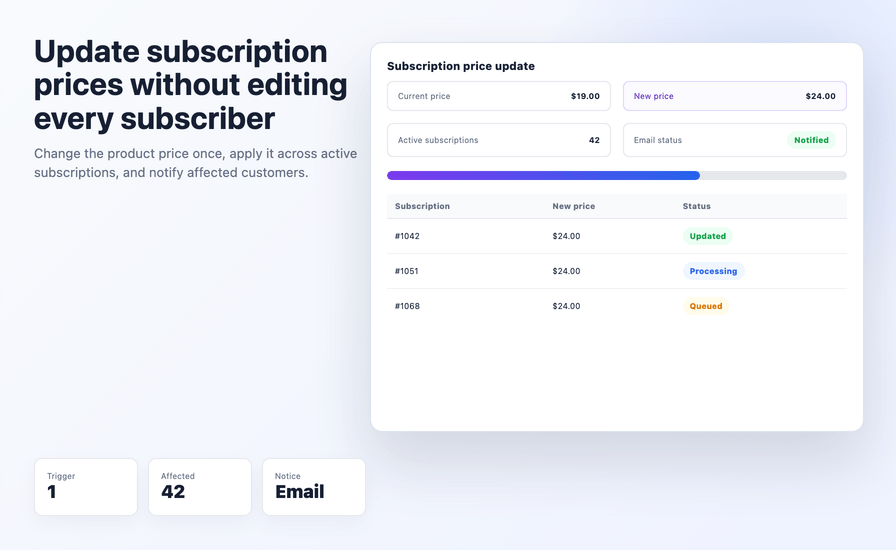
The AICOSO Bulk Update Subscription Price Plugin allows you to make bulk changes to existing subscriptions with one action. When you update the price on your product with the plugin, every active subscriber will receive an email alerting them to the change before their next billing period begins. There is no need to edit individual records, and no subscribers will miss out on receiving the email notification.
The plugin can be used with both simple and variable WooCommerce Subscriptions. Requires WooCommerce Subscriptions. $29/yr with a 30-day money-back guarantee.
This is the most common question WooCommerce subscription store owners run into. Below is the honest answer.
By default, WooCommerce Subscriptions do not automatically extend changes in subscription product prices to existing subscribers. When a subscription product price is changed, only new customers will pay the new price. All existing customers will continue to be charged at the previously charged price (possibly from 3 years ago now) at least until you manually edit each current subscriber’s price.
If you want to change the price of existing customers’ WooCommerce subscriptions without using a plugin, your options are :
Option 1 – Manual Edit: To edit the line item price for a subscription in WooCommerce Subscriptions, you must go into each one separately and save the changes. If you have 500 active subscriptions in your store, you will have to make 500 separate edits and not notify customers automatically.
Option 2 – Custom Code or AutomateWoo Workflow: A developer would need to write and test a script for you, or you may have to have an entirely separate subscription set up through AutomateWoo. This set up would also have a separate notification workflow, which may be complicated to set up.
Option 3 – AICOSO Bulk Update Subscription Price: Change the price at the product level and the plugin will see the change, and automatically apply the new price to every active subscriber in a batch and automatically notify all customers. One action, no developer, and no manual edits to subscribers.
The plugin exists specifically to help solve the scalability problem of doing these edits manually. WooCommerce does not provide this solution natively.
When you change the price on a subscription product in WooCommerce, the plugin will update all active subscriptions to reflect the new price. There is no need to go in to any of the individual subscriptions to do this. The edit is done at the product level – meaning that there is just one place to change the price, and the plugin will handle all active subscribers for you.
This works for both simple subscription products and variable subscription products and for both increases and decreases in price.
Subscription prices are indecipherable from your WooCommerce store. When you use this plugin to change the price of any of your subscriptions, all of your customers will be automatically notified via email about the new price before it is billed to them for their next subscription billing cycle. This means that you will comply with best practices in the subscription billing industry by providing notification of changes to your customers’ subscriptions pricing prior to billing.
Your customers will understand why they will see a different amount charged on their next subscription renewal. They will receive a professional and informative email explaining the reason for the pricing adjustment. Implementing this notification functionality will help you create long-term customer relationships by saving money from churn, disputes, and chargebacks due to an unexpected charge amount.
When you have a large list of active subscribers (hundreds, or thousands), the plugin will automatically process batches of subscriber information in order to avoid server timeouts or performance degradation of your store during the updating process. The updates are handled in the background so that your store remains functional throughout the process of rolling out any changes to your subscription pricing.
The plugin is capable of updating both variable and simple WooCommerce subscription products. Regardless of which type of subscription was used to create an order with an old price, the subscription price will be accurately updated in the new price regardless of the subscription product type that created the order.
All activities occur utilizing an already established WooCommerce dashboard with zero external platform, SaaS, and new portal to learn. As this solution operates via a WooCommerce Subscription Integration, it follows a pre-existing WooCommerce Subscription Charge Management Procedure.
Below are several examples of how WooCommerce Store Owners can change Pricing on Existing Subscribers versus New Subscribers:
1) Cost Increases (cost of producing via suppliers or other means increased) – Store Owners must pass these increased costs through to existing subscribers, making sure they contact each customer well prior to its implementation.
2) Yearly Price Reviews for Subscription Businesses – Yearly Review will result in the same price for all Subscribers regardless of whether or not they became Subscribers prior to the Price Change or subsequently.
3) Currency Rate Changes – Store Owners doing business in more than 1 market need to change the way they bill for subscriptions when the Currency Rate changes or the Region Price changes.
4) Promotional Pricing Expiry – Store Owners will convert Subscribers who entered into a promotional subscription to a regular(standard) Subscription after the promotional period.
5) WooCommerce Cost Of Goods in the Supply Chain Changing – From the Purchasing side of Supply Chain to the Manufacturing side – These changes must be passed through to Subscribers as required until the changes are reflected in Subscriber Invoice.
In every one of these scenarios, WooCommerce gives you no useful tools. Therefore, the AICOSO Bulk Update Subscription Pricing Plugin closes that gap.
Stores that need advanced subscription management features beyond price updates — cancellation flows, upgrade/downgrade logic, dunning management, or complex
The setup process is easy:
No developer required. No additional workflow configuration needed.
WooCommerce does not update prices for existing subscribers when you change a product price. To change the subscription price for existing customers, install the AICOSO Bulk Update Subscription Price plugin. Update the product price in WooCommerce, and the plugin applies the new rate to all active subscribers automatically, sending notification emails to every affected customer.
No. WooCommerce Subscriptions only applies a new product price to subscriptions created after the change. Subscribers who signed up before the price change continue paying the original rate indefinitely unless each subscription is manually edited or a plugin like this one is used to update them in bulk.
Yes. The plugin sends an automatic email notification to every customer whose subscription price is updated. Customers are informed of the new amount before it applies to their next billing cycle.
Yes. The plugin works with both simple and variable WooCommerce subscription products.
The plugin uses batch processing to handle large subscriber lists without server timeouts. Updates run in groups in the background, keeping your store operational throughout the process.
Yes. This plugin requires Answer - WooCommerce Subscriptions to be active on your store. It extends WooCommerce Subscriptions' functionality — it does not replace it.
The plugin updates all active subscribers for the affected product. For targeted subscriber-level updates, the manual editing approach in WooCommerce Subscriptions is available for individual cases.
The automatic notification emails go out as subscriptions are updated. For advance notice before you trigger the change, send a manual email to your subscriber list first — this is considered best practice for subscription price increases and reduces churn significantly.
Catégories
Informations sur l'extension
Vérifications qualité
Pays
Langues







