Icône du produit

Delivery and Pickup Scheduler pour WooCommerce

Allow users to select a date & time of delivery/pickup for orders & products. You can also display an estimated date for orders & products.
Choisissez une option de facturation
$99
Économisez 20 %
$198 $158.40

L’abonnement comprend

  • Mises à jour et améliorations du produit
  • Assistance client
  • Remboursement garanti sous 30 jours

Offer Your Customers Delivery Options

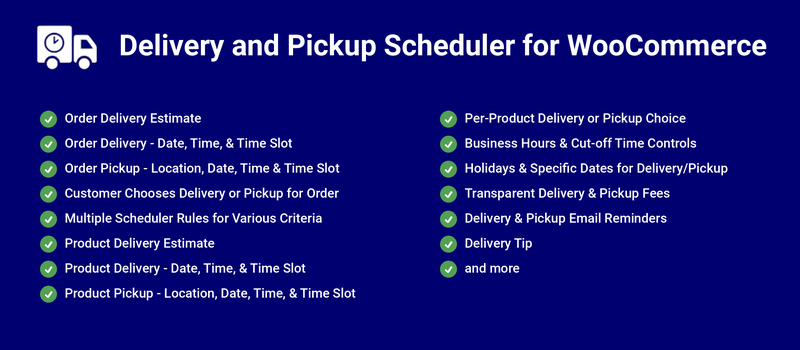
Delivery and Pickup Scheduler for WooCommerce can help you offer the following prominent features to your WooCommerce Shop,

  • Order Delivery Estimate
  • Order Delivery Date Picker
  • Order Delivery Date and Time Picker
  • Order Delivery Date and Time Slot Picker
  • Pickup Locations for Order and Product
  • Order Local Pickup Location and Date Picker
  • Order Local Pickup Location, Date and Time Picker
  • Order Local Pickup Location, Date and Time Slot Picker
  • Delivery or Local Pickup selection by the Customer for their Order
  • Email notification for the respective Pickup Locations to notify about the Order Pickup
  • Product Delivery Estimate
  • Product Delivery Date Picker
  • Product Delivery Date and Time Picker
  • Product Delivery Date and Time Slot Picker
  • Product Local Pickup Location and Date Picker
  • Product Local Pickup Location, Date and Time Slot Picker
  • Delivery or Local Pickup selection by the Customer for the Product
  • Fee calculation for the Same Day and Next Day Delivery and Local Pickup
  • Delivery or Pickup can be restricted for specific dates using Holiday option
  • Delivery or Pickup can be done in a Specific Dates even if it is a Holiday or Non-Deliverable/Pickup Day
  • Tax calculation for the Delivery/Pickup Fee
  • Tipping for Order

Benefits

Increase Site Revenue

Earn additional revenue for your site by charging fees for faster delivery/pickup.

Increase Customer Convenience

Based on the configuration, notify customers of their delivery/pickup dates or let them select the delivery/pickup date for their orders as well as for the products.

How Does it Work?

Order Delivery

The Order Delivery date can be displayed based on the Processing Time, Cut-Off time and Business Days & Time configuration.
Order Delivery Estimate

  • The user adds products to the cart and goes to the checkout page.
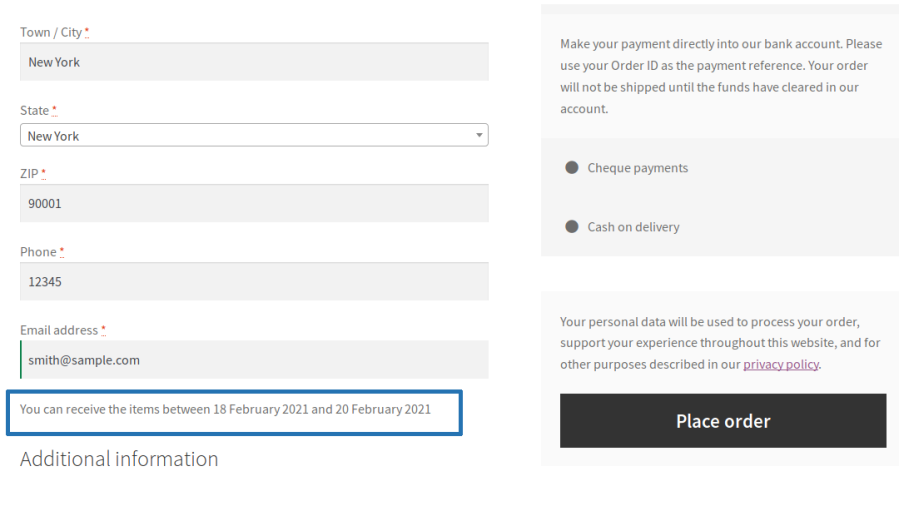
  • The estimated delivery date duration info for the order will be displayed on the checkout page.
Order delivery estimate on checkout page

Order Delivery Date Picker

  • The user adds products to the cart and goes to the checkout page.
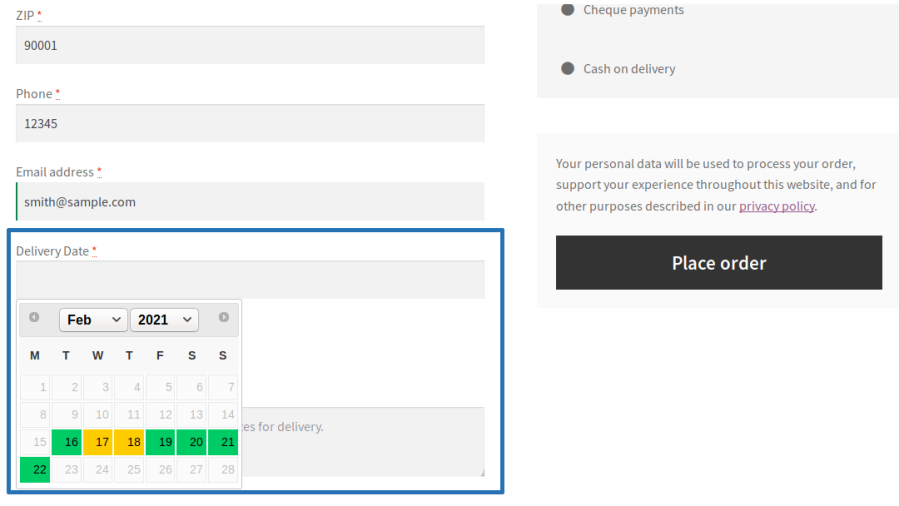
  • On the checkout page, the user can select their preferred date for the order delivery from the available dates.
Order delivery date picker on checkout page

Order Delivery Date and Time Picker

  • The user adds few products to the cart and proceeds to the checkout page.
  • On the checkout page, the user can select their preferred date and time for the order delivery from the available dates and time duration.
Order delivery and time picker on checkout page

Order Delivery Date and Time Slot Picker

  • The user adds products to the cart and proceeds to the checkout page.
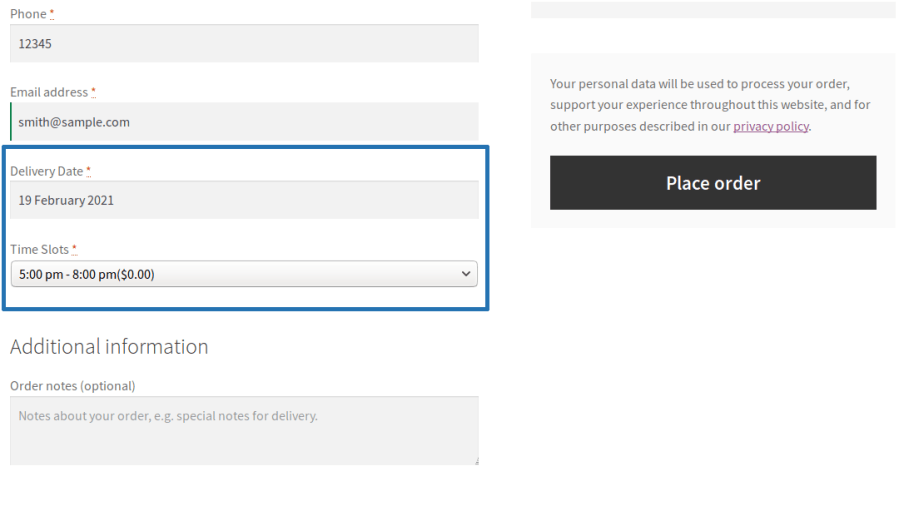
  • On the checkout page, the user can select their preferred date and time slot for the order delivery from the available dates and time slots.


Order delivery and time slots picker on checkout page

Order Pickup

The Order Pickup date can be displayed based on the Processing Time, Cut-Off time and Business Days & Time configuration.
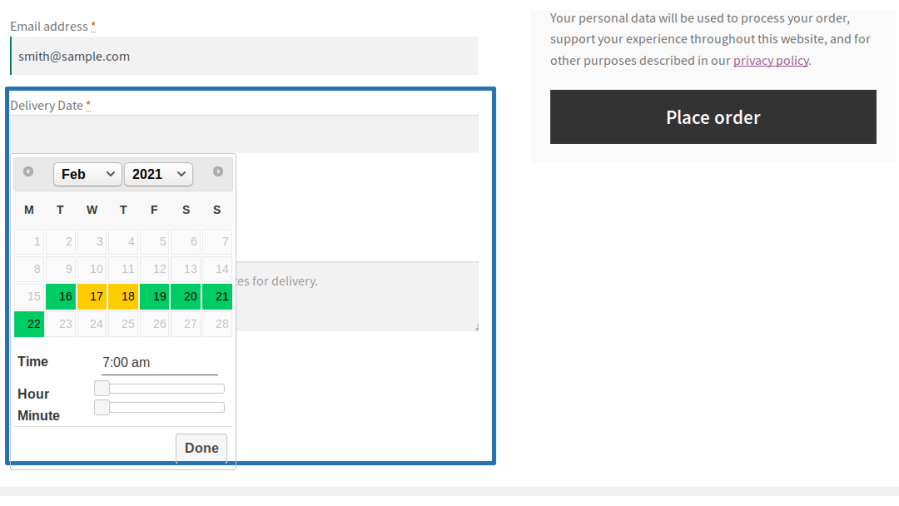
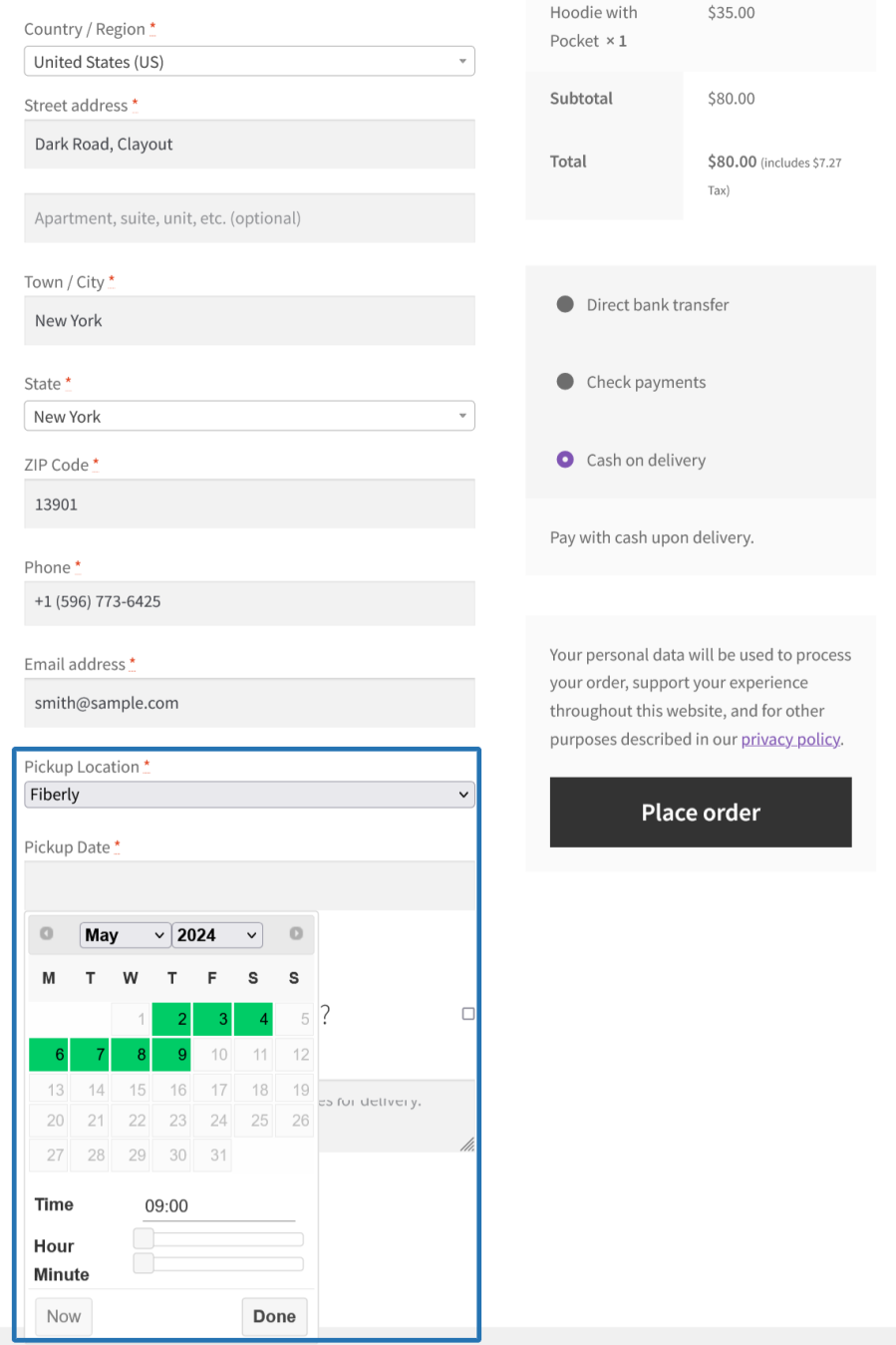
Order Pickup Location and Date Picker

  • The user adds products to the cart and proceeds to the checkout page.
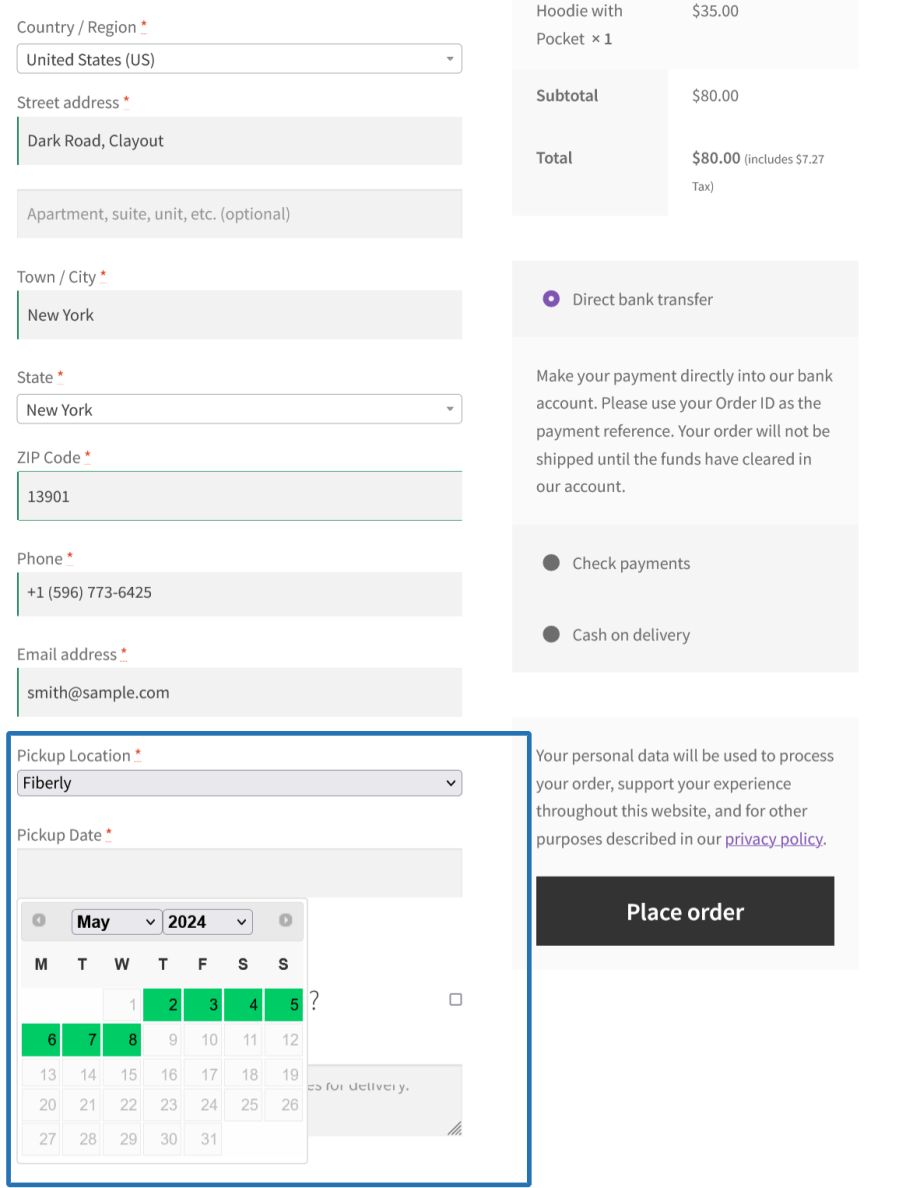
  • On the checkout page, the user can select their preferred pickup location, date for the order pickup from the available location and dates.
Order pickup location, date selector on checkout page

Order Pickup Location, Date and Time Picker

  • The user adds products to the cart and proceeds to the checkout page.
  • On the checkout page, the user can select their preferred pickup location, date and time for the order pickup from the available locations, dates and time duration.
Order pickup location, date & time selector on checkout page

Order Pickup Location, Date and Time Slots Picker

  • The user adds products to the cart and proceeds to the checkout page.
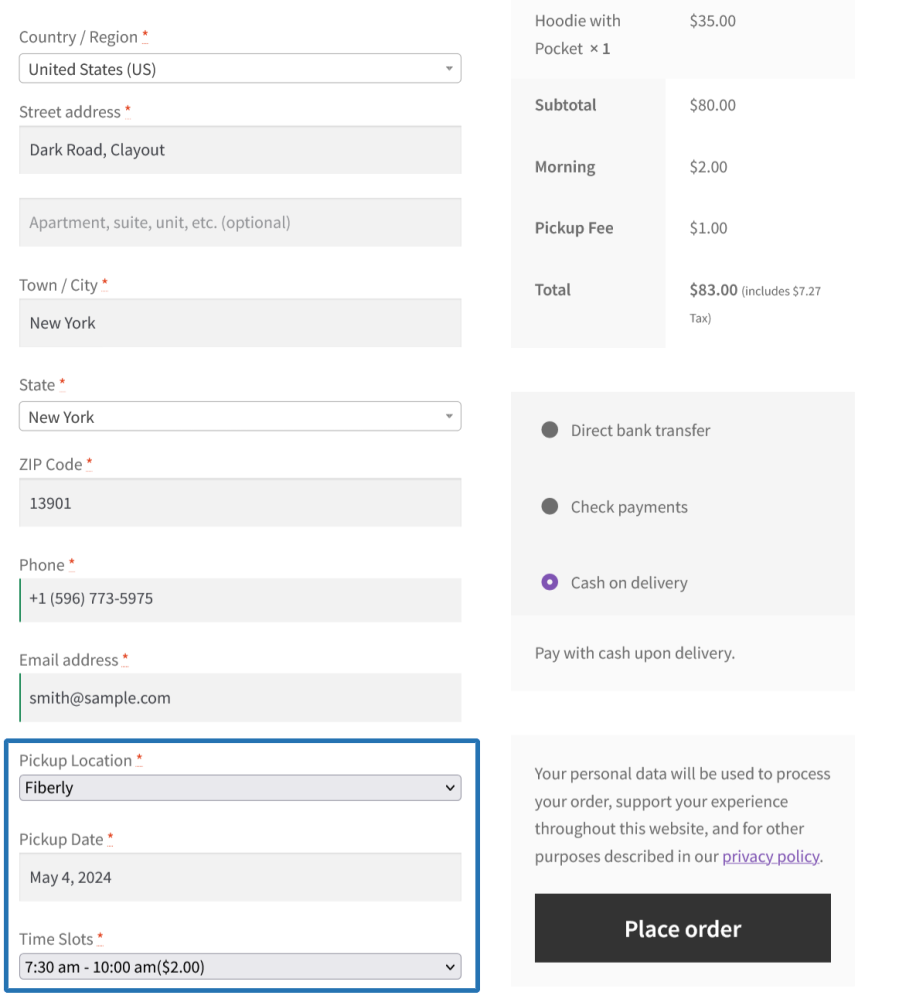
  • On the checkout page, the user can select their preferred pickup location, date and time slot for the order pickup from the available locations, dates and time slots.
Order pickup location, date & time slot selector on checkout page

Delivery or Pickup Mode Selection by Customer for their order

Customers can choose either Delivery or Pickup for the order based on their preference during the purchase. Based on the type selected, they need to proceed with the respective steps to select the Delivery Date, Time/Time Slots or Pickup Location, Date, Time/Time Slots before completing the purchase.
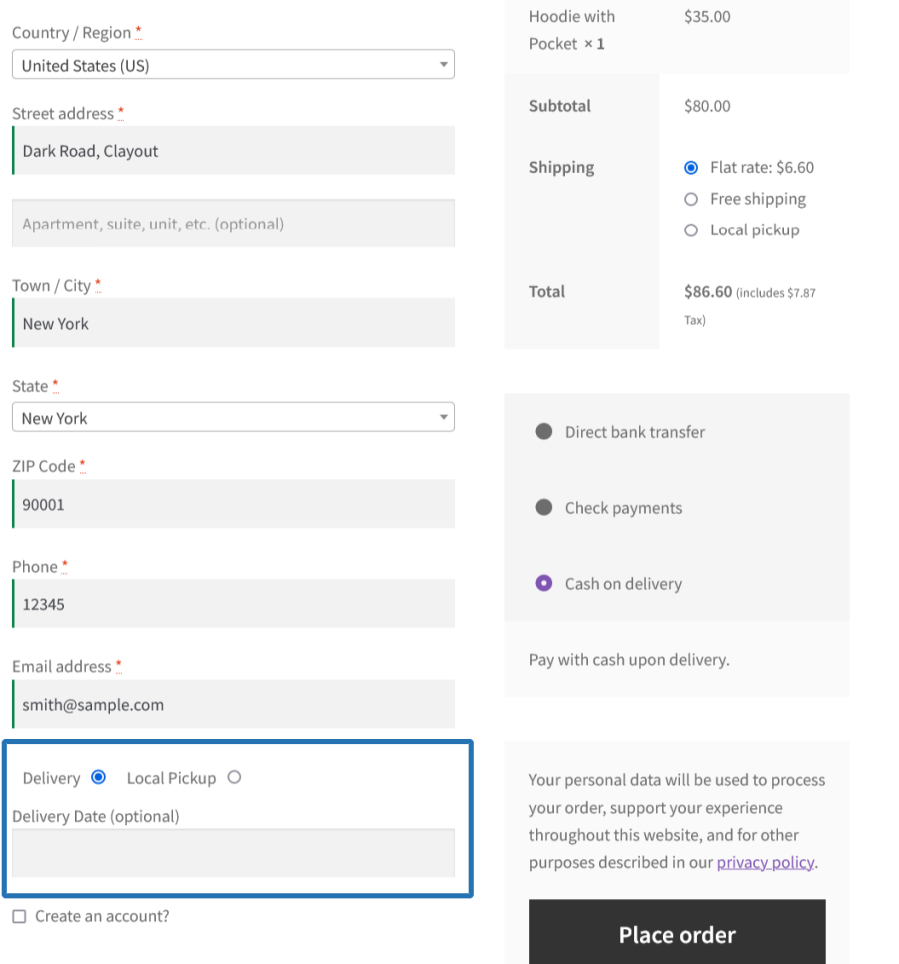
User chooses delivery/local pickup on the checkout page

Product Delivery

The Product Delivery date can be displayed based on the Processing Time, Cut-Off time and Business Days & Time configuration under the respective product configuration.
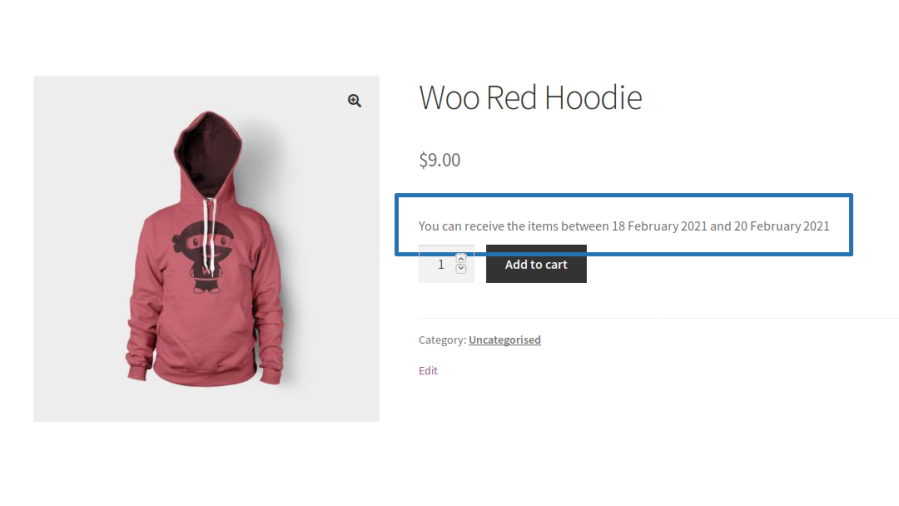
Product Delivery Estimate

  • On the single product page, the estimated delivery info of the product will be displayed to the user.
  • When a user adds a product to their cart the product’s estimated delivery date duration will be displayed below its title.
Delivery estimate displayed on product page

Product Delivery Date Picker

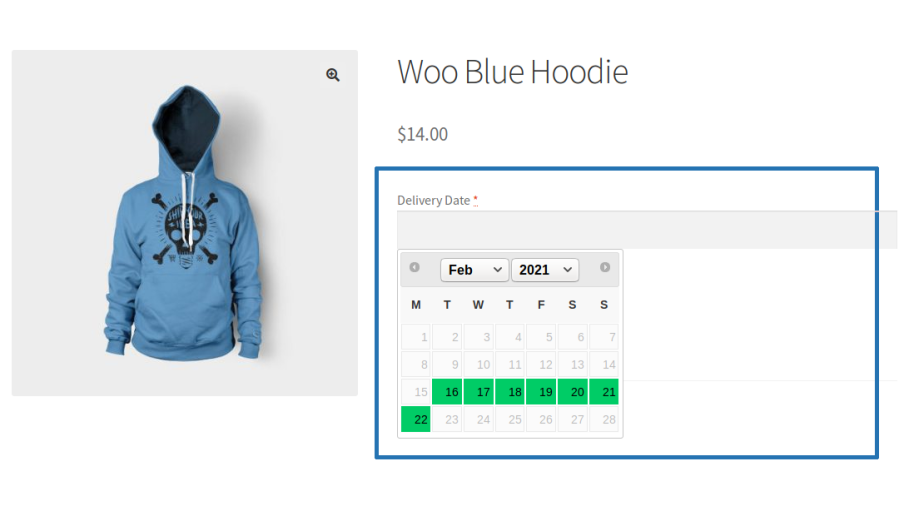
  • On a single product page, the delivery date calendar will be displayed for user’s selection.
  • The user can select their preferred delivery date for the product before adding it to the purchase.
Delivery date picker on product page

Product Delivery Date and Time Picker

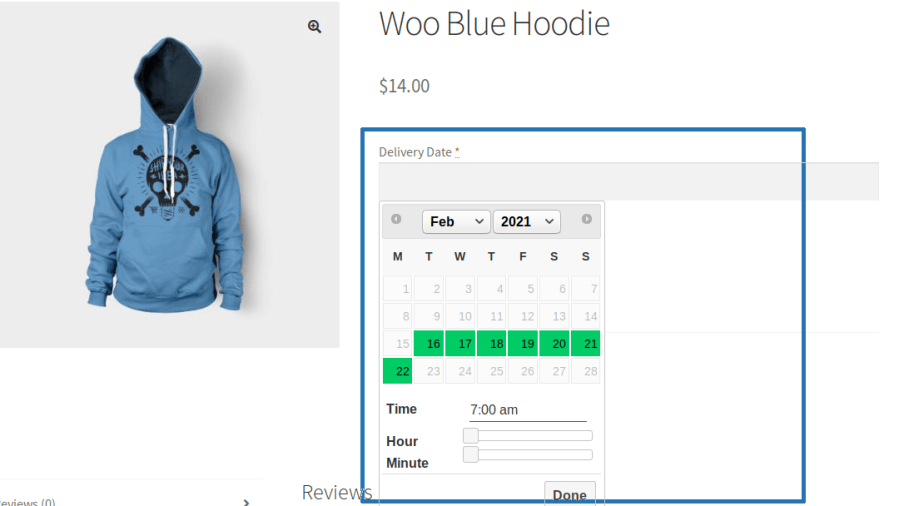
  • On the single product page, the delivery date calendar will be displayed for user’s selection.
  • The user can select their preferred delivery date along with the time for the product before adding it to the purchase.
Delivery date picker & time selector on product page

Product Delivery Date and Time Slot Picker

  • On the single product page, the delivery date calendar will be displayed for user selection.
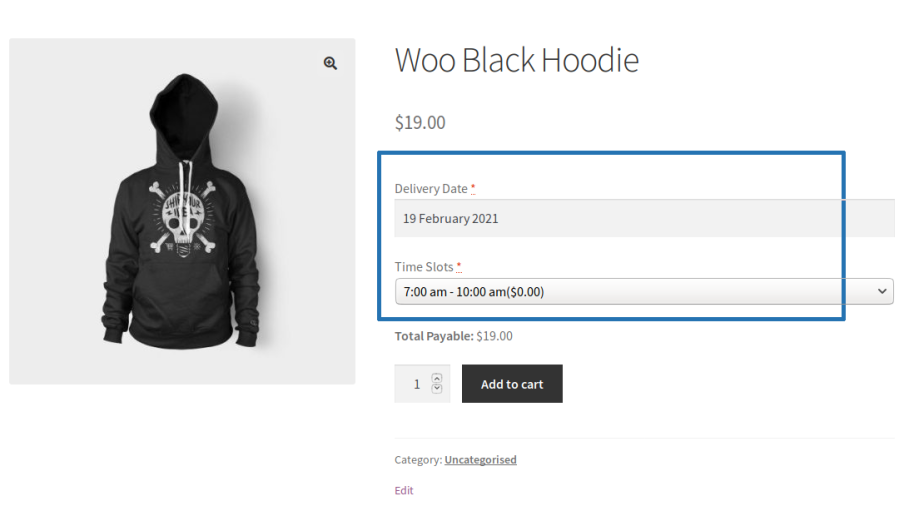
  • The user can select their preferred delivery date along with the time slot for the product before adding it to the purchase.
Delivery date picker & time slot selector on product page

Product Pickup

The Product Pickup date can be displayed based on the Processing Time, Cut-Off time and Business Days & Time configuration under the respective product configuration.
Product Pickup Location and Date Picker

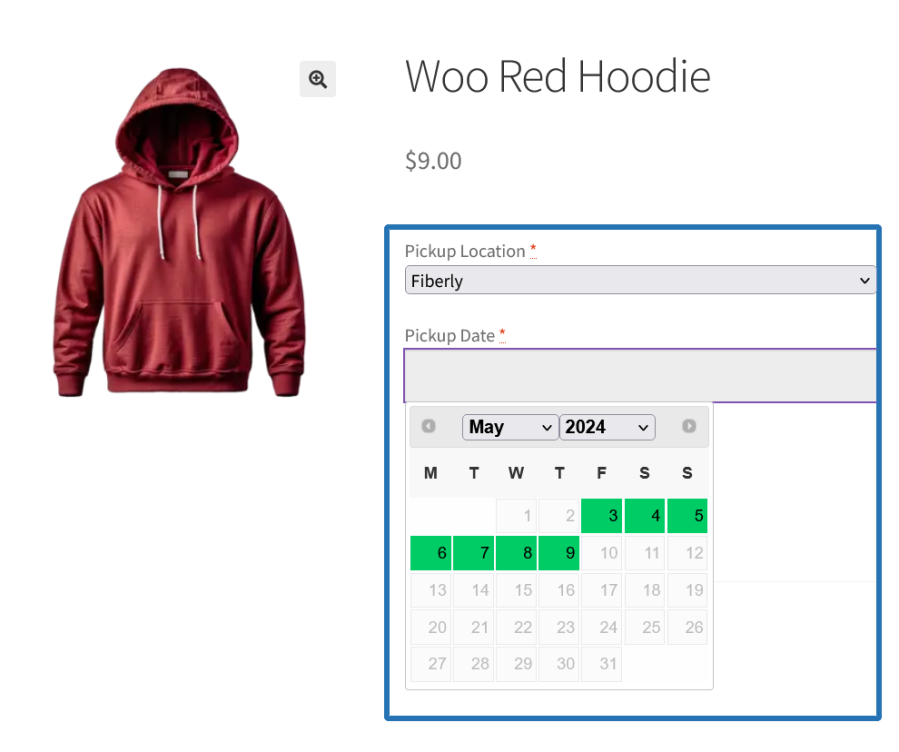
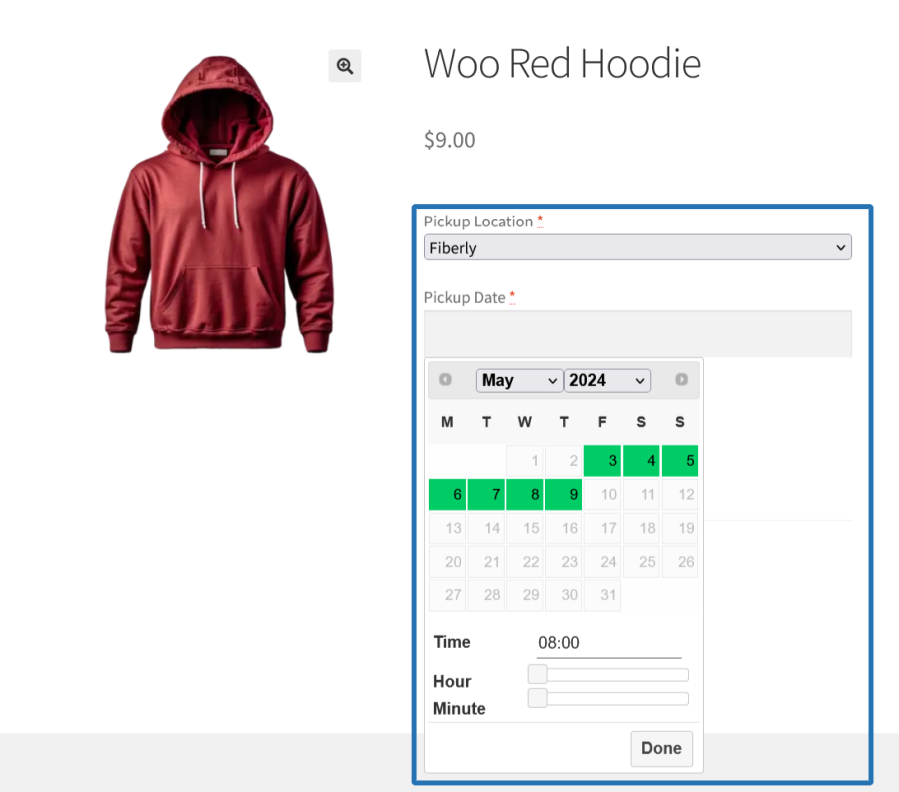
  • On the single product page, the pickup location and date picker will be displayed for user’s selection.
  • The user can select their preferred location along with the date for picking up the product before adding it to the purchase.
Product pickup location & date selector on product page

Product Pickup Location, Date and Time Picker

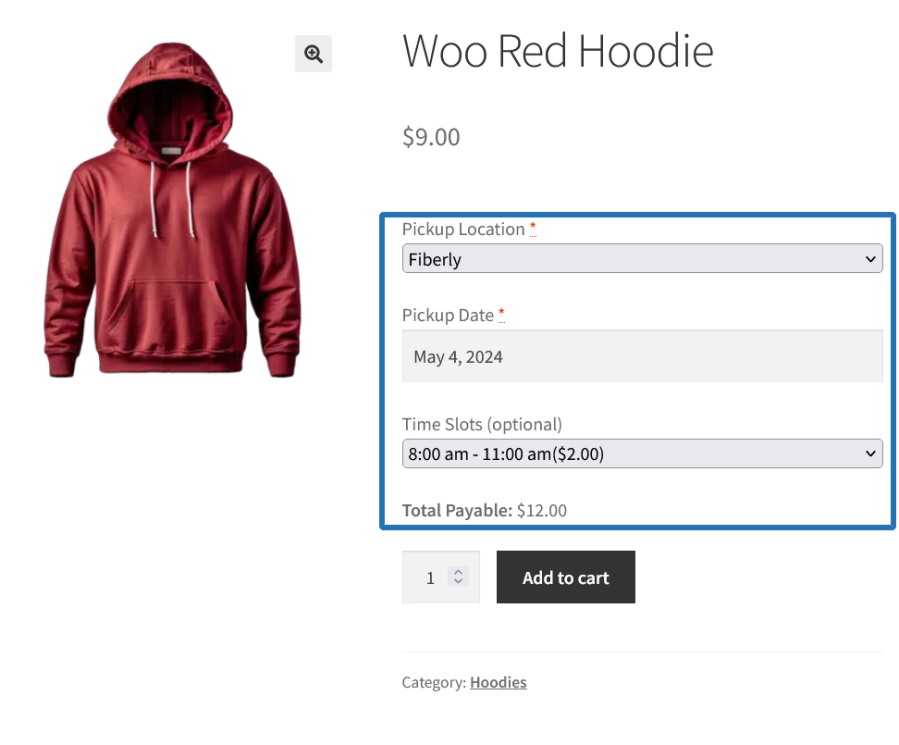
  • On the single product page, the pickup location and date picker will be displayed for user’s selection.
  • The user can select their preferred location along with the date and time for picking up the product before adding it to the purchase.
Product pickup location, date & time selector on product page

Product Pickup Location, Date and Time Slot Picker

  • On the single product page, the pickup location and date picker will be displayed for user’s selection.
  • The user can select their preferred location along with the date and time slot for picking up the product before adding it to the purchase.
Product pickup location, date & time slot selector on product page

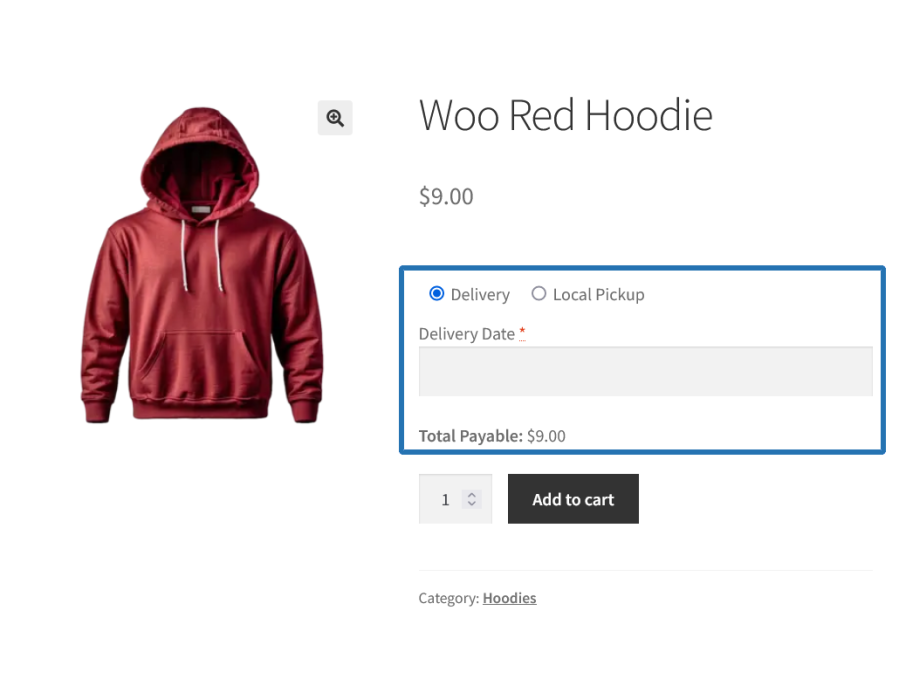
Delivery or Pickup Mode Selection by Customer for the product

  • Customers can choose either Delivery or Pickup for the product based on their preference during the purchase. Based on the type selected, they need to proceed with the respective steps to select the Delivery Date, Time/Time Slots or Pickup Location, Date, Time/Time Slots before adding it to the purchase.
User chooses delivery/local pickup on the product page

Other Useful Features Offered

Holiday for Delivery/Local Pickup

The Delivery or Local Pickup can be skipped for specific available dates using the Holiday configuration.

Specific Days Delivery/Local Pickup

The Delivery or Local Pickup can be done in a specific date even if it is a Holiday or Unavailable day using the Specific Date Delivery/Local Pickup configuration.

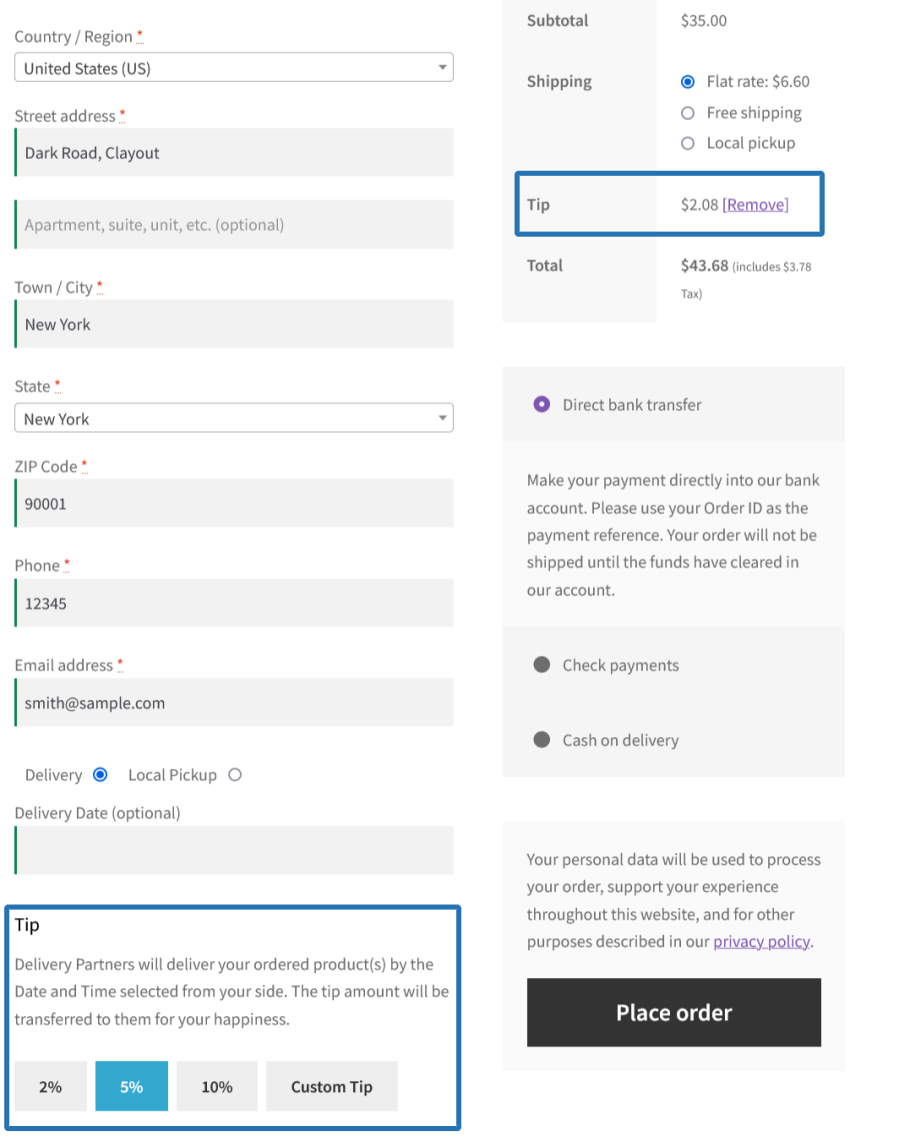
Order Tipping

Allow customers to add tip for their order for allowing them to choose their preferred Order Delivery/Pickup date and time during the Order placement.
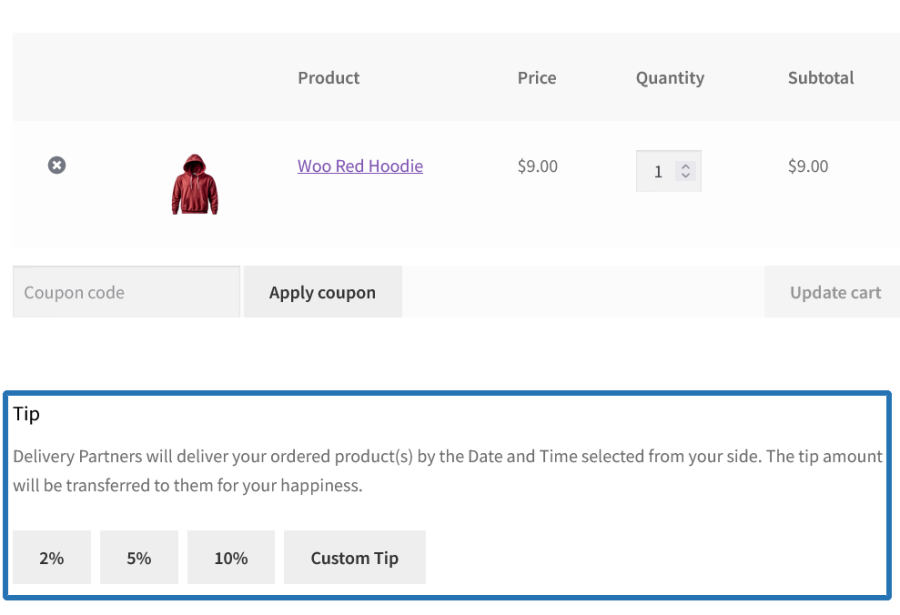
Tip Selection on Cart Page
Tip Selection on Checkout Page
Tip Added on Checkout Page

Restrictions

  • Maximum Deliveries/Pickups per day can be restricted
  • Delivery/Pickup can be restricted for specific weekdays
  • Maximum Deliveries/Pickups per Time Slot can be restricted
  • Time slots can be restricted for specific days
  • Business days can be restricted for specific weekdays
  • Number of days for Delivery/Pickup availability display in the calendar can be restricted
  • Pickup Locations for Order can be restricted for specific Products/Categories/Product Types

Calendar for Delivery/Pickup of the Order/Product for Site Admin

A calendar to display the following info,

  • Order Delivery
  • Order Local Pickup
  • Product Delivery
  • Product Pickup
  • Tip

Popular Features

1. Order Delivery — Expected Delivery Estimate

Customers see a clear estimated delivery window at checkout instead of a calendar. The message tells them the earliest and latest date they can expect to receive their order no date selection required, no friction added.

  • Estimated delivery window displayed at checkout (e.g. « You can receive the items between Monday and Wednesday »).
  • Shown on the order confirmation page and in the order email.
  • Customers know upfront when to expect their order without needing to make any selection.

2. Order Delivery — Date, Time, and Time Slot Selection at Checkout

Customers can conveniently choose their preferred delivery date, delivery date with time, or delivery date with time slot during checkout, ensuring their order arrives when it suits them best. Available dates and time slots are displayed based on store availability, while fully booked or unavailable options are automatically restricted.

  • Customers select their preferred delivery date from a calendar at checkout.
  • Fully booked delivery dates are clearly marked and cannot be selected.
  • Holiday dates are automatically blocked and can display an explanatory message.
  • « Partially Booked » status and remaining availability can be shown for dates nearing capacity.
  • Selected delivery date, time, or time slot is displayed on the order confirmation page, order details, and customer emails.
  • Works on both the classic and block-based WooCommerce checkout.

Date-only delivery

Customers select a delivery date with no time selection required.

Delivery with time selector

Customers choose any preferred delivery time within the available delivery window.

Delivery with time slots

Customers select from predefined delivery windows such as Morning, Afternoon, or Evening.

  • Fully booked time slots are clearly labeled and cannot be selected.
  • Partially booked slots can show remaining availability (for example, « Remaining Orders: 3 »).
  • An « As Soon As Possible » option can be offered as a delivery choice.
  • The first available delivery slot can be pre-selected as a recommended option.
  • Any applicable time slot fee is added as a separate line item in the cart and order totals.

3. Order Local Pickup — Location, Date, and Time Selection at Checkout

Customers choose where they want to collect their order from a list of store pickup locations, then select a pickup date and optionally a time or time slot. The chosen location’s address and details are confirmed in the order.

  • Customers select their preferred pickup location from a dropdown at checkout.
  • After selecting a location, customers choose a pickup date from a calendar.
  • Holiday dates at that location are automatically blocked
  • Pickup location, date, and time slot are confirmed on the order and in the email.
  • Works on both the classic and block-based WooCommerce checkout.

4. Order Schedule — Customer Chooses Between Delivery and Pickup

Customers are given the choice at checkout to either have their order delivered or collect it from a pickup location. Based on their selection, the relevant date, time, and location fields appear automatically.

  • Customers choose « Delivery » or « Local Pickup » directly at checkout.
  • Selecting Delivery shows the delivery date picker and time options.
  • Selecting Pickup shows the pickup location dropdown, date picker, and time options.
  • Fields update dynamically without a page reload based on the customer’s choice.
  • Chosen fulfillment method, date, and time are confirmed in the order summary and email.

5. Product Delivery — Expected Delivery Estimate on the Product Page

An estimated delivery window is displayed directly on the product page, giving customers a clear indication of when they can expect to receive that specific product before they even add it to their cart.

  • Estimated delivery message shown on the product page (e.g. « Expected Delivery Date: in 2 to 4 days »).
  • Per-product estimate: Different products can show different delivery windows.
  • Customers see delivery expectations before adding to cart, improving purchase confidence.
  • Estimate is shown in the order details and confirmation after purchase.

6. Product Delivery — Date, Time, and Time Slot Selection on the Product Page

Customers can conveniently choose their preferred delivery date, delivery date with time, or delivery date with time slot directly on the product page before adding an item to the cart. Available dates and time slots are displayed based on store availability, while fully booked or unavailable options are automatically restricted.

  • Customers select their preferred delivery date from a calendar on the product page.
  • Unavailable, fully booked, and holiday dates are blocked in the calendar and can display an explanatory message.
  • « Partially Booked » status and remaining availability can be shown for dates nearing capacity.
  • Selected delivery date is shown in the cart and checkout, confirming the customer’s choice before order placement.
  • Selected delivery date, time, or time slot is displayed in the order details, and customer emails.
  • Works on both classic and Blocks-based WooCommerce product pages.

Date-only product delivery

Customers select a delivery date for a specific product with no time selection required.

Product delivery with time selector

Customers choose a delivery date and any preferred delivery time within the available delivery window for the selected product.

  • Time selection appears after a delivery date is chosen.
  • Selected delivery date and time are displayed throughout the purchase journey.

Product delivery with time slots

Customers select a delivery date and choose from predefined time slots window such as Morning, Afternoon, or Evening for each product.

  • Fully booked time slots are clearly labelled and cannot be selected.
  • Partially booked slots can show remaining availability (for example, « Remaining Orders: 3 »).
  • An « As Soon As Possible » option can be offered as a delivery choice.
  • The first available delivery slot can be pre-selected as a recommended option
  • Any applicable time slot fee is added with the product cost.
  • Selected delivery date and time slot are displayed in the cart, checkout, order details, and customer emails.

7. Product Local Pickup — Location, Date, and Time Selection on the Product Page

Customers choose a pickup location and select a pickup date and optionally a time per product, directly on the product page. Each product in the cart can have its own independent pickup location and schedule.

  • Customers select a pickup location per product on the product page.
  • After selecting a location, customers choose a pickup date from a calendar.
  • Date-only pickup: Date selection only, no time field shown.
  • Pickup with time selector: Customers pick a preferred time within the available range.
  • Pickup with time slots: Customers choose from named, bookable slot options.
  • Booked dates and slots at the chosen location are clearly marked and blocked.
  • Pickup location, date, and time are shown in the cart and confirmed in the order and email.

8. Product Schedule — Customer Chooses Between Delivery and Pickup per Product

On products that support both fulfillment methods, customers choose whether they want the item delivered or would prefer to collect it — directly on the product page. The relevant date, time, and location fields appear based on their selection.

  • Customers choose « Delivery » or « Pickup » per product on the product page.
  • Selecting Delivery shows the delivery date picker and time options for that product.
  • Selecting Pickup shows the pickup location selector, date picker, and time options for that product.
  • Each product in the cart can have its own independent fulfillment choice.
  • The chosen method, date, and time per product are shown in the cart, order summary, and email.

9. Holiday and Specific Date in the Delivery/Pickup

Customers can only select available delivery dates, with holidays and non-service days automatically excluded from the delivery scheduling calendar. If a holiday falls within the delivery time frame, estimated delivery dates are automatically adjusted, ensuring accurate delivery expectations and preventing orders from being scheduled on unavailable dates.

The Specific Date feature gives store owners the flexibility to open delivery or local pickup availability on any date even on days that are otherwise marked as holidays or unavailable in the scheduler.

This means your store is never rigidly locked to its default schedule. When a particular date needs to be made available regardless of how it’s classified in your calendar it can be unlocked as a bookable slot, and customers will see it as a valid option at checkout just like any regular delivery or pickup day.

10. Transparent Delivery and Pickup Fees

Customers see accurate, itemized delivery and pickup fees in the cart and at checkout. Fees update dynamically based on the date or time slot they select, so there are no surprises at the payment step.

  • Delivery fee displayed as a line item in the cart and checkout totals.
  • Same Day Delivery fee applied and shown when the customer selects today’s date.
  • Next Day Delivery fee applied and shown when the next-day date is selected.
  • Weekday-specific fee applied based on which day of the week the customer selects.
  • Specific Date fee applied when the customer selects a date with a special price override.
  • Time Slot fee shown when the customer selects a paid time slot.
  • Zero-value fees can be hidden so customers only see fees that actually apply.
  • All fees are shown transparently before payment, giving customers full cost visibility.

11. Day-of-Delivery and Pickup Email Reminders

Customers receive a reminder email on the day their order is due for delivery or pickup. The email confirms the key details — what’s coming, when, and (where applicable) which time slot was booked.

  • Reminder email sent to the customer on their delivery date for order-level deliveries.
  • Reminder email sent on the pickup date for order-level pickups.
  • Reminder email sent on the delivery date for product-level deliveries.
  • Reminder email sent on the pickup date for product-level pickups.
  • Emails include the booked time slot when one was selected.
  • Location-specific pickup reminder emails also sent to the pickup location’s contact address on the day of collection.

12. Delivery and Pickup Details Visible Across the Customer Journey

Once a delivery or pickup date and time are selected, customers can see their choices at every stage from the product page through the cart, checkout, order confirmation, and My Account.

  • Selected delivery or pickup date shown in the cart before checkout.
  • Date and time slot confirmed at checkout in the order review section.
  • Delivery or pickup date shown on the order confirmation page after purchase
  • Date and time slot included in the order email.
  • Delivery/Pickup Date and Time column visible in the My Account orders table.

13. Tip for Delivery Partners

Customers can choose to leave a tip for the delivery team directly on the cart or checkout page. The tip is added as a transparent line item in the order total and can be removed before placing the order.

  • Customers select a tip from preset options (e.g. 10%, 20%, 30%) displayed as clickable buttons.
  • Custom tip option lets customers enter any amount they prefer.
  • Tip amount shown as a separate, labelled line item in the cart and checkout totals.
  • Customers can remove the tip before completing the order via a visible remove link.
  • Tip description message can be shown to explain where the tip goes (e.g. « This tip will be transferred directly to the delivery team »).
  • Available on both the cart page and the checkout page.
  • Works on both the classic and block-based WooCommerce cart and checkout.

Extensive Features List

Multiple Delivery and Pickup Options

  • Allow customers to schedule delivery or local pickup dates.
  • Supports both order-level and product-level scheduling.
  • Let customers select:
    • Schedule Delivery with Date only
    • Schedule Pickup with Date only
    • Schedule Delivery with Date and Time
    • Schedule Pickup with Date and Time
    • Schedule Delivery with Date and Time Slots
    • Schedule Pickup with Date and Time Slots
    • Display Estimated Delivery Date for the product as well as Order Delivery.
  • Provide an As Soon As Possible option for faster fulfillment.

Flexible Scheduling Modes

  • Configure scheduling at:
    • Order Level (entire order)
    • Product Level (individual products)
  • Allow customers to choose delivery and pickup preferences during product schedule or order schedule.

Time Slot Management

  • Create and manage custom delivery time slots.
  • Create and manage custom pickup time slots.
  • Configure slot-based scheduling.
  • Limit the number of bookings per time slot.
  • Automatically mark fully booked slots as unavailable.

Multiple Pickup Locations

  • Create and manage multiple pickup locations.
  • Allow customers to select their preferred pickup location.
  • Configure location-specific:
    • Processing hours
    • Scheduler configurations [Applicable weekdays, order limit, fee configuration & more]
    • Pickup restrictions
    • Resources [Time Slots, Holidays, Specific Dates]
  • Display pickup location information during checkout.

Business Days & Operating Hours

  • Define the amount of time required to prepare an order before it can be delivered or picked up using Processing Time management.
  • Processing time for preparing deliveries/pickups.
  • Enable or disable any day of the week based on your operational schedule.
  • Set opening and closing times for each business day to match warehouse or production hours.
  • Prevents customers from selecting unavailable dates.
  • Configure business days of the week for deliveries and pickups.
    • Delivery services
    • Pickup services
    • Product level delivery/pickup

Delivery & Pickup Fees

  • Apply fees for delivery/pickup schedule.
  • Configure same-day delivery/pickup surcharges.
  • Configure next-day delivery/pickup surcharges.
  • Configure specific date delivery/pickup surcharges.
  • Automatically hide fees when their value is zero.

Advanced Scheduler Rules

  • Create custom scheduling rules based on:
    • Products
    • Product categories
    • Customer conditions
    • Cart conditions
    • Shipping methods
    • Pickup locations
  • Configure rule-based delivery and pickup availability.
  • Apply different delivery/pickup logic using flexible rule criteria.

Holiday & Special Day Management

  • Block delivery or pickup services on selected dates or date ranges.
  • The blocked dates become non-selectable for the delivery/pickup.
  • Configure a start date and end date to block an entire period (e.g., Festive season, company vacation).
  • Set holidays to repeat automatically on a regular schedule (e.g., every year on December 25th).
  • Estimated delivery dates automatically exclude holidays and shift to the next available date.
  • Specific Dates allow merchants to enable delivery or pickup on particular dates regardless of standard weekday restrictions.
  • The specific dates can also include special pricing and order limits.
  • Apply a custom fee for deliveries or pickups scheduled on special dates such as:
    • Mother’s Day
    • Valentine’s Day
    • Festival periods
    • Peak-demand days

Product-Level Scheduling

  • Configure unique delivery schedules for individual products.
  • Configure unique pickup schedules for individual products.
  • Assign product-specific:
    • Time slots
    • Availability for scheduling delivery/pickup
    • Pickup locations
    • Holiday restrictions
    • Specific Date restrictions
  • Display product-level delivery estimates.

Order Tip Functionality

  • Allow customers to add tips during checkout.
  • Enable tip collection on:
    • Checkout Page
    • Cart Page
  • Support predefined and configurable tip amounts.
  • Customize the display and positioning of tip fields.
  • Fully compatible with both shortcode-based and block-based checkout experiences.

Checkout Experience & Display Controls

  • Display delivery and pickup scheduling fields directly during checkout.
  • Customize field labels and placeholder text.
  • Configure field positions.
  • Provide a streamlined customer delivery/pickup selection experience.
  • Support both traditional WooCommerce checkout and modern block-based checkout.

Calendar & Schedule Management

  • View all scheduled deliveries and pickups from a centralized calendar.
  • Manage scheduled deliveries and pickups through dedicated admin screens.
  • Track delivery and pickup schedules efficiently.

Order Management Integration

  • Display delivery/pickup information within order details.

Notifications & Communication

  • Send automated notifications for scheduled deliveries/pickups.
  • Notify customers about the upcoming deliveries/pickups.
  • Send reminder notifications for deliveries or pickups due on the current date.
  • Support customizable customer and admin notifications.

Reporting & Administration

  • Manage:
    • Deliveries
    • Pickups
    • Pickup Locations
    • Time Slots
    • Holidays
    • Specific Dates
    • Scheduler Rules
    • Tips
  • Use centralized admin management screens with dedicated list views.
  • Offer transparent delivery and pickup availability before order placement.

Requirements

Minimum PHP version: 5.6


Avis Clients

Moyenne des notes 4.8
12 avis
5 étoiles, 83 % des avis
4 étoiles, 17 % des avis
3 étoiles, 0 % des avis
2 étoiles, 0 % des avis
1 étoile, 0 % des avis
12 avis
  • So Cloudy
    Noté 4 sur 5
    Assistance
    Fév 13, 2026
    Assistance
  • cgsinvestmentsllc
    Noté 5 sur 5
    Assistance
    Nov 19, 2025
    Assistance
    The support team is great, I found an issue in the current version - a very minor display issue - and reported it through their support link. Within 24 hours, they had a beta version of a fix for me to try and it resolved the issue. Other than support, the plugin itself looks to be very feature-rich and can handle large number of scenarios of delivery & pickup needs. It didn't take too long to figure out how to use it and their documentation is very comprehensive.
  • info48d8a47a972
    Noté 5 sur 5
    Assistance
    Oct 30, 2025
    Assistance
    Great support. Even added a completely new function after I requested it within a week. Plug-in does what it says.
  • Joel Arena
    Noté 5 sur 5
    Assistance
    Mai 20, 2025
    Assistance
    Très bonne extension. Support rapide et compétent.
  • inspiringa6102a89ec
    Noté 5 sur 5
    Assistance
    Mai 4, 2025
    Assistance
    The Flintop team handled my support requests with care and attention to detail. They took my feedback and made changes to their extension to make it work for my webshop and I couldn't be happier with their timely support.

Informations sur l'extension

  • Version PHP requise: 7.4.0
  • Testé avec WordPress: 7.0
  • Testé avec WooCommerce: 10.8.1
  • Nécessite au minimum WordPress: 6.2
  • Nécessite au minimum WooCommerce: 8.2.0

Compatibilité

  • High performance order storage (HPOS)

Pays

  • Mondial

Langues

English (United States)

Related Products

Prix $109 par an
Noté 4.6 sur 5 étoiles
Prix $279 par an
Noté 3.2 sur 5 étoiles
Prix $79 par an
Noté 3.4 sur 5 étoiles
Prix $59 par an
Noté 3.1 sur 5 étoiles
Prix $109 par an
Noté 2.7 sur 5 étoiles
Prix $49 par an
Noté 4.1 sur 5 étoiles
Prix $109 par an
Noté 2 sur 5 étoiles
Prix $109 par an
Noté 2.3 sur 5 étoiles
Prix $109 par an
Noté 2.6 sur 5 étoiles
Utilisation de vos données personnelles
Nous et nos partenaires traitons vos données personnelles (telles que les données de navigation, adresses IP, informations sur les cookies et autres identifiants uniques) sur la base de votre consentement et/ou de notre intérêt légitime afin d’optimiser notre site web, nos activités marketing et votre expérience utilisateur.