
Icône du produit

Post-Purchase Offers pour WooCommerce

Post Purchase Offers for WooCommerce helps you to earn additional revenue to your site by presenting offers once the purchase is completed.
Choisissez une option de facturation
$49
Économisez 20 %
$98 $78.40

L’abonnement comprend

  • Mises à jour et améliorations du produit
  • Assistance client
  • Remboursement garanti sous 30 jours

Offer Buyers Post-Purchase Offers

The Post-Purchase Offers for WooCommerce plugin presents offers to your customers after their purchases are complete.

Benefits

Additional revenue to the site

When a customer accepts a Post-Purchase offer, they spend more and increase your revenue.

Improves customer experience

Display targeted offers to your customers based on their last purchase and improve their overall user experience.

Attract new customers

Customers who benefit from Post-Purchase offers may refer new users to your site.

How does it work?

  • The user adds a product to their cart, proceeds to the checkout page, and completes their purchase.
User’s Cart Page
  • After they place an order, the plugin will redirect the user to the offer page.
  • Offers will be sorted based on the configured display priority and the number of Offers will be decided based on the configured display count when Multiple Order Bumps is allowed to be chosen.
  • The offer page presents the user with single or multiple offers (based on configuration) and displays offers to users related to their last purchases.
Offer Displayed to the User
  • If the user accepts the offer, they can click the Accept-Offer button.
  • If the user wishes to decline the current offer, they can click the Skip button.
  • If the user wishes to decline all the offers at once, they can click the Skip-All-Offers button.
  • If the user accepts one or more offers and they decide to decline the remaining offers, they can click the Skip-Remaining-Offers button.
Skip Other Offers Button on Offers Page
  • Once the user views the offer(s) and they accept one or more, the plugin can redirect them to the checkout page to complete their purchase. The user can fill in their address and make the payment.
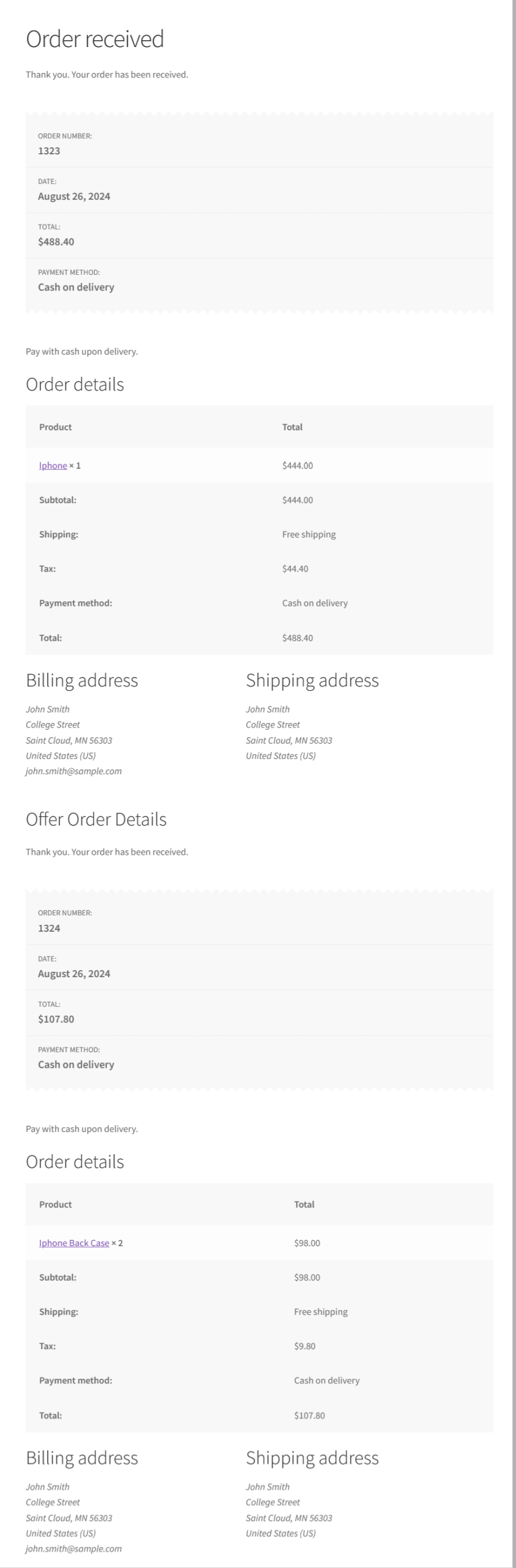
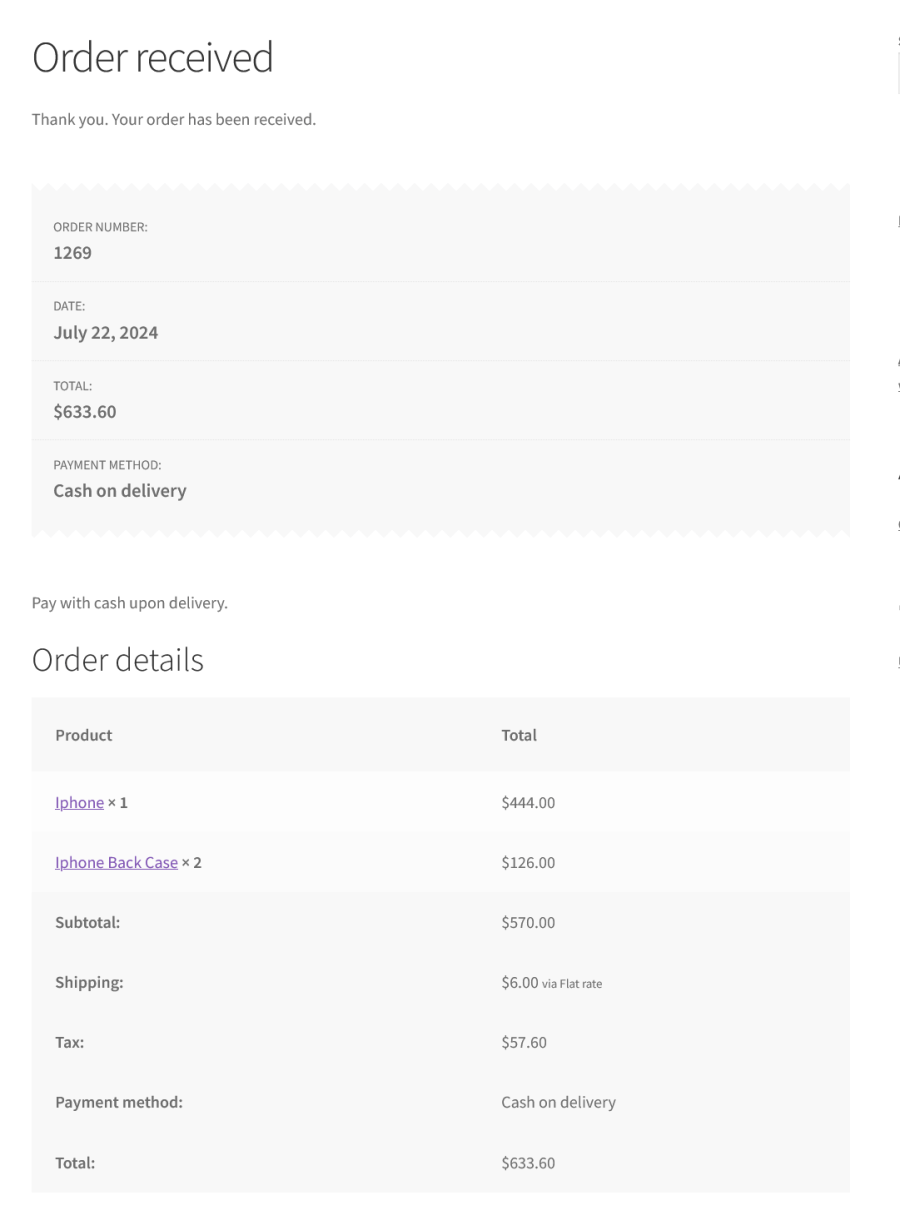
  • The order with post-purchase offered product(s) is processed in two ways,

Separate Orders

Offer Product Processed as Separate Order

Same Order

Offer Product Processed in the Same Order


Features

Multiple discount types

Offer deals with percentage discounts, fixed discounts, fixed prices, Percentage Discount based on Product’s Regular Price, Fixed Discount based on Product’s Regular Price and Product without discount.

Multiple offers to user

You can present multiple offers to your users, and they can:

  • Accept all the Offers
  • Reject all the Offers
  • Accept fewer Offers

Criteria

Offer Product can be awarded based on the below criteria conditions,

Order based Criteria – Product, Category, Sub-Total, Order Total, Product Type.

User based Criteria – Purchase History, User Role, Product/Category based Purchase condition.

Specific Period based – Specific Weekdays/Specific Date range.

Skip Functionality

Skip the Offer Product if it is already available in the customer’s cart.

Number of Orders based Restriction

The offer can be restricted after it is applied on specific number of orders.

Number of Orders per User based Restriction

The offer can be restricted after it is applied on specific number of orders placed by the user. This is applicable only for the Logged-in users.

Offer Product Acceptance

The offered product acceptance can be done in the following ways,

Offer page

The customer will be allowed to accept the Offer Product on the Offer page.

Custom Page

The customer will be redirected to the Custom page and they can add it in there when they are trying to accept the offer. In this case, the customer will get clear idea about the Offered Product.

Customizable

The Offered Products display can be customized using various display options and color customization.

Quantity for Offer Product

Option for the site admin to set the quantity for the offer product.

Restrict WooCommerce Coupon

Option for the site admin to prevent users from using WooCommerce coupons on the offer product(s)

Restrict Shipping Cost Calculation for the additional Order

Option for the site admin to prevent the users from paying the shipping cost the additional order which is applicable for the Offer Products.

Supported Payment Gateways for Processing the Offer Product in the Same Order

Processing the Offer Product in the Same Order will be applicable the following payment gateways only,
  • Stripe Payment Gateway
  • Standard Offline Payment Gateways

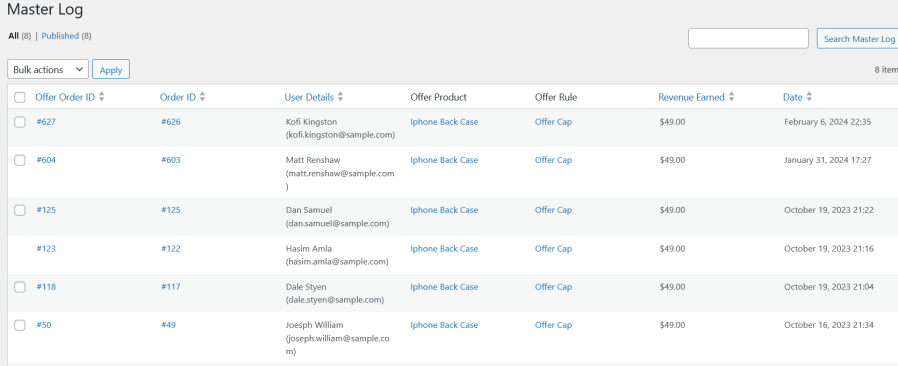
Master Log

Master Log

Master Log section to list the activity of the Post Purchase Offers.

Reports

Reports

Separate reports section to present the following information for each Offer:

  • Visit count
  • Accepted count
  • Skipped count
  • Order count
  • Revenue earned
  • Conversion rate

Popular Features

1. Post-Purchase Offer Creation & Discount Configuration

Create targeted, one-click offers that appear immediately after a customer completes checkout, letting shoppers add an extra product to their purchase at a special price before they leave the order confirmation flow.

Key Capabilities:

  • Offer Product selection: Choose any product or product variation to feature as the post-purchase offer.
  • Configurable offer quantity: Set how many units of the offer product are added when accepted.
  • Three discount types: Percentage Discount, Fixed Discount, and Fixed Price.
  • Custom discount value per offer, independent of the product’s regular WooCommerce pricing.
  • Offers can be configured without a discount value when simply cross-selling at regular price.

2. Flexible Order Processing (Separate or Same Order)

Decide how accepted offer products are fulfilled. Either bundled into the customer’s original order or processed as a brand-new order with fine-grained control over shipping and coupon behaviour.

Key Capabilities:

  • Separate Order mode: Automatically generates a new order for the accepted offer product(s).
  • Same Order mode: Adds the offer product directly into the customer’s original order.
  • Restrict shipping cost calculation for offer products processed in a separate order.
  • Restrict WooCommerce coupon discounts from applying to offer products already added to an order.
  • Offer products are excluded from being offered again if they were part of the last purchased order (configurable).

3. Advanced Rule-Based Targeting

Show the right offer to the right customer using a flexible rule builder that supports Order, User, and Offer Period conditions, can be combined with AND/OR logic across multiple rule groups.

Key Capabilities:

  • Three rule types: Order (based on cart contents, product count, or order total), User (registration period, role, guest vs. registered), and Offer Period (scheduled date range or specific weekdays).
  • Include or exclude: Specific products, categories, tags, or brands from triggering an offer.
  • Payment gateway filter: Restrict an offer to orders paid through selected payment methods.
  • Multiple rule groups can be combined with AND (within a group) and OR (between groups) logic, plus one-click rule duplication.
  • User role and account-age targeting, including guest-only or registered-only eligibility.

4. Multiple Offers & Priority Control

Run several post-purchase offers at once and control exactly how they’re prioritized and presented when a customer qualifies for more than one at the same time.

Key Capabilities:

  • Multiple Offers Priority setting: by Offer Created Date, Highest Priced Offer, or Lowest Priced Offer.
  • Offer Display Count: Configure how many eligible offers are shown to the customer.
  • Skip Offer Product option to avoid re-offering a product the customer just purchased.
  • Each offer can be independently set to Active or Inactive from its status meta box.

5. Offer Restriction & Usage Limits

Keep offers scarce and controlled with built-in caps on how many times an offer can be redeemed, store-wide or per customer.

Key Capabilities:

  • Order count restriction: Cap the total number of orders an offer can be applied to.
  • User count restriction: Limit how many times a single customer can redeem the same offer.

6. Offer Presentation & Display Page Configuration

Control exactly where and how the post-purchase offer page appears, with support for both the plugin’s global offer page and fully custom, shortcode-built pages.

Key Capabilities:

  • Global Page or Custom Page Mode: use the store-wide offer page or assign a dedicated page per offer.
  • Shortcode-based offer page builder for full layout control on a custom page.
  • Custom CSS field (global and per-offer) to match the offer page and elements to your theme.

7. Reporting & Master Log Tracking

Track exactly how offers are performing with a dedicated activity log and reporting screen inside the WordPress admin.

Key Capabilities:

  • Master Log list table recording every offer shown, accepted, or skipped, tied to its related order.
  • Export option for Master Log entries, for offline analysis or record-keeping.
  • Dedicated Reports page summarizing offer activity across the store.
  • Date-range filters to narrow log and report results to a specific period.

Extensive Features List

Post-Purchase Offer Presentation

  • Automatically present post-purchase offers to customers immediately after they complete an order.
  • Show offers on a separate page immediately after customers complete their purchase.
  • Display relevant offers linked to the customer’s recent purchase.
  • Present multiple eligible offers sequentially, allowing customers to review and act on each one.
  • Optionally skip an offer if the offer product was already included in the customer’s last purchased order.

Flexible Offer Order Processing

  • Choose between two offer fulfillment modes for each store:
    • Separate Order: accepted offer products are automatically processed in a newly created order, independent of the original purchase.
    • Same Order:accepted offer products are added directly to and processed within the original order.
  • Optionally exclude offer products from shipping charges when processed via Separate Order, providing free shipping on accepted offers
  • Optionally restrict WooCommerce coupon discounts from applying to offer products, ensuring offer prices remain unchanged.

Offer Product Configuration

  • Select the product that you want to provide as an offer product.
  • Set a specific quantity for the offer product so customers receive a defined number of units when they accept.
  • Configure a discount on the offer product using multiple discount types:
    • Percentage Discount off the sale price
    • Fixed Discount off the sale price
    • Fixed Price: Set an exact selling price for the offer
    • Regular Price Percentage Discount : Percentage off the regular price
    • Regular Price Fixed Price: Set a price relative to the regular price
    • None: Present the product at its standard price with no discount

Offer Display Page Configuration

  • Configure a global offer page that all offers default to, selected from any published WordPress page.
  • Override the global page at the individual offer rule level with a custom page per rule, enabling distinct landing experiences for different offers.
  • Build fully custom offer page layouts using shortcodes to place offer components anywhere on a page.

Offer Usage Restrictions

  • Restrict any offer to a maximum number of total orders across all customers, capping the offer’s overall reach.
  • Restrict any offer to a maximum number of acceptances per user, limiting how many times a single customer can claim the same offer.

Rule-Based Criteria & Targeting (Order Conditions)

  • Trigger offers based on what the customer’s order contains, using rich order-based rule conditions:
    • Contains Products: Order includes any specified product(s)
    • Does not contain Products: Order excludes specified product(s)
    • Contains Products from Category: Order includes products from selected categories
    • Does not contain Products from Category: Order excludes products from selected categories
    • Contains Products from Tag: Order includes products with selected tags
    • Does not contain Products from Tag: Order excludes products from selected tags
    • Cart Subtotal is less than or equal to a specified amount
    • Cart Subtotal is more than or equal to a specified amount
    • Order Total is less than or equal to a specified amount
    • Order Total is more than or equal to a specified amount
    • Number of Products in Cart less than or equal to a specified count
    • Number of Products in Cart more than or equal to a specified count
    • Contains Payment Gateways: Order was placed using selected payment gateway(s)
    • Does not contain Payment Gateways: Order was not placed using selected payment gateway(s)

Post Purchase Offers for WooCommerce helps you earn additional revenue by presenting offers to users once their purchase is complete.

Requirements

Minimum PHP version: 5.6


Avis Clients

Nous acceptons des avis pour ce produit et les afficherons dès que nous en aurons quelques-uns de plus.

Informations sur l'extension

  • Version PHP requise: 7.4.0
  • Testé avec WordPress: 7.0
  • Testé avec WooCommerce: 10.7.0
  • Nécessite au minimum WordPress: 6.2
  • Nécessite au minimum WooCommerce: 8.2.0

Compatible avec

Compatibilité

  • Cart & checkout blocks
  • High performance order storage (HPOS)

Pays

  • Mondial

Langues

English (United States)

Related Products

Prix $79 par an
Noté 3.4 sur 5 étoiles
Prix $279 par an
Noté 3.2 sur 5 étoiles
Prix $59 par an
Noté 3.1 sur 5 étoiles
Prix $109 par an
Noté 2.7 sur 5 étoiles
Prix $49 par an
Noté 4.1 sur 5 étoiles
Prix $109 par an
Noté 2 sur 5 étoiles
Prix $109 par an
Noté 2.3 sur 5 étoiles
Prix $39 par an
Noté 2.8 sur 5 étoiles
Prix $109 par an
Noté 2.6 sur 5 étoiles
Utilisation de vos données personnelles
Nous et nos partenaires traitons vos données personnelles (telles que les données de navigation, adresses IP, informations sur les cookies et autres identifiants uniques) sur la base de votre consentement et/ou de notre intérêt légitime afin d’optimiser notre site web, nos activités marketing et votre expérience utilisateur.