Icône du produit

Savings Plan pour WooCommerce

Savings Plan for WooCommerce helps users to save for products sold on your shop and receive them once the amount has been saved.
Choisissez une option de facturation
$79
Économisez 20 %
$158 $126.40

L’abonnement comprend

  • Mises à jour et améliorations du produit
  • Assistance client
  • Remboursement garanti sous 30 jours

Offer Customers a Savings Plan to Buy Your Products

Savings Plan for WooCommerce helps users save for products you sell. When the buyer saves the total purchase price, it alerts them.

Types of Savings Plans

Fixed Installment

The user saves a fixed amount for a specified period.

Fixed Duration

The user saves for a product within a defined period. The user can save any amount, any number of times.

Indefinite Duration

In this Savings Plan type, there is no time limit. The user saves any amount any number of times.

Benefits

Convert potential prospects to customers

Offering a convenient way to save for future purchases within your site can help to convert potential prospects to customers.

Gain insights into future sales

Customers saving for purchases reveal future purchase intent. Track savings for products to predict purchase trends.

Attract new customers

Customers who benefit from savings plans may refer new users to your site.

How does it work?

Fixed Installments Savings Plan

  • A user lands on a single-product page.
  • If the user wants to purchase the product, they click the Add-to-Cart button.
  • If the user wants to save for the product, they have to select the Save-for-this-Product checkbox.
  • Once enabled, the available savings plans display in a dropdown menu.
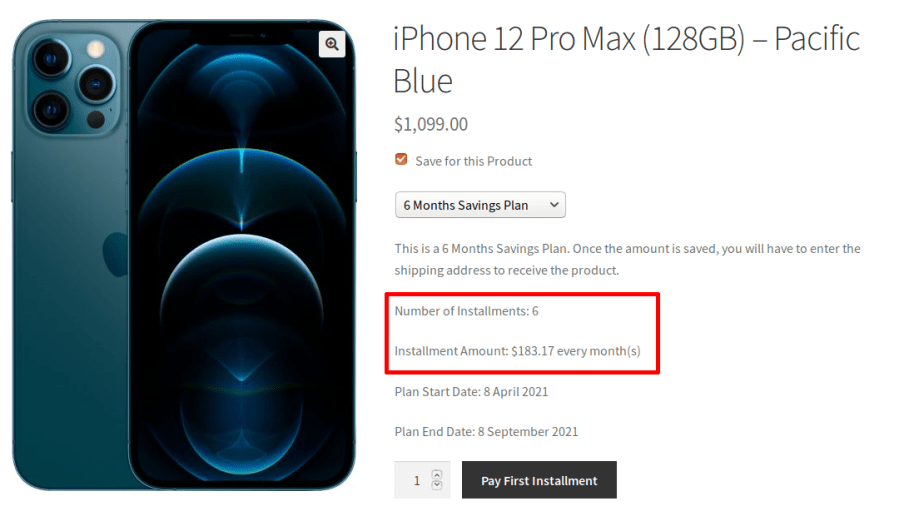
  • Once a savings plan is selected, the following details will be displayed:
    • Number of installments
    • Installment amount and installment frequency
    • Plan the start date and end date
  • When the user selects the Pay-First-Installment button, the product will add to the cart. Once payment is complete, the savings plan opens.
  • Your users can access their savings plan from their My Account Page > My Savings Plan.
  • The user will manually pay the remaining installments. You can optionally enable Automatic Payments when your users pay using WooCommerce Stripe Payment Gateway.
Fixed Installment Dates without Deposit
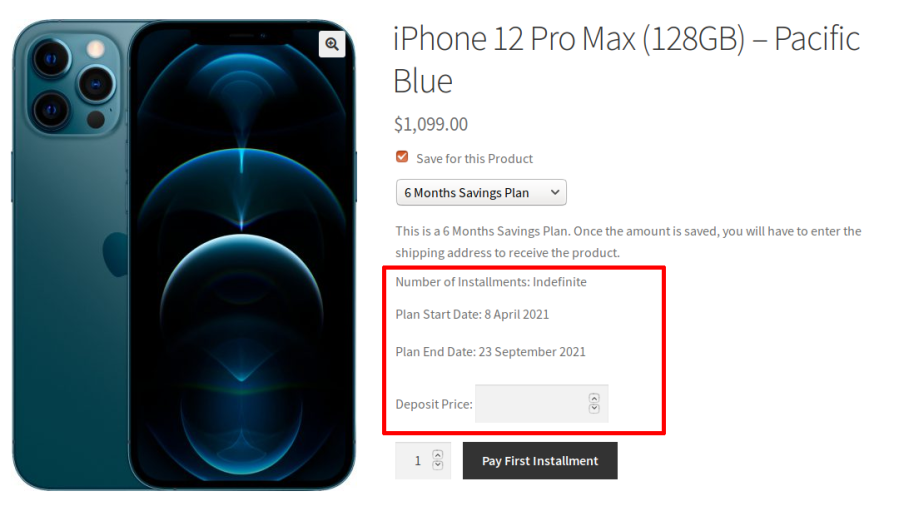
Fixed Installment Dates with a Deposit

Fixed Duration Savings Plan

  • A user lands on a single product page.
  • If the user wants to purchase the product, they click the Add-to-Cart button.
  • If the user wants to save for the product, they enable the Save-for-this-Product checkbox.
  • Once enabled, the available Savings Plans will display in a dropdown menu.
  • Once a Savings Plan is selected, the following details will display.
    • Plan start date and end date
    • A field to input the savings amount
  • When the user selects the Pay-First-Installment button after inputting the savings amount, the product will add to the cart. The savings plan opens when the payment is complete.
  • Your users can access their savings plan from their My Account Page > My Savings Plan.The user will manually pay the remaining installments.
  • The Fixed Duration Savings Plan requires that the user saves for their chosen product within a defined time period. The user can save any amount, any number of times. You can optionally restrict the minimum or maximum amount of the savings plan.
Fixed Duration with a Deposit and Indefinite Payments

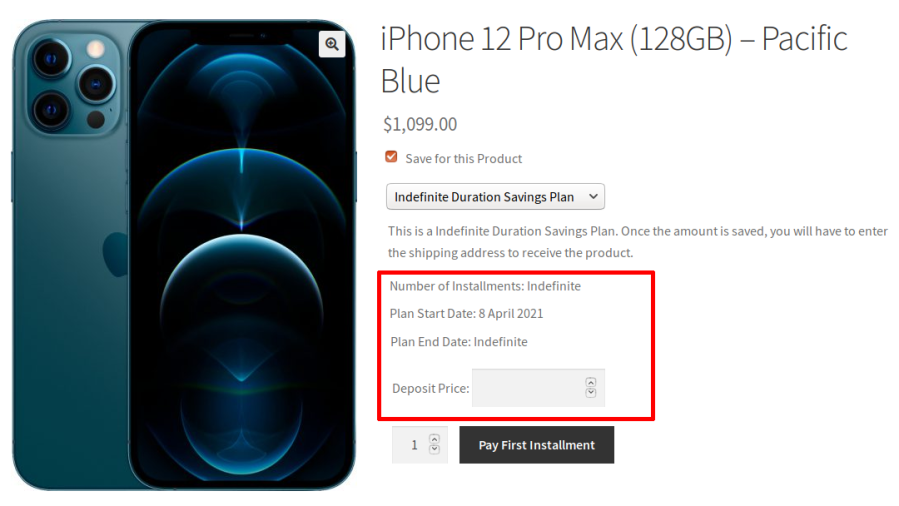
Indefinite Duration Savings Plan

  • A user lands on a single product page.
  • If the user wants to purchase the product, they click the Add-to-Cart button.
  • If the user wants to save for the product, they enable the Save-for-this-Product checkbox.
  • Once enabled, the available savings plans will display in a dropdown menu.
  • Once a savings plan is selected, the following details will display:
    • Plan start date
    • A field to input the savings amount
  • When the user selects the Pay-First-Installment button after inputting the savings amount, the product will add to the cart. The savings plan opens when the payment is complete.
  • Your users can access their savings plan from their My Account Page > My Savings Plan.The user will manually pay the remaining installments.
  • In the Indefinite Duration Savings Plan type, there is no time limit. The user can save any amount, any number of times. You can optionally place a restriction on the minimum or maximum amount saved.

Product Fulfillment Process

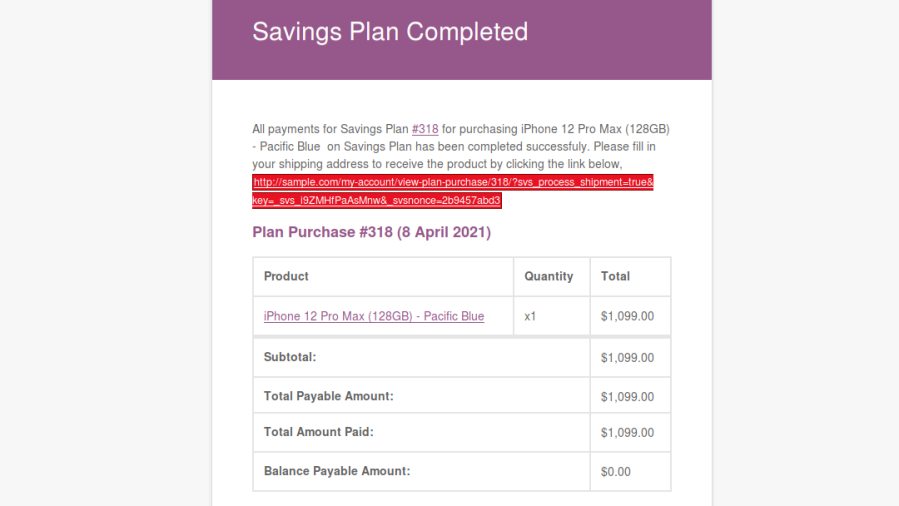
  • Once all installments are paid, the user is notified by email. The emails contain links directing users to checkout pages.
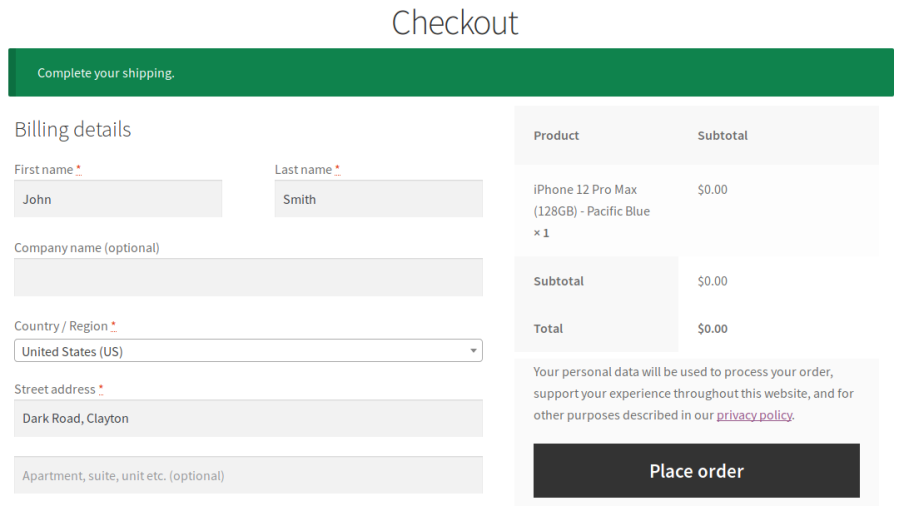
  • On the checkout page, the user can review their shipping address and make changes if needed. Users can agree to pay shipping costs, if applicable, and place their orders.
  • Savings Plan for WooCommerce helps users to save for products sold in your shop and purchase them once they save the total price.
Savings Plan Completed Email
Product Checkout After Saving the Money

Popular Features

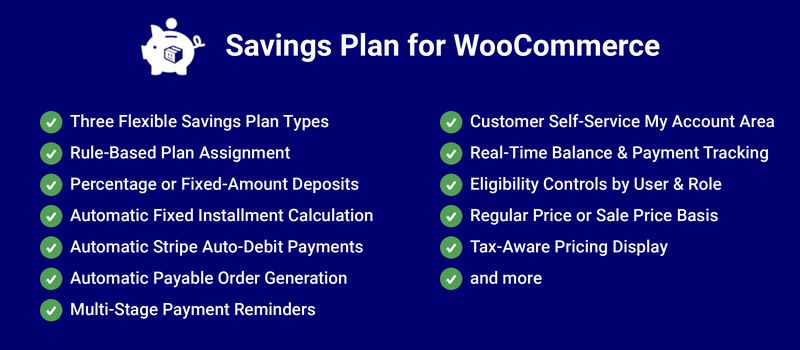
1. Three Flexible Savings Plan Types

Choose between Fixed Installment (set amount, set schedule), Fixed Duration (pay any amount, any number of times, before an end date), or Indefinite Duration (pay any amount, any number of times, with no end date) giving you a savings model that fits everything from disciplined layaway plans to open-ended piggy-bank saving.

2. Rule-Based Plan Assignment

Assign savings plans to products through flexible targeting rules instead of manually linking a plan to every single product apply a plan across an entire category or a hand-picked product list in one go.

3. Percentage or Fixed-Amount Deposits

Set minimum and maximum deposit amounts as either a percentage of the product price or a fixed monetary value, giving you full control over how much a customer can contribute per payment.

4. Automatic Fixed Installment Calculation

For Fixed Installment plans, the exact installment amount is calculated automatically from the plan’s duration and frequency no manual math required when setting up a new plan.

5. Automatic Stripe Auto-Debit Payments

Integrate directly with WooCommerce Stripe’s Credit/Debit Card payment method to automatically charge a customer’s saved card on each installment’s due date — turning savings plans into a true « set it and forget it » experience for both you and the customer.

6. Automatic Payable Order Generation

The plugin automatically creates the next payable order before it’s due, with admin control over exactly how many days in advance so payments are always ready to collect right on schedule.

7. Multi-Stage Payment Reminders

Send multiple reminder emails at configurable intervals before a payment is due (e.g., 3, 2, and 1 days out), reducing missed payments and keeping customers engaged with their plan.

8. Customer Self-Service My Account Area

Customers can view all their active savings plans, payment history, and remaining balance, and even update their payment method directly from their WooCommerce account no support tickets required.

9. Real-Time Balance & Payment Tracking

Every plan purchase shows a live balance payable and cumulative amount paid so far, giving customers full transparency into exactly where they stand at any moment.

10. Eligibility Controls by User & Role

Restrict savings plans to specific customers or user roles, or exclude certain users entirely perfect for offering the feature only to registered members or specific customer segments.

11. Payment Gateway Restrictions

Exclude specific payment gateways from being used for savings plan orders, and when automatic payments are enforced, only auto-debit-capable gateways (like Stripe) are shown at checkout.

12. Regular Price or Sale Price Basis

Choose whether savings plan calculations are based on a product’s regular price or its current sale price, giving you control over how discounts interact with the savings model.

13. Tax-Aware Pricing Display

All pricing shown to the customer deposits, balances, and totals automatically respects your store’s WooCommerce tax settings, keeping every figure accurate and compliant.

Extensive Features List

Sales Growth & Customer Affordability

  • Savings plans can be assigned through rules instead of manual product linking
  • Rules can target specific products or categories
  • Minimum and maximum deposits can be percentage-based or fixed monetary values
  • Installments can occur at configurable frequencies
  • Fixed installment amounts are automatically calculated from duration and frequency

Savings Plan Automation

  • Creates payable orders before due dates
  • Admin can choose how many days before due date orders are generated
  • Multiple reminder intervals supported (e.g., 3, 2, and 1 days)

Eligibility & Access Control

  • Allow Savings Plans only for selected users or user roles

Payment Method Control

  • Exclude specific payment gateways for Savings Plan orders
  • When automatic payments are enforced, only supported payment methods are shown

Customer Transparency & Financial Tracking

  • Real-time balance payable calculations
  • Tracks cumulative paid amount
  • Pricing display follows WooCommerce tax settings

Administrative Flexibility

  • Admin can choose whether savings calculations use Regular Price or Sale Price


Requirements

Minimum PHP version: 5.6


Avis Clients

Nous acceptons des avis pour ce produit et les afficherons dès que nous en aurons quelques-uns de plus.

Informations sur l'extension

  • Version PHP requise: 7.4.0
  • Testé avec WordPress: 7.0
  • Testé avec WooCommerce: 10.8.1
  • Nécessite au minimum WordPress: 6.2
  • Nécessite au minimum WooCommerce: 8.2.0

Compatibilité

  • High performance order storage (HPOS)

Pays

  • Mondial

Langues

English (United States)

Related Products

Prix $279 par an
Noté 3.2 sur 5 étoiles
Prix $79 par an
Noté 3.4 sur 5 étoiles
Prix $59 par an
Noté 3.1 sur 5 étoiles
Prix $109 par an
Noté 2.7 sur 5 étoiles
Prix $109 par an
Noté 2 sur 5 étoiles
Prix $49 par an
Noté 4.1 sur 5 étoiles
Prix $109 par an
Noté 2.3 sur 5 étoiles
Prix $39 par an
Noté 2.8 sur 5 étoiles
Prix $109 par an
Noté 2.6 sur 5 étoiles
Utilisation de vos données personnelles
Nous et nos partenaires traitons vos données personnelles (telles que les données de navigation, adresses IP, informations sur les cookies et autres identifiants uniques) sur la base de votre consentement et/ou de notre intérêt légitime afin d’optimiser notre site web, nos activités marketing et votre expérience utilisateur.