
Installations actives
1K+
L’abonnement comprend
Assistance
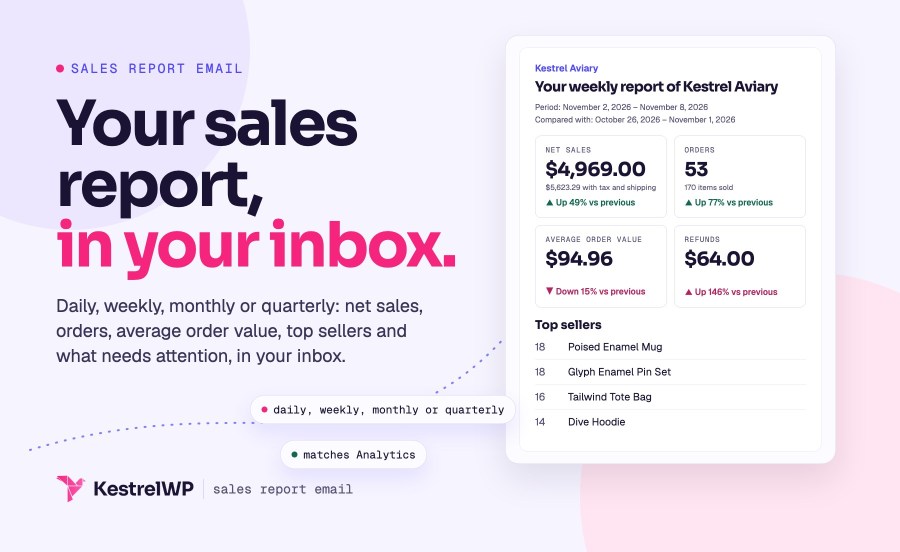
L’extension WooCommerce Sales Report Email est LA solution pour recevoir des rapports de vente automatisés directement dans votre boîte de réception. Plus besoin de se connecter manuellement pour vérifier l’état des ventes de vos produits – avec cette extension, vous recevez les informations sans effort.
Grâce à notre extension, vous pouvez désormais recevoir des rapports de ventes automatisés dans votre boîte de réception, sans tracas. Que vous souhaitiez être tenu(e) au courant chaque jour, chaque semaine ou chaque mois, notre extension fait en sorte de vous faire parvenir les informations utiles concernant les ventes de votre boutique, sans effort particulier de votre part.

Install Sales Report Email, add your address under WooCommerce » Settings » Emails » Sales Reports, and choose daily, weekly, monthly or quarterly. New installs start on weekly, sent on Monday at 03:00 in your store’s time zone, once you add a recipient.
A summary of net sales, orders, items sold, average order value and refunds, compared with the previous period if you turn Comparison on. Then top sellers, top categories, new sign-ups, active subscribers if Subscriptions or Constellation is active, and a Needs attention box for unpaid and failed orders and low stock.
Yes. The report is built from WooCommerce Analytics and counts orders by the date they were paid, so its figures match the Analytics dashboard. Analytics has to be turned on: the report leaves out orders placed while it is off, and the plugin warns you in the admin.
Yes. Tick the sections under Report contents, and set Period to since the last email, yesterday, the last 7 days or the last 30 days. There is no date picker; a developer can set a custom period or skip dates such as holidays with the wc_sales_report_email_date_range and wc_sales_report_email_skip_dates filters.
Yes to both. Enter several addresses separated by commas, and edit the Subject, Email heading and Intro text in the report’s email settings. The default subject is “Sales Report of” followed by your site title.
Stores upgrading from 1.x keep their existing report: Comparison, Top categories, Unpaid and failed orders and Low stock start turned off, so your emails don’t change unannounced. Tick them under Report contents in Sales Reports settings. New installs start with every section on.
Catégories
Informations sur l'extension
Vérifications qualité
Pays