

Installations actives
800+
L’abonnement comprend
Assistance
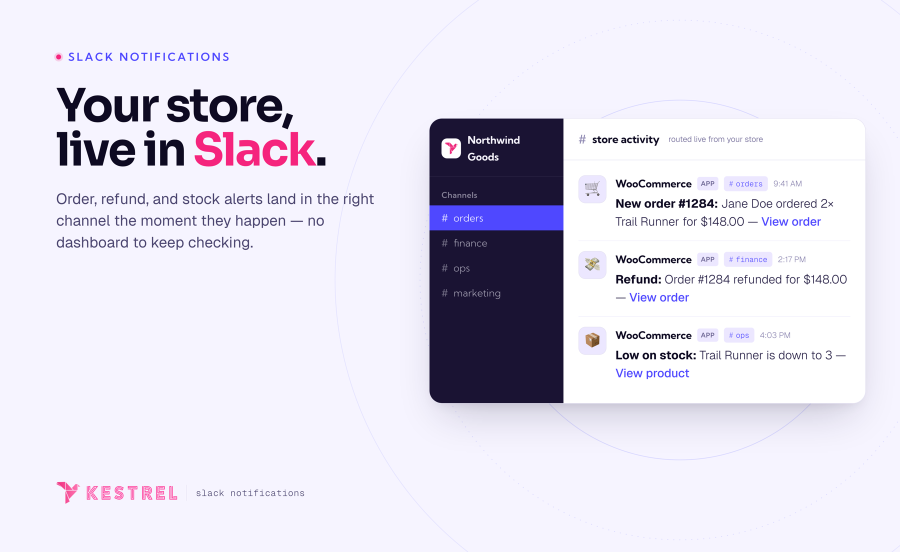
WooCommerce Slack place votre boutique WooCommerce au cœur des conversations de votre canal Slack, vous permettant à vous et votre équipe de rester au courant de ce qui se passe dans votre boutique sans faire d’effort.
Sept événements de notification sont actuellement activables de manière facultative. Vous pouvez configurer un canal et un émoji spécifiques pour chaque notification, et personnaliser le texte de cette dernière à votre convenance !
Certains types de notification intègrent également des notifications étendues qui vous permettent, si vous le souhaitez, d’envoyer les articles de ligne de commande détaillés ou le contenu de vos avis. Ainsi, vous n’avez plus besoin d’ouvrir votre tableau de bord pour consulter vos dernières commandes.

Vous pouvez même personnaliser chaque message de notification à votre guise. Par exemple, voici une personnalisation de la notification Nouvel avis et son affichage dans Slack :


Pour en savoir plus sur WooCommerce Slack, consultez la documentation disponible ou n’hésitez pas à ouvrir une demande d’assistance avec vos questions d’avant-vente.
Développée par 
Ten event types: new order, order status update, subscription renewal, refund, back order, low stock, out of stock, new review, new customer, and newly published post. Each one is an independent switch and can be routed to its own Slack channel.
Yes. Every event has its own channel selector, and you can choose more than one channel per event. Send orders to #sales, stock alerts to #ops, and refunds to #finance — or fan a single event out to several channels at once. Anything you leave unset uses your default channel.
Yes. Each event has a message template built from tokens like {order_number} and {order_total}, plus Slack markup for clickable links. Turn on extended notifications to add rich attachments with line items, product thumbnails, and timestamps. Developers can customize further through the extension's filters.
Yes. When a subscriptions extension is active, renewal orders trigger their own Slack notification, so recurring revenue shows up alongside new orders. WooCommerce Subscriptions, Constellation by Kestrel, and YITH WooCommerce Subscription are all supported.
Orders created through standard WooCommerce order hooks — including POS plugins that use them — will trigger notifications. Some POS tools create orders through non-standard flows; if yours is one of them, the order-status event is a reliable fallback for catching those orders.
Yes. WooCommerce Slack declares compatibility with High-Performance Order Storage (custom order tables) and the Cart and Checkout blocks, so it fits both classic and modern WooCommerce stores.
Yes, it’s extensible and translation-ready, so developers can tailor it further if needed.
Not currently. WooCommerce Slack sends notifications one way — from your store into Slack — to keep your team informed at a glance. Managing orders still happens in WooCommerce. If you would like to see more management features crossing to your store from Slack, please contact our team and we'll be happy to help!
Informations sur l'extension
Vérifications qualité
Compatibilité
Pays







