
Icona del prodotto

Bulk Search & Replace per WooCommerce

Safely search & replace across your entire store’s products, categories, media, orders, and more, with a powerful dry-run preview and export
Scegli un'opzione di fatturazione
$49
Risparmia 20%
$98 $78.40

L'abbonamento include

  • Aggiornamenti e miglioramenti del prodotto
  • Servizio clienti
  • Garanzia di rimborso entro 30 giorni

Stop editing WooCommerce records one by one

Renaming a brand? Fixing SKU prefixes? Updating image alt text or old URLs across hundreds of products? Bulk Search & Replace handles it in minutes — not days.

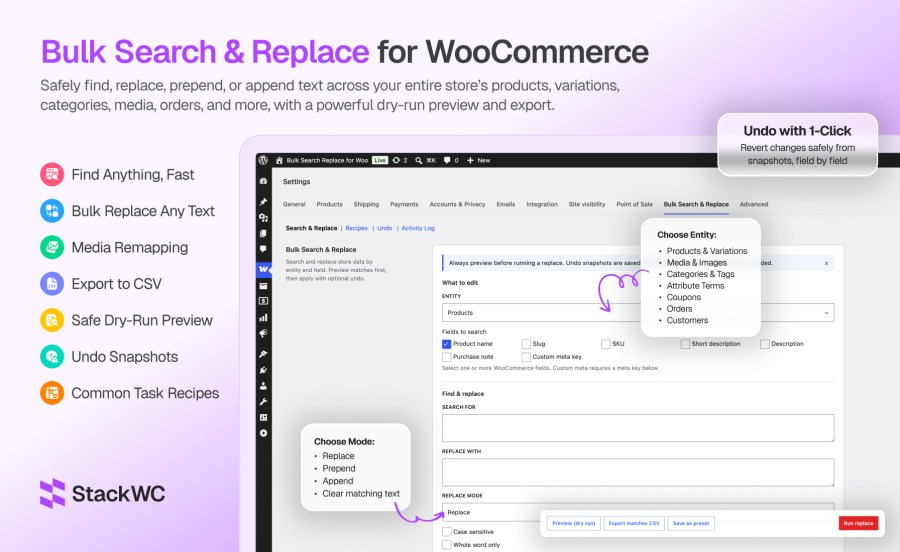
The tool lives inside WooCommerce at WooCommerce → Settings → Bulk Search & Replace. Pick what to search, preview every match with before/after values, export a CSV for review, and apply when ready. Nothing is saved until you confirm.

Built for real store operations

Every update runs through WooCommerce APIs — products, variations, orders, coupons, and customers use the same CRUD layer your store already relies on. That means serialized product meta stays intact, variations keep working, and High-Performance Order Storage (HPOS) orders are fully supported.

Preview first. Undo if needed

Dry-run preview is the default workflow. See exactly what will change before a single row is touched. When you run a replace, field-level undo snapshots are saved automatically so you can roll back the entire job from the Undo tab.

8 data types. One tool.

Search and replace across:
  • Products — names, SKUs, slugs, descriptions, purchase notes, custom meta
  • Variations — variation SKUs, descriptions, custom meta
  • Media & images — alt text, titles, captions, URLs, and image remap by attachment ID or URL
  • Categories & tags — names, slugs, descriptions
  • Attribute terms — global attribute values like Color and Size
  • Coupons — coupon codes and descriptions
  • Orders — billing/shipping addresses, customer notes, custom order meta (HPOS compatible)
  • Customers — stored addresses, display name, custom user meta

Recipes for common jobs

13 built-in recipes cover everyday tasks: SKU prefix changes, rebrands, domain migrations, coupon prefix updates, order company name fixes, image alt text updates, CDN URL changes, and product image swap (remap A → B). Save your own presets for jobs you run often.

Built for large catalogs

Batch processing handles big stores without timeouts. Configurable batch size, live progress, and memory-aware defaults keep jobs stable on shared hosting and dedicated servers alike.


Key features ::

  • Dry-run preview — See before/after diffs and match counts before anything is saved
  • One-click undo — Roll back any completed job with field-level snapshots (enabled by default)
  • CSV export — Download up to 5,000 matching rows for audit, sign-off, or offline review
  • 8 WooCommerce entities — Products, variations, media, categories/tags, attributes, coupons, orders, customers
  • 4 replace modes — Replace, prepend, append, and clear matching text
  • Advanced matching — Case sensitive, whole word, and guarded regular expression support
  • 13 built-in recipes — SKU prefix, rebrand, domain/URL, coupon prefix, image remap, CDN update, and more
  • Save custom presets — Reuse complex searches without reconfiguring filters
  • Product image remap — Swap attachment A → B by ID or URL across featured, gallery, and variation images
  • Scoped media search — Alt text, titles, captions, and URLs on product images only
  • HPOS compatible — Order updates use WooCommerce order CRUD; custom order tables supported
  • Custom product types — Works with Bookings, Subscriptions, and other non-standard product types
  • Batch processing — Configurable batch size (1–100) with live progress for large catalogs
  • Scope filters — Narrow by status, category, stock, SKU, product IDs, order dates, user roles, and more
  • Custom meta support — Search and replace any product, variation, order, or customer meta key
  • Activity log — Full audit trail of replace and undo operations with user attribution
  • WooCommerce-native UI — Lives under WooCommerce → Settings; no extra admin menu clutter
  • Safe by design — Capability checks, nonce verification, confirmation dialogs, regex ReDoS guards
  • No raw database writes — Updates via WooCommerce APIs to protect serialized data
  • Translation ready — Full i18n support with .pot template included

Preview before you change anything

Every job starts with a dry run. Matching items show field-by-field before/after values and total match counts. Store owners review first, apply second.

Undo any job in one click

Undo snapshots are saved by default. If something looks wrong after a replace, open the Undo tab and restore previous values through WooCommerce APIs — no manual database work.

Covers your whole catalog, not just products

Most bulk-edit tools stop at products. Bulk Search & Replace handles variations, product images, categories, attribute terms, coupons, orders, and customer profiles in one place.

Enterprise-safe on any hosting

Batch processing, memory-aware defaults, and WooCommerce CRUD updates keep large jobs stable. HPOS orders, custom product types, and serialized meta are handled correctly.


Ideal for

  • Rebranding product names, descriptions, and image alt text after a company rename
  • Changing SKU or coupon prefixes across the entire catalog
  • Fixing old domain or CDN URLs in product content and image metadata
  • Updating billing or shipping company names on historical orders
  • Renaming category labels, tag names, or attribute term values (Grey → Gray)
  • Swapping an outdated product photo for a new one across many products
  • Bulk-appending SKU suffixes during a catalog version change
  • Exporting match lists to CSV for team review before applying changes

Comparison one-liner :

Manual editing Bulk Search & Replace
Edit one product at a time Update hundreds of records in one job
No preview of impact Dry-run preview with before/after diffs
Hard to reverse mistakes One-click undo with field-level snapshots
No audit trail Activity log with user and match counts
Risky database plugins WooCommerce API updates only


Domande più comuni

What does Bulk Search & Replace for WooCommerce do?

It lets store owners find and replace text across WooCommerce products, variations, images, categories, attributes, coupons, orders, and customers in bulk — with preview, CSV export, and undo.

Can you preview changes before applying?

Yes. Dry-run preview shows matching items with before/after values. You can also export CSV. Nothing is written until Run replace is confirmed.

Can you undo a bulk replace job?

Yes. Undo snapshots are saved by default. Completed jobs can be rolled back from the Undo tab.

Does it work with HPOS (High-Performance Order Storage)?

Yes. Order updates use the WooCommerce order CRUD layer and the plugin declares HPOS compatibility.

What WooCommerce data types are supported?

Products, variations, media/images, categories and tags, attribute terms, coupons, orders, and customers.

Related Products

Prezzo $279 Annualmente
Valutato 3.9 su 5 stelle
Prezzo $79 Annualmente
Valutato 3.4 su 5 stelle
Prezzo $59 Annualmente
Valutato 3.1 su 5 stelle
Prezzo $109 Annualmente
Valutato 2 su 5 stelle
Prezzo $109 Annualmente
Valutato 2.8 su 5 stelle
Prezzo $49 Annualmente
Valutato 4.1 su 5 stelle
Prezzo $199 Annualmente
Valutato 4 su 5 stelle
Prezzo $109 Annualmente
Valutato 2.5 su 5 stelle
Prezzo $39 Annualmente
Valutato 2.8 su 5 stelle
Uso dei tuoi dati personali
Noi e i nostri partner trattiamo i tuoi dati personali (come dati di navigazione, indirizzi IP, informazioni sui cookie e altri identificatori univoci) sulla base del tuo consenso e/o del nostro legittimo interesse per ottimizzare il nostro sito web, le attività di marketing e la tua esperienza utente.




