
Icona del prodotto

Image Zoom Pro per WooCommerce

Image Zoom Pro for WooCommerce offers tools which can help your users to view the product image and product gallery images more clearly.
Scegli un'opzione di fatturazione
$49
Risparmia 20%
$98 $78.40

L'abbonamento include

  • Aggiornamenti e miglioramenti del prodotto
  • Servizio clienti
  • Garanzia di rimborso entro 30 giorni

Help Shoppers View Your Products In More Detail

Image Zoom Pro for WooCommerce helps you extend WooCommerce’s default product-image-zoom capabilities.

Features

1. Zoom types

  • Default image zoom
  • Window zoom
  • Lens zoom

2. Mouse-wheel-zoom

  • Zoom in on product images and image galleries with your mouse wheel

3. Restrictions

  • Restrict which product’s images are eligible for image zooming

Benefits

1. Avoid refunds

Letting users get a close view of your products helps them make informed choices. Informed buyers are more likely to be satisfied with their purchases.

2. Increase conversion rates

Clear images and close-up views will increase buyer interest in your products. Increase your conversion rates with zoom views.

How does it Work?

Image Zoom Pro for WooCommerce includes the following tools to give shoppers a clear view of product images and product galleries.

Image Zoom Types

Apart from the default image zoom offered by WooCommerce, choose between:

1. Window Zoom

In Window Zoom mode, the zoomed view will display in a separate window when users hover over it.
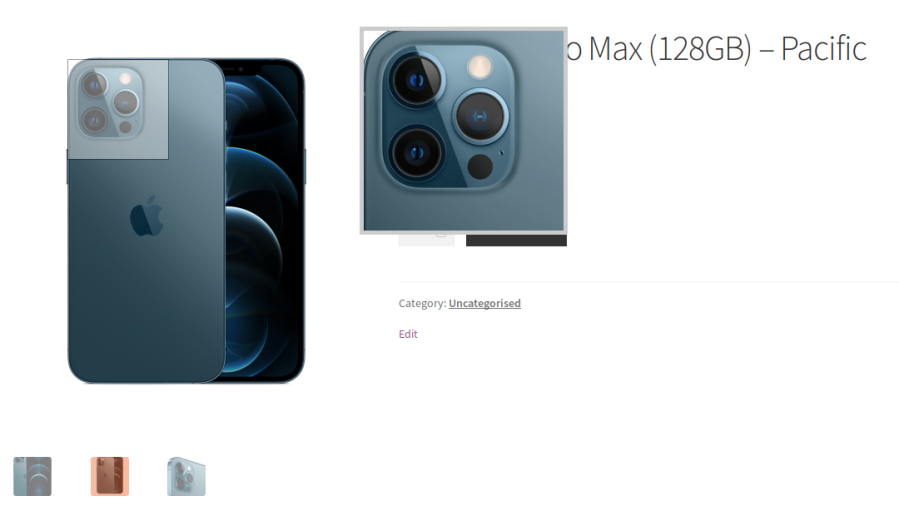
Window Zoom with Square Lens

2. Lens Zoom

In Lens Zoom mode, the zoomed view will display inside a lens when the user hovers over the image.
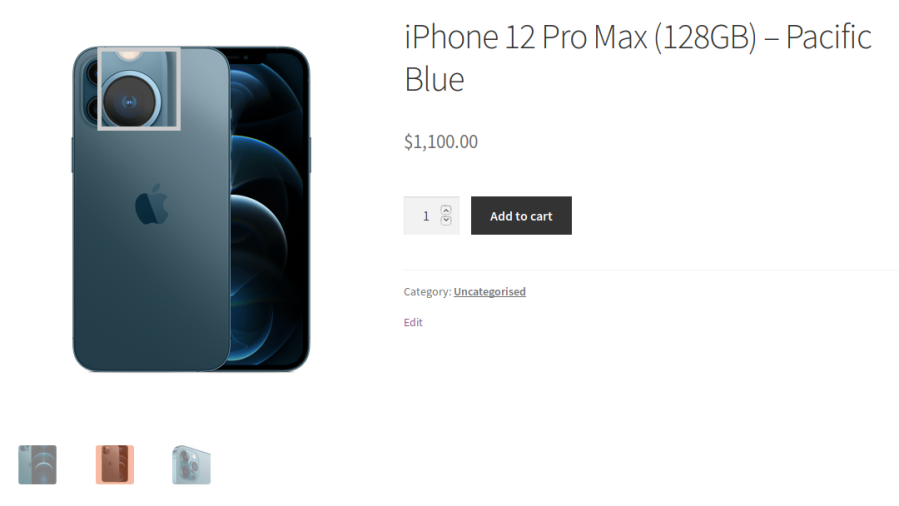
Lens Zoom with Square Lens

Lens Types

Round

In Round Lens, the zoomed area will be displayed inside a circle.
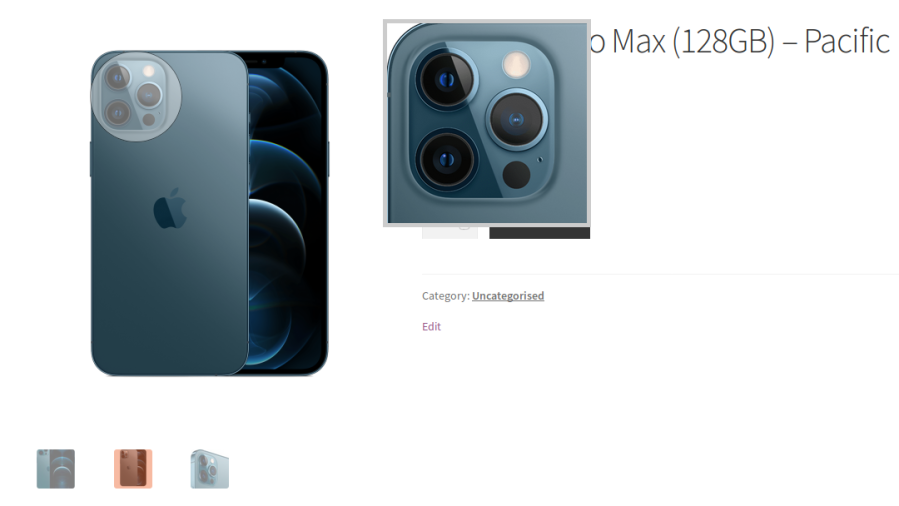
Lens Zoom with Round Lens

Square

In Square Lens, the zoomed area will be displayed inside a square.

Lens Zoom with Square Lens

Mouse Wheel Zoom

Users can adjust the zoom of an image using their mouse wheel. This option can be turned on or off.

Popular Features

1. Three Distinct Zoom Styles

Choose between Lens Zoom, Window Zoom, or Inner Zoom three completely different ways for shoppers to magnify product images. Each style suits a different store layout, so you can pick whichever feels most natural for your product photography.

2. Separate Desktop & Mobile Zoom Control

Enable and configure zoom independently for desktop and mobile devices, since the ideal zoom experience is very different on a large screen versus a touchscreen. You’re never forced into a one-size-fits-all setup.

3. Mouse Wheel Zoom

Let shoppers scroll their mouse wheel to zoom in and out smoothly, with a configurable maximum zoom ratio (up to 3x the original image size). It’s a natural, intuitive way for desktop shoppers to inspect fine detail.

4. Customizable Zoom Border

Add a styled border around the zoomed image area, with full control over border thickness and color, so the zoom effect feels like a polished part of your store’s design rather than a bolted-on plugin.

5. Adjustable Easing & Fade Animations

Fine-tune the speed and smoothness of the zoom transition, plus fade-in effects for the lens and zoom window, so the interaction feels responsive and premium instead of jumpy or abrupt.

6. Configurable Zoom Window Position & Size

Precisely control where the zoom preview window appears relative to the product image including its width, height, and offset with a dedicated position option for mobile devices too.

7. Tint/Shadow Overlay Effect

Apply a tint or shadow overlay to the parts of the image that aren’t being zoomed, with adjustable color and opacity. This subtly draws the shopper’s eye to the zoomed detail and adds a professional visual touch.

8. Choice of Lens Shapes

Pick between a square or round lens shape for the zoom cursor, letting you match the zoom interaction style to your store’s overall aesthetic.

9. Custom Mouse Pointer Styles

Swap the default cursor for a custom pointer or crosshair while hovering over zoomable images, giving shoppers a clearer visual cue that the image is interactive.

10. Zoom on Shop, Category & Cart Pages

Extend the zoom effect beyond the single product page to shop pages, category listings, and even cart page thumbnails, so customers can inspect products more closely wherever they encounter them.

11. Product, Category, Tag & Brand Exclusions

Selectively turn off zoom for specific products, categories, tags, brands, or entire product types, giving you granular control over exactly where the effect appears across your catalog.

12. Fully Responsive Zoom Behavior

The zoom effect automatically adapts based on device and screen size, ensuring a consistent, smooth experience whether a customer is on a phone, tablet, or desktop.

Extensive Features List

1. Product Experience & Conversion Optimization

  • Enable zoom on Shop pages
  • Enable zoom on Category pages
  • Zoom functionality extends beyond single-product pages
  • Zoom can be enabled on cart thumbnails
  • Inner Zoom mode exists in plugin settings
  • Desktop and mobile can use different zoom modes
  • Dedicated responsiveness toggle

2. Mobile & Desktop Optimization

  • Zoom can be enabled only for desktop devices
  • Zoom can be enabled only for mobile devices
  • Separate mobile window positions

3. Product & Catalog Targeting

  • Exclude individual products from zoom functionality
  • Exclude zoom for specific WooCommerce product types
  • Exclude products based on product tags
  • Exclude products belonging to selected brands
  • Restrictions are validated against the parent product for variations

4. Zoom Window & Magnification Controls

  • Adjustable maximum zoom level for mouse wheel zoom
  • Custom zoom window width and height
  • Window position supports 16 placement configurations
  • X-axis and Y-axis window offset
  • Prevent lens from moving outside image boundaries
  • Window Zoom can reuse lens configuration
  • Custom lens dimensions

5. User Interaction Controls

  • Three cursor modes:
    • Default
    • Cursor
    • Crosshair
  • Easing animation engine
  • Set animation speed in milliseconds
  • Adjustable fade-in speed for lens zoom
  • Adjustable fade-in speed for zoom window
  • Adjustable tint animation speed

6. Design & Visual Customization

  • Adjustable zoom border thickness
  • Border color customization
  • Optional tint and shadow overlay around zoomed area
  • Custom tint colors
  • Adjustable opacity (0–1)
  • Built-in custom CSS editor
  • Image-based selection interface

7. Plugin Compatibility

  • Zoom works inside gift wrapper interfaces of Gift Wrapper for WooCommerce plugin
  • Zoom support on gift card image interfaces of Gift Cards for WooCommerce plugin
  • Zoom works on free gifts interfaces of Free Gifts for WooCommerce plugin


Requirements

Minimum PHP version: 5.6

Image Zoom Pro for WooCommerce allows your users to view the product image and gallery images more clearly.


Informazioni sull'estensione

  • Versione PHP richiesta: 7.4.0
  • Testato con WordPress: 6.9.4
  • Testato con WooCommerce: 10.7.0
  • Richiede almeno WordPress: 6.2
  • Richiede almeno WooCommerce: 8.2.0

Funziona con

Compatibilità

  • High performance order storage (HPOS)

Paesi

  • Mondiale

Lingue

English (United States)

Related Products

Prezzo $279 Annualmente
Valutato 3.2 su 5 stelle
Prezzo $79 Annualmente
Valutato 3.4 su 5 stelle
Prezzo $59 Annualmente
Valutato 3.1 su 5 stelle
Prezzo $109 Annualmente
Valutato 2.7 su 5 stelle
Prezzo $109 Annualmente
Valutato 2 su 5 stelle
Prezzo $49 Annualmente
Valutato 4.1 su 5 stelle
Prezzo $109 Annualmente
Valutato 2.3 su 5 stelle
Prezzo $39 Annualmente
Valutato 2.8 su 5 stelle
Prezzo $109 Annualmente
Valutato 2.6 su 5 stelle
Uso dei tuoi dati personali
Noi e i nostri partner trattiamo i tuoi dati personali (come dati di navigazione, indirizzi IP, informazioni sui cookie e altri identificatori univoci) sulla base del tuo consenso e/o del nostro legittimo interesse per ottimizzare il nostro sito web, le attività di marketing e la tua esperienza utente.




