Icona del prodotto

Product Designer per WooCommerce

Product Designer for WooCommerce allows your users to design the products as per their needs and purchase them in your Shop.
Scegli un'opzione di fatturazione
$99
Risparmia 20%
$198 $158.40

Confronto prodotti

L'abbonamento include

  • Aggiornamenti e miglioramenti del prodotto
  • Servizio clienti
  • Garanzia di rimborso entro 30 giorni

  • Improves Customer Experience ― Offering the flexibility of designing the products to customers can make them feel that they are buying a personalized product. This improves the overall customer experience.
  • Drives Additional Revenue to the Site ― When a customer buys a customized product, they can be charged for using elements such as images, texts, clip art, and more. This can serve as additional revenue to the site.
  • Attracts New Customers ― Customers who have benefited from the Product Designer are likely to refer new users to your site.

With Product Designer for WooCommerce, your users can design and customize a product to fit their needs, which will drive customer satisfaction and additional revenue growth on your site.
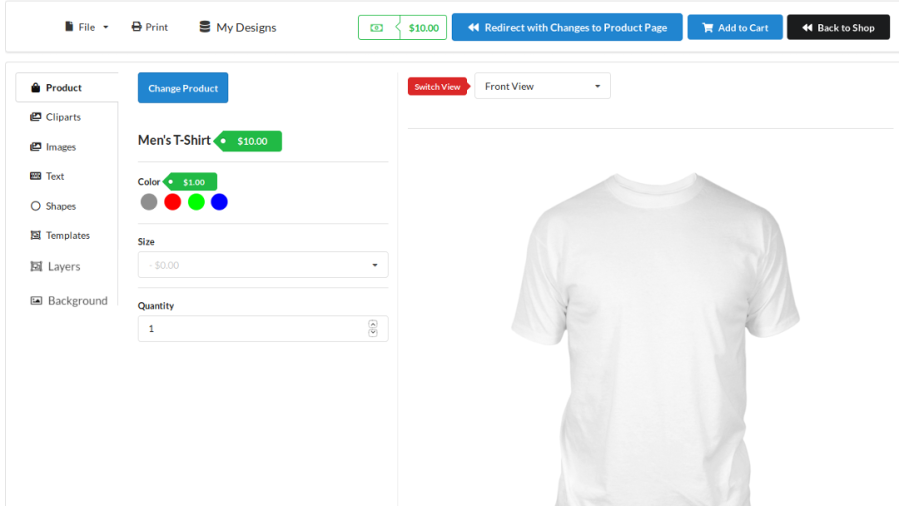
How Does Product Designer for WooCommerce Work?

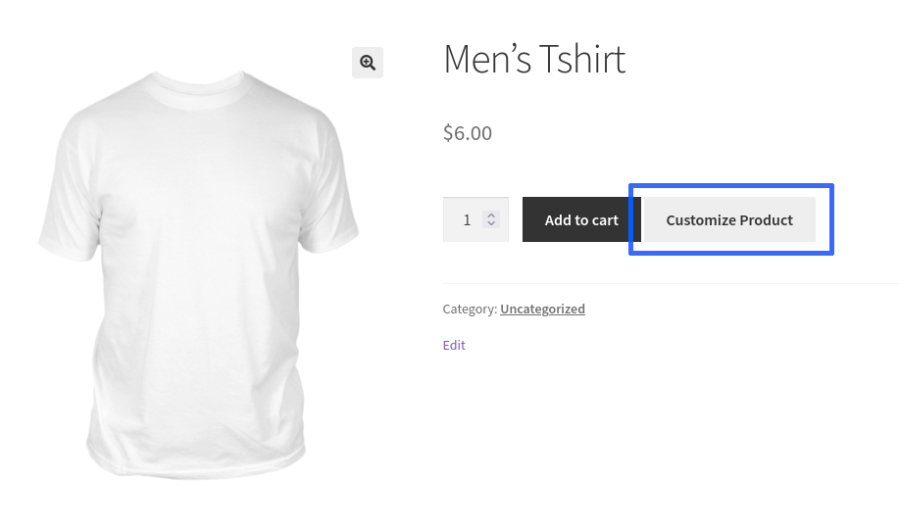
  • The “Customize Product” button will be displayed in the Shop & Single Product pages if the product is linked to any product base.
Customize Product Button on Single Product Page
  • When the user clicks on the Customize Product button, they will be redirected to the Product Designer page.

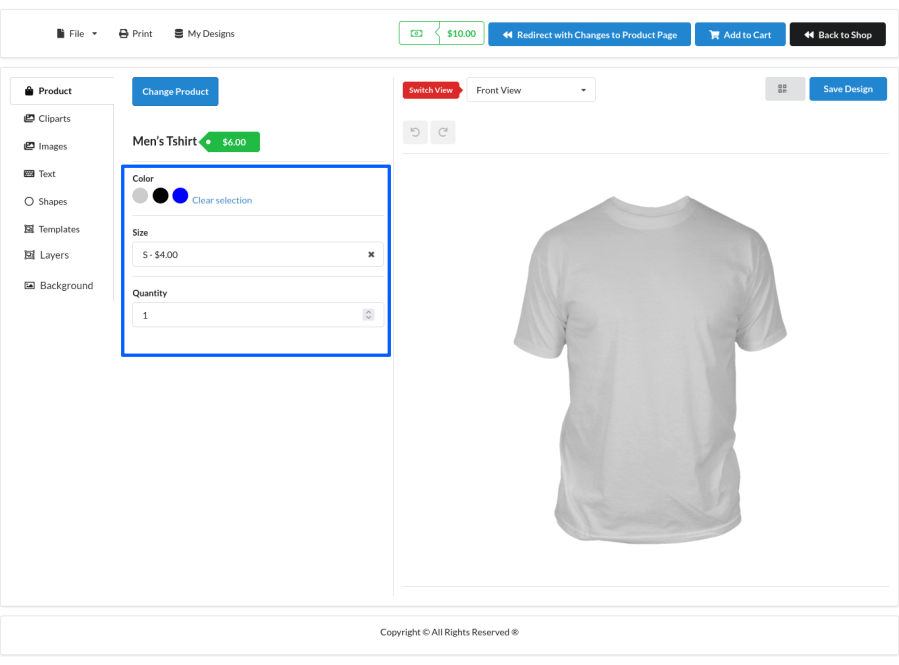
Designer Page

  • You can add product attributes such as color, size, message, etc. using the field types Product Color, Text, Text Area, Single Select, Checkbox, Radio box. You can set attributes to be optional/mandatory.

Product Attributes Customization

  • Customers can customize the product with the help of the following elements,
    • Images
    • Cliparts
    • Text
    • Shapes
    • Templates
  • After completing the designing and selecting the attributes, customer can click “Redirect with Changes to Product Page” if they want to go to single product page with the product customization.


Redirect with Changes to Product Page
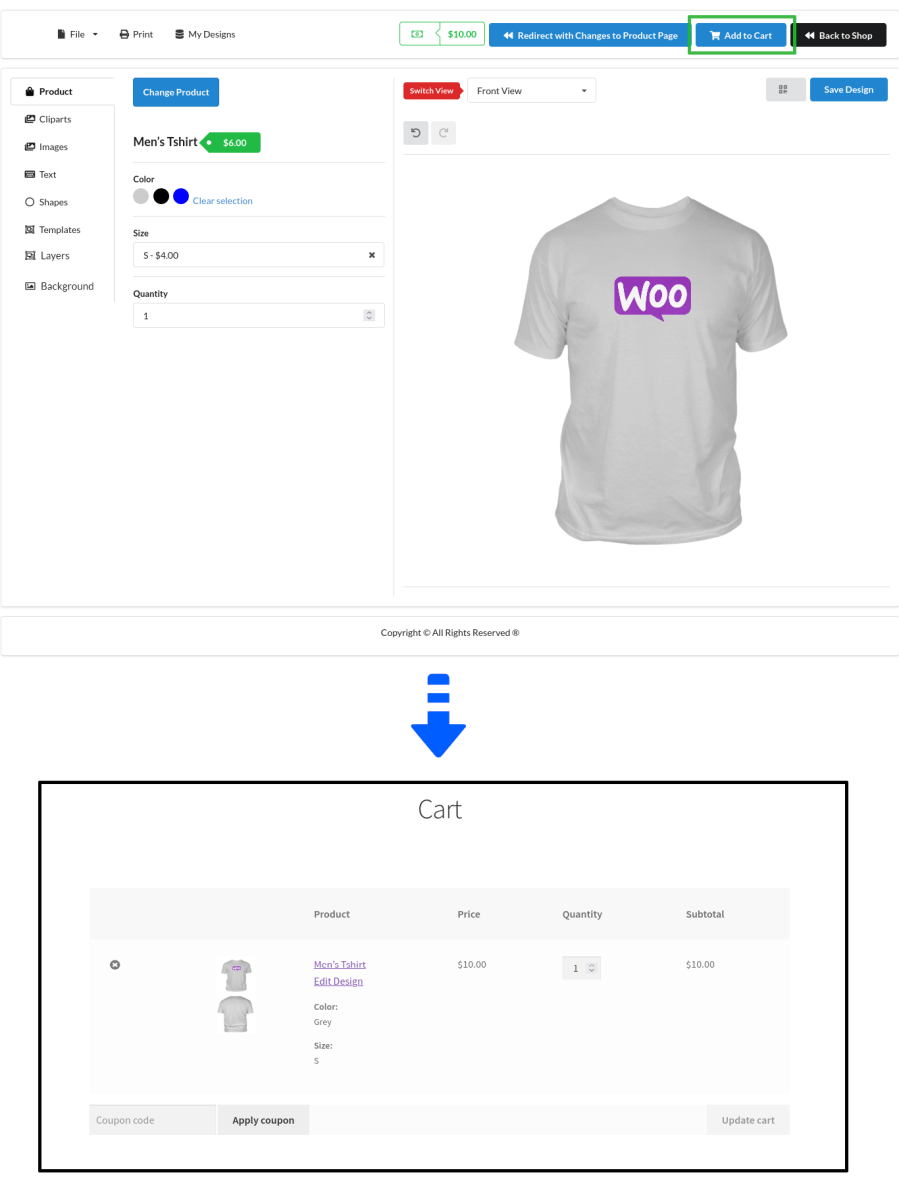
  • From the product designer page, they can also directly add the product to the cart by clicking the “Add to Cart” button.

Designed Product Added to Cart

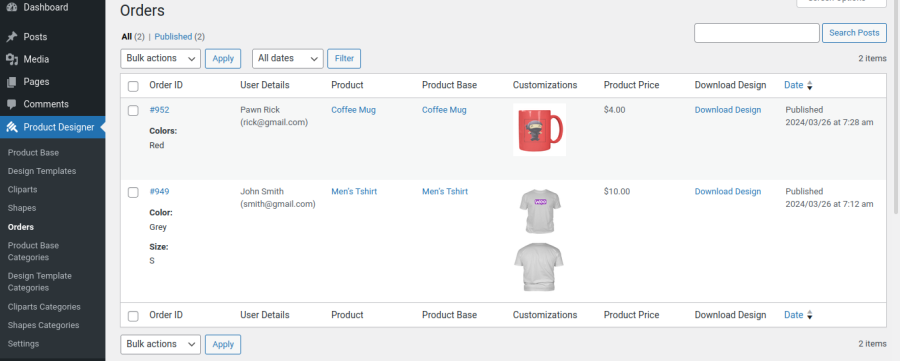
  • Once the customer places the order, the site admin can see the orders with product customization in “Product Designer > Orders” section in admin dashboard. The Site Admin has to click the “Download Design” button on the respective order which when clicked they will be redirected to frontend product designer page with customer design and attributes loaded.
Orders Page
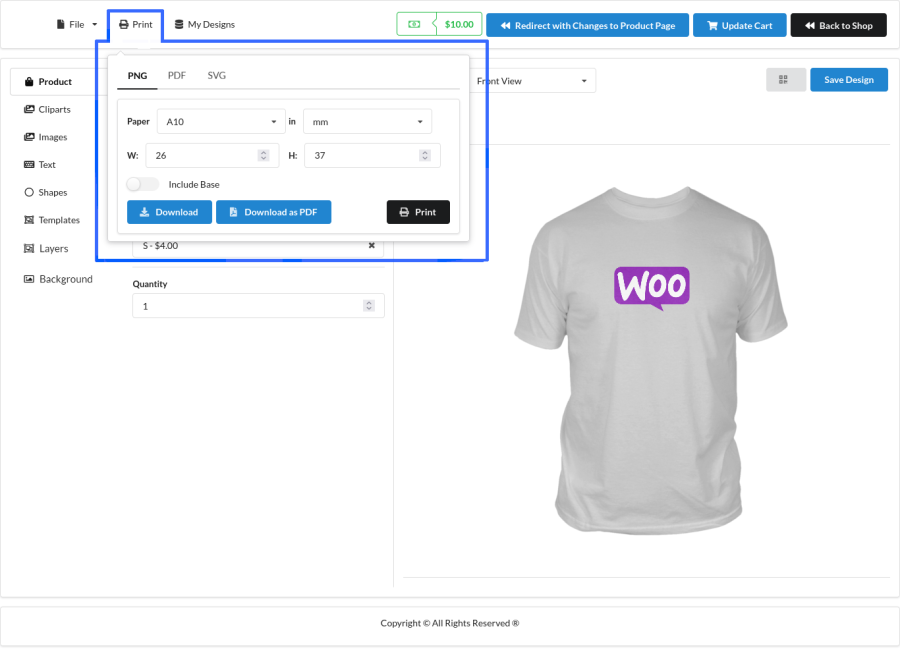
  • Now,the admin has to click “Print” menu to Print/Download the design.

Admin Download or Print Design Using Print Option

Popular Features

1. Product Templates

Create reusable design templates for your customers. Pre-designed templates help customers personalize products faster while maintaining consistent branding and reducing design effort.

2. Clipart Library

Upload and organize custom clipart collections that customers can add to their designs. You can even charge extra for premium clipart to generate additional revenue.

3. Customer Image Uploads

Allow customers to upload their own images, logos, and artwork directly into the product designer. Control file types, dimensions, and upload sizes to ensure print-ready designs.

4. Advanced Text Personalization

Let customers add custom text using Google Fonts or your own custom fonts. Support text alignment, font colors, font backgrounds, superscript, subscript, uppercase, and lowercase formatting.

5. Multi-View Product Design

Create multiple design areas for a product such as Front, Back, Left Sleeve, Right Sleeve, Inside Cover, or any custom view. Customers can personalize every side of the product from a single designer.

6. Product Bases & Attribute Management

Create product bases and link multiple WooCommerce products to them. Configure colors, text fields, dropdowns, checkboxes, and other attributes with individual pricing rules.

7. Flexible Design Pricing Rules

Turn product personalization into a revenue-generating feature by charging customers based on the design elements they use. Configure pricing rules that match your business model without requiring custom development.

  • Charge different prices for templates, clipart, shapes, colors, background images, and image uploads.
  • Apply fixed fees or per-character pricing for text personalization.
  • Set individual pricing for premium design assets.
  • Create premium personalization packages with ease.

Object-Based Pricing

Charge customers based on the number of objects added to their design. For example, you can charge separately for each text element, image, clipart, shape, or other design object added to the canvas.

View-Based Pricing

Assign different prices to different design views of a product. For example, charge separately when customers customize the Front, Back, Left Sleeve, Right Sleeve, Inside Cover, or any additional design area.

This flexible pricing system helps maximize revenue while giving customers complete freedom to personalize products exactly the way they want.

8. 300 DPI Print-Ready Export

Generate high-quality 300 DPI print-ready artwork directly from customer designs. Download production-ready files from WooCommerce orders and streamline fulfillment.

9. Layer Management

Customers can easily manage complex designs using layer controls. Design elements can be moved forward or backward, copied, pasted, and organized for precise customization.

10. Watermark Protection

Protect premium artwork and design assets by displaying watermarked previews before checkout. Custom watermark text can be configured from the admin panel.

11. Mobile-Friendly Product Designer

Provide a seamless product customization experience across desktop, tablet, and mobile devices without requiring separate configurations.

12. Save & Continue Designing

Allow logged-in customers to save unfinished designs and return later to complete their customization, helping reduce abandoned personalized orders.

Extensive Feature List

1. Design & Customization Management

  • Works seamlessly with Simple and Variable products.
  • Provides a dedicated product designer page for an uninterrupted customization experience.
  • Create and manage unlimited product bases for different product types.
  • Support multiple product views within a single product base for front, back, and other customizable areas.
  • Link multiple WooCommerce products to a single product base for easier management.
  • Support both transparent and non-transparent product images.
  • Organize products using product base categorization.
  • Arrange design elements using intuitive layer controls.
  • Easily copy and paste design objects between design areas.

2. Templates, Clipart, Shapes & Backgrounds

  • Create and manage unlimited design templates for customer personalization.
  • Organize templates using template categories for easier navigation.
  • Build extensive clipart libraries for customer use.
  • Organize artwork using clipart categorization.
  • Create custom SVG-based shapes for advanced design possibilities.
  • Organize shapes using shape categories.
  • Create and manage background images for product customization.
  • Categorize background images for improved asset management.
  • Assign individual pricing for templates, clipart, shapes, and backgrounds.

3. Product Attributes & Personalization Controls

  • Support multiple attribute types including Product Color, Text Fields, Dropdowns, Checkboxes, and Radio Buttons.
  • Create multiple attributes for each product base.
  • Configure attribute-based pricing for personalized products.
  • Apply different pricing rules for color attributes and custom options.

4. Advanced Text Customization

  • Support Google Fonts and custom fonts for personalized designs.
  • Restrict available font families globally or per product base.
  • Provide flexible text alignment controls for precise positioning.
  • Support uppercase, lowercase, superscript, and subscript formatting options.
  • Customize font colors and text background colors.
  • Apply creative text masking effects using images.
  • Charge fixed fees or per-character fees for text personalization.

5. Storefront & Theme Integration

  • Integrate the designer page with your theme’s header and footer.
  • Display product descriptions and short descriptions on the designer page.
  • Configure a custom logo and favicon for the designer experience.
  • Choose from multiple designer themes including Amazon, Basic, Chubby, Github, Material, and Custom.
  • Control the visibility of customization options on product, shop, and category pages.

6. User Access & Upload Controls

  • Restrict customization to specific users or user roles.
  • Allow or restrict customization for guest users.
  • Restrict image uploads for guest customers.
  • Control supported upload file formats.
  • Configure minimum and maximum upload file sizes.
  • Configure minimum and maximum image dimensions for uploads.

7. Production & Order Management

  • Download customer designs directly from WooCommerce orders.
  • Access and manage customer-approved artwork from the order screen.
  • Support efficient production workflows and fulfillment processes.

8. Revenue & Pricing Controls

  • Charge additional fees for image uploads.
  • Configure pricing for templates, clipart, shapes, and background images.
  • Create premium personalization experiences using flexible pricing rules.
  • Monetize product customization with advanced pricing controls.

9. Developer & Administration Features

  • Built with a flexible modular architecture for easier customization.
  • Enable or disable individual designer modules such as Templates, Clipart, Images, Text, Shapes, Layers, and Backgrounds.
  • Manage all personalization assets from a centralized admin interface.
  • Configure advanced product setups using a flexible product base system.

Requirements

Minimum PHP version: 5.6

Product Designer for WooCommerce can help your users design their own products and purchase them in your shop.


Domande più comuni

Designing is not working on mobile devices. Why?

As of now, designing on mobile devices is supported only on the “Default” theme. If you have selected any different themes in “Product Designer > Settings > General > Product Designer Page Theme Settings”, then designing won’t work.

Is Product designing supported for variable product types?

This plugin supports only simple product type. If you want to give multiple attributes for the product(like size, colour, etc.), then you can create the attributes within the product base which gives a similar result of a variable product.

I need to add custom fonts to give text customization. Is that possible?

Yes, it is possible to add custom fonts. Follow the below steps to add custom fonts,

  • Add the custom font file(format supported: otf, ttf, woff, woff2) in the WordPress media library.
  • Copy the file path.
  • Go to “Product Designer > Settings > General > Custom Fonts Settings” and Paste the copied file path in the “Custom Fonts File Path” option.
Is this plugin supported for mobile devices?

Yes, designing is supported on mobile devices.

How to charge a fixed amount for adding text irrespective of the charging amount per character?

Go to “Product Designer > Settings > General > Text Settings > Number of Characters” and set a higher value(for example 10000) so that the fixed amount that you have set in the “Fee” option will be charged for adding text.

Why color options that I have set in the product base are not displaying?

Edit the product base and check whether the “Base Image Segmentation” option is set as “Foreground/Overlay” and also check whether you have set a transparent image as the base image. The Color attribute won’t work in “Background” segmentation.

Recensioni dei clienti

Valutazione media 2.5
8 recensioni
5 stelle, 25% delle recensioni
4 stelle, 13% delle recensioni
3 stelle, 0% delle recensioni
2 stelle, 13% delle recensioni
1 stella, 50% delle recensioni
8 recensioni
  • ilustrastories
    Valutato 4 su 5
    Funzionalità
    Mar 21, 2025
    Funzionalità
    Este plugin tiene muy buenas funcionalidades y el equipo de soporte muy rápido y agradable. Obviamente considero que tiene mejoras, pero la versión actual ofrece muchas opciones de personalización.
  • kalamataingr
    Valutato 5 su 5
    Jul 10, 2023
    Solid functionality with active development
    Feature-rich with active development and support. One of the best choices for customizable products.
  • cdswebdev
    Valutato 1 su 5
    Mar 5, 2023
    Plugin seems to be ignored or abandoned..doesn't work.
    This plugin seems like a half-baked idea. The plugin designer does not even feature it on their own website or their CodeCanyon account which leads me to believe they have abandoned the plugin altogether. There are several issues: 1. Templates don't seem to work at all. If you make a template (based on their limited documentation) and then upload it, the site just "spins" and the template never loads. 2. Product colors - if you have "white" as an option for one of your product colors you can not even see that option on the page unless you just happen to hover your mouse over it (product color swatches should have a small stroke / outline). 3. Adding text - You can add text but good luck chan...
  • gallego_d
    Valutato 5 su 5
    Aug 19, 2022
    Great plugin, easy to use and works out-of-the-box
    For it's modest pricetag, it's really a complete for a web-to-print site. We really like the editor simple but powerful GUI and all the options we could ask for, images provided via cliparts, users' own images, shapes in svg (so that colors can be customized), google font for texts, qr creation and an intuitive way of putting it all on top o a clothing item or whatever you wish to allow customization for, objects, cards. Also support was fast and helped even outside the plugin's scope (we had a problem with a API and they went the extra mile to test and explain the issue). We used it for an apparel designing-printing website, and added a few changes to adapt it to the client specs, mostly fr...
  • brasiremimecom
    Valutato 1 su 5
    Jan 31, 2022
    Not good enougth

Informazioni sull'estensione

  • Versione PHP richiesta: 7.4.0
  • Testato con WordPress: 6.9.4
  • Testato con WooCommerce: 10.7.0
  • Richiede almeno WordPress: 6.2
  • Richiede almeno WooCommerce: 8.2.0

Compatibilità

  • Cart & checkout blocks
  • High performance order storage (HPOS)

Paesi

  • Mondiale

Related Products

Prezzo $279 Annualmente
Valutato 3.2 su 5 stelle
Prezzo $79 Annualmente
Valutato 3.4 su 5 stelle
Prezzo $59 Annualmente
Valutato 3.1 su 5 stelle
Prezzo $109 Annualmente
Valutato 2.7 su 5 stelle
Prezzo $49 Annualmente
Valutato 4.1 su 5 stelle
Prezzo $109 Annualmente
Valutato 2 su 5 stelle
Prezzo $109 Annualmente
Valutato 2.3 su 5 stelle
Prezzo $109 Annualmente
Valutato 2.6 su 5 stelle
Prezzo $109 Annualmente
Valutato 2.3 su 5 stelle
Uso dei tuoi dati personali
Noi e i nostri partner trattiamo i tuoi dati personali (come dati di navigazione, indirizzi IP, informazioni sui cookie e altri identificatori univoci) sulla base del tuo consenso e/o del nostro legittimo interesse per ottimizzare il nostro sito web, le attività di marketing e la tua esperienza utente.