

Confronto prodotti
L'abbonamento include
Supporto
Control exactly what each customer sees. Role-Based Product Vault lets you hide or display products, prices, and “Add to Cart” buttons based on user role, country, or purchase history ; built for wholesale stores, B2B portals, VIP programs, and members-only shops.
Show or hide entire products and categories for specific WooCommerce user roles : Guest, Registered Customer, Wholesaler, VIP, or any custom role. Build a personalized catalog for every type of shopper without creating separate stores.
Hide prices for guests, logged-out visitors, or specific customer groups, and show different pricing to wholesalers, VIPs, or registered users. Replace hidden prices with a custom message, a “Login to see price” prompt, or a direct login link, ideal for B2B pricing and quote-based store.
Remove or disable the “Add to Cart” button for selected user roles, replacing it with custom text or a redirect URL (such as a contact or login page). Useful for catalog-only stores, private product lines, or gating purchases behind an approved account.
Control product visibility by customer location using geolocation-based rules. Hide specific products, categories, or pricing from shoppers in certain countries useful for regional compliance, exclusive market launches, or shipping-restricted items.
Set rules based on what a customer has already bought or how much they’ve spent. Hide products from first-time shoppers, or unlock exclusive items once a customer reaches a spend threshold or has ordered before.
Go beyond whole-product visibility; hide or disable individual variations (size, color, tier, etc.) for specific roles. Ideal for B2B stores where only verified business accounts should see certain variants or wholesale only options.
Create and manage multiple visibility rules at once. Assign priority levels so that when rules overlap on the same product, the highest-priority rule wins giving you precise, conflict-free control as your rule list grows.
Key Benefits
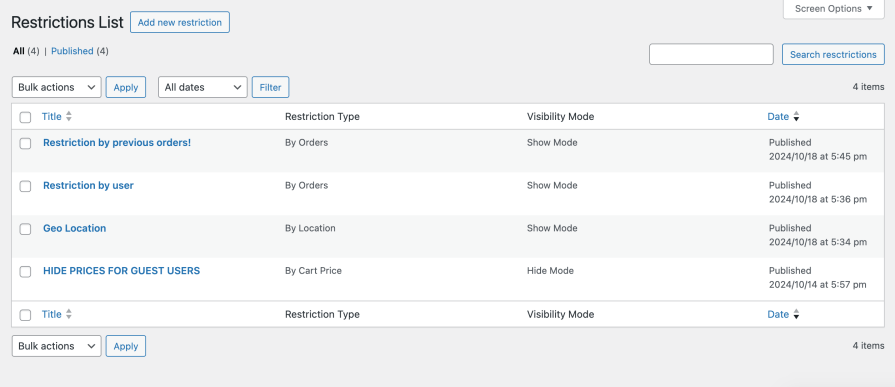
You can set your restriction rule name and set priority for the rule (rules with higher priority will be applied first). For example, restrict access to a product variation for non-wholesale customers, or display unique pricing only to logged-in users.
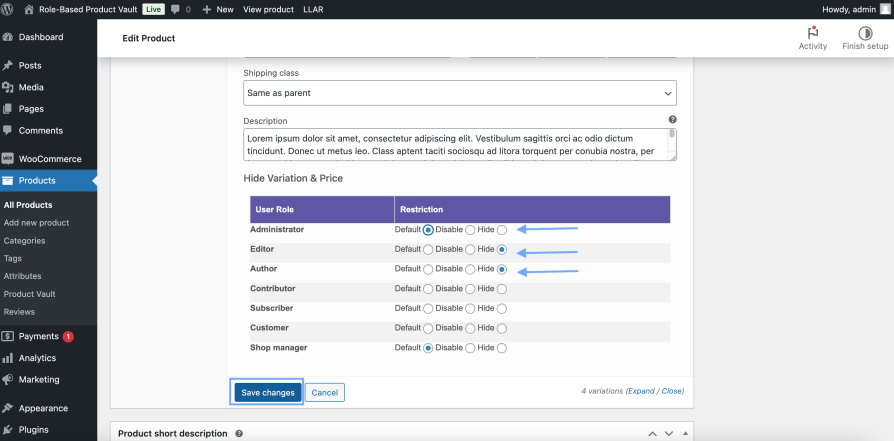
You can set variations visibility and disable them by user role. This is especially helpful for B2B WooCommerce stores where only business accounts can access special variants or pricing.
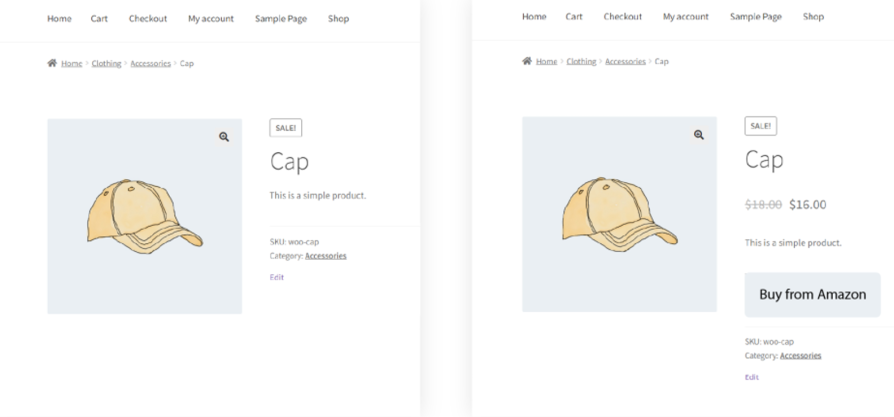
Controlled display of products, prices, and buttons based on active restrictions, ensuring a clean and personalized storefront.
Yes, variations can be hidden by configuring the restriction rules at the variation level.
You can create and apply multiple restriction rules at once. The plugin uses a priority system, so the rule with the highest priority overrides others on the same product.
Yes. Create a rule targeting the Guest role specifically, and hide or replace the price with a custom message or login prompt while leaving pricing visible to logged-in customers.
Yes, the plugin offers geolocation-based product visibility controls to help you localize your WooCommerce store and comply with regional policies.
Yes. You can set rules based on previous orders or total amount spent. For example, hiding new-arrival products from first-time shoppers or unlocking items after a spend threshold.
Yes. Use the location-based rules to hide products, categories, or prices from shoppers in specific countries, based on geolocation.
Informazioni sull'estensione
Controlli di qualità
Compatibilità
Paesi







