

L'abbonamento include
Supporto
Smart Delivery Estimates removes the guesswork from delivery timing. Instead of a generic “ships in 5–7 business days” message shown to every visitor, this plugin reads your actual WooCommerce shipping zone configuration and displays the delivery window that genuinely applies to each customer — calculated from their real location, not a one-size-fits-all guess.
A customer in New York sees your US zone’s estimate. A customer in Canada sees your Canada zone’s estimate. Both are accurate, both update automatically, and neither requires the customer to type anything.
How It Works
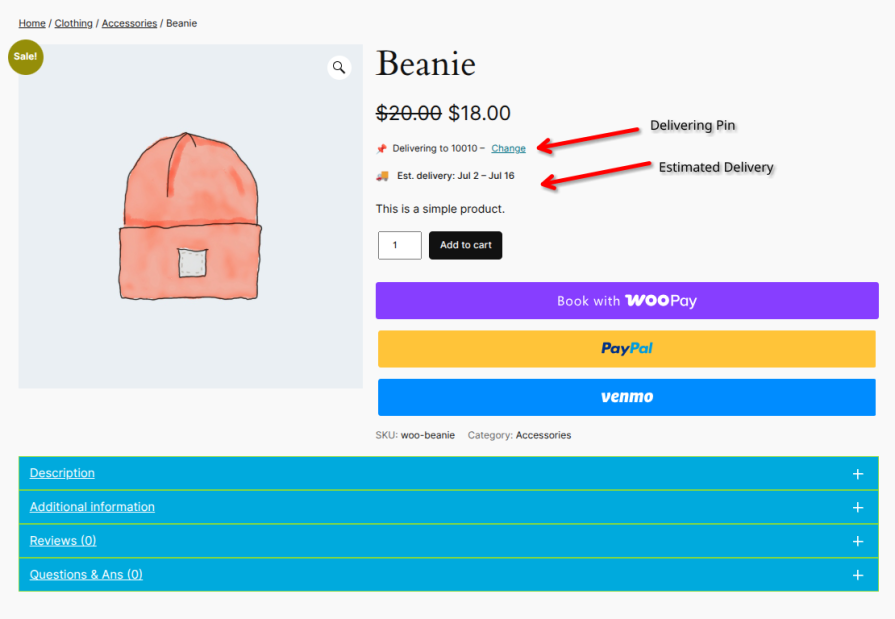
The moment a customer lands on your store, Smart Delivery Estimates detects their approximate location via IP geolocation and matches it against your configured WooCommerce shipping zones — instantly, with no page reload and no postcode entry required. The customer sees a delivery estimate immediately: “Delivering to 10010 — Est. delivery: May 25 – May 27.” If the detected location is wrong, a one-click Change link lets them enter their own postcode, and the estimate updates in place.
That same detected postcode flows through to checkout, pre-filling the postcode field so any postcode-dependent shipping method (USPS, Table Rate, carrier plugins) calculates correctly without the customer re-entering it.
Three Delivery Strategies — Pick What Fits Your Store
Global Rules sets one delivery window for your entire store — perfect for single-region sellers who just want a simple, consistent estimate everywhere.
Shipping Zone Based assigns a different delivery window to each WooCommerce shipping zone you’ve already configured — ideal for stores shipping internationally where delivery time genuinely differs by country or region.
Shipping Zone + Method Based goes one step further, letting each shipping method within a zone carry its own estimate — so “Standard Shipping” can show 5–7 days while “Express Shipping” shows 1–2 days, within the same zone, automatically matched to whichever method the customer selects.
Built for Real Stores, Not Just Demos
Estimates aren’t limited to the product page. They appear consistently across the shop and category loop, the cart (classic and WooCommerce Blocks), checkout, the order confirmation page, and order confirmation emails — so customers see the same trustworthy information at every step of their purchase journey, including after checkout when it matters most for reducing “where’s my order” support tickets.
Delivery dates respect working days by default, skip weekends automatically, and can include a daily order cutoff time (“Order before 3:00 PM Mon–Fri for delivery May 25–27”). Individual products or categories can override the zone’s default timing entirely — useful for pre-order items, made-to-order goods, or anything that genuinely ships on a different schedule.
Everything renders through WordPress’s native translation functions, so month names, weekday names, and date formats automatically match your site’s active language without any extra configuration.
Key Features
Works With
For Store Owners
Setup takes under five minutes. Select your delivery strategy, configure min/max days per shipping zone, set an optional daily cutoff time, and the plugin handles the rest. No coding required. The delivery format is fully customizable — use built-in placeholders like {start_month_short} {start_day} to match your store’s style.
No. The plugin reads your existing WooCommerce shipping zone setup — there's nothing to duplicate or re-enter.
You choose the fallback behavior: auto-detect via IP (recommended), default to your "Locations not covered" zone, or simply hide the estimate and prompt for a postcode.
Yes — both the classic shortcode-based cart/checkout and the Blocks-based cart/checkout are fully supported.
Yes. Smart Delivery Estimates is designed to layer on top of your existing shipping methods rather than replace them.
Yes — the delivery text format is fully customizable using placeholders like {start_month_short} {start_day}, so you control exactly how dates appear.
Categorie
Informazioni sull'estensione
Controlli di qualità
Paesi







