

Confronto prodotti
L'abbonamento include
Supporto
This plugin lets you automatically adjust product prices across your entire WooCommerce store based on real-world conditions. Set rules using product categories, stock levels, customer location, date and time, device type, and operating system — then let the plugin handle the rest.
Prices update instantly on shop pages, product pages, the cart, checkout, thank-you page, and order details. Your customers always see consistent, accurate pricing at every step.
With built-in CSV and JSON import/export, AJAX-powered performance, and enterprise-grade validation, Smart Dynamic Pricing is built for stores that need pricing automation they can trust — whether you sell 50 products or 50,000.
Trusted by Thousands of WooCommerce Store Owners
Smart Dynamic Pricing is built by Dotstore, the team behind 45+ specialized WooCommerce plugins trusted by 4,000+ website users worldwide. Every plugin in the Dotstore catalog is developed by Multidots — a team of 160+ WordPress professionals with deep WooCommerce expertise. When you install Smart Dynamic Pricing, you get the same code quality, dedicated support, and regular updates that Dotstore customers have relied on since 2014.
Dynamic Pricing Powers the World’s Leading Brands
The strategy behind this plugin is not experimental. Dynamic pricing is already driving billions of dollars in revenue for the world’s most successful companies:
Amazon adjusts product prices millions of times every day, using real-time signals like demand, competition, and inventory levels. That same principle — matching the right price to the right moment — is exactly what Smart Dynamic Pricing brings to WooCommerce store owners.
Airbnb uses Smart Pricing to help hosts set optimal nightly rates based on local demand, seasonality, and event proximity. Hosts who enable it see significantly more bookings and higher earnings. The location-based and date/time rules in this plugin give WooCommerce stores the same capability.
Uber pioneered surge pricing — adjusting ride fares in real time based on demand density and driver availability. While your store does not sell rides, the underlying logic is identical: when demand is high and supply is limited, pricing should reflect that. Stock-based rules in Smart Dynamic Pricing automate this for physical and digital products.
These are not niche tactics. Over 30% of e-commerce companies already use some form of dynamic pricing, and the global dynamic pricing software market is projected to reach $41.43 billion by 2033. Smart Dynamic Pricing makes these enterprise-grade strategies accessible to every WooCommerce store — no API subscriptions, no SaaS fees, no external dependencies.

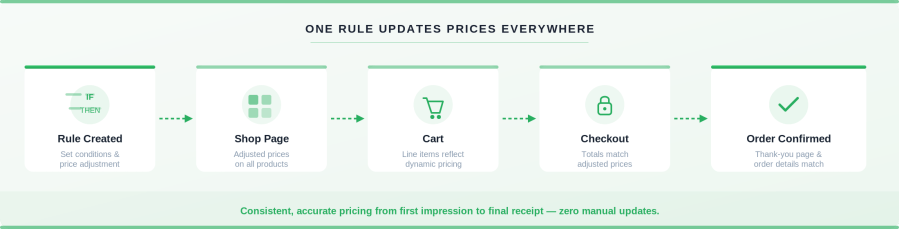
Fixed pricing leaves money on the table. A customer browsing from New York at 2 PM on a Tuesday has different buying triggers than someone in London shopping on a Saturday night. Smart Dynamic Pricing lets you respond to those differences automatically.
The numbers back this up. Research from McKinsey shows that retailers implementing dynamic pricing see 5–10% margin improvements on average. During peak seasons and promotional windows, stores report 15–25% revenue lifts from automated, rule-based pricing. And the payback period is fast — most stores recoup the cost of this plugin within the first promotional cycle.
Here is what that looks like in practice:
Reduce abandoned carts.
A visitor browses your store on a mobile device but leaves without buying. With device-based pricing rules, you could offer a small mobile-only discount that nudges them to complete the purchase. For example, a 5% discount for mobile shoppers during evening hours when browsing is at its highest.
Sell smarter across regions.
You sell globally, but a $99 price point that works in the US might be too high for customers in India or Brazil. Location-based rules let you set regional pricing by country, state, or city — so your offers stay competitive in every market without manually managing separate price lists.
Move slow inventory automatically.
You have 200 units of a seasonal product that did not sell as expected. Instead of manually discounting it, set a stock-based rule: when inventory exceeds 100 units, apply a 15% discount automatically. When the stock drops below 20, remove the discount or even increase the price. Your inventory manages itself.
Run flash sales without the stress.
Set a date-and-time rule to activate a 20% discount every Friday at 6 PM and end it on Sunday at midnight. The plugin turns the sale on and off automatically — no late-night logins, no forgotten coupons, no pricing errors.
Scale without slowing down.
As your catalog and traffic grow, manual price changes become risky and time-consuming. Smart Dynamic Pricing replaces repetitive work with rule-based automation, reducing errors and saving hours every week. The AJAX-powered engine and smart caching keep your store fast, even with dozens of active rules.
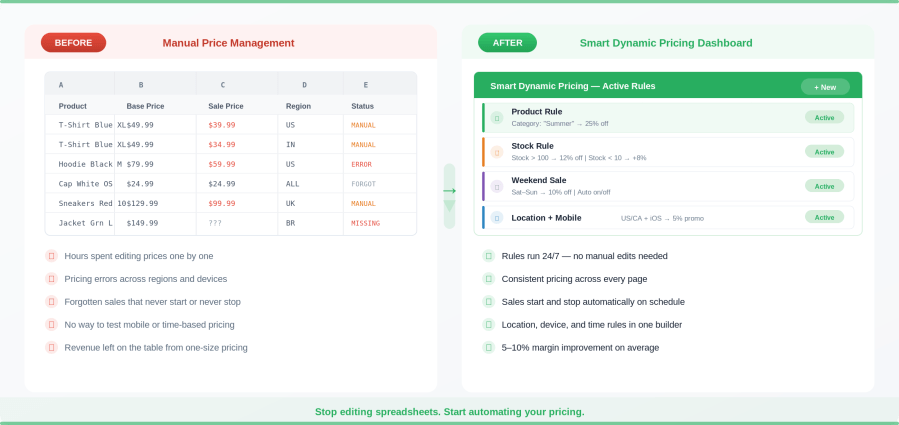
This plugin is not only for large stores. It is for any WooCommerce business that wants more control, better conversions, and less manual work. Here are the most common situations where it becomes essential:
Smart Dynamic Pricing gives you ten types of pricing rules, each designed around real business scenarios — not theoretical use cases.
Control pricing at the product level. Apply discounts to specific products, categories, tags, or brands. Exclude certain items from discounts when needed.
Real-life example: A clothing store runs a summer clearance sale with 25% off everything in the “Summer Collection” category, but excludes new arrivals tagged “fall-preview” from the discount.
Let inventory levels drive your pricing automatically. Increase prices when stock is low to protect margins, or discount products with excess inventory to clear space.
Real-life example: An electronics store has 300 units of last year’s phone case model. A stock-based rule automatically applies a 20% discount when inventory exceeds 150 units, dropping to 10% when stock falls below 50. No manual intervention needed.
Show different prices based on the customer’s country, state, or city. The plugin detects location using saved addresses for logged-in users and browser location for guests.
Real-life example: A nutrition supplement brand charges standard pricing in the US and Canada, but offers a 15% regional discount for customers in India, Brazil, and Mexico — making their products competitive in price-sensitive markets.
Schedule pricing changes by specific date ranges, time of day, day of the week, or month of the year. No need to manually start or stop promotions.
Real-life example: A coffee equipment store runs a “Weekend Brew Sale” every Saturday and Sunday with 10% off all grinders. A separate rule offers 15% off site-wide during the first week of December for a holiday promotion. Both rules activate and deactivate automatically.
Target customers based on their device or operating system. Create mobile-only discounts, OS-specific promotions, or device-based pricing experiments.
Real-life example: A fitness apparel brand offers a 5% “mobile shopper” discount to customers browsing on iOS and Android devices. This encourages mobile conversions, which historically have a higher abandonment rate.
Adapt pricing based on who the customer is. Differentiate between logged-in customers and guest users, or combine user context with location and device rules for highly personalized pricing.
Real-life example: A B2B wholesale supplier offers logged-in wholesale customers a flat 30% discount across all products, while guest visitors see standard retail pricing. This replaces the need for a separate wholesale catalog.
Build complex pricing logic without conflicts. Outer groups work like an if/else-if ladder, with each group containing inner conditions combined using AND or OR logic. The first matching outer group applies the price adjustment.
Real-life example: A global furniture store sets up three outer groups: Group 1 checks if the customer is in the US AND browsing on mobile (applies 8% discount). Group 2 checks if the customer is in the UK AND it is a weekend (applies 12% discount). Group 3 applies a default 5% discount for everyone else. Only one group fires — no stacking, no conflicts.
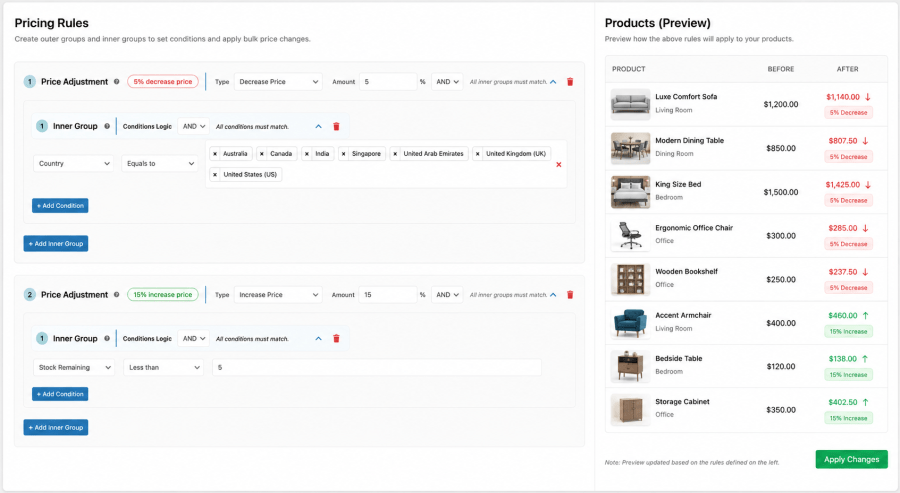
When more than one rule qualifies for the same product, you control what happens. Choose between First Occurrence (the default — the first matching rule wins), Highest Discount (the customer gets the best deal), or Lowest Discount (you protect your margins).
Real-life example: A pet supply store has a “Weekend Sale” rule (10% off) and a “Low Stock” rule (15% off for items with fewer than 5 units). Using the Highest Discount strategy, a customer shopping on Saturday for a low-stock item gets the 15% discount automatically.
Manage pricing rules efficiently across environments. Export rules as JSON for backups, migrate rules from staging to production, or bulk-update rules across multiple stores using AJAX-based batch processing.
Real-life example: An agency managing 12 WooCommerce stores for different clients builds a set of holiday pricing rules on a staging site, tests them, then exports the JSON and imports it into all 12 production stores in minutes.
Every rule follows built-in safety checks. Prices can never go negative, and a minimum price floor (for example, $0.01) is enforced automatically. Even when multiple discounts apply, your pricing stays accurate and reliable.
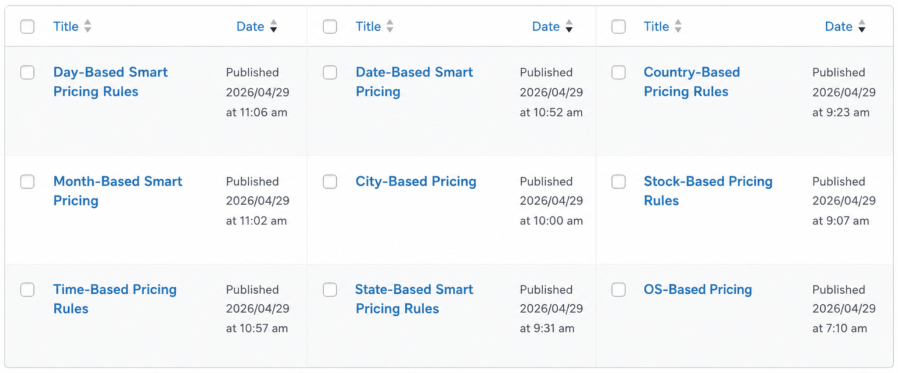
For logged-in users, the plugin reads the shipping or billing address stored in their WooCommerce account. For guest visitors, it uses browser-based geolocation (with the visitor’s permission) to detect country, state, or city. This dual approach ensures accurate location detection for both returning and first-time customers.
Yes. Location-based rules let you set unique pricing by country, state, or city. For example, you can offer a 15% discount for customers in India while keeping standard pricing in the US — all from a single product catalog. No need for separate stores or multi-currency plugins.
You control the outcome with three matching strategies. First Occurrence applies the first matching rule and stops. The highest discount gives the customer the best possible price. Lowest Discount protects your margins by applying the smallest adjustment. Choose the strategy that fits your business goals.
No. Smart Dynamic Pricing uses AJAX-powered processing and smart caching to evaluate rules without impacting page load times. The engine is designed for high-traffic stores with large catalogs and dozens of active rules.
Yes. Date and time-based rules let you define exact start and end dates, specific days of the week, or time-of-day windows. For example, you can schedule a flash sale every Friday at 6 PM that automatically ends Sunday at midnight — no manual intervention required.
Yes. Pricing rules apply to simple products, variable products, and individual variations. You can target specific variations within a variable product or apply a blanket rule across all variations in a category.
Yes. Every rule type supports exclusions. You can exclude specific products, categories, tags, or brands from any discount. For example, run a store-wide 20% sale but exclude products tagged “premium” or “new-arrival.”
Yes. Smart Dynamic Pricing is listed on the official WooCommerce Marketplace. It has been reviewed and vetted for code quality, security, and WooCommerce compatibility. You can install it with confidence knowing it meets WooCommerce’s development standards.
No. The plugin runs entirely inside your WordPress installation. There are no external API calls, no SaaS subscriptions, and no monthly fees beyond your plugin license. Your pricing data stays on your server.
Coupon codes require customers to find and enter a code at checkout. Smart Dynamic Pricing applies price adjustments automatically based on conditions you define — no codes needed. Customers see the adjusted price on the shop page, product page, cart, and checkout without taking any action.
Yes. Use User Context rules to differentiate between logged-in wholesale customers and guest retail visitors. For example, logged-in users with a “wholesale” role can see a flat 30% discount across all products, while everyone else sees standard retail pricing.
Yes. Device and OS-based rules let you target customers by device type (mobile, tablet, desktop) or operating system (iOS, Android, Windows, macOS). This is useful for running mobile-only promotions or testing device-specific pricing strategies.
Yes. Rules can be exported as JSON files and imported into any other WooCommerce store running Smart Dynamic Pricing. This is especially useful for agencies managing multiple client stores or for migrating rules from staging to production environments.
Outer groups work like an if/else-if ladder — the plugin checks each outer group in order and applies the first one that matches. Inside each outer group, inner conditions are combined with AND or OR logic. Use this when you need multi-condition rules, such as “customer is in the US AND browsing on mobile, AND it is a weekend.”
Yes. The plugin is built following WooCommerce development standards and is compatible with most themes and plugins. It is developed by theDotstore, the team behind 45+ WooCommerce extensions, so compatibility with the broader WooCommerce ecosystem is a core priority.
Go to the Smart Dynamic Pricing rule builder, select “Stock-Based Rule,” and define your thresholds. For example, when stock exceeds 100 units, apply a 15% discount. When the stock drops below 20, remove the discount. The plugin checks inventory levels in real time and adjusts prices automatically.
Yes. Stock-based rules work in both directions. You can increase prices when inventory is low (scarcity pricing) or decrease prices when inventory is high (clearance pricing). This gives you the same demand-responsive pricing strategy used by companies like Uber and Airbnb, applied to physical and digital products.
Categorie
Informazioni sull'estensione
Controlli di qualità
Paesi







