

L'abbonamento include
Supporto
When customers can’t decide between two or more products, they leave. Product comparison is one of the most effective tools for reducing that drop-off — giving shoppers a clear, structured view of how products differ so they can make a confident purchase decision without going elsewhere.
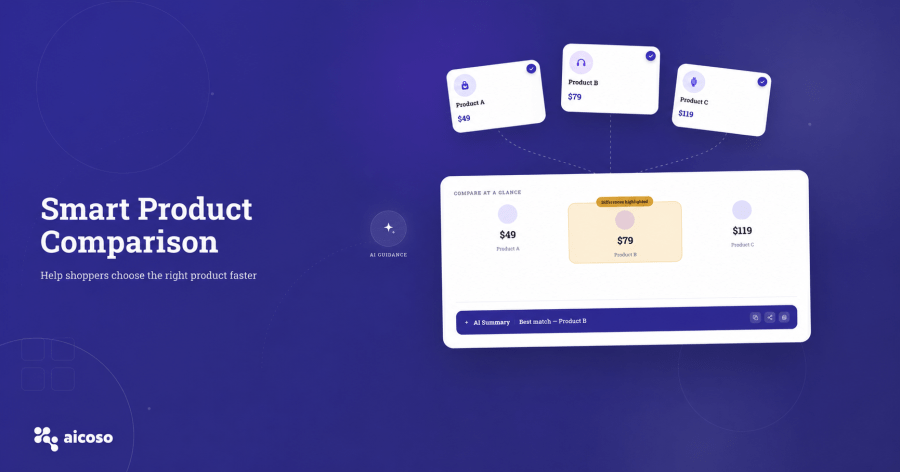
The AICOSO Product Comparison Plugin for WooCommerce brings a fully featured comparison experience to your store. Choose which fields to display, highlight only the differences that matter, design your own comparison popup or floating bar, let customers share comparisons across social platforms, and most importantly, gives every shopper an instant AI-generated summary of the products they’re comparing, so they understand exactly what they’re choosing and why. Available for $X/yr through the WooCommerce Marketplace.
Using:
You decide what information appears in every product comparison. Choose from product image, short description, price, SKU, stock status, dimensions, weight, or any other field relevant to your store’s products. For each comparison session, you can also control which fields are visible and choose to hide rows where the values are identical across all selected products — so the comparison stays focused on what actually differs between them, rather than repeating the same information across every column. This keeps the comparison clean, relevant, and easier for customers to read at a glance.
The plugin gives you full control over how the comparison experience looks on your store. Use the built-in comparison designer to configure your popup layout, colours, and display options to match your store’s branding. Prefer a less intrusive format? Enable the floating bar instead, which gives customers a persistent, accessible comparison tray as they browse your catalogue. Both formats are built to work within your existing WooCommerce theme without requiring any custom development.
This is the feature that sets the AICOSO Product Comparison Plugin apart from every other comparison tool available for WooCommerce. Once a customer has added products to their comparison view, they can trigger an AI analysis of the selected products. Within seconds, the plugin generates a full written summary and analysis of everything being compared — breaking down the key differences, strengths, and trade-offs across the selected products in plain language.
No other product comparison plugin for WooCommerce offers this. Stores on Amazon and Flipkart invest heavily in helping customers understand product differences — the AICOSO plugin brings that same level of clarity to your WooCommerce store, without the enterprise budget.
Customers can also choose the tone of the AI response before generating it. Three options are available: friendly and enthusiastic for a conversational, approachable tone; professional and detailed for customers who want a thorough, structured breakdown; and minimalist and direct for customers who just want the key points quickly. This means the AI analysis adapts to the type of customer reading it, rather than delivering one generic output for everyone.
Once the AI comparison analysis is generated, the panel is fully draggable. Customers can pick it up and move it anywhere on their screen — so it doesn’t block the product images or comparison table they’re still reviewing. This small but meaningful design decision keeps the comparison experience comfortable and uninterrupted, regardless of screen size or layout preference.
Customers don’t always buy alone. Shoppers frequently want to share a product comparison with a partner, friend, or colleague before committing to a purchase. The plugin includes built-in sharing options so customers can share their active comparison directly to Facebook, WhatsApp, or X, or copy a link to share via any other channel they prefer. Sharing a comparison keeps your store involved in the decision-making conversation — even when it happens outside your website.
The plugin removes friction at the final step. Once a customer has reviewed the comparison and made their decision, they don’t need to close the comparison window, navigate back to the product page, and add to cart manually. A Buy Now button is built directly into the comparison interface, allowing the customer to go straight to cart or checkout from inside the comparison view. Fewer steps between decision and purchase means fewer customers dropping off before they complete the order.
Getting started takes under 10 minutes:
No developer required. No third-party platform or external service needed beyond the plugin itself.
Customers who compare products are closer to buying than customers who are still browsing.
Therefore, the AICOSO Product Comparison Plugin gives them the tools to make that decision confidently with customisable comparison fields, flexible design, social sharing, direct checkout, and an AI analysis that explains exactly what they’re choosing and why.
You can display product image, short description, price, SKU, stock status, dimensions, weight, and other available product fields. You can also choose which fields to show and hide rows where values are identical across all compared products.
Once products are added to the comparison view, the customer triggers an AI analysis. The plugin generates a written summary of the key differences, strengths, and trade-offs across the selected products within seconds. The customer can choose the tone, such as friendly, professional, or minimalist before generating the response.
Yes. The plugin includes sharing options for Facebook, WhatsApp, and X, as well as a copy-link option for sharing through any other channel.
Yes. The Buy Now button inside the comparison window routes directly to your standard WooCommerce cart or checkout flow — no separate configuration required.
The AICOSO Product Comparison Plugin is available exclusively through the WooCommerce Marketplace at $X/yr. Purchase, updates, billing, and renewals are all handled through the Marketplace.
Controlli di qualità
Paesi







