Icona del prodotto

Tab Manager per WooCommerce

Gives you complete control over your product page tabs, create local and global tabs using a visual drag-and-drop interface, and more.
Scegli un'opzione di fatturazione
$99
Risparmia 20%
$198 $158.40

Confronto prodotti

L'abbonamento include

  • Aggiornamenti e miglioramenti del prodotto
  • Servizio clienti
  • Garanzia di rimborso entro 30 giorni

Showcase product information by adding custom tabs

Completely Customize Product Tabs with WooCommerce Tab Manager

As a WooCommerce store owner, we know you love your products. In fact, you love them so much you probably want to tell your customers everything about them, from dimensions to shipping and manufacturing details. We get it! But you probably want a really polished way to do it on your product pages, right? Tab Manager helps you create professional, informative product pages using easy-to-manage product tabs.

Tab Manager gives you complete control over your product page tabs, allowing you to easily create new tabs for products, share tabs among multiple products, reorder tabs using a visual drag-and-drop interface, and more. No more messing with filters, template files, or modifying your theme; you’ll be able to create custom tabs from the convenience of the WordPress dashboard. Even most 3rd party tabs added by other plugins will be detected, allowing you to hide or order them alongside your own tabs.
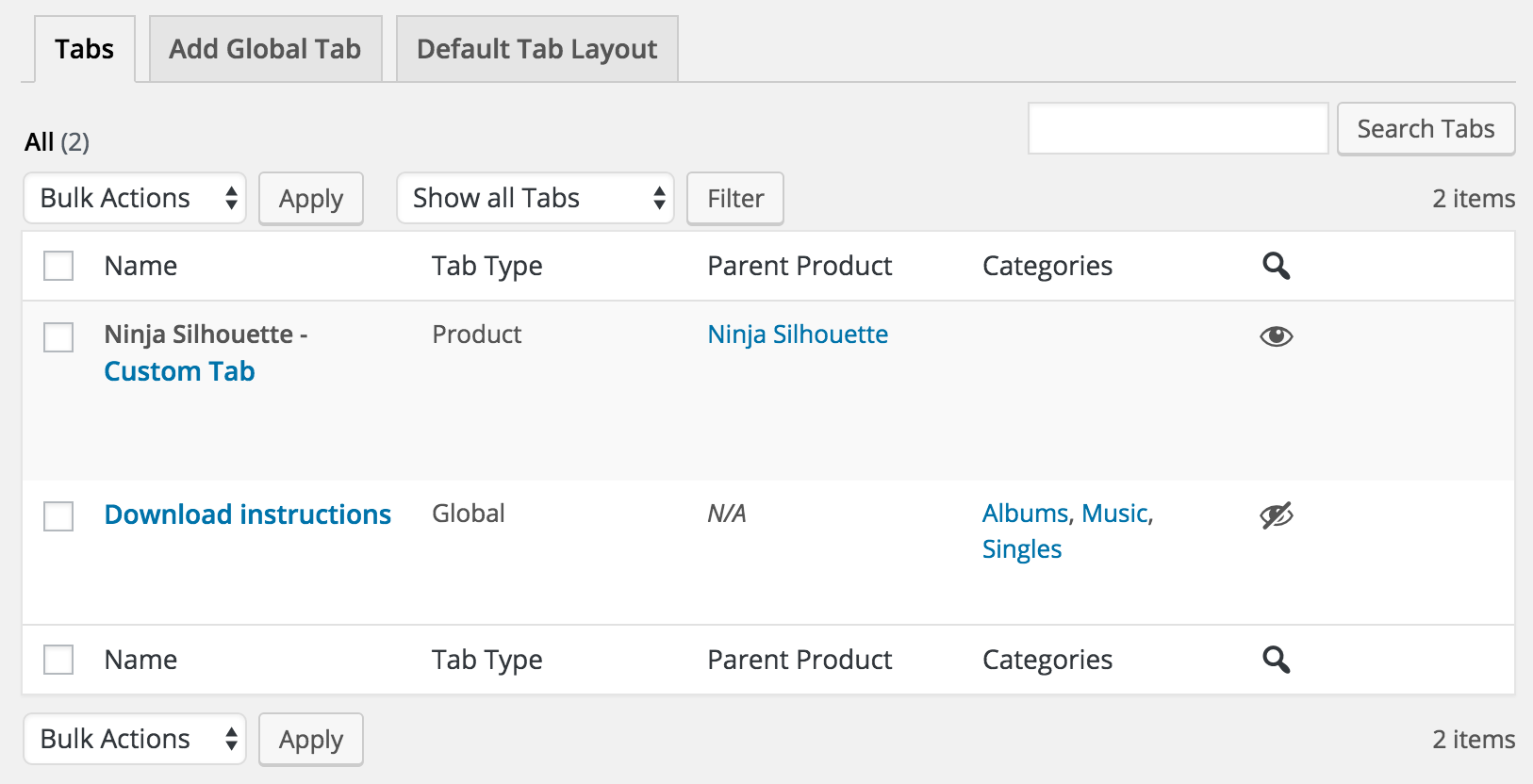
WooCommerce Tab Manager - Tab List

What Can Tab Manger Do?

  • Core tabs – re-order, remove, or rename the core Description, Additional Information, and Reviews tabs
  • 3rd Party tabs – most tabs added by 3rd party plugins will be automatically detected, and will be sortable
  • Global tabs – create tabs that can be added to more than one product, allowing for easy content sharing and saving you time!
  • Global tabs can also be restricted to display only on certain product categories NEW
  • Product level tabs – create tabs that are customized to a specific product.
  • Create a default tab layout (re-order as you wish!) that can be applied to all products
  • Override the default layout on a per-product basis to customize tabs for a single product.
  • Add any number of custom product tabs and order them
  • Include tab content in site search results NEW
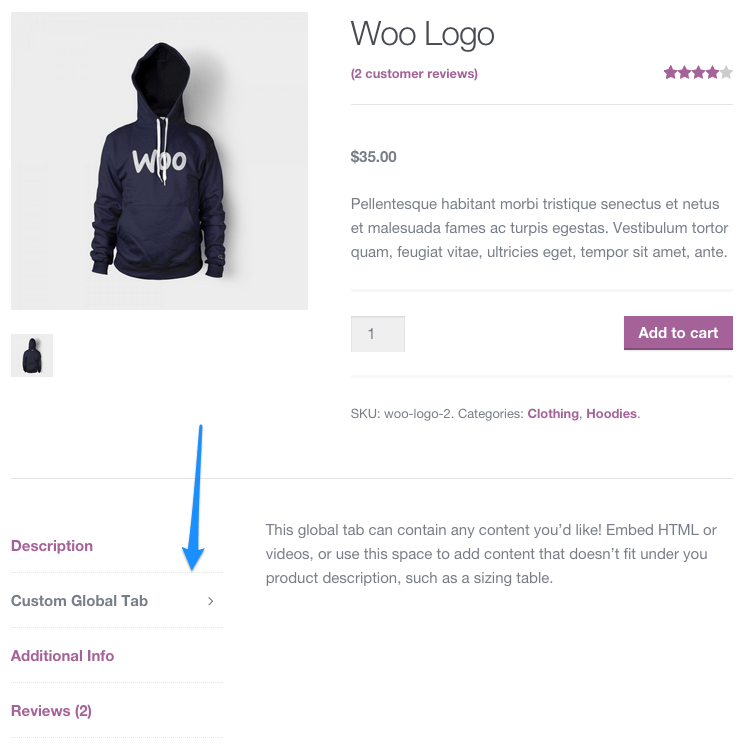
WooCommerce Tab Manager frontend
Example of a custom tab

Default Tab Layout

Manage the default tabs for all products in your store (which can be overridden on a per-product basis)! You can re-order tabs, rename them, remove core tabs, and add your own global tabs.
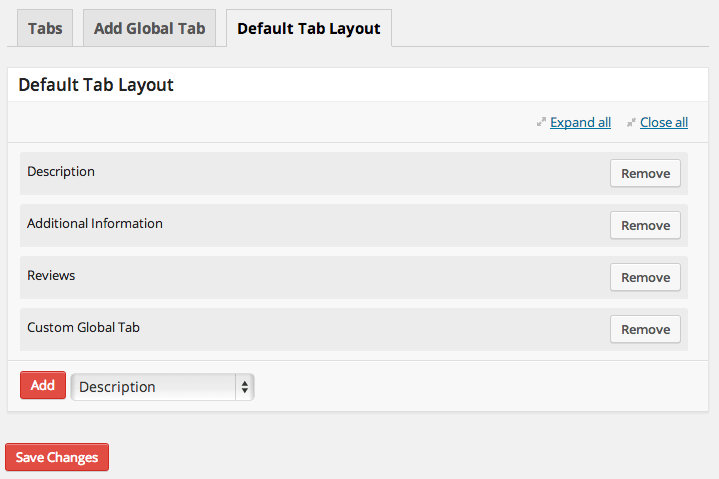
WooCommerce Tab Manager Default Tab Layout
Default Tab Layout

Per-Category Global Tabs – NEW

Need to add global tabs, but only for certain product categories? You can determine which global tabs should show up on which categories, even if the global tab is part of your default layout.
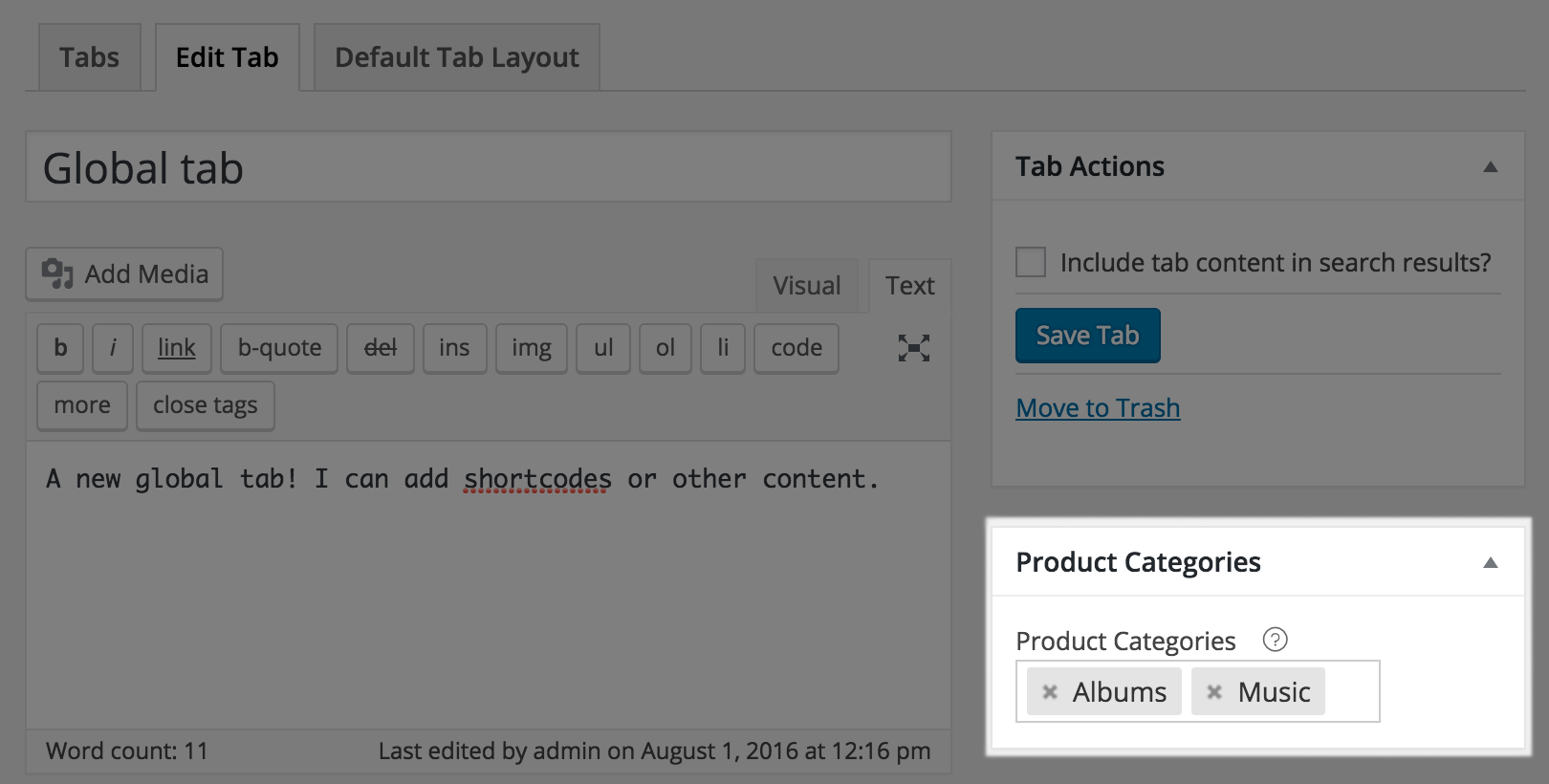
WooCommerce Tab Manager: Global tab categories

Or, just leave your category selector blank to let global tabs show for any product.

Overriding Product Layout

If a product needs a unique tab layout, or a customized tab, you can override the default tab layout. This lets you re-order tabs for the product, remove tabs from the default layout, add global tabs, or add a customized tab for this product.
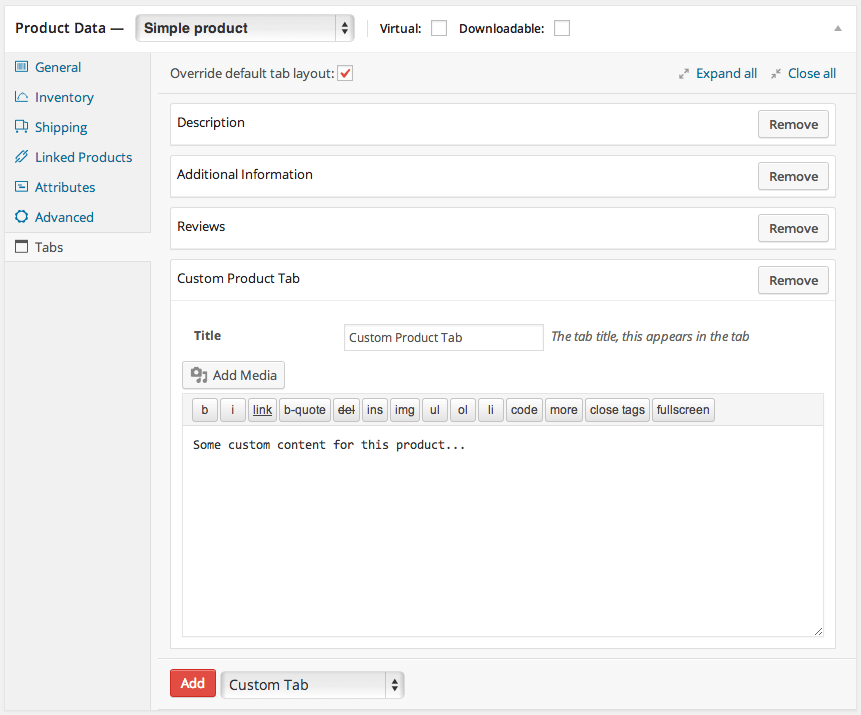
WooCommerce Tab Manager Add Custom Product Tabs
Add Custom Tabs Under Product Data

Keep Tab Content in Your Search Results

Any product-specific tabs you add will mostly likely contain content. If a customer searches for a keyword in that content, the product will show up as a search result. You can also make global tabs searchable, which is helpful if a global tab is only used on certain products.
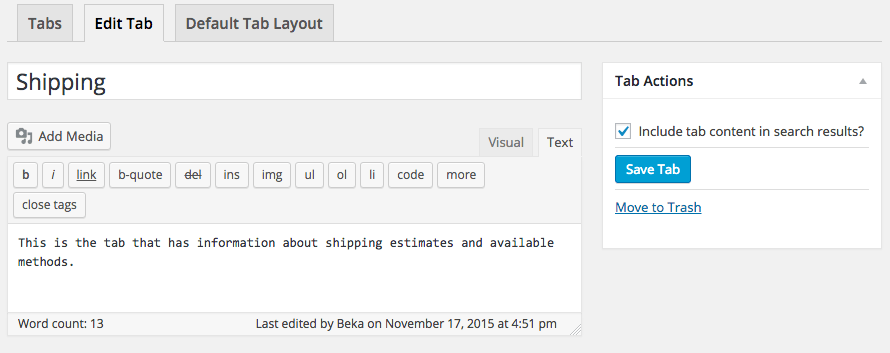
WooCommerce Tab Manager make tab searchable

This is even compatible with the popular, free Relevanssi plugin to keep tab content in your search index.

Embed Forms & Information in Tabs

You can use separate tabs to display embedded information, such as videos, images, and more. Shortcodes will be expanded in tab content so you can embed information from other popular plugins like Gravity Forms for pre-sales forms, embed YouTube product explainer videos, or use other shortcodes to modify content display.

How to Get Started (in 5 minutes or less)

  1. Buy this extension 🙂
  2. Download and install into your WooCommerce store
  3. Start adding tabs under Product Data, or add global tabs under WooCommerce > Tab Manager
  4. That’s it! Sit back and enjoy superbly managed tabs!

Need any more reason to buy? When you purchase a SkyVerge-developed extension, you’re getting the highest quality extensions for your WooCommerce store. Gain peace of mind by knowing that when you purchase our products, your store’s performance is as important to us as it is to you.


Informazioni sull'estensione

  • Versione PHP richiesta: 7.4
  • Testato con WordPress: 7.0
  • Testato con WooCommerce: 10.8.1
  • Richiede almeno WordPress: 5.6
  • Richiede almeno WooCommerce: 3.9.4

Funziona con

Paesi

  • Mondiale

Lingue

English (United States), French (France), Italian

Recensioni dei clienti

Valutazione media 3.4

16 reviews from verified users

5 stelle, 56% delle recensioni
4 stelle, 0% delle recensioni
3 stelle, 6% delle recensioni
2 stelle, 6% delle recensioni
1 stella, 31% delle recensioni
  • Valutato 1 su 5
    Matt FlewittUnited Kingdom (UK)Feb 8, 2026
    This should be built into woocommerce and we only pay for it because woocommerce product reviews stops working without it, which then removes all the ratings and photos left by reviewers, I resent having to pay for this plugin and wish we’d picked a different product review plugin so we didn’t have to also pay for this.
  • Valutato 1 su 5
    rixonjayUnited Kingdom (UK)Jan 22, 2026
    Warning: This Plugin Breaks WordPress Search function. This issue isn’t limited to one site or one type of theme. If you have this plugin installed, your customers will not be able to search product names or codes for WooCommerce products. We have lost sales due to this issue that SkyVerge have spent weeks denying, they blamed everything else for the search not working. Even though when we first reported the problem they confirmed they could see the issue on a test site at their end. We did everything that SkyVerge asked us to do, videos, screen grabs etc. and they just kept stringing us along. They then released an update and the fist line of the fixes is the issue with the search not working!!! 6 weeks of being made to think the issue was something we had done and losing sales.... DO NOT BUY THIS PLUGIN!!
  • Valutato 1 su 5
    LuckyCanadaJan 6, 2026
    Warning: This Plugin Breaks WordPress Search This issue isn’t limited to my site; if you have this plugin installed, your customers likely can’t search for WooCommerce products, even if you’re using a separate search plugin. That means lost sales. The developer acknowledged the problem when I opened a support ticket, but the fix may take up to 30 days. In the meantime, they still continue to happy sell the plugin. Take your money elsewhere.
  • Valutato 1 su 5
    TomAustriaNov 16, 2025
    I am using TT5 block theme and than this: WooCommerce Tab Manager is not yet compatible with the Checkout block. We recommend following this guide to revert to the [woocommerce_checkout] shortcode. and this: WooCommerce Tab Manager is not yet compatible with the Cart block. We recommend following this guide to revert to the [woocommerce_cart] shortcode. this is incredible :(
  • Valutato 2 su 5
    jmSpainOct 6, 2025
    Great concept, but outdated and poor support – needs urgent update I originally loved the idea behind WooCommerce Tab Manager – it's a straightforward way to customize product tabs without hacking code, and it works fine on the frontend for basic setups. However, after the WordPress 6.7 update (late 2024), the plugin hasn't been touched since August 2024, leaving it incompatible with modern WP standards. I'm now flooded with PHP notices in debug logs: "Notice: Function _load_textdomain_just_in_time was called incorrectly. Translation loading for the woocommerce-tab-manager domain was triggered too early." This doesn't break the site, but when debugging any WooCommerce issue, the logs are useless – buried under hundreds of these warnings every page load. It's frustrating for developers or anyone maintaining a store. I contacted support twice: first 2 months ago, got a polite "we'll fix it soon." Followed up recently, same vague response. No timeline, no patch. At this point, it feels abandoned. If you're on an older WP version, it might still work okay. Fix the support and update the plugin, devs – it has potential! Original Review: Fantastic support! Thank you.

Related Products

Prezzo $119 Annualmente
Valutato 3.5 su 5 stelle
Prezzo $109 Annualmente
Valutato 4.6 su 5 stelle
Prezzo $149 Annualmente
Valutato 4.8 su 5 stelle
Prezzo $279 Annualmente
Valutato 3.2 su 5 stelle
Prezzo $79 Annualmente
Valutato 4 su 5 stelle
Prezzo $29 Annualmente
Valutato 3.6 su 5 stelle
Prezzo $79 Annualmente
Valutato 4.2 su 5 stelle
Prezzo $49 Annualmente
Valutato 3.6 su 5 stelle
Prezzo $199 Annualmente
Valutato 4 su 5 stelle
Uso dei tuoi dati personali
Noi e i nostri partner trattiamo i tuoi dati personali (come dati di navigazione, indirizzi IP, informazioni sui cookie e altri identificatori univoci) sulla base del tuo consenso e/o del nostro legittimo interesse per ottimizzare il nostro sito web, le attività di marketing e la tua esperienza utente.