
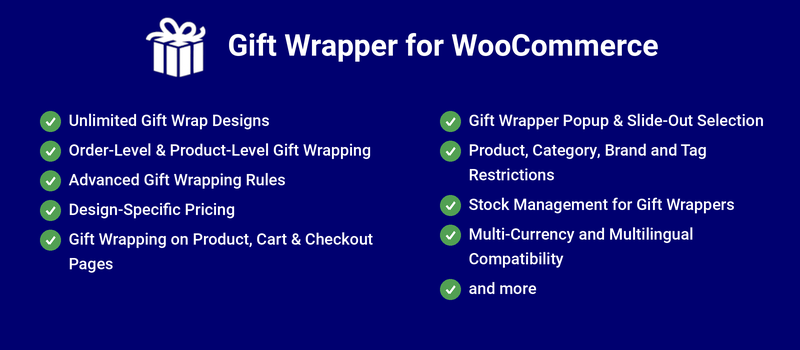
With Gift Wrapper for WooCommerce, shoppers can add gift wrap to individual products right from the product page, or gift wrap their entire order from the cart or checkout page. They can also enter a personalized message, and store owners can choose whether to charge a fee for gift wrapping,
Benefits
Increased revenue: Set a fee for gift wrapping and up your revenue with every order.
Convenience for customers: Shoppers save time and hassle by ordering already-wrapped gifts, and happy customers are return customers.
Increased brand visibility: Gift wrapping not only makes a good impression on your customers — when they gift your products, recipients also learn about your brand!
Popular Features
Support for multiple product types
Gift Wrapping for WooCommerce supports simple and variable products.
Gift wrapping option on a simple productGift wrapping options on a variable product
Unlimited gift wrapping designs
Configure any number of gift wrap designs, and set optional pricing for each one. It is also possible to set gift wrapper without designs.
Design Configuration Page
Offer gift wrapping from product or checkout pages
On single product pages, shoppers will see the gift wrap option near the “Add to cart” button:
Gift wrap selection on single product page
Once they check the box, the available gift wrap designs will be automatically displayed. When the shopper chooses a design, any gift wrap fee you’ve set will be added to the product’s price, and the total will be updated:
Gift wrapping design selection and message customization on product page
In cart and checkout page, the customer will be able to edit the gift wrapping options which they have selected in product level. If they haven’t selected gift wrapper in product level, then they can choose the gift wrapper for individual items in cart and checkout page.
Customers can also Gift Wrap their entire order in cart and checkout page. When “Gift Wrap this Order” button is clicked, they will be able to select the gift wrapper options.
Gift wrapping option on cart page
When a shopper clicks the “Gift Wrap this Order” button, the available Gift Wrapper designs display in a pop-up:
Gift wrapping design selection and message customization on cart page
When the shopper chooses a design, a “Gift Wrapper” product will be added to the cart:
Gift wrapped products on cart page
Extensive Features List
Gift wrapping can be configured as optional or mandatory
Gift wrap charges can scale automatically based on product quantity
Different gift wrap prices can be assigned to different products
Gift wrapping can be priced at the overall order level
Gift wrap fees can be configured as fixed charges
Each gift wrap design can have its own pricing
Gift wrap fees are dynamically added and recalculated in the cart
Gift wrapping can be offered free of charge
Customers can select gift wrapping directly from individual product pages
Gift wrapping can be applied at the entire order level
Customers can preview available gift wrap designs visually
Customers can enter custom gift messages
Customers can enter sender names
Gift wrapping can be selected using popup and modal interfaces
Gift wrapping interactions update dynamically without full page reloads
Gift wrap options are available directly within the cart and checkout pages
Gift wrap quantities automatically sync with cart quantities
Admins can enable or disable gift wrapping for specific WooCommerce user roles
Gift wrapping can be hidden entirely for guest users
Admins can enable gift wrapping only for selected products
Gift wrapping eligibility can be controlled based on product categories
The plugin validates whether products in the cart are eligible for gift wrapping
The plugin can handle carts containing both gift-wrappable and non-gift-wrappable products
Gift wrapping automatically hides when configured eligibility conditions are not met
Gift wrapping display behavior changes dynamically based on cart and product conditions
Admins can prevent customers from selecting both product-level and order-level wrapping together
Admins can create and manage multiple gift wrap designs
Different gift wrap designs can be assigned to specific products
Admins can configure global settings separately from product-level overrides
Each product can override global gift wrap behavior
Admins can control where gift wrapping appears on product, cart, and checkout pages
Admins can decide where custom fields appear:
Product level
Order level
Both
Custom fields can be made mandatory
Gift wrap selections are automatically stored in WooCommerce order metadata
Gift wrapping information is added to WooCommerce order details
Gift wrap instructions and messages can appear in WooCommerce order notes
Supports WooCommerce Cart and Checkout Blocks
Display positions are configurable for better theme compatibility
The plugin supports localization and translation
Gift wrapping functionality includes shortcode support
The plugin exposes multiple WooCommerce hooks and filters for customization
Developers can reposition frontend components using hooks
Product-level gift wrapper supported for simple and variable product types.
Order gift wrapper supported for all product types.
Gift wrapper option can be given with designs/without designs.
In design mode, unlimited designs can be created and for each design, different prices can be given.
Users can gift wrap the entire order in cart/checkout page even if gift wrapper is selected for any products in product level.
Users can add/edit product level gift wrapper for individual items in cart/checkout page.
The gift wrapper option can be given only for specific products.
Displaying gift wrapper option for certain users/user roles can be excluded.
Possible to hide the gift wrapper option for guest users.
Possible to exclude virtual products from gift wrapping.
Gift wrapper options can be displayed in a pop-up or toggle.
The gift wrapper option can be given as optional or set as mandatory.
Order gift wrapper can be shown on the cart and checkout page.
Different positions supported to show order gift wrapper.
Order gift wrapper price can be multiplied based on item quantity.
Show first name, last name, and gift wrapper message fields to get the respective values.
Gift wrapper designs can be created globally or can be created for each product.
Perguntas frequentes
Is it possible to give different gift wrapper designs for different products?
Gift wrappers can be created at the product level. Go to the edit product page and you can see the “Gift Wrapper” section where you can create gift wrapper designs for the specific product.
How to flag orders placed with gift wrapper to shipstation?
In addition to displaying gift wrapper details in the “Item” section in orders, it will be displayed also in the “Order notes” section. You can use this to flag the gift wrapper information in shipstation.
I’m unable to find the gift wrapper labels/messages displayed in frontend on the PO file. Where can I find it?
The labels/messages displayed in the frontend are customizable.
Go to “WooCommerce > Gift Wrapper > Localization” to customize the labels.
Go to “WooCommerce > Gift Wrapper > Messages” to customize the messages.
Avaliações de clientes
Classificação média
4.4
7 avaliações
5 estrelas, 71% de avaliações
5
71%
4 estrelas, 14% de avaliações
4
14%
3 estrelas, 0% de avaliações
3
0%
2 estrelas, 14% de avaliações
2
14%
1 estrela, 0% de avaliações
1
0%
7 avaliações
Mais recente
Todas as categorias
transformationevangelist
Classificado com 5 de 5
Suporte
mar 6, 2025
Suporte
pauldebnam
Classificado com 2 de 5
Suporte
dez 23, 2024
Suporte
Great plugin - does just what it says
does a great job - just what I needed it to, simple to use and had an issue with one button being too low - support team came back quickly with a simple CSS change which fixed it *Edit for 2024 with reduced rating, bit of a failure, not only did price go up by 60% this year, they also released a breaking update right before Christmas that completely broke our site CSS and stopped several other plugins like sidecart and woocommerce buttons from working just when we needed the plugin, meaning we had to disable to allow customers to take orders. Support wasn't so great asking us to export entire site over to a new test site with no customer data so you can have a play with it just isn't realist...
Cotton Creek Farms
Classificado com 5 de 5
fev 2, 2024
Great Support!
Whipped this plugin in for the holiday shopping rush and I was surprised at how many people bought the gift wrap add on.
Circled back to the developer after the holidays to report an SEO issue I'd like fixed and it was promptly addressed within a day.
Very pleased with the support, attention to detail, and overall experience.
Pauline Thomas
Classificado com 4 de 5
nov 23, 2023
works well but images are too small
It works well but the images are too small to see the wrapping designs, it could do with an option for the customer to zoom in, also on mobile devices if you scroll down to select a design you can no longer see the description and price of your selection, if I had the option to place a single larger image per line with the heading above each image I would use it
Nós e nossos parceiros processamos seus dados pessoais (como dados de navegação, endereços IP, informações de cookies e outros identificadores únicos) com base em seu consentimento e/ou nosso interesse legítimo para otimizar nosso site, atividades de marketing e sua experiência de usuário.




