

Comparação de produtos
A assinatura inclui
Suporte
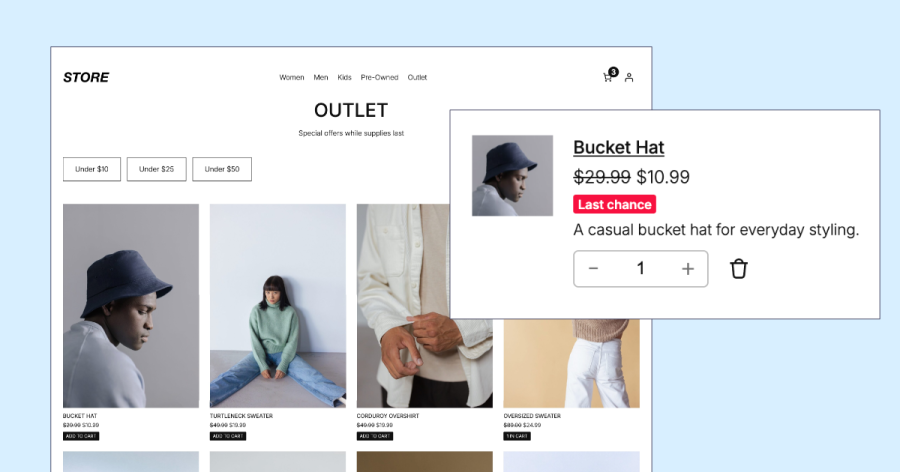
Limited-time launch price. Make room for new and exciting products by adding an outlet or clearance section page to your store. Add your overstocked and discontinued products so customers can find them before they’re gone.
Promote outlet products across the store with a fully-customizable badge that appears on the product page, cart, and checkout.
Outlet Pro provides an all-in-one solution to add an outlet in WooCommerce. It includes a standalone page and a promotional badge and message on products.
Customize the outlet page exactly using the WordPress page editor. Use the familiar WordPress editing tools to add any banner image, colours, typography, and other layout options. Name it “Outlet”, “Clearance Section”, “Final Sale”, “Offers”, or anything else to suit your store.
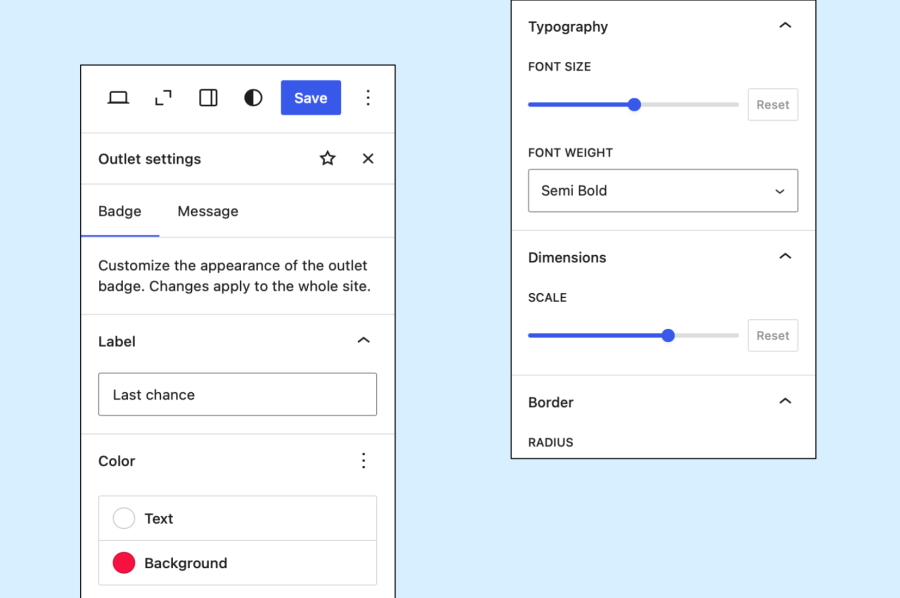
Modify the badge style to match your theme, and update the badge and message text to provide information to your customers.
Products are tagged for inclusion in the outlet with a per-product checkbox, or by using the bulk editing tool to tag multiple products at once.

Outlet Pro is compatible with a wide range of themes and page builders, and supports customization for block and classic themes.
Features currently in development:
An outlet is a dedicated area to promote the products you need to clear. It helps customers easily discover products they might want before they are gone. Products in the store’s outlet display a badge and message, allowing you to apply special policies such as no change-of-mind returns or provide other information to your customers.
Add or edit a product, scroll to the "Product data" section, and under Inventory check "Include in outlet", then save.
Yes, the name can be changed to match your store, such as "Clearance Section", "Offers", "Last Chance", or anything else.
Outlet products are typically on sale, but are different to sales campaigns. Add products to the outlet page when you intend to sell them out quickly. Sales campaigns are better suited for store-wide or seasonal promotions.
Informações da extensão
Verificações de qualidade
Países







