
Ícone do produto

Previously Ordered Items para WooCommerce

A modern, beautifully designed plugin that brings one-click reordering, hide and show controls, custom nicknames, and intelligent discontinued product handling.
Escolha uma opção de cobrança
$49
Economize 20%
$98 $78.40

A assinatura inclui

  • Melhorias e atualizações de produtos
  • Suporte ao cliente
  • Garantia de 30 dias para reembolso

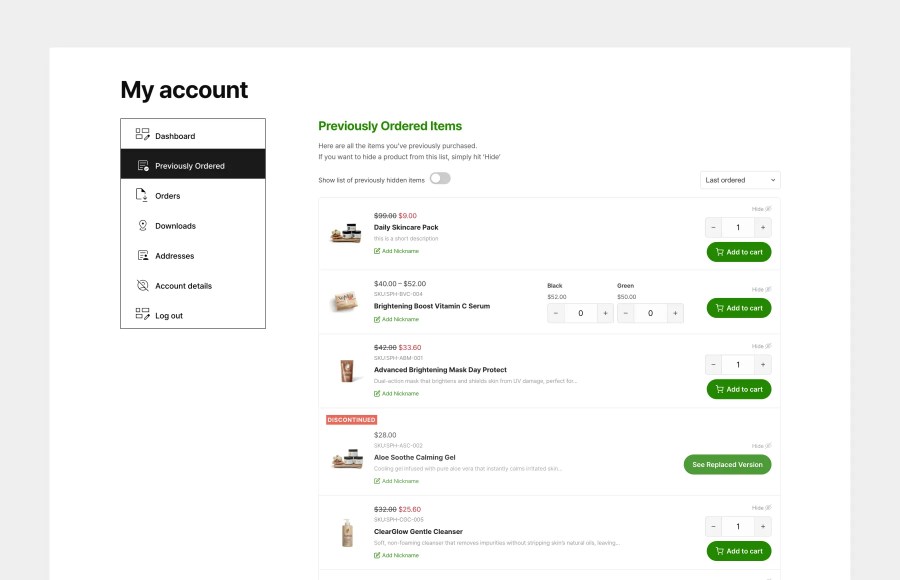
A powerfully simple WooCommerce extension that turns repeat purchases into a seamless experience. Perfect for consumables, fashion, supplements, homeware, and any store where repeat purchases drive revenue.

  • A dedicated Previously Ordered Items page inside My Account shows every product a customer has ever purchased
  • One-click Add to Cart with a quantity selector directly from the list. No hunting through the catalogue.
  • Customers can hide products they no longer want to see and restore them instantly with a toggle. Hidden items are never deleted.
  • Custom nicknames let customers label products with names that make sense to them
  • Sort by last ordered, popularity, price low to high, or price high to low. Customers stay in control.
  • Variable product support: ordered variations are grouped under their parent product with clear labels
  • A built-in Discontinued Products system handles delisted products gracefully, with banners and replacement links
  • Fully compatible with WooCommerce HPOS and Cart and Checkout Blocks

Repeat Purchases Made Effortless

The biggest barrier to repeat purchases is friction. Customers who loved your product last month should not have to search your catalogue to find it again. This plugin removes that friction entirely.

Inside their My Account area, customers get a clean, scannable list of everything they have ever ordered. They can adjust the quantity and hit Add to Cart without leaving the page. For stores with repeat buyers including consumables, fashion, food, supplements, and homeware, this page alone can meaningfully lift reorder rates.

Hide, Nickname and Organize

Not every customer wants to see every product they have ever ordered. The list gives them full control:
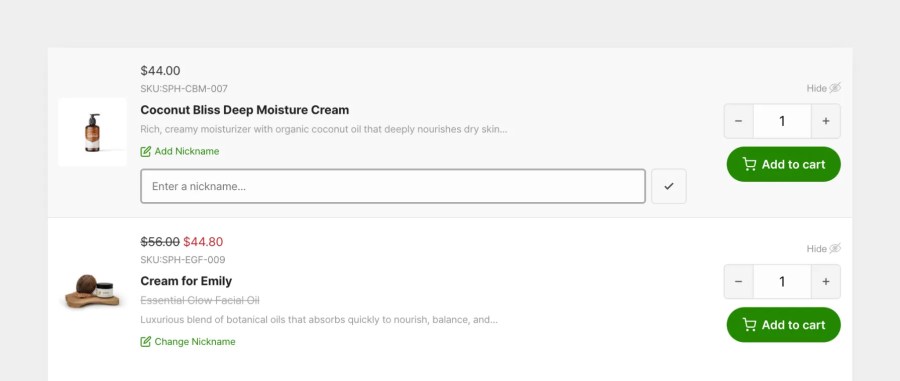
  • Hide any product with a single click. The item disappears from the list without being deleted.
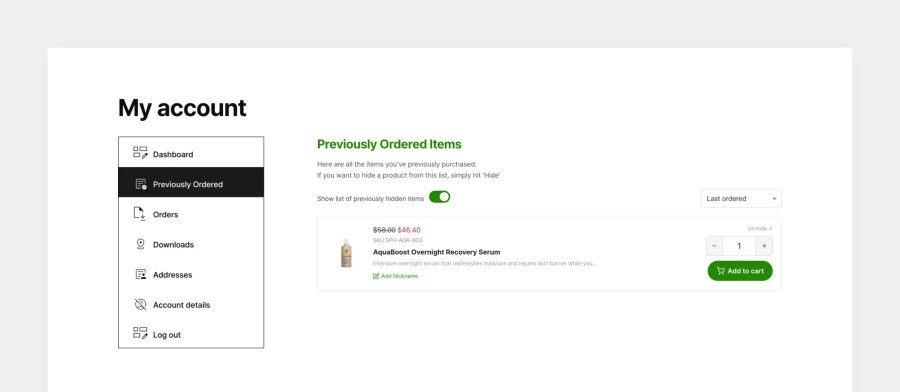
  • A Show Hidden Items toggle lets customers review and restore anything they have hidden.
  • If a customer re-orders a hidden product, it is automatically restored to their visible list.
  • Custom nicknames let customers label products with names that make sense to them. Especially useful for variable products or B2B customers managing multiple SKUs.
  • Nicknames can be added, changed, or cleared at any time inline on the page.
Close-up of nickname input and hide button on a product row


List of previously hidden items and option to unhide


Variable Products, Handled Properly

When a customer has ordered multiple variations of the same product such as different sizes, colors, or formats, the plugin groups them correctly under the parent product with clear variation labels shown for each. Customers can reorder any specific variation directly from the list, without needing to navigate to the product page and select options manually.
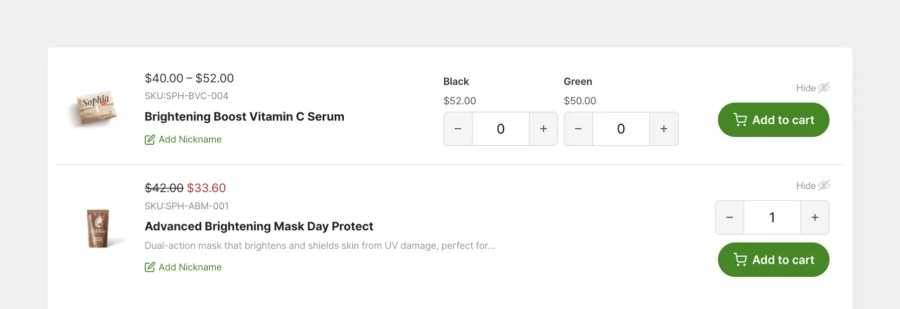
Variable product row showing grouped variations with labels and individual Add to Cart buttons


A Discontinued Products System Built In

When products get delisted, most stores leave customers stranded with broken experiences. This plugin solves that with a dedicated discontinued products workflow:
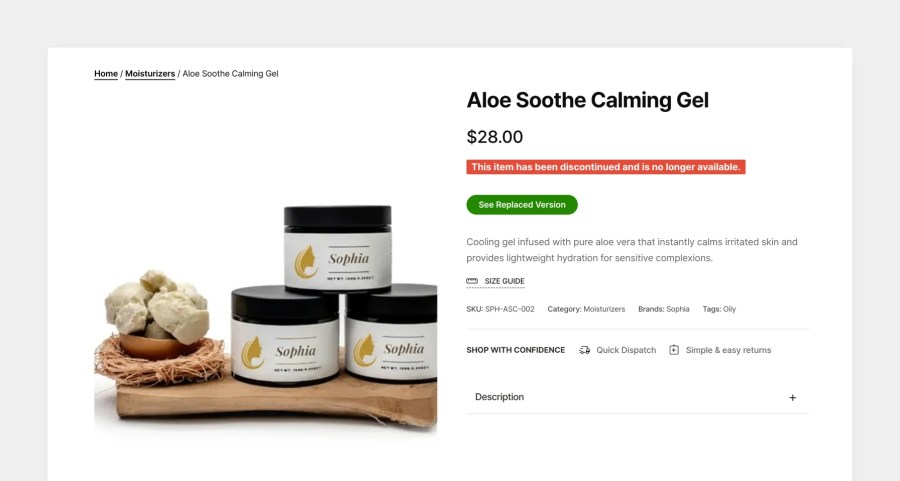
  • Mark any product as Discontinued from a new tab inside the WooCommerce product editor
  • A customizable banner appears on the product page with your discontinued message
  • Discontinued products are automatically removed from purchase. No accidental add to cart.
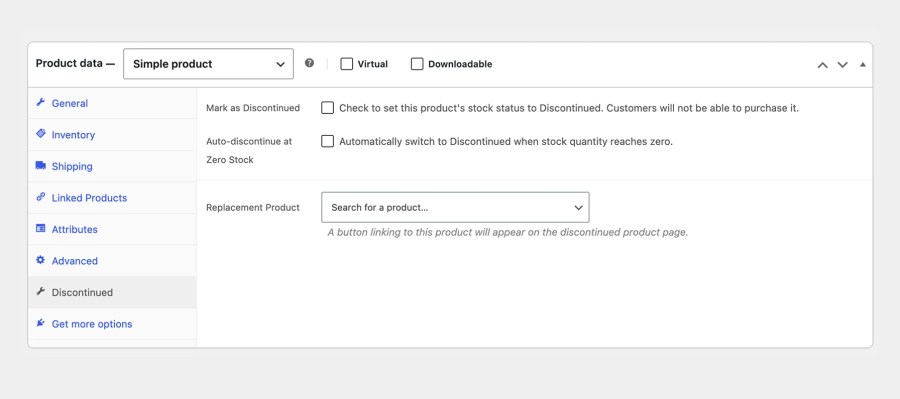
  • Set a replacement product link and button text to direct customers to the right alternative
  • Add alternative product suggestions directly on the discontinued product page
  • Set a global discontinued message that applies to all discontinued products, or override it per product
  • Auto-discontinue when stock hits zero: products are marked as Discontinued automatically when they run out
  • Banner colors are fully customizable from the WooCommerce settings panel
Discontinued product banner on a product page with replacement link

Simple Admin Setup

All settings live inside a dedicated tab in WooCommerce settings. No separate admin menus, no complex configuration.
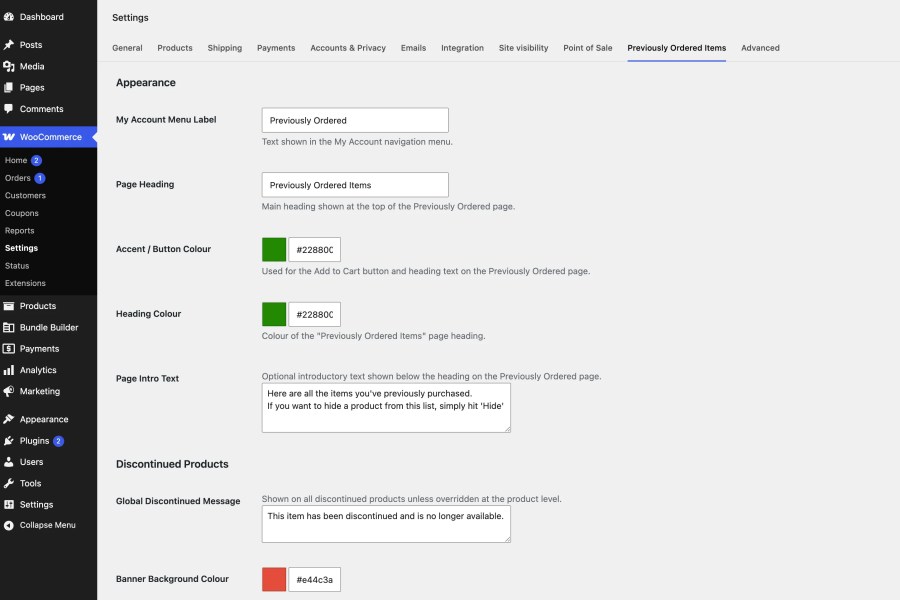
  • Set the My Account menu label for the Previously Ordered page
  • Customize the page heading and optional intro text shown to customers
  • Set the accent and heading color to match your brand
  • Configure the global discontinued banner message, background color, and text color
  • Reset all colors to defaults with a single button
  • Product-level discontinued settings are managed from a new Discontinued tab inside each product
WooCommerce settings tab showing appearance and discontinued product settings


Performance and Compatibility

  • Transient caching on ordered item lookups keeps the page fast even for customers with long order histories
  • Cache invalidates automatically when an order status changes or a new order is placed
  • Fully compatible with WooCommerce High Performance Order Storage (HPOS)
  • Fully compatible with WooCommerce Cart and Checkout Blocks
  • Works with both classic checkout and blocks checkout for new order detection
  • Clean uninstall removes all plugin data from the database
Individual Product settings for managing discontinued product

Perguntas frequentes

Where does the Previously Ordered Items page appear?

It appears as a new tab in the customer's My Account area. The menu label is fully customizable from the WooCommerce settings panel.

Does it work with variable products?

Yes. Variable products are grouped under their parent in the list, with each ordered variation shown with its label (e.g. Size M / Blue). Customers can reorder any specific variation directly from the list.

What happens when a customer hides a product and then reorders it?

The plugin automatically restores the product to their visible list when a new order containing it is completed. The customer does not need to manually unhide it.

Can customers see products they have hidden?

Yes. A toggle on the Previously Ordered page lets customers reveal their hidden items and restore any of them to the main list.

What does the Discontinued status do exactly?

Marking a product as Discontinued prevents it from being added to the cart and displays a customisable banner on the product page. You can also set a replacement product link and show alternative product suggestions on the same page.

Can I set a different discontinued message per product?

Yes. The global discontinued message is set in WooCommerce settings and applies to all discontinued products. You can override it with a custom message on any individual product from the Discontinued tab in the product editor.

Can products be discontinued automatically?

Yes. You can enable auto-discontinue on a product so it is automatically marked as Discontinued when its stock quantity reaches zero.

Does it work with WooCommerce HPOS?

Yes, fully compatible with High Performance Order Storage.

Does it work with the Cart and Checkout Blocks?

Yes, fully compatible.

Is customer data removed when the plugin is uninstalled?

Yes. Running the uninstaller removes all plugin-created database tables and stored data cleanly.

Avaliações de clientes

Estamos aceitando avaliações para este produto e as exibiremos quando tivermos mais algumas.

Informações da extensão

  • Versão PHP necessária: 7.4
  • Testado com WordPress: 7.0
  • Testado com WooCommerce: 10.9.3
  • Requer pelo menos o WordPress: 6.0
  • Requer pelo menos o WooCommerce: 7.0.0

Países

  • Em todo o mundo
Uso dos seus dados pessoais
Nós e nossos parceiros processamos seus dados pessoais (como dados de navegação, endereços IP, informações de cookies e outros identificadores únicos) com base em seu consentimento e/ou nosso interesse legítimo para otimizar nosso site, atividades de marketing e sua experiência de usuário.