
Product Icon

Product Attachments Pro for WooCommerce

Product Attachments for WooCommerce lets you attach/upload any type of files to customer orders directly on product pages, order emails, or customer account sections.
Escolha uma opção de cobrança
$39
Save 20%
$78 $62.40

A assinatura inclui

  • Melhorias e atualizações de produtos
  • Suporte ao cliente
  • Garantia de 30 dias para reembolso

  • Upload Files Easily – Add PDFs, images, documents, and more as product attachments.
  • Per-Product & Category Files – Assign unique files to specific products or categories.
  • View in Tabs – Open supported files directly in an existing or new browser tab.
  • Wide Format Support – Works with 21+ different file types.
  • Attach URLs – Link external resources or guides directly to products.
  • Flexible Display – Show attachments in a new tab, existing tab, or on the product page.
  • Email Attachments – Send files in customer order emails based on order status.
  • Display Files in My Account Section – Display attachments in the customer’s account by order status.
  • Order Confirmation Files – Automatically include attachments in order confirmation emails.
  • Order Status Control – Restrict file access by status (completed, failed, canceled, etc.).
  • Role-Based Access – Limit file viewing or downloads to specific user roles.
  • File Expiry Dates – Set expiry dates for each downloadable file.
  • Customizable Buttons – Personalize download and view button text, color, and style.
  • File Size Display – Show file sizes next to download buttons.
  • Centralized Dashboard – Manage all attachments from one admin panel.
  • Bulk Import (New) – Quickly attach files to products using a CSV import.

Product Attachments for WooCommerce allows you to easily upload and manage downloadable and viewable files such as PDFs, images, and videos. With customizable display options, you can choose where and how these attachments appear on product pages.

Product Attachments Pro offers bulk upload capabilities, file expiry management, and role-based access control. It also integrates with order confirmation emails, improving the overall customer experience and store efficiency.
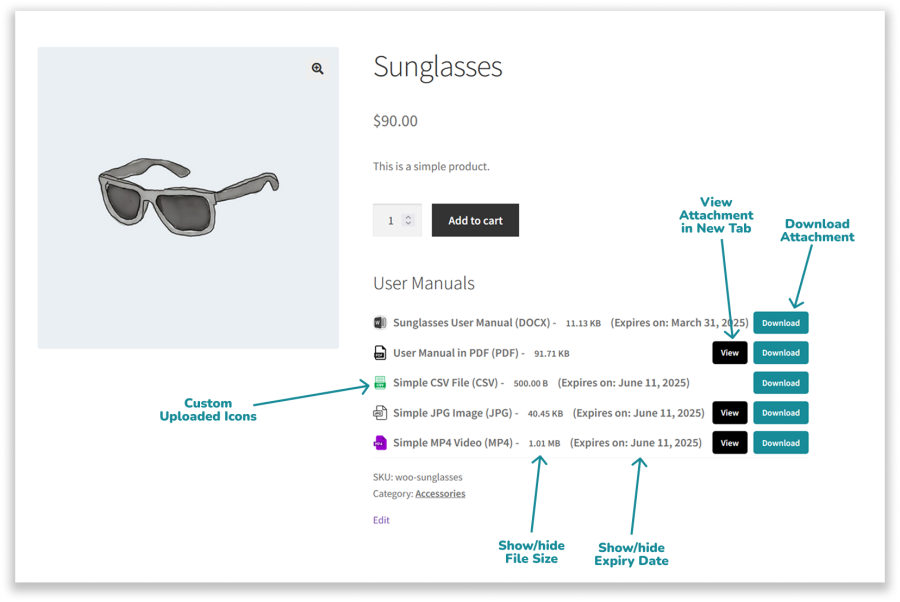
Product Attachments for WooCommerce


File Attachments in My Account Section

Allow customers to access attached files from their My Account section based on the order’s current status. Control file visibility for statuses like Completed, Processing, or On Hold to ensure timely access to relevant documents using Product Attachments for WooCommerce
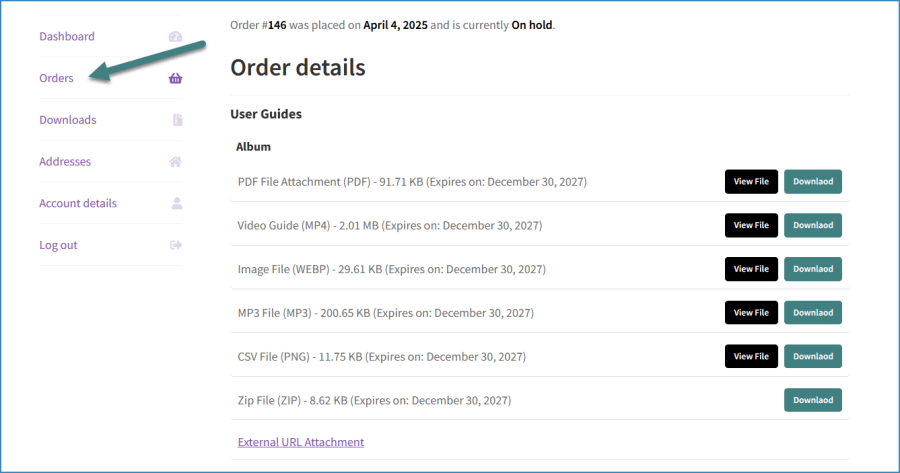
WooCommerce File Attachments in Dashboard

Attach Files to Customer Order Email

Automatically send attachment files to customer order emails based on specific order statuses such as Complete, Processing, Cancelled, On Hold, Pending Payment, Refunded, Failed, or Draft. Product Attachments for WooCommerce allows you to customize which documents are sent at each stage to ensure customers receive the right information at the right time.

Email Attachment WooCommerce

Customizable Attachment Display and Email Integration

Customizable Placement: Choose where the attachments appear on the product page.
File Size Visibility: Display file sizes to help customers make informed decisions.
Email Integration: Automatically include attachments in order confirmation emails for easy access after purchase.
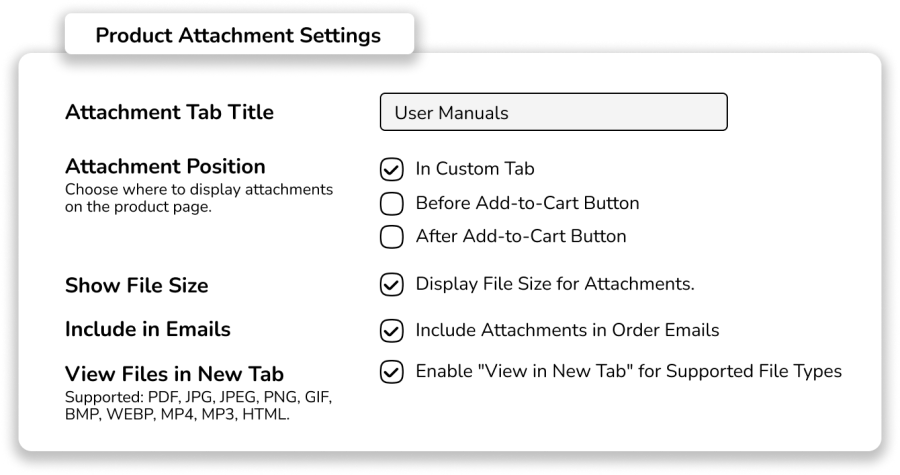
Product Attachments Settings for WooCommerce

Supported File Attachments Formats

Product Attachments for WooCommerce supports a wide range of file formats, you can attach 21 different types of file formats including documents (PDF, DOCX, CSV), images (JPG, PNG, GIF), media files (MP4, MP3), and compressed files (ZIP, RAR). This allows you to easily upload and manage a variety of file types for your products, offering great flexibility for your store.

Bulk File Attachments & Access Control

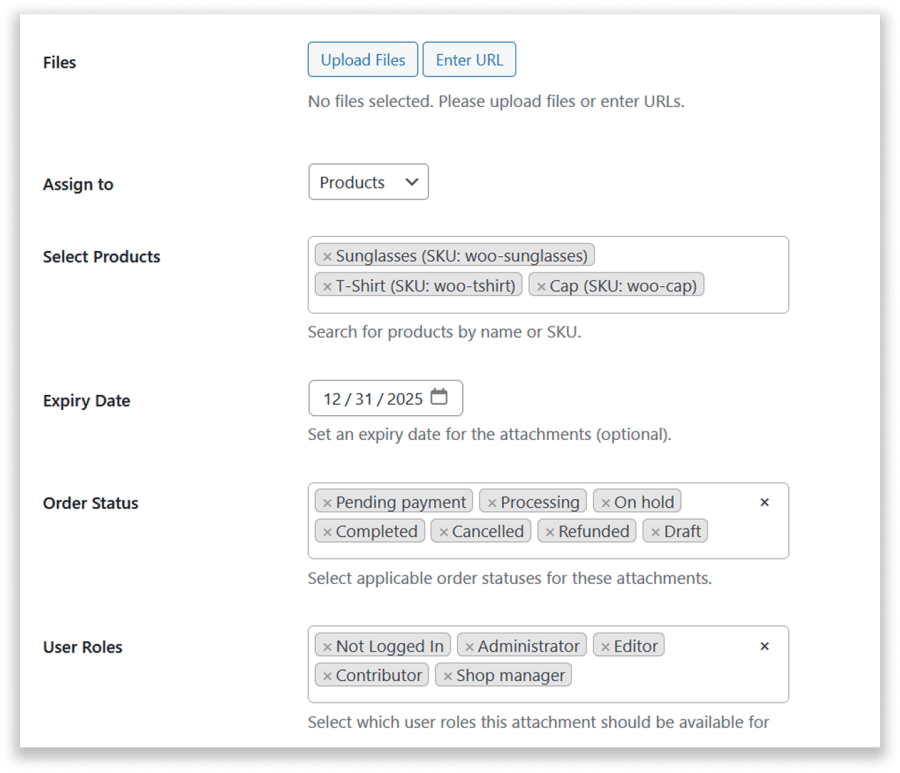
Multiple Upload Options: Upload multiple files at once or add external URLs.
Product & Category Assignment: Attach files to specific products or entire categories.
Expiry Settings: Set expiration dates to control file availability.
Order Status Restrictions: Limit access based on order status (processing, completed, etc.).
Role-Based Access: Restrict file access to specific user roles for better control.Bulk File Attachments WooCommerce
Custom File Type Icons

Upload custom icons for different file types to improve visual identification and enhance user experience. Tailor the icons to match your store’s branding, making it easier for customers to recognize and interact with files.
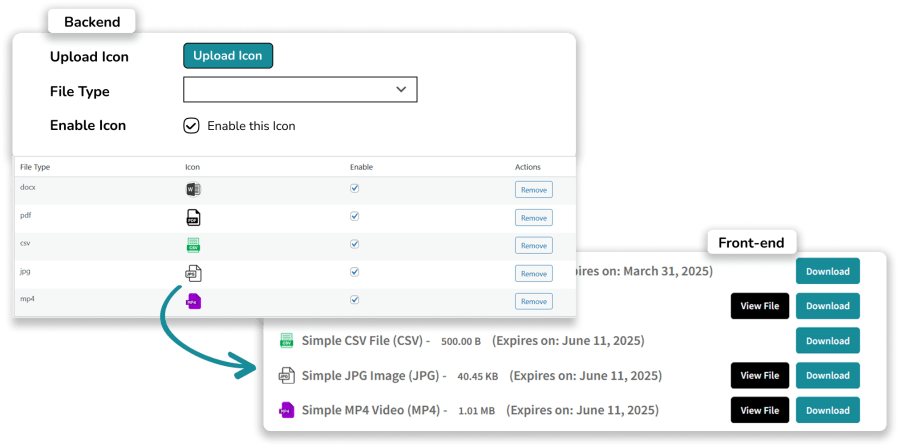
Upload Custom Icons

Buttons Customization

Personalize the text for Download and View buttons and modify their colors to align with your store’s branding.
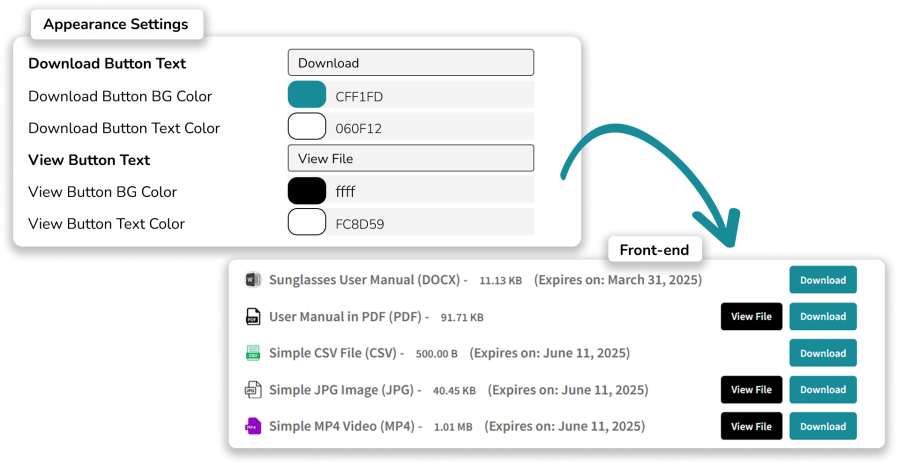
Button Customization for File Attachments WooCommerce

Comprehensive Dashboard

Easily manage all attachments from a user-friendly admin panel, organizing files efficiently to improve store management and customer experience. In this dedicated dashboard, you can
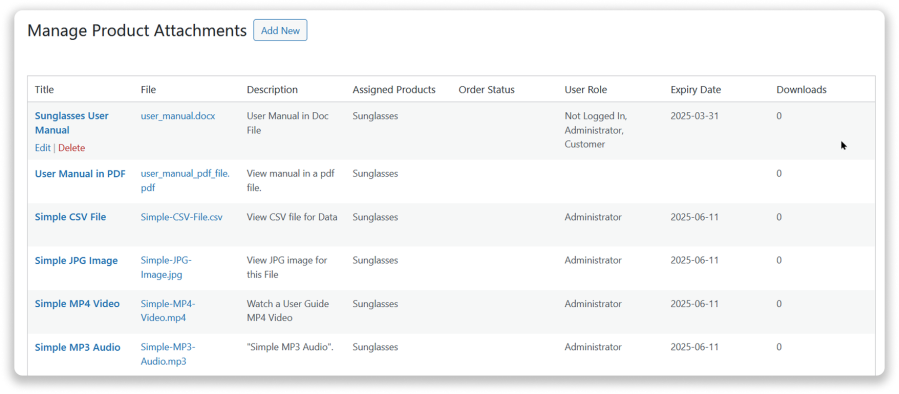
  • Edit settings instantly via a popup without leaving the page
  • Remove attachments in just a click for better control.
  • Instantly view assigned attachments for each product.
  • Monitor file expiration dates with ease.
  • Track individual file downloads to measure engagement.
  • Search & filter attachments for specific products.

Comprehensive Dashboard for File Attachments WooCommerce

Bulk Assign Files using CSV

Option to import and assign multiple product attachments using a CSV file, streamlining the process of linking external files to your WooCommerce products in bulk. Simply map columns for attachment name, product SKU, and the file’s URL for efficient management.


Perguntas frequentes

What file types can I upload with Product Attachments Pro?

You can upload a wide range of file types, including PDF, DOC, DOCX, PPT, PPTX, XLS, XLSX, CSV, TXT, HTML, JPG, JPEG, PNG, GIF, BMP, WEBP, MP4, MP3, AVI, ZIP, and RAR files.

Can I include attachments in order confirmation emails?

Yes, you can automatically include attachments in order confirmation emails. Whenever a customer places an order, the relevant attachments will be sent along with the email, ensuring they receive the necessary documents or files related to their purchase without additional steps.

Can I allow customers to view files instead of downloading?

Yes, Product Attachments Pro allows customers to view files directly without downloading them. You can enable this feature for supported file types (like PDF, Images, Videos, Doc File, XLS, CSV, HTML File, and more), allowing users to open files in a new tab for easy viewing.

Can I restrict file access by order status or user role?

Yes, you can limit file access based on order status (e.g., completed, cancelled) and user roles

Can I upload custom icons to file attachments?

Yes, Product Attachments Pro allows you to upload custom icons for different file types. This feature helps improve visual identification, making it easier for customers to recognize file types while also aligning with your store’s branding and design.

Can I upload files in bulk and assign them to specific products or categories?

Yes, Product Attachments Pro allows you to upload files in bulk and assign them to specific products or categories. You can easily upload multiple files at once, streamlining the process of managing attachments for your products. Additionally, you can also add external URLs to products for quick access.

Avaliações de clientes

Classificação média 4.6
5 avaliações
5 estrelas, 80% de avaliações
4 estrelas, 0% de avaliações
3 estrelas, 20% de avaliações
2 estrelas, 0% de avaliações
1 estrela, 0% de avaliações
5 avaliações
  • Ego-IT
    Classificado com 5 de 5
    Suporte
    fev 21, 2026
    Suporte
  • Robin
    Classificado com 3 de 5
    Facilidade de uso
    nov 4, 2025
    Facilidade de uso
    Installed tool did not work for our purposes. Support suggested to get admin rights to our shop to repair. For obvious reasons we declined and chose to deinstall. millemari.
    • Extify Plugins
      dez 13, 2025
      Hi. Thank you for your feedback. We’re sorry to hear that the plugin did not meet your requirements. To clarify, our support team only suggests temporary admin access (preferably staging site) when it’s necessary to properly investigate and resolve technical issues directly on the site. This is a standard and optional practice, and we fully understand and respect your decision to decline access for security reasons. If you’d like, you’re welcome to reach out to us again with more details about your setup, and we’ll do our best to assist without requiring admin access where possible. We appreciate your time and feedback.
  • sastiflight
    Classificado com 5 de 5
    Suporte
    set 22, 2025
    Suporte
    Great plugin, works perfectly and the support team is very responsive.
  • twsharon14
    Classificado com 5 de 5
    Funcionalidade
    jun 27, 2025
    Funcionalidade
    Easy way to add various types of attached files. Quick responses to questions as well!
  • dentalsafetysolutions
    Classificado com 5 de 5
    Suporte
    jun 23, 2025
    Suporte
    I had some issues out of the gate, but largely due to user error. Extify support was quick to respond and even quicker to explain what needed to happen. They even issued a fix for a conflict within my theme so that things would display properly. This is the kind of top notch service that I wish all plugin developers could implement. Great plugin with great features. I'm very happy with my purchase

Extension information

  • PHP version required: 7.4
  • Tested with WordPress: 6.9
  • Tested with WooCommerce: 9.8
  • Requires at least WordPress: 6.1
  • Requires at least WooCommerce: 7.9

Países

  • Em todo o mundo

Related Products

Preço: $79 Anualmente
Classificado com 3.4 de 5 estrelas
Preço: $279 Anualmente
Classificado com 3.2 de 5 estrelas
Preço: $59 Anualmente
Classificado com 3.1 de 5 estrelas
Preço: $49 Anualmente
Classificado com 4.1 de 5 estrelas
Preço: $109 Anualmente
Classificado com 2.8 de 5 estrelas
Preço: $109 Anualmente
Classificado com 2 de 5 estrelas
Preço: $109 Anualmente
Classificado com 2.3 de 5 estrelas
Preço: $109 Anualmente
Classificado com 2.6 de 5 estrelas
Preço: $109 Anualmente
Classificado com 2 de 5 estrelas




