

Instalações ativas
300+
A assinatura inclui
Suporte
Product Availability Slots for WooCommerce lets you sell limited-time products during fixed time slots in your WooCommerce shop.
Using this plugin, it’s easy to sell products on specific days at specific time slots. Offering products on a limited time can create a sense of urgency which can trigger the user to make the purchase right away.
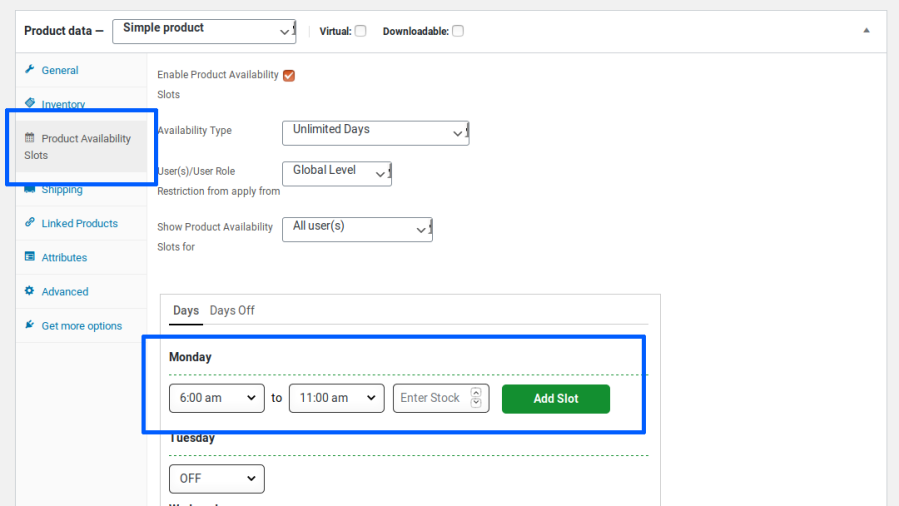
Once configured, the product will be available for purchase at the specified time slots.
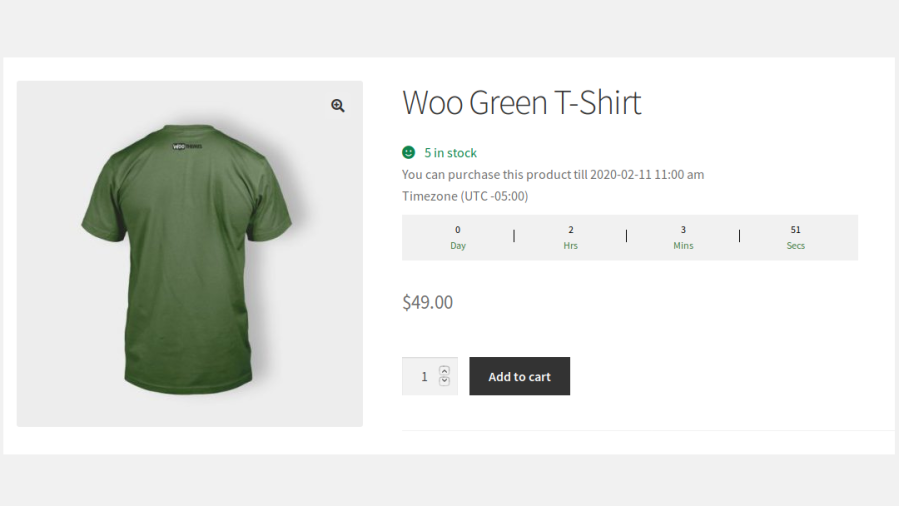
Outside the specified time slot, the Add to Cart button will be hidden for the product and the product’s next available date will be displayed.
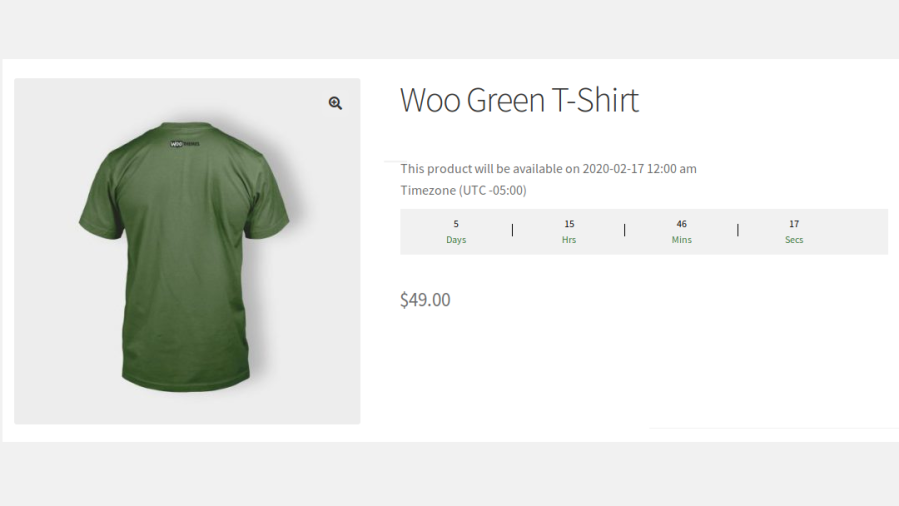
If Availability Notifications are enabled, users can also enter their email address on the product page and get an email automatically as soon as the product becomes available again.
Control exactly when products can be purchased by making them available only during specific dates, days, and time periods. Create urgency and drive conversions with time-limited product availability.
Configure product availability based on your business requirements. Restrict purchases to specific date ranges, recurring weekly schedules, or custom availability periods.
Create multiple purchase windows within a single day to match your operational schedule. Ideal for flash sales, food ordering, event registrations, and limited-time product releases.
Manage availability settings at the individual product level for both simple and variable products. Configure unique schedules based on the requirements of each product.
Control inventory availability within specific time slots by defining stock quantities for each slot. Prevent overselling and manage demand more effectively.
Keep customers informed about product availability with visual countdown timers and availability messages. Encourage faster purchasing decisions and improve the shopping experience.
Create exclusive purchasing opportunities by restricting product availability to specific users or customer groups. Perfect for member-only products, wholesale customers, or VIP sales.
Prevent purchases during holidays, maintenance periods, or unavailable business days. Easily configure exceptions without modifying your regular schedules.
Control product purchasing across your store during maintenance periods, holidays, or special business events. Display custom messages to keep customers informed.
Allow customers additional time to complete their purchases after a time slot expires. Improve checkout completion rates while maintaining scheduling accuracy.
Save time by applying availability settings to multiple products simultaneously. Manage large product catalogs efficiently from a centralized interface.
Automatically manage product visibility based on configured schedules. Show or hide products according to availability rules without requiring manual intervention.
Understand how your time-slot products are performing with built-in Analytics. Track slot sales, demand insights, and top products, review expired products, and export the data to make informed scheduling decisions.
1. Works for both Registered Users & Guest Users.
2. Works for both Simple Products & Variable Products.
3. Configure Product Availability Slots using either a Quick Setup mode for faster configuration or an Advanced Setup mode for granular control over availability schedules.
4. Product Purchases can be restricted based on the following scenarios:
5. Product availability can be configured either for Recurring Schedules (Unlimited Days) or Specific Date Ranges (Limited Days) based on business requirements.
6. Schedule Single/Multiple Time Slots for each day.
7. The Time Interval between each slot can be set based on:
8. Restrict the number of quantities for a product that can be sold in each time slot.
9. Configure User and User Role-based Restrictions globally or at the product level, with options to restrict or exempt specific Users and User Roles.
10. Days Off can be configured for individual products.
11. Product Availability Slots can be configured to multiple products at once through Bulk Actions, with support for Product and Category Filters.
12. Option to set the Buffer Time for users to complete the purchase after the time slot is exceeded.
13. Option for site administrators to temporarily restrict purchases across the entire store and display Custom Closure Messages with configurable text, colors, and display settings.
14. A Countdown Timer can be displayed on the Shop & Product Page to highlight:
15. Supports Multiple Countdown Timer Styles to match your site’s design.
16. Option to hide products that are not purchasable anymore on the site.
17. Option to hide the Time Zone Details on the product page.
18. Availability dates can be displayed based on the WordPress Date Format.
19. Set the Maximum Quantity Purchasable Per Customer, Per Slot to limit how many units a single customer can buy in each time slot. Applies to both registered and guest customers.
20. Restrict product purchases based on the Customer’s Country (Geolocation).
21. Option to enable Availability Notifications, where customers can submit their email on the product page of an unavailable product (simple or variable) and automatically receive an email when it becomes available again, with an easy option to unsubscribe.
22. Customers can view and manage their notification requests from the Availability Notifications section in My Account.
23. Notification Log for site administrators to track all notification requests and emails sent to customers, with filters for date range, status, product and email.
24. Availability and restriction messages support Dynamic Shortcodes to automatically display details such as available date, start time, end time, expiry date, and product information.
25. Built-in Analytics Dashboard displaying slot sales, demand insights, top products, and expired products, with support for CSV Export.
26. Compatible with WooCommerce Subscriptions, allowing Product Availability Slots to work seamlessly with subscription-based products.
27. Translation Ready and supports Customizable Messages.
Example: Monday (09 am – 11.30 pm), Wednesday (09 am – 11.30 pm) & Friday (09 am – 11.30 pm).
Answer
Yes, it is possible. Please check by following the below steps,
Yes, it is possible. Please check by following the below steps,
Note: Once the To Date has been reached, then the product will not be purchasable anymore on the site.
Please check the below details about the flow of the Hide Expired Products option,
We have given "Availability Type" as "Unlimited Days" & "Limited Days".
i) If you choose "Unlimited Days", then the configured product will be available for purchase based on the slots configured on your site & it will continue.
If the user comes to your site on the unavailable slot, a message will be displayed with the date & time so that they can come to know when this product will be again available for purchase. In this case, the product will not be hidden in this scenario.
ii) If you choose "Limited Days", then you need to set the "From & To Date Range" so that the product will be purchasable only in between the From & To Date & users can purchase the product only in the configured slots[ex. every Wednesday from 10:00 a.m. to 06:00 p.m. from June 01 to June 30].
Once the To Date[June 30] has been reached, then the corresponding product will be expired & from then onward the product is no longer purchasable anymore on your site.
At this moment, this product will be visible on your site but users can't purchase & the below message will be displayed on the shop & product page.
"Currently, this product is Unavailable".
In this case, if you wish to hide this product automatically from your site, then you can make use of this option[Hide Expired Products].
iv) Similarly, it follows the same behavior for the Variable Products.
For example:
Product A contains two variations[V1 & V2].
V1 - Availability Date Range[10th June - 20th June]
V2 - Availability Date Range[15th June - 28th June]
Categorias
Informações da extensão
Verificações de qualidade
Compatibilidade
Países







