


Instalações ativas
100+
A assinatura inclui
Suporte
Product Sales Count for WooCommerce allows you to display the Product Sales Count in the Shop, Category, Tag and Single Product Pages in your WooCommerce Shop.
You can also choose to display the sales count for a particular time duration. Some of the examples for displaying the custom duration sales count include,
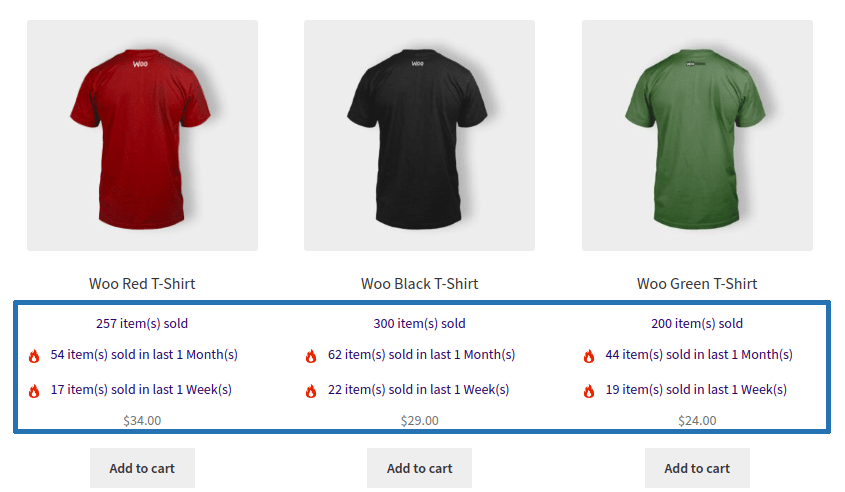
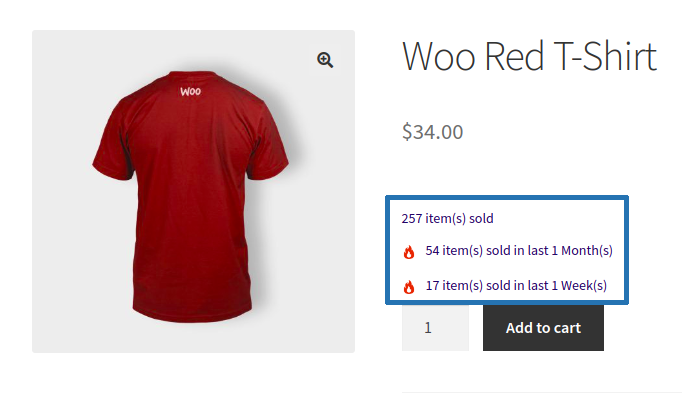
Display the number of products sold directly on product pages, shop pages, and category pages. Showing sales figures builds trust by highlighting product popularity and encourages customers to make purchase decisions with greater confidence.
Choose where the sales count appears on the single product page using multiple predefined display positions. Position the sales count before or after the add-to-cart section, within the product summary, or near product metadata to match your store’s layout.
Display product sales count based on custom time periods, such as the last 7 days, 30 days, 90 days, or any configurable duration, instead of showing only lifetime sales. You can also configure and display multiple sales count duration to highlight both recent trends and long-term product popularity. This helps customers identify trending products while giving store owners greater flexibility in showcasing sales performance.
Generate Total Sales, Product Sales Count, and Category Sales Count shortcodes using the built-in Shortcode Generator. Easily display store-wide sales, individual product sales, or category-wise sales anywhere on your WooCommerce store, including custom pages, widgets, landing pages, and page builders. This provides complete flexibility to showcase sales statistics wherever they have the greatest impact.
Automatically update product sales counts when WooCommerce orders reach selected order statuses such as Processing or Completed. The plugin keeps sales figures accurate without requiring any manual intervention.
Control when sales counts are displayed using configurable conditions. Hide sales counts below a specified sales threshold or automatically suppress them for out-of-stock products to keep your storefront clean and relevant.
Display product sales counts throughout shop, category, and archive pages to increase product visibility before customers visit the product page. This helps popular products stand out across your catalog.
Customize the alignment of sales count information on shop and category pages using left, center, or right positioning. Fine-tune the appearance to match your theme and storefront design.
Informações da extensão
Verificações de qualidade
Compatibilidade
Países







