Wallet for WooCommerce adds a wallet function to your store.
Features
Wallet Top-up
Users can top-up the funds to their wallet & make use of it on future purchases.
In addition, you can award Bonus Funds when your users top-up the funds & meet the configured criteria[i.e. Min – Max Top-up Amount].
Wallet Redeeming Usage
Your users can make use of their funds available in the wallet using following 2 ways,
i Wallet partial usage
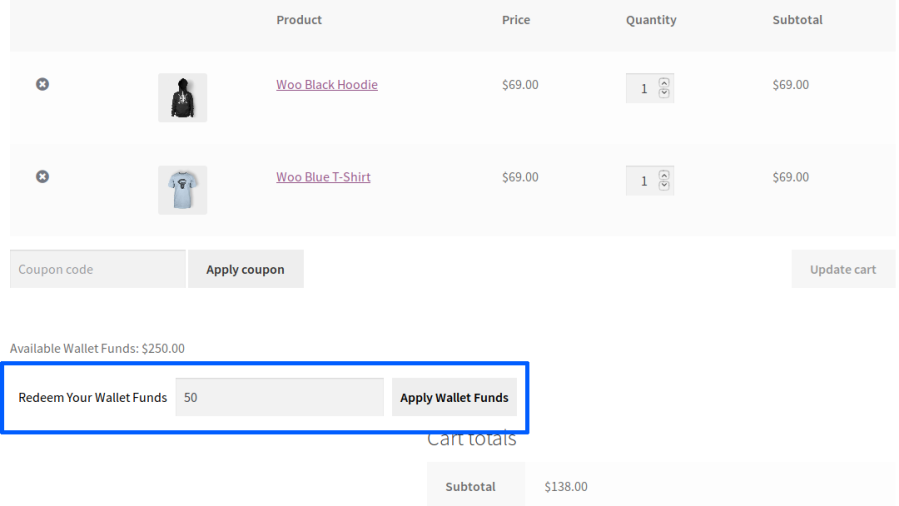
Wallet redeeming field can be displayed in cart & checkout using which users can get a discount by applying the available funds.
Funds will be applied only to the cart subtotal. Hence, users should pay the balance amount using available payment methods in checkout.
Also, it supports for Manual Orders.
ii Wallet payment gateway
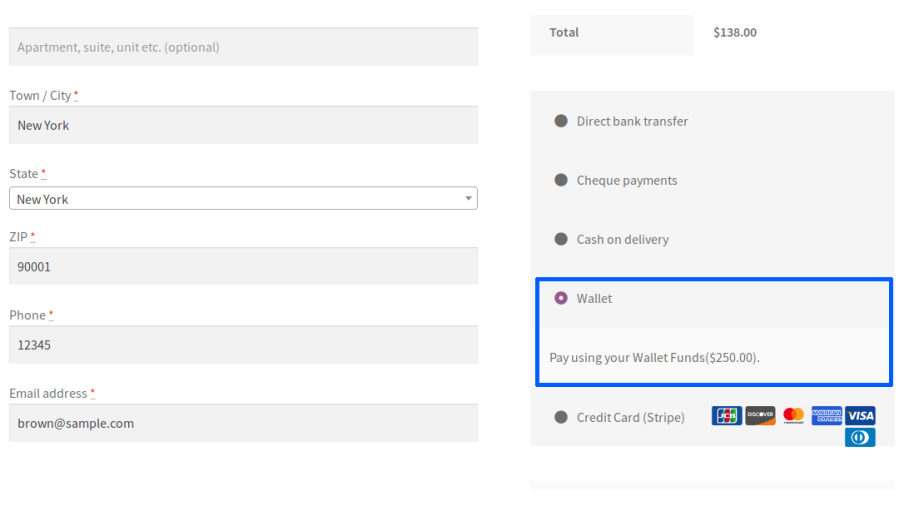
A separate payment gateway for using the wallet funds for placing the order.
Can be used for manual orders
Fund transfer and request
Your users can transfer/request funds to other users on your site. You have the option of charging your users a fund transfer fee.
Wallet Withdrawal
You can allow your users to withdraw their funds from the wallet by submitting a request.
Supported Payment Methods are,
Bank Transfer
PayPal
You have an option to charge a withdrawal fee from your users.
Wallet auto top-up
Your users can set up to automatically add funds to their wallets if their wallet balances fall below a specified threshold.
Product Purchase
Your users can receive the funds in their wallet for purchasing on your site. You can set the funds type based on Product Total/Order Total/Order Total Range.
Also, as a site admin you can award the product purchase funds for manual orders.
Gift vouchers
The Gift Voucher module allows you to generate gift vouchers that contain wallet balances. You can issue gift vouchers to your users and they can redeem the gift vouchers to add to their wallet balances.
Wallet balance with expiration dates
You can set up an expiration date for your user’s wallet balance.
Wallet actions
You can award wallet balances to your users for the following actions,
Account Signup
Daily Login
Product Review
Email Notifications
You can send email notifications to your users for their wallet activity.
Refunds
As a site admin, you can send the refund amount of the order[i.e. orders placed through any payment method] to your user’s wallet.
Reset
Site admin can reset the Wallet Balance & Transaction Log of their users.
Compatibility
Compatibility given with the “Woo Subscriptions” plugin
Compatibility given with “Cart and Checkout Blocks”
Compatible given with the “YayCurrency & WooCommerce Multi-Currency Switcher” plugin
Benefits
Offer convenience to your users
Your customers can plan their purchases and add sufficient funds to their accounts to complete them later.
Faster checkout
When your users place their orders through their wallet, they can quickly complete their purchase which reduces cart abandonment.
Insights on future sales
You can get insights on future sales on your site based on the wallet balance of your users.
How does it Work?
Wallet funds top-up
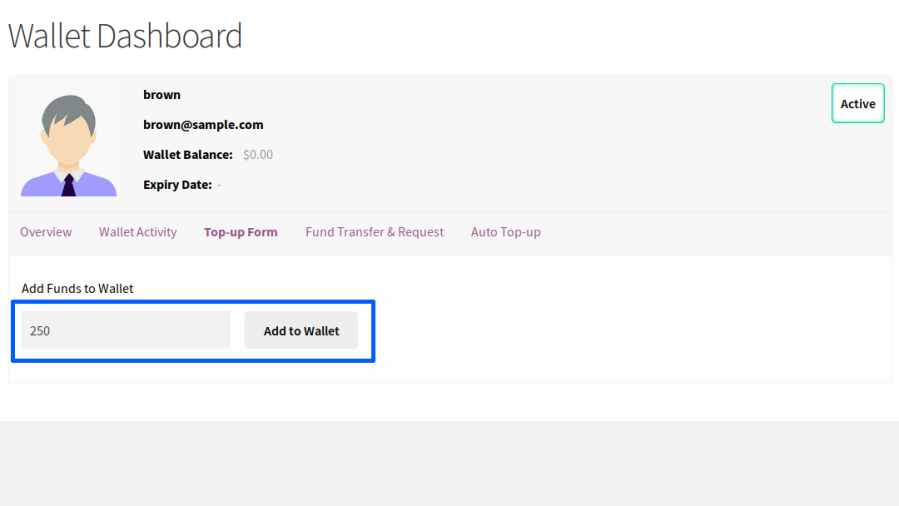
To add funds to the user’s account, the user will have to access the Top-up form from the wallet dashboard.
Within the section, your users can enter the amount they wish to add to their account and proceed to Top-up.
Adding funds to the wallet
Once the top-up button is clicked, a product will be added to the cart. Once the user completes the purchase and the payment is received, the funds will be added to the user’s account.
Wallet balance reflecting in user’s account
Wallet funds – partial usage
A user adds a few products to their cart and they wish to use some of their wallet balance in the current order.
An option to partially redeem the wallet balance will be available in the cart and on the checkout page. The site admin can restrict Partial Funds Usage based on Order Total.
Wallet redeem field on cart page
Users can enter the amount they wish to redeem and redeem it. Once the wallet balance is partially redeemed, the user can use other payment methods on the site and place the order.
Once the order is placed, the used Wallet balance will be debited from the user’s account.
Wallet funds – usage via payment gateway
A user adds few products to their cart and proceeds to the checkout page to make a payment.
On the checkout page, if the user has a sufficient wallet balance, to place the order, the wallet payment gateway will be visible to the user.
Wallet payment gateway
If the user chooses to pay with their wallet balance, they will have to select the wallet payment gateway to place their order.
Once the order is placed, the used wallet balance will be debited from the user’s account.
Wallet fund transfer and request
Fund Transfer module provides the following features,
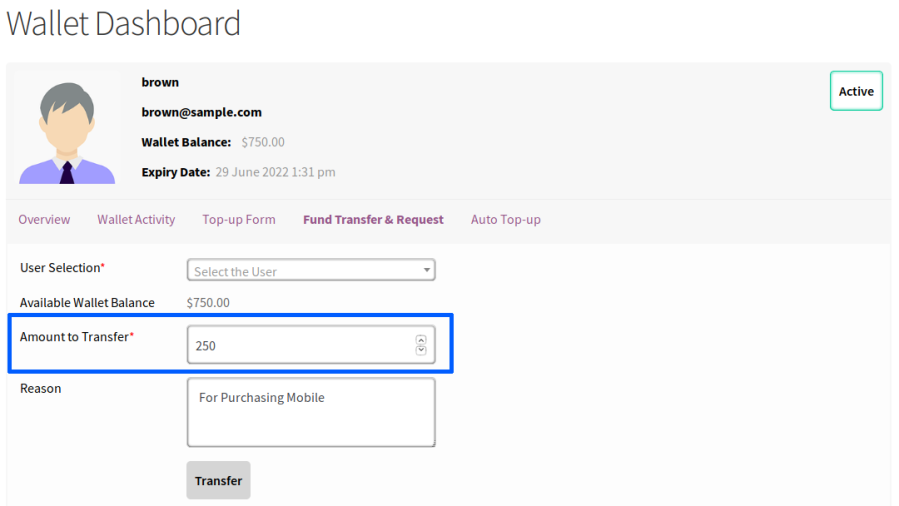
Users can transfer their wallet balance to other users on the site (Direct Fund Transfer).
Users can request wallet funds from other users on the site (Fund Request).
Direct fund transfer
To transfer funds to another user, the user will have to access the Fund Transfer menu from the wallet dashboard. It can be found in Fund Transfer Details > Fund Transfer.
Once the request form is accessed, the user must search and identify the user to whom the fund request has to be sent.
The user will have to fill in the amount for transfer and submit the form.
Wallet fund transfer form
You can optionally enable OTP based authentication for additional security.
The OTP will be sent via email. When OTP authentication is enabled, the user will have to fill in the OTP to complete the fund transfer.
Fund request
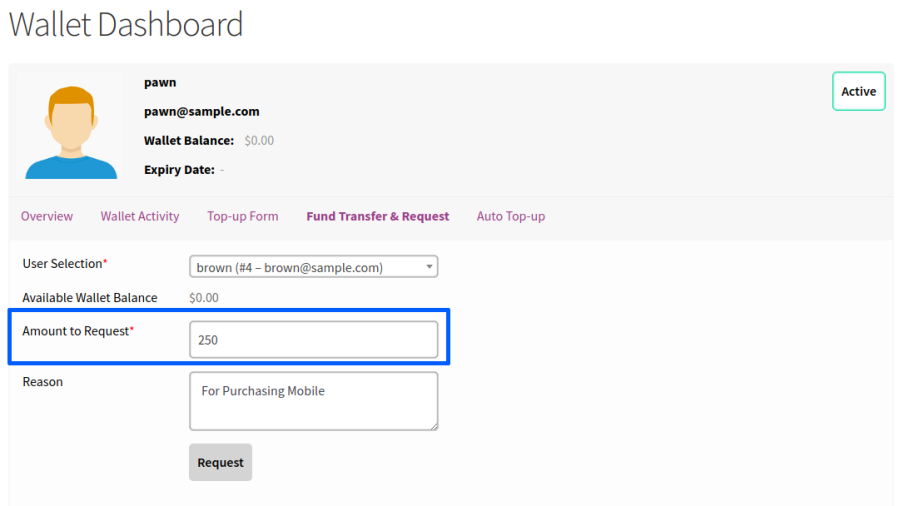
Any user who wishes to request wallet funds should access the Fund Transfer menu from the wallet dashboard. It can be found in Fund Transfer Details > Fund Transfer.
Once the request form is accessed, the user must search and identify the user to whom the funds will be requested.
The user will have to fill in the amount needed and submit the form.
Wallet fund request form
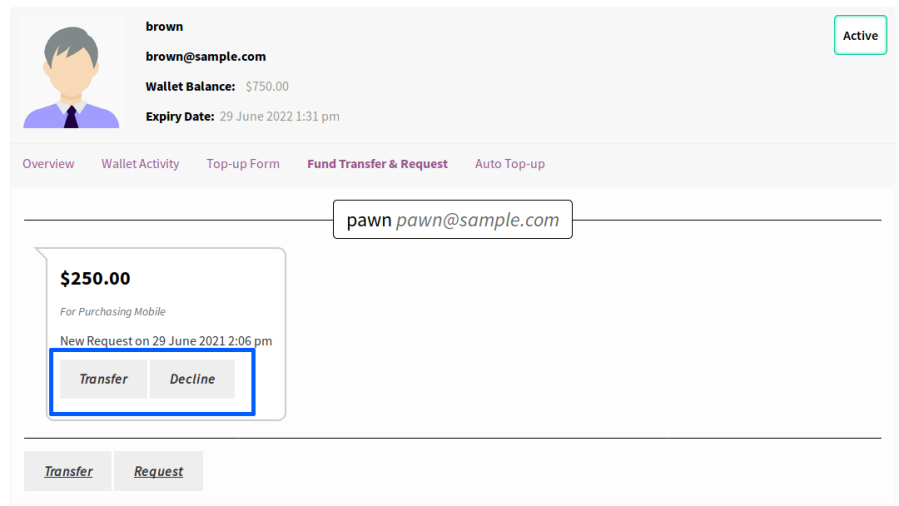
Once the request is submitted, the other user will be notified about a new request.
The user can respond to the request directly from their dashboard.
Fund request response
If the request is approved, the requested amount will be credited to the user’s wallet.
Wallet Withdrawal
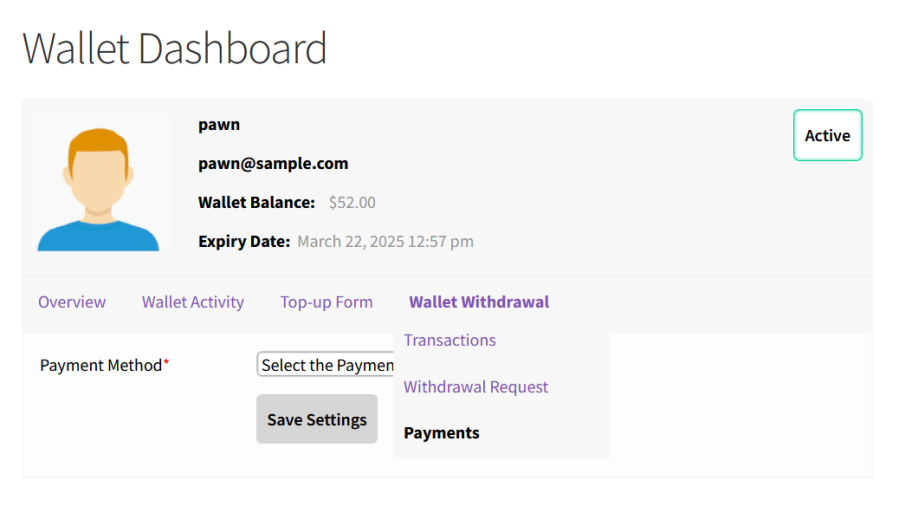
At first users should select the payment method to receive the withdraw funds from their Wallet Dashboard[Wallet Withdrawal -> Payments].
Wallet withdrawal payment selection
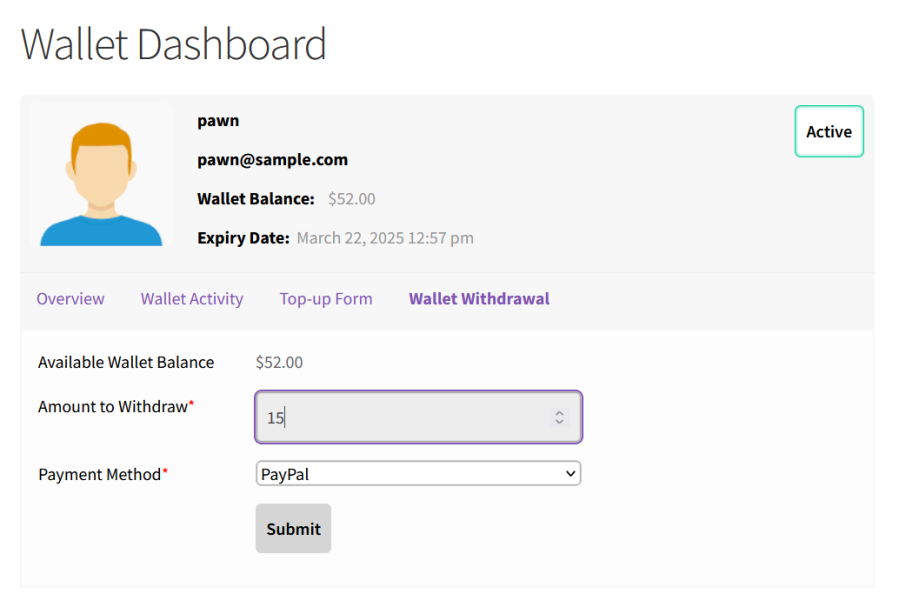
After that, they can submit the withdrawal request[Wallet Withdrawal -> Withdrawal Request] which is a 2 step form. First they should enter the funds to withdraw & then need to confirm the details.
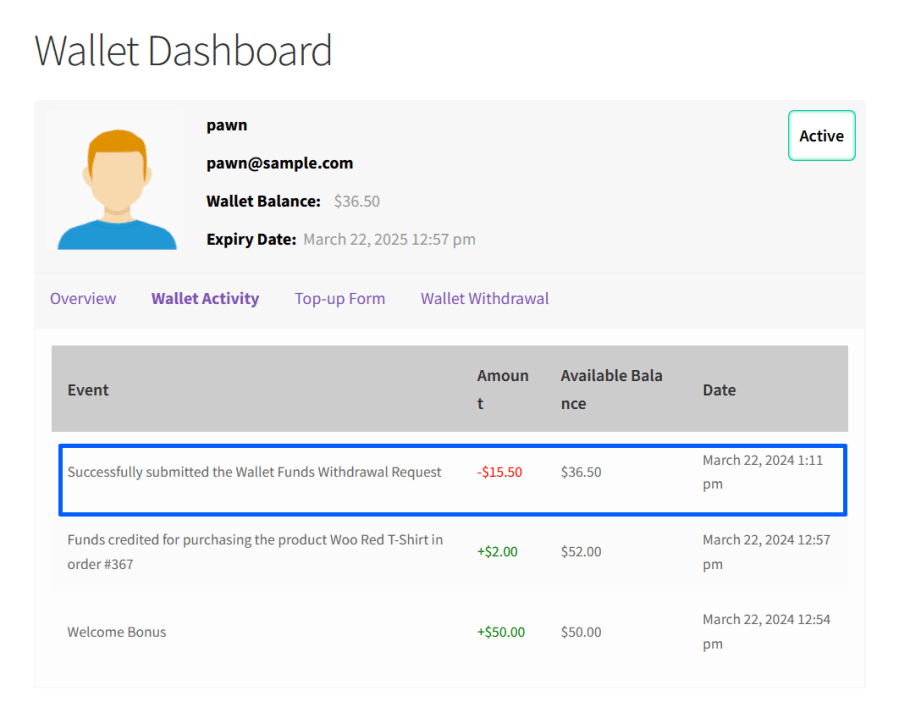
Once the request is submitted successfully, the requested funds will be deducted from the users wallet.
Wallet withdrawal request submitted
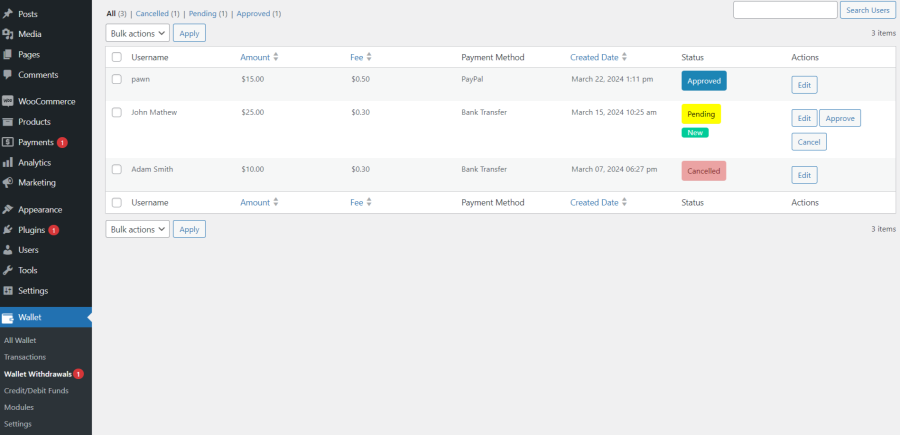
If a user chooses the payment method as Bank Transfer, then the site admin has to manually pay the amount to users account by using the details given by them.
If a user chooses the payment method as PayPal[supports Payout Integration], then the requested amount will be transferred to user’s PayPal ID immediately after admin’s approval.
If the admin rejects the submitted request, then the deducted funds will be added back to the users wallet.
Admin processing withdrawal requests
Product Purchase
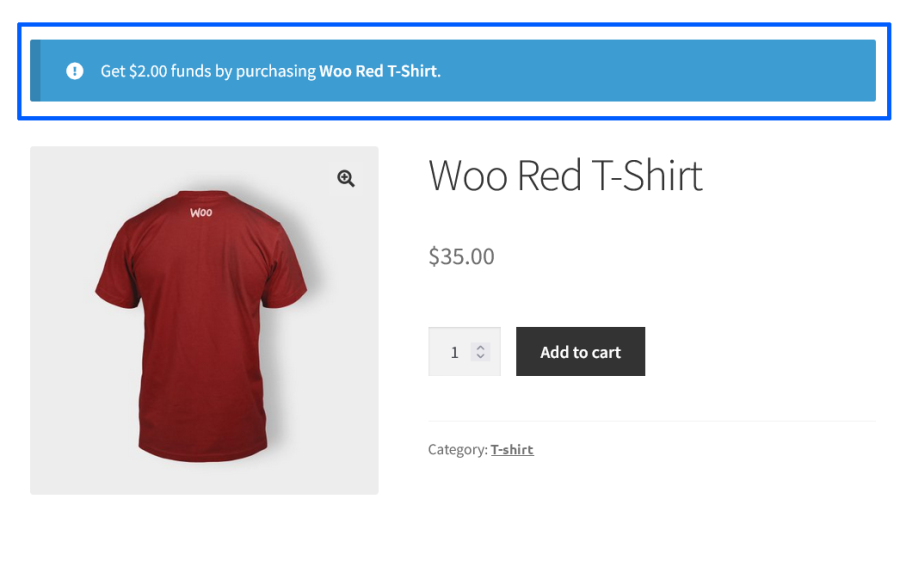
Users can see the funds they will receive for purchasing the products in shop page, product page, cart page & checkout page.
Product purchase wallet reward notice
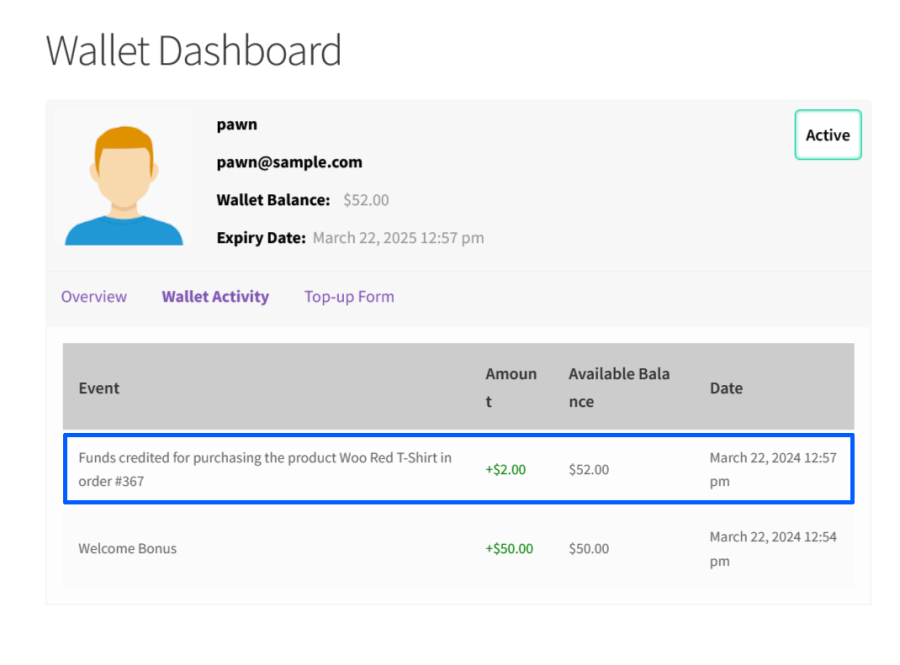
Once they placed the order, the funds will be added to the wallet when the order status reaches either processing/completed.
Product purchase reward credited to wallet
Wallet Auto Top-up
Wallet Auto Top-up Module allows your users to automatically top-up their wallet when their wallet balance falls below a specified threshold value.
To set up Auto Top-up, the user will have to access the Auto Top-up menu from the wallet dashboard.
Within the section, based on the configuration, the user will have to select the amount for Auto Top-up and the threshold amount.
After entering the amount, the user will have two options,
They can pay the Top-up amount and authorize future Auto Top-up
Authorize future Auto Top-up without making any payment
Once the authorization is complete, funds will be added to the user’s account whenever the wallet balance falls below a specified threshold.
Unique features offered in this plugin
Subscription Auto Renewal using wallet balance (Requires WooCommerce Subscriptions)
Wallet Auto Top-up using WooCommerce Stripe payment gateway
Gift Vouchers module for generating Gift Vouchers in bulk
Wallet balance with unlimited validity(optional)
Wallet Actions module for issuing wallet balances to users for account signup
Tax will not be charged for Wallet Top-up
Wallet balance expiration email reminder
Wallet balance credit for daily login
Wallet balance credit for product review
Widget support
Frontend dashboard presentation improvements
Transaction log presentation improvements
Displaying Cron Information[Cron Name and Last Updated] info to the user.
Wallet balance displayed in the user’s table
Extensive Feature List
Wallet Management
Customers can maintain a digital wallet balance within their WooCommerce account.
Wallet balances can be used as a payment method during checkout.
Customers can make partial order payments using wallet funds.
Administrators can manually credit or debit wallet balances.
Detailed wallet transaction history is maintained for every customer.
Wallet balances can be imported and exported using CSV files.
Wallet balance expiry periods can be configured and managed.
Complete wallet activities are recorded for auditing and reporting purposes.
Wallet Top-up
Customers can add funds to their wallet using supported payment gateways.
Custom and predefined recharge amounts can be configured.
Top-up increment amounts can be configured.
Recharge bonus campaigns can be created to encourage wallet funding.
Bonus rewards can be configured based on recharge amount ranges.
Recharge bonus campaigns can be scheduled for specific periods.
Additional recharge fees can be configured based on payment gateways.
Selected payment gateways can be enabled or restricted for wallet top-ups.
Auto Top-up
Customers can enable Auto Top-up to automatically maintain their wallet balance.
Auto Top-up can be triggered when wallet balances fall below configured threshold values.
Minimum wallet balance thresholds can be configured.
Automatic recharge amounts can be configured.
Authorized Auto Top-up orders can be managed.
Auto Top-up transactions and activities are fully tracked.
Supports automatic wallet top-ups through WooCommerce Stripe Gateway.
Wallet Payments (Funds Usage)
Customers can pay for WooCommerce orders using wallet funds.
Partial wallet payments are supported.
Wallet usage can be restricted based on products and categories.
Minimum and maximum wallet usage limits can be configured.
Wallet balances can be automatically deducted once products are added to the cart.
Discounts can be offered to customers for using the wallet payment gateway.
Wallet balances are updated instantly after successful transactions.
Product Purchase Rewards
Customers can earn rewards for purchasing products.
Product purchase rewards can be configured as fixed amounts or percentages.
Reward campaigns can be configured for specific products, product categories, or order totals.
Product and category filters can be used to control reward eligibility.
Delayed reward crediting is supported.
Product purchase rewards can be displayed across the entire store.
Wallet Actions
Customers can earn Signup Rewards upon successful account registration.
Customers can earn Daily Login Rewards for daily login activities.
Customers can earn Product Review Rewards for submitting product reviews, and rewards can be granted only after review approval.
Fund Transfer
Customers can transfer wallet funds to other registered users.
Wallet-to-wallet transfers are processed directly between customers.
Minimum, maximum, and daily transfer limits can be configured.
Transfer fees can be applied to fund transfers.
OTP verification can be enabled for transfer security.
Transfer eligibility and validation rules can be configured.
Transfer notifications are supported.
Complete transfer history and logs are maintained.
Fund Requests
Customers can request funds from other wallet users.
Fund requests can be approved or rejected by recipients.
Pending fund requests can be managed from the customer dashboard.
Customers can cancel pending fund requests.
Fund request statuses and activities can be tracked.
Approved requests automatically transfer wallet funds.
Gift Voucher Management
Gift vouchers can be created by site administrators and distributed to customers.
Customers can redeem gift vouchers to receive wallet credits.
Voucher code validation and redemption controls are supported.
Gift voucher notifications are supported.
Voucher redemption history can be monitored by administrators.
Withdrawal Management
Customers can submit wallet withdrawal requests.
Administrators can approve or reject withdrawal requests.
Bank Transfer and PayPal are supported as withdrawal methods.
Approved withdrawal amounts can be transferred directly to customers’ PayPal accounts using PayPal Payouts.
Withdrawal fees can be configured.
Minimum and maximum withdrawal limits can be configured.
OTP verification can be enabled for withdrawal requests.
Withdrawal statuses and transaction history are maintained.
Withdrawal notifications and management tools are available.
Referral Program
Customers receive unique referral codes.
Referral Signup Rewards can be configured.
Referral Signup Rewards can be awarded immediately after successful registration.
Referral Signup Rewards can be awarded after the referred user places a minimum number of orders.
Referral Signup Rewards can be awarded after the referred user spends a minimum amount on the site.
Customer Dashboard
Customers can access a dedicated wallet dashboard.
Wallet balances, transactions, and account activities are displayed within the dashboard.
Customers can manage transfers, requests, recharges, referrals, and withdrawals from a single interface.
Incoming fund requests can be reviewed and managed from the dashboard.
Dashboard layouts and wallet widgets can be customized.
Shortcodes
Dedicated shortcodes are available to display wallet features anywhere on the site.
Shortcodes are available for the Wallet Dashboard, Wallet Overview, and Transaction Details.
Shortcodes are available for Wallet Top-up, Fund Transfer, and Fund Request Forms.
Shortcodes are available for Auto Top-up, Gift Voucher, and Withdrawal Request Forms.
Shortcodes are available to display Wallet Balance, Wallet Status, Wallet Expiry Information, and Wallet Usage Details.
Notifications & Communication
Automated notifications are supported for wallet activities, rewards, transfers, requests, vouchers, and withdrawals.
OTP-based notifications can be enabled for secure wallet operations.
Notification templates can be customized to match store requirements.
Messages
Custom wallet messages can be configured for wallet operations, validations, restrictions, notifications, and customer interactions.
Reset
Wallet balances can be reset for selected users, user roles, or all users.
Wallet transaction records can be reset when required.
Reset actions can be performed for individual users, user roles, or all users.
Reports & Administration
Comprehensive wallet transaction logs are maintained.
Customer-wise wallet reporting and activity monitoring are available.
Import and export tools simplify wallet management.
Administrators can manage transfers, withdrawals, vouchers, rewards, and wallet activities from a centralized dashboard.
Coupon Restriction Controls
WooCommerce coupons can be restricted during wallet recharge transactions.
Coupon fields can be hidden during wallet top-up checkout.
Compatibility
Supports WooCommerce Cart Blocks and Checkout Blocks.
Compatible with WooCommerce High-Performance Order Storage (HPOS).
Compatible with Woo Subscriptions[Subscription Auto Renewal using wallet balance].
Compatible with YayCurrency – WooCommerce Multi-Currency Switcher.
Compatible with WooCommerce Stripe Gateway for wallet recharge and Auto Top-up operations.
Compatible with WPML String Translation.
Supports WordPress Multisite installations.
Provides a mobile-responsive experience across devices.
Custom CSS
Custom CSS styling can be added to personalize the wallet interface and match the site’s branding.
Wallet for WooCommerce helps your users to quickly complete a purchase by adding funds to the site and using them for future purchases.
Requirements
Minimum PHP version: 5.6
Avaliações de clientes
Classificação média
4.2
5 avaliações
5 estrelas, 80% de avaliações
5
80%
4 estrelas, 0% de avaliações
4
0%
3 estrelas, 0% de avaliações
3
0%
2 estrelas, 0% de avaliações
2
0%
1 estrela, 20% de avaliações
1
20%
5 avaliações
Mais recente
Xioten
Classificado com 5 de 5
Maio 29, 2024
Au top !
Super plugin, qui inclus également le cashback (qui n'est pas forcément mis en avant, mais l'option est là). Facile d'utilisation, pas eu de problème de compatibilité, j'utilise jetwoobuilder et également d'autres modules comme Yith et Iconic pour les dates et horaires. Possibilité de custom le module assez facilement et support réactif.
Samuel Gonzalez
Classificado com 1 de 5
abr 3, 2024
Hay un bug que o no quieren solucionar o no les interesa
Realmente por facilidad de uso y por practicidad el producto esta muy bueno, sin embargo tiene un bug muy peligroso y es que por alguna razon, de repente el cliente compra un producto 2 veces pero solo le descuenta de su saldo una sola vez.
Hemos reportado el bug y enviado captura del problema pero dicen que no lo pueden resolver porque no pueden replicar el problema y que otros clientes tampoco tienen ese problema, asi que lamentablemente hasta ahora no tienen solucion
anonymized-5541344
Classificado com 5 de 5
fev 8, 2024
Muy util
Al principio se encontró un pequeño bug pero al solicitar soporte fue solventado de manera rápida y eficiente. Complacido hasta los momentos con la extensión
evinor
Classificado com 5 de 5
jan 20, 2023
Great product
It is a very good and flexible plugin which works flawlessly and exactly as expected, with a great support team. It covers aspects like transfer, withdrawal, with OTP function, user dashboard. Admin can credit/debit to users, and can control and check many aspects.
biruk zak
Classificado com 5 de 5
dez 22, 2022
Love it, I especially like the integration with WooCommerce subscription
I love the product, the support respond quickly & fixed my issue with an update to the plugin. I love it's integration with WooCommerce subscription. This features alone can replace all manual payment gateways that doesn't support renual of payment. I believe they will have more exciting features added to it in the future.
Nós e nossos parceiros processamos seus dados pessoais (como dados de navegação, endereços IP, informações de cookies e outros identificadores únicos) com base em seu consentimento e/ou nosso interesse legítimo para otimizar nosso site, atividades de marketing e sua experiência de usuário.