
Product Icon

Bulk Cleanup for WooCommerce

Safely bulk delete WooCommerce orders, users, products, coupons, reviews, and sessions with scheduled cleanup that keeps your store fast.
Choose a billing option
$49
Save 20%
$98 $78.40

Das Abonnement beinhaltet

  • Product updates and improvements
  • Kundensupport
  • 30-tage geld-zurück-garantie

Keep your WooCommerce database lean — without the manual cleanup

Bulk delete orders, customers, products, coupons, and reviews with advanced filters, live hygiene insights, and automated schedules. Preview everything first. Export a CSV backup. Trash before you permanently delete. Bulk Cleanup for WooCommerce helps store owners remove stale orders, unused coupons, inactive customers, and database bloat — with filters, scheduling, preview, and CSV export built in.

Bulk delete WooCommerce orders, users, products, coupons & reviews. Live hygiene dashboard, scheduled cleanup, preview & CSV export. HPOS compatible.

WooCommerce stores accumulate data fast — abandoned checkout drafts, failed orders, expired cart sessions, unused coupons, and customer accounts that never placed an order. Over time, that bloat slows admin screens, inflates backups, and makes your database harder to manage. Bulk Cleanup gives you one place to see what’s piling up, remove it safely, and automate recurring maintenance — so you’re not deleting things one by one from the admin.

Key features ::

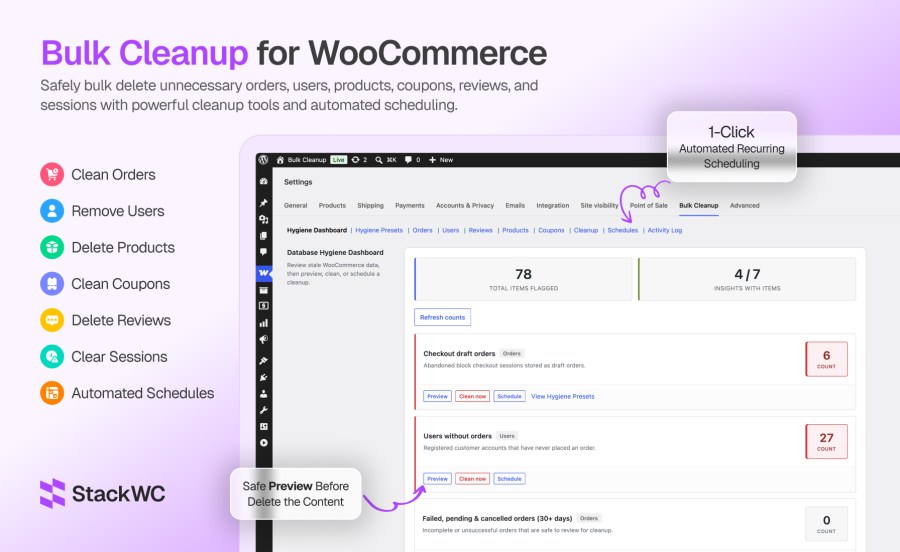
Hygiene Dashboard

See what needs cleanup before you delete anything:

  • Live counts for checkout-draft orders, failed/pending/cancelled orders (30+ days), guest orders (90+ days), trashed orders (30+ days), expired cart sessions, expired unused coupons, and users without orders
  • Summary stats for total flagged items and insights with matches
  • Preview, Clean now, or Schedule on each insight (session cleanup has no preview)
  • Refresh counts on demand

Hygiene Presets

Ready-made recurring cleanup policies. Applying a preset creates a scheduled job:

  • Weekly checkout-draft order cleanup (move to trash)
  • Daily expired cart session cleanup
  • Monthly failed, pending, and cancelled order cleanup (move to trash, 30+ days)
  • Weekly empty order trash (permanent delete, 30+ days in trash)
  • Monthly guest order cleanup (move to trash, 90+ days)
  • Monthly expired unused coupon cleanup (move to trash)
  • Apply or remove presets; manage linked jobs under Schedules

Bulk Cleanup Orders

  • Filter by order status (WooCommerce statuses, including checkout-draft when available)
  • Filter by date range, order total (min/max), and payment method
  • Filter by customer type (guest vs registered)
  • Move to trash or delete permanently
  • Preview matching orders and export CSV (up to 5,000 rows)
  • Inline scheduling (one-time or recurring)

Bulk Cleanup Users

  • Filter by user roles, registration date range, and email addresses (comma-separated)
  • Filter by user meta key and value
  • Users without orders only
  • Reassign orders to another user before deletion
  • Permanent delete only (with preview and CSV export)
  • Inline scheduling
  • Current user and administrators are never deleted

Bulk Cleanup Reviews

  • Filter by review status, star rating (1–5), date range, product IDs, and author user ID
  • Move to trash or delete permanently
  • Preview, CSV export, and inline scheduling

Bulk Cleanup Products

  • Filter by product status, type, category, stock status, featured flag, SKU, and date range
  • Move to trash or delete permanently
  • Preview, CSV export, and inline scheduling

Bulk Cleanup Coupons

  • Filter by coupon status and discount type
  • Expired coupons only and/or unused coupons only
  • Search by coupon code and filter by date range
  • Move to trash or delete permanently
  • Preview, CSV export, and inline scheduling

General Cleanup Tools

Quick operations with configurable options:

  • Delete inactive users (by days since registration; optional users-without-orders check)
  • Delete users without orders (with role exclusions)
  • Delete guest orders older than X days (trash or permanent)
  • Delete failed, pending, or cancelled orders older than X days (trash or permanent)
  • Permanently empty trashed orders (optionally older than X days)
  • Clean expired WooCommerce cart/checkout sessions
  • Schedule any of these cleanup operations from this tab

Schedules

  • Create jobs from entity tabs, the Hygiene Dashboard, or Hygiene Presets
  • Intervals: one-time, hourly, daily, weekly, monthly
  • Dashboard with active, paused, and completed job counts
  • Pause, resume, run now, and delete schedules
  • Configurable batch size per job
  • Background batch processing for scheduled jobs
  • Optional email when a scheduled job completes (default address + optional per-job override)

Activity Log

  • Log of manual deletions and completed scheduled runs
  • Shows date, source (manual vs scheduled), action, item type, count, and user
  • Stats: items deleted in the last 30 days and total logged events

Safety & Security

  • Preview and confirmation before destructive actions
  • CSV export from the preview modal (up to 5,000 rows)
  • Move to trash or delete permanently (orders, products, coupons, reviews)
  • Batch processing with a progress indicator on entity deletes
  • Nonce verification and capability checks (stackwc_bcfw_manage, administrators by default)
  • Administrators and the logged-in user are protected from user deletion
  • WooCommerce HPOS (High-Performance Order Storage) compatible
  • Activity logging for successful deletions and completed schedules

Create one-time or recurring jobs from any tab. Choose hourly, twice daily, daily, weekly, or monthly intervals. Pause, resume, run now, or delete schedules from one dashboard. Email notifications tell you when a job finishes.

How it works

For a first-time cleanup:

  • Install and activate Bulk Cleanup (WooCommerce required).
  • Go to WooCommerce → Settings → Bulk Cleanup.
  • Open the Hygiene Dashboard and click Refresh counts.
  • Preview any insight with a high count.
  • Export CSV if you want a backup, then Clean now or apply a Hygiene Preset.

For targeted bulk delete:

  • Open the relevant tab — Orders, Users, Products, Coupons, or Reviews.
  • Set your filters and click Preview.
  • Choose Move to Trash (reversible) or Delete Now (permanent).
  • Confirm and review the result in the Activity Log.

For ongoing automation:

  • Apply Hygiene Presets or create a custom schedule from any tab.
  • Set batch size and enable email notifications.
  • Manage jobs under Schedules and review the Activity Log monthly.

Who it’s for Ideal for:

  • WooCommerce stores with years of order history
  • Shops using block checkout (checkout-draft buildup)
  • Stores with large customer databases and inactive accounts
  • Agencies managing client stores that need periodic DB hygiene
  • High-traffic stores where manual cleanup isn’t practical

Häufig gestellte Fragen

Can I bulk delete WooCommerce orders safely?

Yes. Bulk Cleanup includes preview before delete, confirmation prompts, optional move-to-trash (reversible), CSV export up to 5,000 rows, batch processing for large stores, and a full Activity Log. Always preview and export a CSV before permanent deletion — that cannot be undone.

Does Bulk Cleanup support scheduled WooCommerce deletions?

Yes. Create one-time or recurring jobs from any tab using Schedule this deletion. Intervals include hourly, twice daily, daily, weekly, and monthly. Hygiene Presets also create recurring schedules automatically. Manage, pause, resume, and run jobs from the Schedules tab.

Can I delete WooCommerce customers without orders?

Yes. Use the Users tab with Only users without orders enabled, the Delete Users Without Orders tool under Cleanup, or the Hygiene Dashboard insight for users without orders. You can also schedule this cleanup to run automatically. Administrators and your logged-in account are always protected.

Can I bulk delete WooCommerce products?

Yes. The Products tab lets you filter by status, type, category, stock status, featured flag, SKU, and date range. Preview matches, export CSV, move products to trash, or delete permanently. Trash gives you a recovery window before permanent removal.

How do I delete unused or expired WooCommerce coupons in bulk?

Open the Coupons tab and enable Expired coupons only and/or Unused coupons only. Filter further by discount type, coupon code, or date. Preview, export CSV, then trash or permanently delete. The Monthly Expired Coupon Cleanup preset automates this on a schedule.

Related Products

Price $279 Jährlich
Rated 3.2 out of 5 stars
Price $79 Jährlich
Rated 3.4 out of 5 stars
Price $59 Jährlich
Rated 3.1 out of 5 stars
Price $109 Jährlich
Rated 2.7 out of 5 stars
Price $109 Jährlich
Rated 2 out of 5 stars
Price $49 Jährlich
Rated 4.1 out of 5 stars
Price $109 Jährlich
Rated 2.3 out of 5 stars
Price $39 Jährlich
Rated 2.8 out of 5 stars
Price $109 Jährlich
Rated 2.6 out of 5 stars
Use of your personal data
We and our partners process your personal data (such as browsing data, IP Addresses, cookie information, and other unique identifiers) based on your consent and/or our legitimate interest to optimize our website, marketing activities, and your user experience.




