
Get a free 14-day trial on a wide range of WooCommerce Marketplace extensions and themes. Explore products
Product Icon

Catalog Visibility Options for WooCommerce

Hide WooCommerce prices until login, restrict products to wholesale buyers, or disable purchases with catalog mode.
Choose a billing option 14-day free
Price: $0 today, then $59
Price: $0 today, then $94.40, discounted from $118

Product comparison

Das Abonnement beinhaltet

  • Product updates and improvements
  • Kundensupport
  • 30-Tage-Geld-zurück-Garantie

Control who can see products, see prices, and buy

Catalog Visibility Options for WooCommerce lets you hide prices until login, reserve products for wholesale buyers, or run your store in catalog mode. Use your existing WooCommerce products and set separate rules for who can browse, see prices, and place orders.

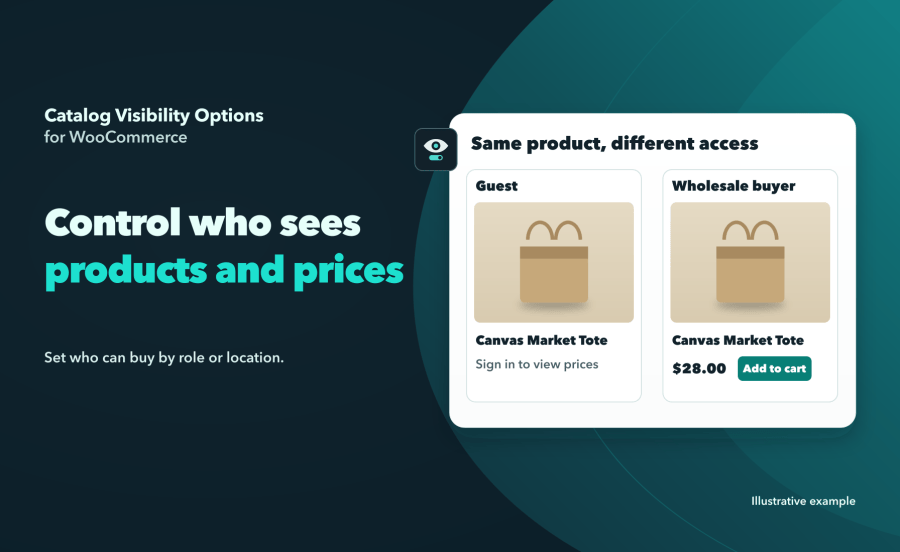
  • Hide prices for guests. Keep products visible and display a sign-in message in place of the price.
  • Restrict products by user role. Show a category or individual product to approved wholesale buyers.
  • Disable purchasing. Keep product pages and prices visible while you collect inquiries or prepare to take orders.

Hide WooCommerce prices until customers sign in

In WooCommerce → Settings → Visibility Options, set Prices to Enabled for Logged In Users. Use Catalog Price Text to tell guests how to get access. Set Purchases to the same login requirement if guests should also wait to place orders.

Run a private wholesale catalog alongside your public shop

Use Show to Specific Roles on a product category to reserve that assortment for a role you use for approved buyers. On an individual product, open Product data → Restrictions to use the category settings or set separate rules for who can view the product, see its price, and purchase it.

Use WooCommerce as a product catalog

Set Purchases to Disabled in Visibility Options. Leave Prices enabled to show prices, or hide them for a quote-only catalog. Use Alternate Content on product pages to give shoppers a contact or ordering instruction.

Set product access by country or region

Enable Location Filter Options to configure restrictions by country or state, region, or territory. You can let shoppers choose a location on a location selection page. When a product has location rules, the location helps determine whether shoppers can see it, see its price, or buy it.

Setup and support

Requires WordPress 6.5 or later, WooCommerce 9.0 or later, and PHP 7.4 or later. See the Catalog Visibility Options documentation for settings and examples. Support tickets are answered by the Catalog Visibility Options developer.


Häufig gestellte Fragen

Can I hide WooCommerce prices until customers log in?

Yes. Go to WooCommerce → Settings → Visibility Options and set Prices to Enabled for Logged In Users. Use Catalog Price Text to display a message such as “Sign in to view prices.” Set Purchases separately to control who can order.

Can I show a product category only to approved wholesale buyers?

Yes. Edit the category under Products → Categories and select Show to Specific Roles under Role Visibility Rules. Choose the role you assign to approved buyers. Other products can stay visible in the same store.

How do I turn WooCommerce into a catalog without online ordering?

Set Purchases to Disabled in Visibility Options. You can keep product pages and prices visible, or disable Prices as well. Use Alternate Content to show a message such as “Contact us for trade orders.”

Can I control visibility and purchases for an individual product?

Yes. Open the product’s Restrictions tab under Product data. You can inherit the category’s settings or set separate rules for product visibility, price visibility, and purchasing.

Can I restrict product access by country or region?

Yes. Enable Location Filter Options and select Countries or States / Territories. Then set the applicable locations on the product or category. You can also configure a page where shoppers select their location.

Can I replace a hidden price or Add to cart button with a message?

Yes. Use Catalog Price Text for a hidden price and Catalog Add to Cart Button Text for the purchase action. Alternate Content adds instructions to the individual product page.

Can I charge a different price to wholesale customers?

Catalog Visibility Options controls who can see the existing price and who can buy. Use a rule-based pricing extension such as Dynamic Pricing if you need to set a different price by user role.

What are the minimum requirements for Catalog Visibility Options?

Catalog Visibility Options requires WordPress 6.5 or later, WooCommerce 9.0 or later, and PHP 7.4 or later.

Kundenbewertungen

Average rating 4.4

11 reviews from verified users

5 stars, 73% of reviews
4 stars, 9% of reviews
3 stars, 9% of reviews
2 stars, 0% of reviews
1 star, 9% of reviews

Click to rate

  • Bewertet mit 5 von 5
    skinandacnespecialistVereinigte Staaten von Amerika (USA)Nov 4, 2026
    I love this! So easy to use compared to other B2C options! Other ones are so complicated and this is the BEST! I needed something that would work to hide some products from users that required a log in/special account in Wordpress and this does it wonderfully! TOP NOTCH!
  • Bewertet mit 5 von 5
    pwoodleVereinigte Staaten von Amerika (USA)Aug 22, 2025
    Was looking for an easy way to convert a store into a catalog site. This worked perfectly.
  • Bewertet mit 1 von 5
    nikiprofKirgisistanJun 10, 2025
    Оставлял заявку в поддержке 2 месяца назад. Со мной связались один раз и попросили доступ. И на этом пропали. Тикет стоит в статусе "Обработка" около 3 месяцев. На письма никто не отвечает. Хотя бы ответьте!
  • Bewertet mit 5 von 5
    Skye McGinnVereinigte Staaten von Amerika (USA)Jul 19, 2023
    Excellent Support! Plugin is easy to use and support was excellent. I needed help with an exception to the visibility rules based on having a product in the cart and they provided useful examples.
  • Bewertet mit 3 von 5
    pgonzalezg983Vereinigte Staaten von Amerika (USA)May 23, 2020
    Not enough granularity in the selection of Users. We need to be able to select users not only by Logged In / Not Logged In. At least we should be able to differentiate users by Role

Related Products

14 day free trial
Rated 2.7 out of 5 stars
14 day free trial
Rated 3.5 out of 5 stars
14 day free trial
Rated 4.6 out of 5 stars
14 day free trial
Rated 3.7 out of 5 stars
14 day free trial
Rated 4 out of 5 stars
14 day free trial
Rated 4 out of 5 stars
14 day free trial
Rated 4.8 out of 5 stars
14 day free trial
Rated 4.2 out of 5 stars
14 day free trial
Rated 3.9 out of 5 stars
Use of your personal data
We and our partners process your personal data (such as browsing data, IP Addresses, cookie information, and other unique identifiers) based on your consent and/or our legitimate interest to optimize our website, marketing activities, and your user experience.