
Start a free 14-day trial by December 1 on a wide range of WooCommerce Marketplace extensions and themes. Explore products
Product Icon

Google Sheet Connector for WooCommerce

Sync WooCommerce orders and products with Google Sheets in real time. Edit store data with two-way sync and automate updates.
Choose a billing option 14-day free
Price: $0 today, then $49
Price: $0 today, then $78.40, discounted from $98

Das Abonnement beinhaltet

  • Product updates and improvements
  • Kundensupport
  • 30-Tage-Geld-zurück-Garantie

Top Features

  • Automatically sync WooCommerce orders to Google Sheets.
  • Manage all orders in one sheet or separate sheets by order status.
  • Support 8 order statuses:
    Pending Payment, Processing, On Hold, Completed, Cancelled, Refunded, Failed and Draft.
  • Choose which order statuses to sync.
  • Automatically map orders by Order ID.
  • Edit order details in Google Sheets and sync changes to WooCommerce.
  • Update product prices, stock quantities and statuses from Google Sheets.
  • Sync your entire product catalog to a dedicated Products sheet.
  • Keep product prices, stock and statuses synchronized.
  • Sync orders in real time when their status changes.
  • Schedule automatic syncs every 15 minutes, hourly, twice daily or daily.
  • Manually sync the latest 100 orders or perform a full re-sync.
  • Choose which order and product fields to sync.
  • Customize column names with field mapping.
  • Enable or disable headers and freeze header rows.
  • Color-code order rows by status.
  • Create, rename, clear and open Google Sheets from WooCommerce.
  • Connect securely using Google OAuth.
  • Monitor connection status and disconnect with one click.
  • View detailed sync logs with order ID, customer name, total, status and timestamp.

Every Order in Google Sheets

Connect WooCommerce with Google Sheets to send all essential order data to one place automatically. Managing, tracking and analyzing orders no longer means manual exports.

Synced order data includes: Order ID, order date, customer details, billing and shipping information, order status, totals (tax, shipping, discounts), payment method, product names, SKUs, quantities and customer notes.

No manual exports. No outdated spreadsheets. Just live WooCommerce data inside Google Sheets.
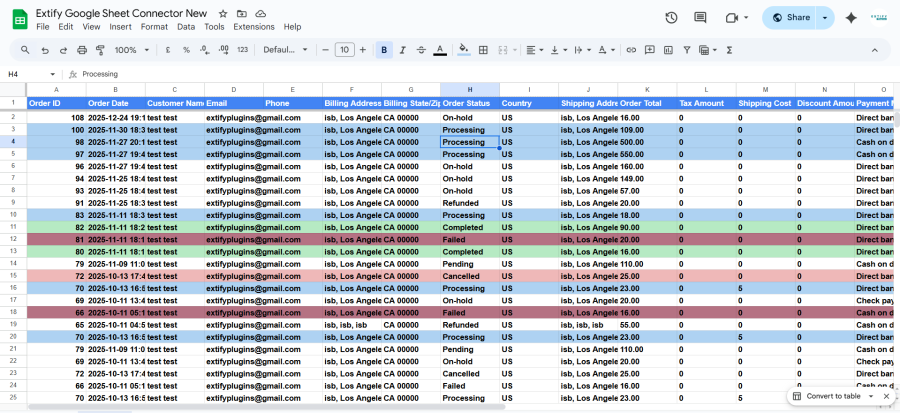
Google Sheet Connector for WooCommerce

Set Up in Minutes, Control Every Detail

Connect your Google account, create or select a sheet, and choose which order statuses and fields to sync. Create, rename, clear and open sheets in one click, and check connection status from the dashboard.
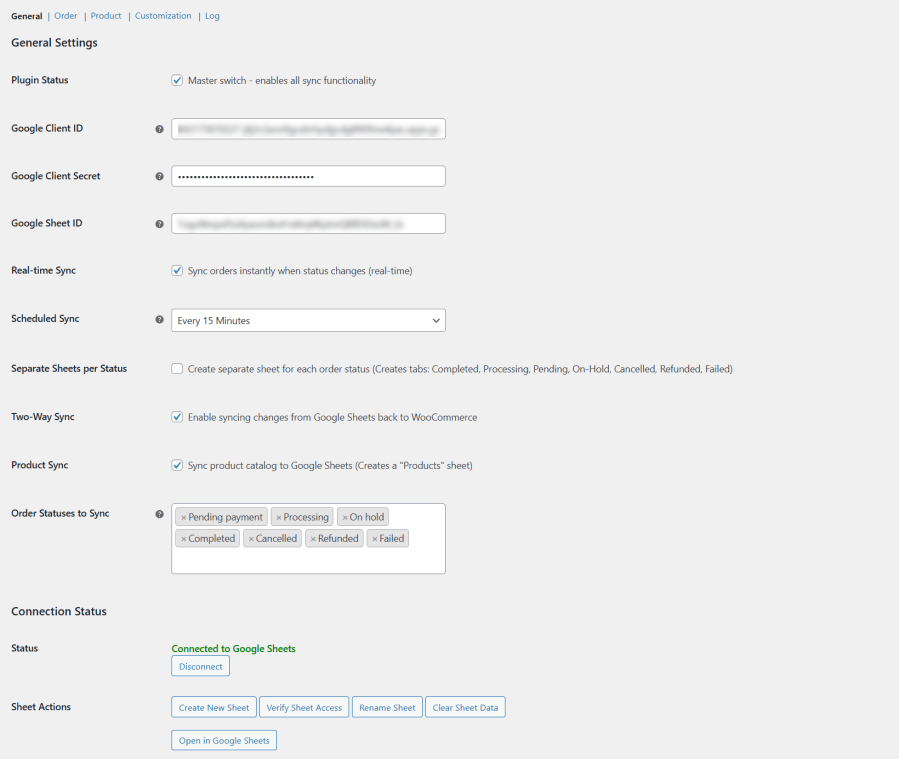
Google Sheet Integration for WooCommerce

Real-Time & Scheduled Sync

Whether you need instant updates or automated background syncing, the plugin adapts to your workflow.
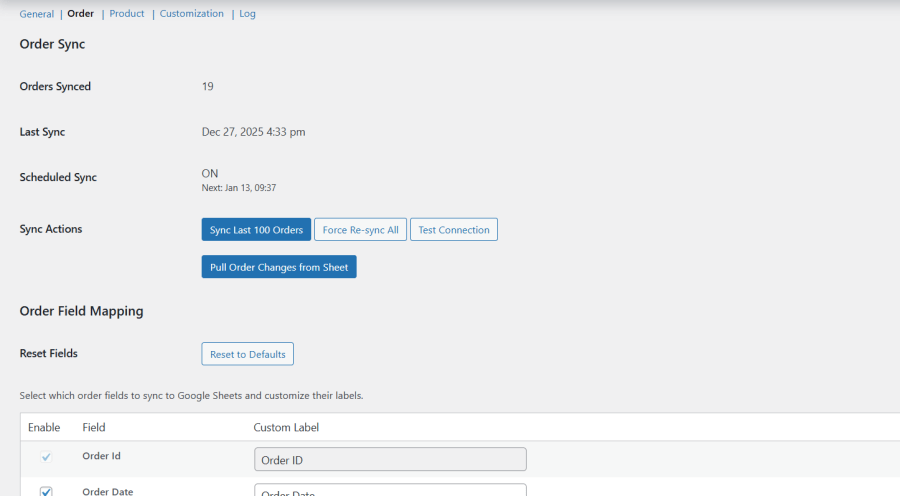
  • Real-time sync when order status changes
  • Scheduled sync every 15 minutes, hourly, twice daily, or daily
  • Manual sync options for last 100 orders or full re-sync

Order Sync WooCommerce Google Sheet 1

Edit in Google Sheets, Update Your Store

Make changes directly in Google Sheets and sync them back to WooCommerce with confidence.

  • Update order details from the sheet
  • Modify product price, stock and status
  • Reduce admin work and speed up operations

Sync Products with your Google Sheet

Sync your entire WooCommerce catalog into a dedicated Products sheet. Keep pricing, stock levels and product statuses aligned between WooCommerce and Google Sheets, without switching dashboards.
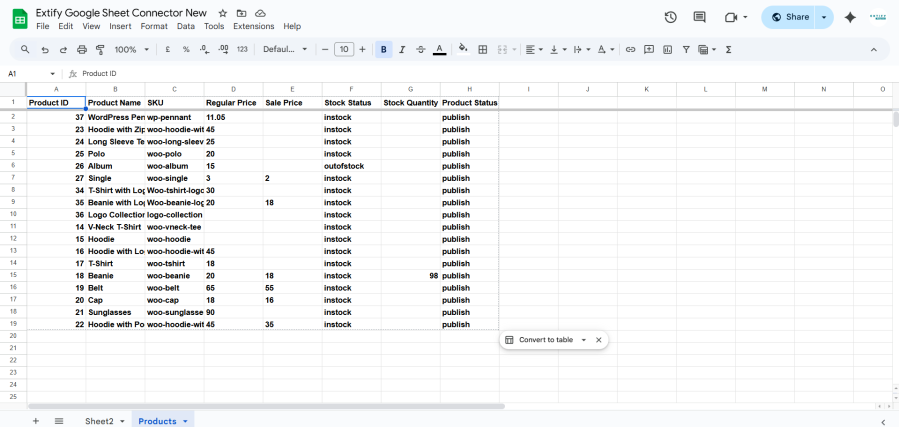
Products in Google Sheet for WooCommerce

Fully Customizable Google Sheet

Turn messy spreadsheets into clear, actionable data:
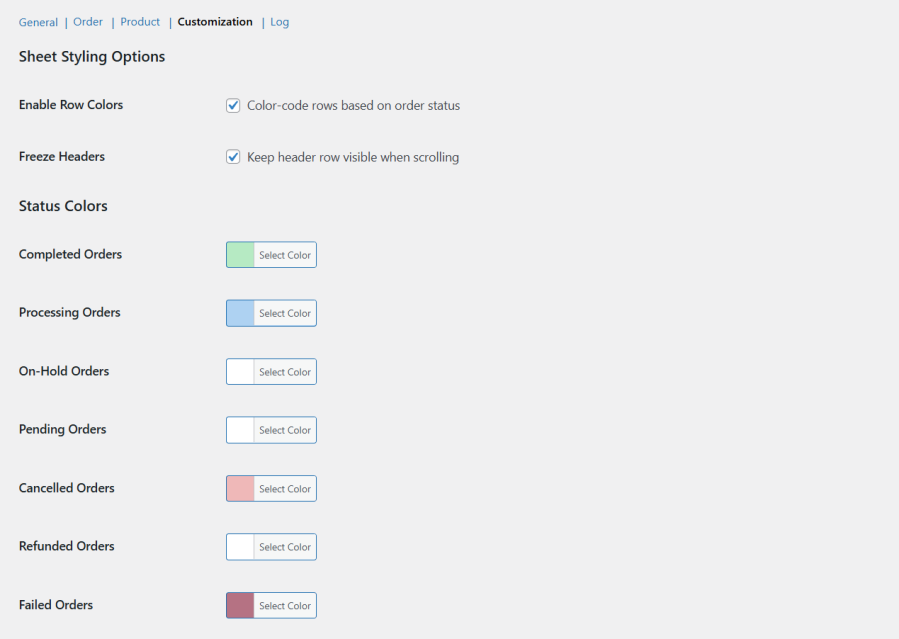
  • Enable or disable sheet headers
  • Freeze header rows for easy scrolling
  • Customize column labels with field mapping
  • Color-code rows based on order status

Google Sheet for WooCommerce Customization

Detailed Sync Logs & Tracking

Track every sync action with complete transparency:
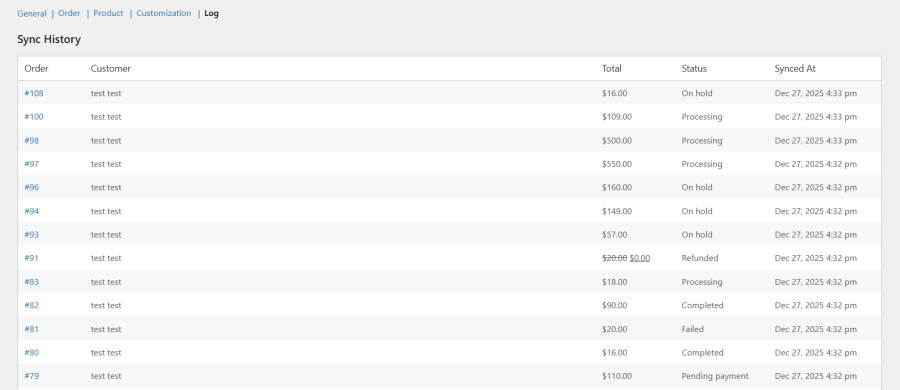
  • Order ID
  • Customer name
  • Order total
  • Order status
  • Sync date & time

Order Sync WooCommerce Google Sheet

Secure, Reliable & Built for Performance

The plugin uses the latest Google API libraries and secure OAuth authentication to ensure reliable and safe data synchronization—without slowing down your store.

Check our detailed Documentation to easily configure and use the plugin step by step.

Ideal For:

  • Store owners & managers
  • Accounting & finance teams
  • Inventory & warehouse management
  • Order fulfillment teams
  • Businesses relying on Google Sheets for reporting

Häufig gestellte Fragen

What does Google Sheet Connector for WooCommerce do?

The plugin syncs your WooCommerce orders and products directly with Google Sheets. You can view, manage, and update store data in real time without exporting CSV files.

Does the plugin support real-time order syncing?

Yes. Orders are synced instantly to Google Sheets whenever the order status changes. You can also use scheduled syncing if preferred.

Which order statuses can be synced?

You can sync the following WooCommerce order statuses:

  • Pending Payment
  • Processing
  • On Hold
  • Completed
  • Cancelled
  • Refunded
  • Failed
  • Draft

You can choose which statuses to sync from the settings.

Can I sync all orders into one Google Sheet?

Yes. You can manage all orders in a single Google Sheet or enable the option to create separate sheets for each order status.

Does the plugin support two-way sync?

Yes. You can update order and product data directly from Google Sheets and sync those changes back to WooCommerce.

Can I sync WooCommerce products to Google Sheets?

Yes. The plugin syncs your entire product catalog to a dedicated Products sheet and supports two-way syncing for price, stock quantity, and product status.

How often does scheduled syncing run?

You can choose from multiple scheduled sync intervals:

  • Every 15 minutes
  • Hourly
  • Twice daily
  • Daily
Can I customize which fields are synced?

Absolutely. You can select which order and product fields to sync and customize column labels using the field mapping options.

Can I change the appearance of the Google Sheet?

Yes. You can:

  • Enable or disable sheet headers
  • Freeze header rows
  • Color-code rows based on order status
Is my data secure?

Yes. The plugin uses secure Google OAuth authentication and the latest Google API libraries to ensure safe and reliable data syncing.

Does the plugin create Google Sheets automatically?

Yes. With one click, you can create a new Google Sheet, verify access, rename sheets, or clear existing sheet data.

Can I disconnect Google Sheets at any time?

Yes. The plugin includes a one-click disconnect option, and the connection status is always visible in the dashboard.

Extension information

  • PHP version required: 7.0
  • Tested with WordPress: 6.9
  • Tested with WooCommerce: 9.*.*
  • Requires at least WordPress: 6.0
  • Requires at least WooCommerce: 7.0

Länder

  •  Worldwide

Related Products

14 day free trial
Rated 3.9 out of 5 stars
14 day free trial
Rated 3.4 out of 5 stars
14 day free trial
Rated 3.1 out of 5 stars
14 day free trial
Rated 2 out of 5 stars
14 day free trial
Rated 2.8 out of 5 stars
14 day free trial
Rated 4.1 out of 5 stars
14 day free trial
Rated 4 out of 5 stars
14 day free trial
Rated 2.5 out of 5 stars
14 day free trial
Rated 2.8 out of 5 stars
Use of your personal data
We and our partners process your personal data (such as browsing data, IP Addresses, cookie information, and other unique identifiers) based on your consent and/or our legitimate interest to optimize our website, marketing activities, and your user experience.