Start a free 14-day trial by December 1 on a wide range of WooCommerce Marketplace extensions and themes. Explore products
Product Icon

Payment Method Based Fee & Discounts for WooCommerce

Add fees or discounts based on select payment gateways. Restrict fee or discount based on country, user roles, order-totals and more.
Choose a billing option 14-day free
Price: $0 today, then $49
Price: $0 today, then $78.40, discounted from $98

Product comparison

Das Abonnement beinhaltet

  • Product updates and improvements
  • Kundensupport
  • 30-Tage-Geld-zurück-Garantie

Highlights

  • Apply fees and discounts based on payment methods
  • Add fixed or percentage-based fees and discounts.
  • Apply fees or discounts based on cart content or amount.
  • Schedule fees and discounts, set fee limits, and tax options.
  • See complete features list

Different payment gateways charge different transaction fees, which can reduce your store’s profits. Without a way to manage these costs, it’s hard to guide customers toward cheaper payment methods.

That is where payment method-based fees & Discounts for WooCommerce come into play. It helps you manage payment costs and encourage customers to use your preferred payment methods. You can add an extra fee for payment methods with higher transaction charges or offer discounts to customers who select more cost-effective options.

Create fixed or percentage-based fees and discounts, set minimum and maximum limits, and apply them to the entire cart or individual products. You can also create conditional rules based on products, categories, brands, user roles, customers, countries, and cart amounts. Schedule your rules for specific dates to run seasonal promotions or limited-time payment offers.


How Do Payment Method Based Fee & Discounts Work?


Using a simple rule-based approach, you can set up payment method-based fees and discounts in 3 easy steps:
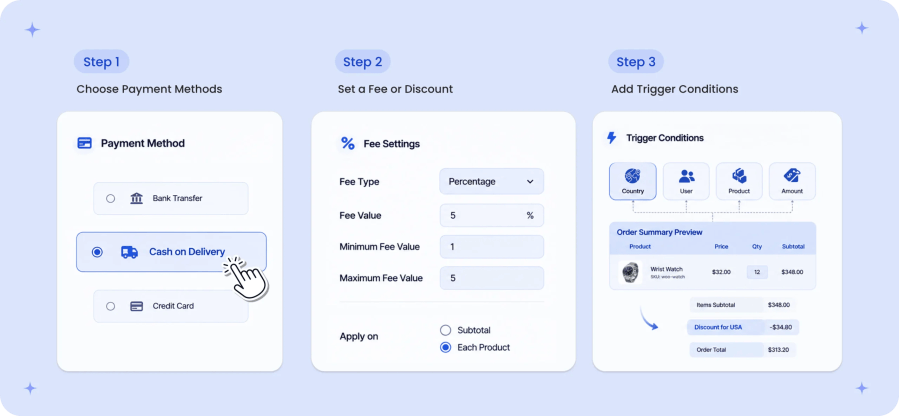

  • Step 1: Choose Payment Methods
    Select the payment methods the rule should apply to, such as Cash on Delivery (COD), bank transfer, or credit card.
  • Step 2: Set a Fee or Discount
    Choose a fixed amount or percentage and decide whether it applies to the entire cart or individual products.
  • Step 3: Add Trigger Conditions
    Set conditions for when the rule should apply. You can target specific products, categories, brands, user roles, customers, countries, and cart amount ranges, or schedule rules for selected dates.

Payment method based fee


Common Use Cases for Payment Method Based Fee & Discounts


Payment method based fee

Recover payment gateway fee

Some payment gateways charge additional fees that affect the profit margin of competitively priced products. For example, PayPal can charge up to 3% on each order. With the Payment Method-based Fee & Discounts extension, you can add a 3% transaction fee and protect your profitability.


Payment method based fee

Run Seasonal Payment Promotions

Suppose your store pays higher transaction fees for credit card payments than for bank transfers. You can add a small fee to credit card payments and offer a discount to customers who pay through bank transfer. This encourages customers to choose a more cost-effective payment method while helping you manage transaction expenses.


Payment method based fee

Charge an extra fee for COD

You can add additional charges to COD (cash on delivery) payments to discourage the use of COD or to cover any additional costs that your shipping company charges for COD delivery.


Payment method based fee

Offer discounts on preferred gateways

You can offer discounts on payment gateways with merchant-friendly services like easy payout, lower transaction charges, better dispute handling, and more.


Create Multiple Fees & Discount Rules


Create custom fee and discount rules for selected payment methods to manage extra transaction costs and control your pricing. For example, offer a discount for bank transfers and add an extra fee for cash on delivery or other high-cost payment options. This gives customers a clear incentive to choose the option that best matches your costs. By giving each fee or discount a custom title, customers can easily see exactly what is being added or deducted at checkout.
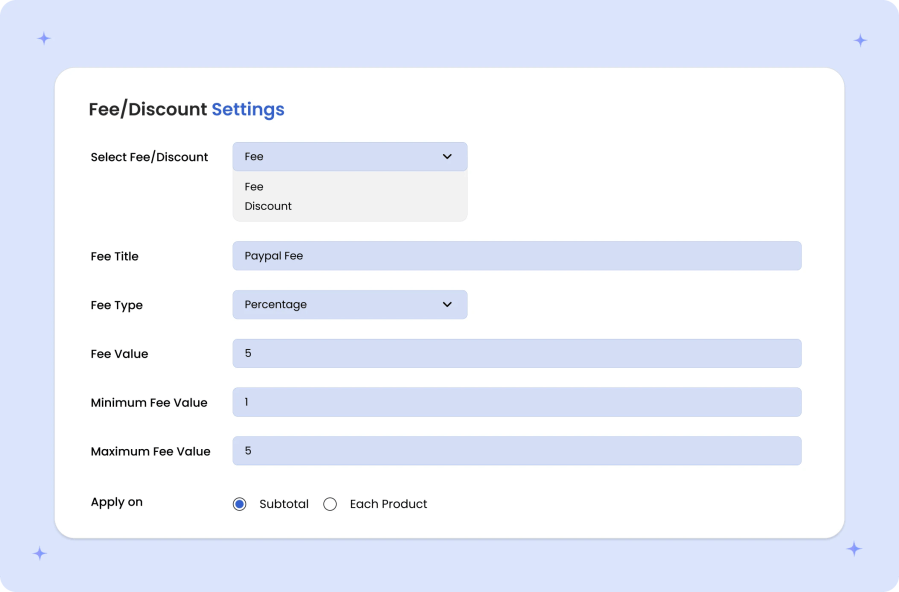
Payment method based fee


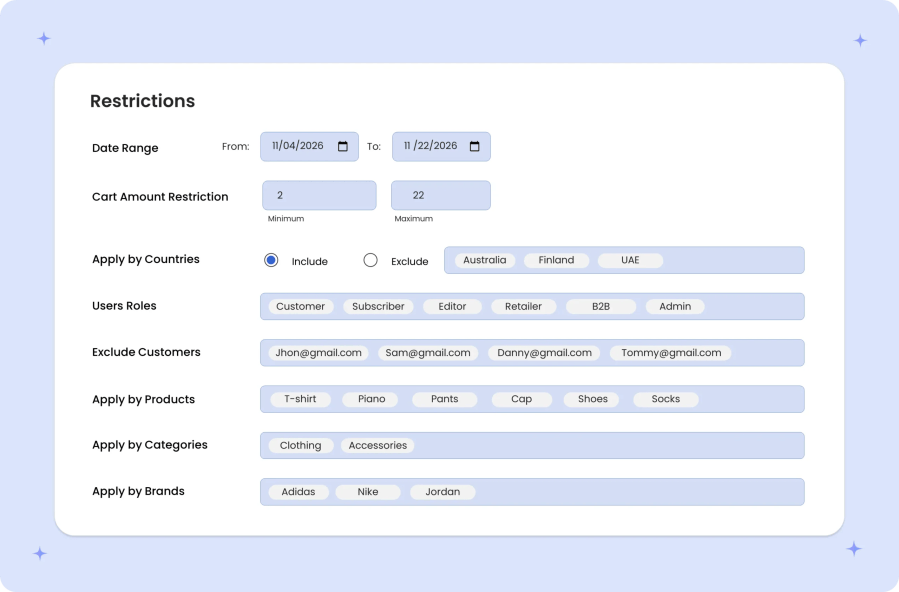
Apply Fees and Discounts based on Various Conditions


Apply fees and discounts only when your conditions are met:

  • Cart restrictions: Set a minimum and maximum cart amount range for the fee or discount to apply.
  • Country restrictions: Include or exclude specific countries for selected payment methods.
  • User role restrictions: Target fee and discount rules at specific customer groups.

For example, some payment gateways add fees for international purchases or for certain countries. If a gateway charges extra for a country, you can add a matching fee for customers from that country and pass the additional cost on to them.
Payment method based fee


Apply Taxes to Fees and Discounts


Select whether each fee or discount is taxable or non-taxable. It can keep your pricing clear and consistent across your store. You can also assign a tax class, such as
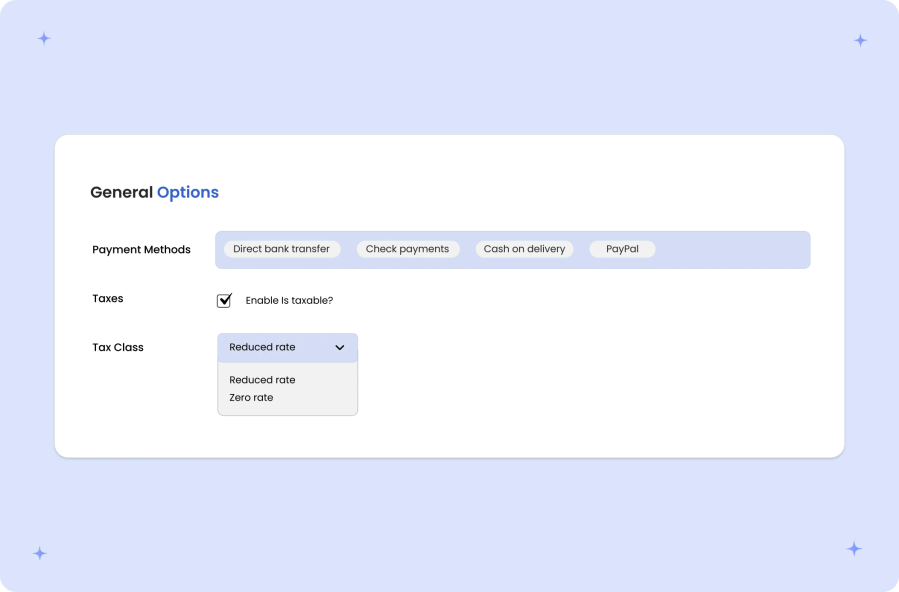
  • Reduced rate
  • Zero rate

Payment method based fee


Detailed Feature List


  • Add fees or discounts based on payment gateways
  • Create fixed or percentage-based fees and discounts
  • Set minimum and maximum fee/discount limits.
  • Set minimum and maximum cart amounts for applying rules.
  • Select specific payment methods for which the fee/discount would be applicable
  • Make fees and discounts taxable or non-taxable, and assign a tax class
  • Customize fee and discount values and titles
  • Apply the discount or fee to the entire cart or to individual products
  • Manage rules from a rule log showing
    • Fee/Discount Title
    • Date
    • Priority
    • Status
  • Schedule rules with a start and end date
  • Restrict fee or discount rules by:
    • Country
    • User roles
    • Product
    • Categories
    • Brands
    • Specific Customers

Related Products

14 day free trial
Rated 3.9 out of 5 stars
14 day free trial
Rated 3.4 out of 5 stars
14 day free trial
Rated 3.1 out of 5 stars
14 day free trial
Rated 4 out of 5 stars
14 day free trial
Rated 2.8 out of 5 stars
14 day free trial
Rated 4.1 out of 5 stars
14 day free trial
Rated 3.5 out of 5 stars
14 day free trial
Rated 2 out of 5 stars
14 day free trial
Rated 3.7 out of 5 stars
Use of your personal data
We and our partners process your personal data (such as browsing data, IP Addresses, cookie information, and other unique identifiers) based on your consent and/or our legitimate interest to optimize our website, marketing activities, and your user experience.