
Product Icon

Product Accessories for WooCommerce

Display curated or rule-based accessories/complementary products in product tabs on your store.
Choose a billing option
$29
Save 20%
$58 $46.40

Product comparison

Das Abonnement beinhaltet

  • Product updates and improvements
  • Kundensupport
  • 30-tage geld-zurück-garantie

Product Accessories for WooCommerce transforms your product pages by adding a dedicated, highly customizable accessories tab to showcase complementary items. Instead of hoping customers discover add-ons on their own, the plugin strategically suggests the right companion products at the perfect moment—when they are ready to purchase.
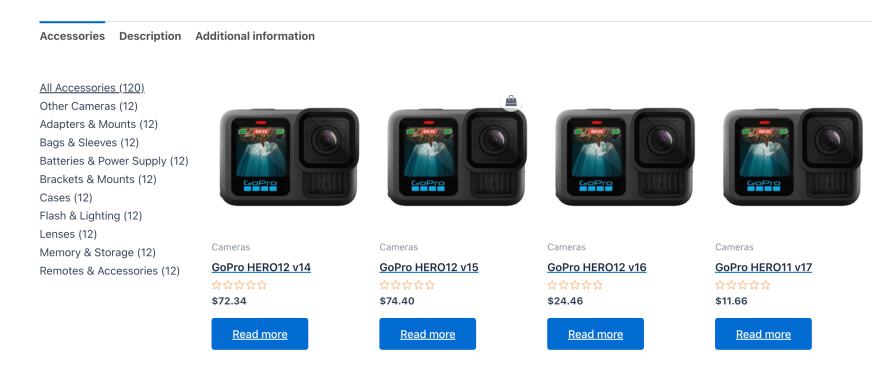
Product accessories tab displaying complementary items on a WooCommerce product page

Top benefits

  • Boost average order value: Turn single-product purchases into high-value bundles with strategic accessory and add-on suggestions.
  • Save time with AI generation: Create relevant accessory lists instantly using OpenAI or Google Gemini directly inside your product editor.
  • Create rule-based recommendations: Save hours of setup time with automated rules that dynamically display products by category, price, brand, and tag.
  • Customize lists per variation: Tailor accessory suggestions based on selected variations, ensuring customers see compatible add-ons for their specific choice.
  • Streamline buying with one-click checkouts: Allow customers to add multiple accessories to the cart simultaneously using a dedicated add-to-cart button.
  • Assign accessories in bulk: Create global templates to assign accessory lists to multiple products or entire categories at once.
  • Increase visibility at checkout and in emails: Promote accessories on the cart page, in order confirmation emails, and throughout the checkout flow.
  • Blend with any theme: Display accessories in beautiful horizontal or vertical layouts that adapt automatically to block-based and classic themes.

How it works

For store owners

You can configure accessory lists in three simple steps. First, edit any product or open a global template. Next, select products manually, define smart rules, or use built-in AI generators to build your lists. Finally, choose between vertical and horizontal tab layouts. The plugin displays these accessories in a responsive design that fits your theme.

For customers

When customers browse a product, they see a clean Accessories tab next to the standard description. Inside the tab, they can view details, see stock status, and add recommended accessories directly to their cart without leaving the page. They can also use the one-click button to add all recommended items at once, which reduces checkout friction.
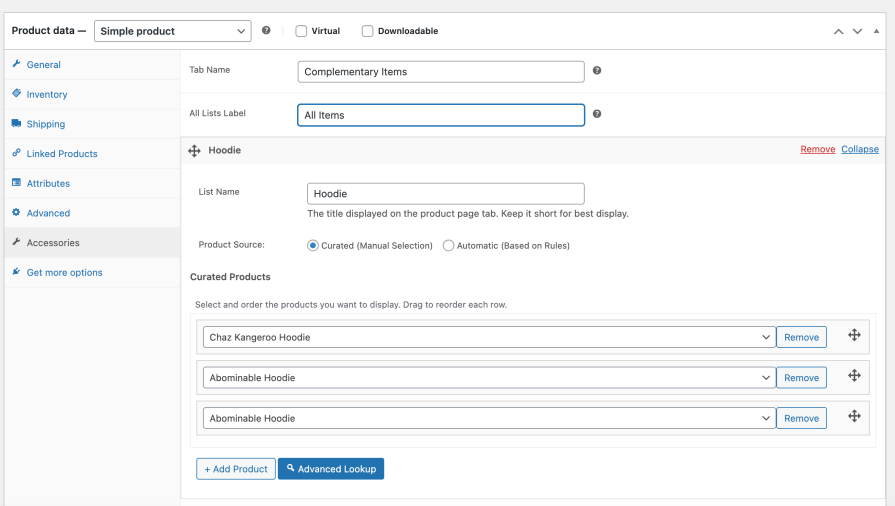
Three ways to build accessory lists

Curated lists for manual control

Manual product accessories curated list setup screen
Hand-pick specific items for each product. This option works best when you want absolute control over your recommendations, or when you highlight premium packages, featured items, and specific brand partnerships.
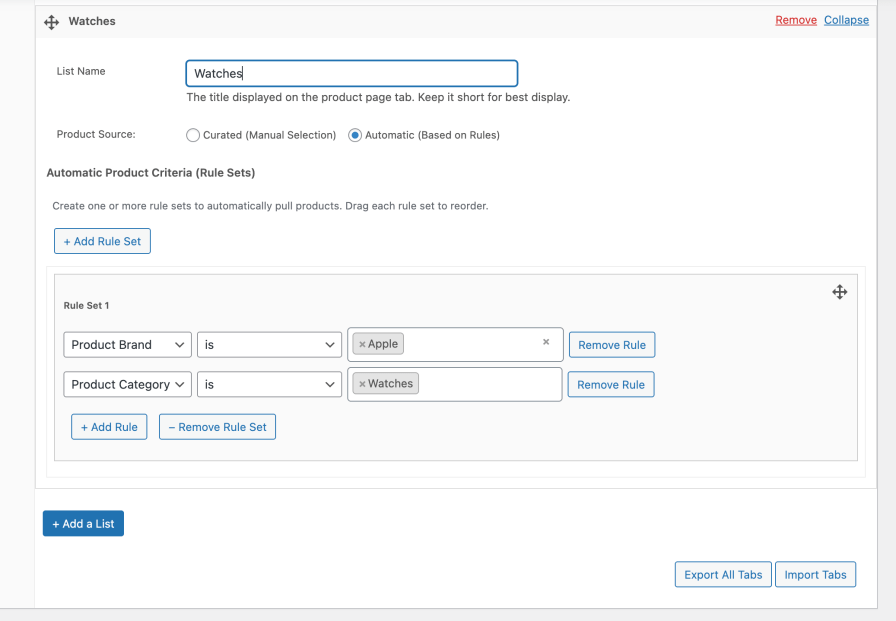
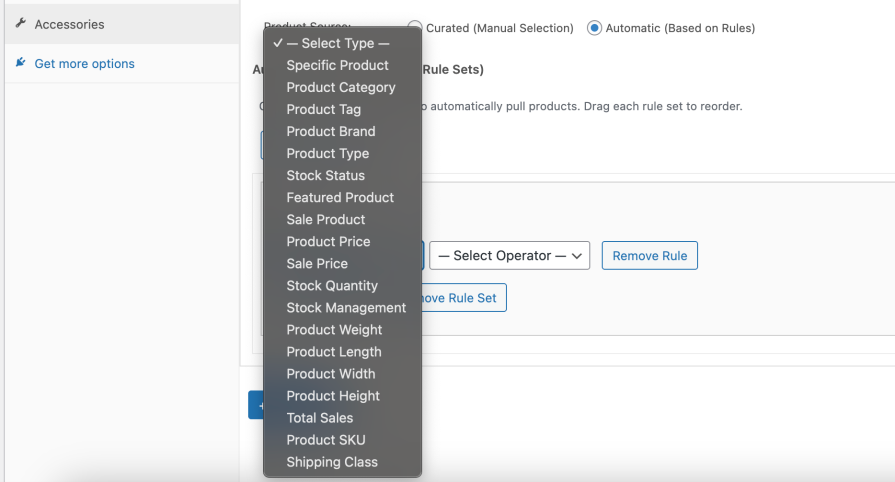
Smart rules for automated recommendations

Smart rules creation screen for automated product accessories
Intelligent filter options for automated accessory lists
Build intelligent rules to populate lists automatically. Define criteria using 19 granular rule types, including categories, tags, brands, prices, stock levels, and sale status. The plugin automatically pulls matching products, which eliminates manual updates and keeps your recommendations current.
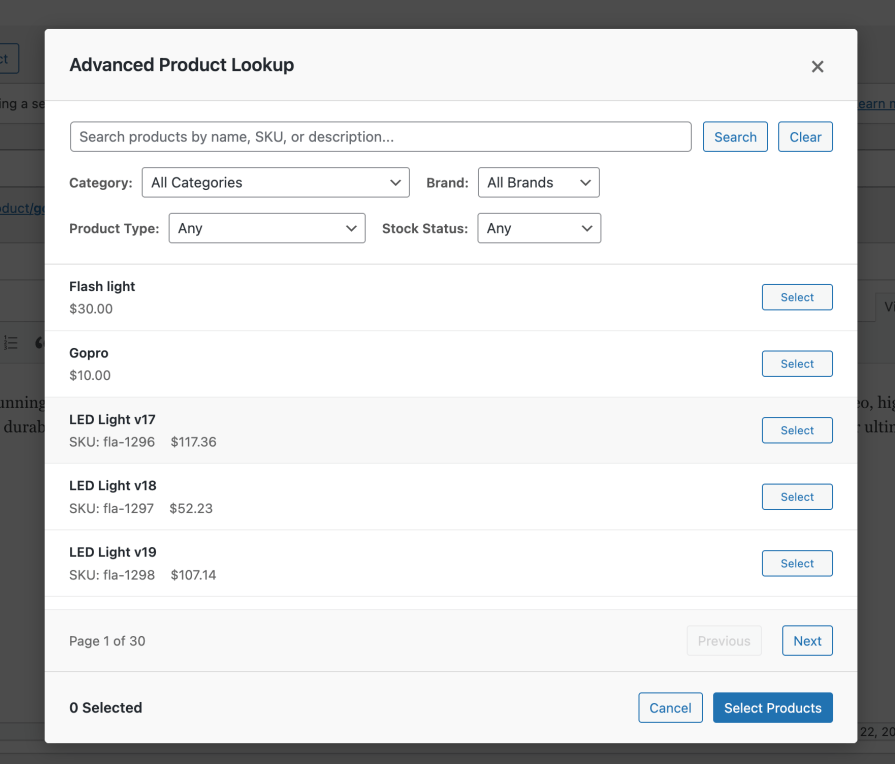
AI generation for instant setup

Advanced lookup and product search tool inside the plugin editor
Save time by generating curated accessory lists using OpenAI or Google Gemini. The built-in AI analyzes your product title, description, and store catalog to suggest highly relevant accessories. You can also provide custom instructions, such as filtering for specific price ranges or categories, to refine the suggestions before applying them.

Advanced features to maximize sales

  • Variation-specific overrides: Swap accessory lists dynamically when customers select a product variation, ensuring they see only compatible parts.
  • Add all accessories to cart: Make it easy for customers to buy everything they need in a single click, which increases average order value.
  • Global templates: Save time by applying standard accessory templates to multiple products or entire categories.
  • Sync upsells and cross-sells: Automatically import existing WooCommerce upsell or cross-sell links into a clean, dedicated accessory tab.
  • Advanced lookup engine: Find and select multiple items in seconds using name, category, or product type filters.
  • Block editor compatibility: Customize layout and placement using the Gutenberg block with real-time preview support.
  • Cart and email integrations: Display accessory recommendations on the cart page and include relevant add-ons in transactional emails.

Perfect for any ecommerce store

  • Electronics and tools: Show cases, cables, and compatible chargers alongside electronic devices or power tools.
  • Beauty and skincare: Suggest applicators, brushes, and complementary skincare steps that complete a routine.
  • Automotive and hardware: Recommend installation tools, lubricants, and matching components for main parts.
  • Home and lifestyle: Display matching furniture pieces, plants, and decorative accents.
  • Fashion and apparel: Suggest coordinating bags, jewelry, and care accessories.

Designed for speed and flexibility

Customize the frontend presentation to match your store layout. Choose between horizontal tabs for standard recommendations and vertical tabs for multiple accessory groups. You can set product limits, display item counts, and hide empty lists to maintain a clean layout. Additionally, Product Accessories for WooCommerce uses optimized database queries and intelligent caching to ensure fast page loads, which protects your conversion rates.

Why this matters for your business

Every product page presents an opportunity to increase revenue, but most stores leave money on the table. Product Accessories for WooCommerce helps customers discover exactly what they need at the perfect time. By eliminating friction and showing compatible add-ons, you increase lifetime customer value, reduce support requests, and boost your average order value.


Häufig gestellte Fragen

How quickly can I start showing accessories on my products?
Setup takes less than 5 minutes. Install the plugin, enable it in WooCommerce settings, edit any product, click the Accessories tab, and add your first product recommendations. Your customers will see the new accessories tab immediately.
Do I need to manually add products to every single item in my store?
Not at all. You can use Smart Rules to automatically suggest products based on categories, tags, or other criteria. Set up rules once, and relevant products appear automatically across multiple items.
Can I control exactly which products appear as accessories?
Yes, you have complete control. Choose manual curation for hand-picked recommendations, or use Smart Rules with specific criteria. You can also combine both approaches on the same product.
What if I have hundreds of products - will this be overwhelming to set up?
The Advanced Lookup feature makes finding and selecting products fast and easy. You can search, filter by multiple criteria, and select dozens of products at once. Smart Rules also work across your entire catalog automatically.
Will this work with my current WooCommerce theme?
Product Accessories integrates with the standard WooCommerce tab system that all properly coded themes support. It automatically matches your theme's styling and layout.
Is it compatible with page builders like Elementor or Divi?
The plugin works with any setup that properly supports WooCommerce product pages, including most major page builders and custom themes.
Will it work with variable products and product variations?
Absolutely. You can set up accessories for simple products, variable products, grouped products, and external products. Accessories appear at the main product level.
How does it handle large product catalogs?
The plugin includes pagination and smart loading to handle stores with thousands of products. You can control how many accessories display per page to maintain optimal loading speeds.
Can customers add accessories to their cart without leaving the product page?
Yes, each recommended product includes an "Add to Cart" button so customers can purchase accessories immediately without navigating away.
Can I customize how the accessories look?
The plugin automatically inherits your theme's WooCommerce styling. For advanced customization, developers can override template files or use CSS modifications.

Kundenbewertungen

We are accepting reviews for this product, and will display them when we get a few more.

Extension information

  • PHP version required: 7.4
  • Tested with WordPress: 7.0
  • Tested with WooCommerce: 10.8.1
  • Requires at least WordPress: 5.8
  • Requires at least WooCommerce: 5.0

Länder

  • Worldwide

Related Products

Price $79 Jährlich
Rated 3.4 out of 5 stars
Price $279 Jährlich
Rated 3.2 out of 5 stars
Price $59 Jährlich
Rated 3.1 out of 5 stars
Price $49 Jährlich
Rated 4.1 out of 5 stars
Price $109 Jährlich
Rated 2.7 out of 5 stars
Price $109 Jährlich
Rated 2 out of 5 stars
Price $109 Jährlich
Rated 2.3 out of 5 stars
Price $109 Jährlich
Rated 2.6 out of 5 stars
Price $39 Jährlich
Rated 2.8 out of 5 stars
Use of your personal data
We and our partners process your personal data (such as browsing data, IP Addresses, cookie information, and other unique identifiers) based on your consent and/or our legitimate interest to optimize our website, marketing activities, and your user experience.




