What is TopLayer/LEO – Variation Generator?
TopLayer/LEO – Variation Generator is a purpose-built variable product builder for WooCommerce stores that manage products with many colors, sizes, materials, finishes, logos, or other attribute combinations.
Instead of building attributes and variations one product at a time, store managers can select global attributes, choose the terms that should become variations, add per-term SKU parts and price adjustments, assign images, and generate the full variable product in one workflow.
Variation Generator can create a new variable product, convert an existing simple product, or rebuild an existing variable product. It preserves key product data, lets you add or remove selected attributes and terms, and rebuilds the final variation set so the product matches the configuration you chose.
As part of the TopLayer/LEO suite, it lives inside the shared TopLayer/LEO tab in WooCommerce settings and uses WooCommerce-native product, variation, attribute, taxonomy, stock, pricing, and media APIs.
Why you should choose Variation Generator
- Save time on complex products: Generate dozens or hundreds of variations without clicking through WooCommerce’s default variation editor.
- Build consistent SKUs: Combine the parent SKU with uppercase term-slug Sub-SKUs and a configurable separator.
- Keep product data intact: Preserve important product fields such as sale price, status, stock settings, tax settings, shipping class, catalog visibility, featured status, reviews, dimensions, categories, tags, images, and purchase notes.
- Update existing variable products safely: Add newly selected attributes and terms, remove unselected attributes and terms from the product, and rebuild only the selected product’s variations.
- Control variation images: Assign term images, set a parent gallery, and optionally map images by another selected attribute.
- Support visual shopping experiences: Enable attribute swatches for global attributes and show saved swatches on catalog and single-product pages.
- Use familiar WooCommerce data: Products remain standard WooCommerce variable products and variations, compatible with normal product management, reporting, exports, and fulfillment workflows.
How it works
- Go to WooCommerce > Settings > TopLayer/LEO > Variation Generator.
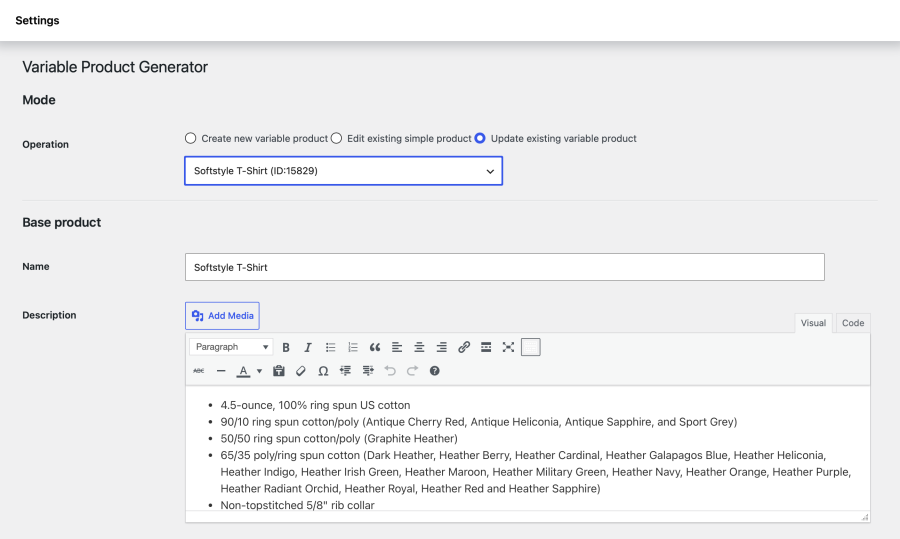
- Choose whether to create a new variable product, convert an existing simple product, or update an existing variable product.
- Fill in the base product fields, including name, descriptions, SKU, status, regular price, sale price, stock, tax, shipping, dimensions, categories, tags, images, and swatch display options.
- Add one or more global attributes.
- Choose the terms to include for each attribute. The plugin calculates every possible selected combination.
- Review or edit each term’s Sub-SKU, price upcharge, image, and optional linked-image mapping.
- Click Generate product.
Variation Generator creates or updates the parent variable product, syncs the selected attribute terms, removes unselected attribute term relationships, deletes the old variations for that product, and creates the new variation set.
Best use cases
- Apparel products with color and size combinations.
- Printed products with material, finish, size, and design options.
- Promotional products with logo, color, and packaging options.
- Product lines where each attribute term changes the SKU, price, or image.
- Stores that need to rebuild existing variable products after adding or removing options.
- Catalogs that benefit from color, text, dual-color, or sampled-image swatches.
Feature highlights
- Create new variable products.
- Convert existing simple products into variable products.
- Update and rebuild existing variable products.
- Select global product attributes and terms through an AJAX-loaded interface.
- Quick-create global attributes from the generator.
- Quick-create attribute terms with explicit slugs.
- Default Sub-SKU values from uppercase attribute term slugs.
- Custom SKU separator for generated variation SKUs.
- Per-term price upcharges.
- Per-term variation images.
- Linked-image dependency mapping between selected attributes.
- Parent product image and drag-sortable gallery management.
- Rich description and short description editors.
- Sale price, stock, tax, shipping, catalog visibility, featured, review, purchase note, category, and tag support.
- Optional frontend attribute swatches on catalog cards and single product pages.
- Swatch display modes for color, secondary color, text, and sampled image.
- WooCommerce-native products, variations, attributes, terms, images, and product metadata.