


Aktive Installationen
4K+
Das Abonnement beinhaltet
Support
With the Stamps.com integration, you can automatically create ready-to-print shipping labels for USPS®, UPS®, and more carriers based on items in an order. Stamps.com seamlessly accesses the latest USPS rates when creating your labels, giving you unprecedented reliability, ease, and speed.
This extension does not display shipping rates to your customers during the checkout process. If you want USPS rates shown on the cart/checkout pages of your site, you need to purchase the USPS Shipping Methods extension as well. Using these two extensions together, your customers see the best rates during checkout and you take advantage of those same rates when creating shipping labels via the backend order admin.
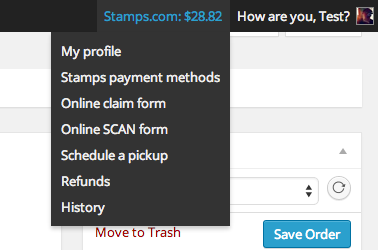
You can also process refunds for and delete Stamps.com shipping labels, and top-up your Stamps.com account.
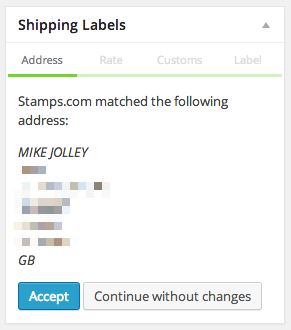
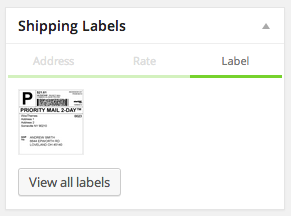
With nearly 500,000 customers, Stamps.com has become the leading USPS postage provider in the country by simplifying access to the lowest USPS shipping rates and the most popular USPS services. Whether you ship one package a day or 1000, from your garage or a giant warehouse, Stamps.com has the tools to make your USPS® shipping process faster, more affordable and more efficient.
Plus WooCommerce customers get exclusive USPS shipping discounts with no minimum volume requirements to help reduce shipping costs. Your average Priority Mail rates are 3% less than standard Commercial Base Pricing and 17.3% less for Priority Mail Express.
Sign up for your Woocommerce-Stamps.com account today and save!
Sign up for a new Stamps.com account today! Every Stamps.com account includes:
At WooCommerce, we understand you’re looking for ways to save money. That’s why we’ve teamed up with IntuiShip, a volume postage partner of the USPS, to offer you deep shipping discounts to help reduce shipping costs. Savings are delivered directly through your WooCommerce-Stamps.com account. No additional account is needed.
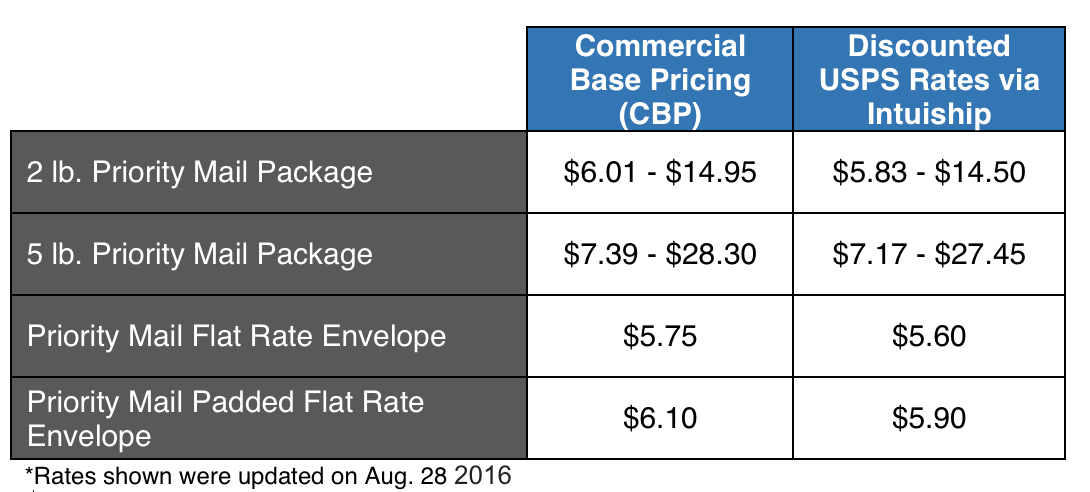
Here are examples of discounted rates you get:
Yes. WooCommerce Stamps.com API is a label printing and fulfillment extension that lets you generate ready-to-print USPS shipping labels straight from the order screen in your WooCommerce dashboard. It pulls the items in an order and connects to your Stamps.com account, so you can create labels without copying order details into a separate shipping tool.
WooCommerce Stamps.com API brings label creation into the order admin, so you can review an order, verify the shipping address, and print a USPS label from the same screen. It also lets you monitor your Stamps.com account balance, add funds, and manage postage from within WooCommerce, which streamlines day-to-day fulfillment for stores shipping within the United States.
No. WooCommerce Stamps.com API is built for creating labels in the order admin, not for displaying live rates during checkout. If you want customers to see USPS rates on the cart and checkout pages, pair it with the USPS Shipping Methods extension. Using both together, shoppers see USPS rates at checkout and you print labels using those same rates from the backend.
They solve two different parts of shipping. WooCommerce Stamps.com API creates and prints USPS labels from your order admin after a purchase. USPS Shipping Methods calculates and displays USPS rates to customers during checkout. Many stores run both: one quotes rates to shoppers, and the other handles label printing and fulfillment.
It can help. Through your Stamps.com account, the extension gives you access to discounted USPS rates on domestic and international shipments, including Priority Mail and Priority Mail Express. It also offers discounted Stamps.com package insurance compared with standard USPS insurance rates. Actual savings depend on your services and volume, so review current rate details on the product page.
Yes. WooCommerce Stamps.com API includes an Automatic Funding option that purchases postage on your behalf when your balance drops below a threshold you set. This is useful if staff handle shipping and you do not want them to buy postage manually, or if you prefer to keep a low balance and top up as you go.
Yes. The extension supports international USPS shipments, and it prompts you for the customs information required before an international label can be generated. You add your customs details and line items for the package contents, then create the label from the order screen.
Yes. From the WooCommerce admin, you can process refunds for Stamps.com labels and delete labels when an order changes or a mistake happens. You can also top up your Stamps.com balance from the same area, which keeps postage management inside your store dashboard.
Yes. The extension includes Stamps.com address verification in the order meta box, so you can confirm a customer's shipping address before creating a label. Verifying addresses up front can help reduce failed deliveries and reprints.
Yes. WooCommerce Stamps.com API connects your store to Stamps.com, so you need a Stamps.com account, which carries a monthly fee. Your Stamps.com credentials let the extension request labels and manage postage on your behalf.
You need a Stamps.com account with its monthly fee, and your hosting environment needs SOAP support in place before installation. After activating the extension, you enter your Stamps.com username and password and set your shipping preferences under WooCommerce settings. If you are unsure about the SOAP requirement, your hosting provider can confirm it.
It is best for United States based WooCommerce stores that ship with USPS and want to print labels and manage postage from within their store dashboard. It suits merchants who already use, or plan to use, a Stamps.com account and want discounted USPS rates plus a straightforward, order-by-order label printing workflow.
It may not be the right fit if your main goal is to show shipping rates to customers at checkout, since this extension focuses on label printing in the order admin. For checkout rates, add USPS Shipping Methods. It is also not suitable if you rely on the Ship to Multiple Addresses plugin, because the two are not compatible. And if you ship primarily with carriers outside USPS, another shipping solution may serve you better.
If you run a WooCommerce store on WordPress and ship with USPS, WooCommerce Stamps.com API is a label printing extension designed for exactly that. It connects to Stamps.com and lets you generate USPS labels from each order, verify addresses, manage postage funding, and process label refunds, all inside your WooCommerce dashboard.
Yes, if you prefer to work in the Stamps.com client rather than printing from WooCommerce. The Stamps.com XML File Export extension lets you select orders and export them into an XML format you can import into Stamps.com. This gives you access to the full set of features on the Stamps.com website, including sending Stamps.com tracking emails to customers.
Kategorien
Extension information
Länder
Anforderungen






