Motivate content creators—motivate content creators to promote your site through affiliate commissions.
Improve traffic quality—content creators promote your site to people who need your products and services and improve the quality of traffic to your site.
Increase conversions and revenue—increased traffic quality leads to increased conversions and revenue.
Marketing insights—analyze affiliate traffic to understand your customers and target future products, advertising, and marketing campaigns.
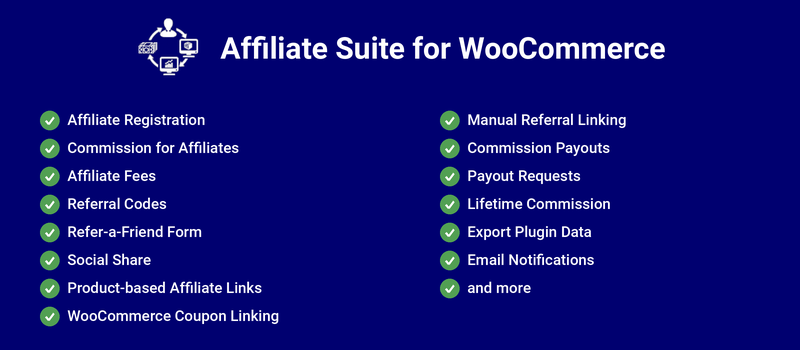
Add a comprehensive affiliate program to your site with Affiliate Suite for WooCommerce.
How does Affiliate Suite work?
Application Submission and Approval
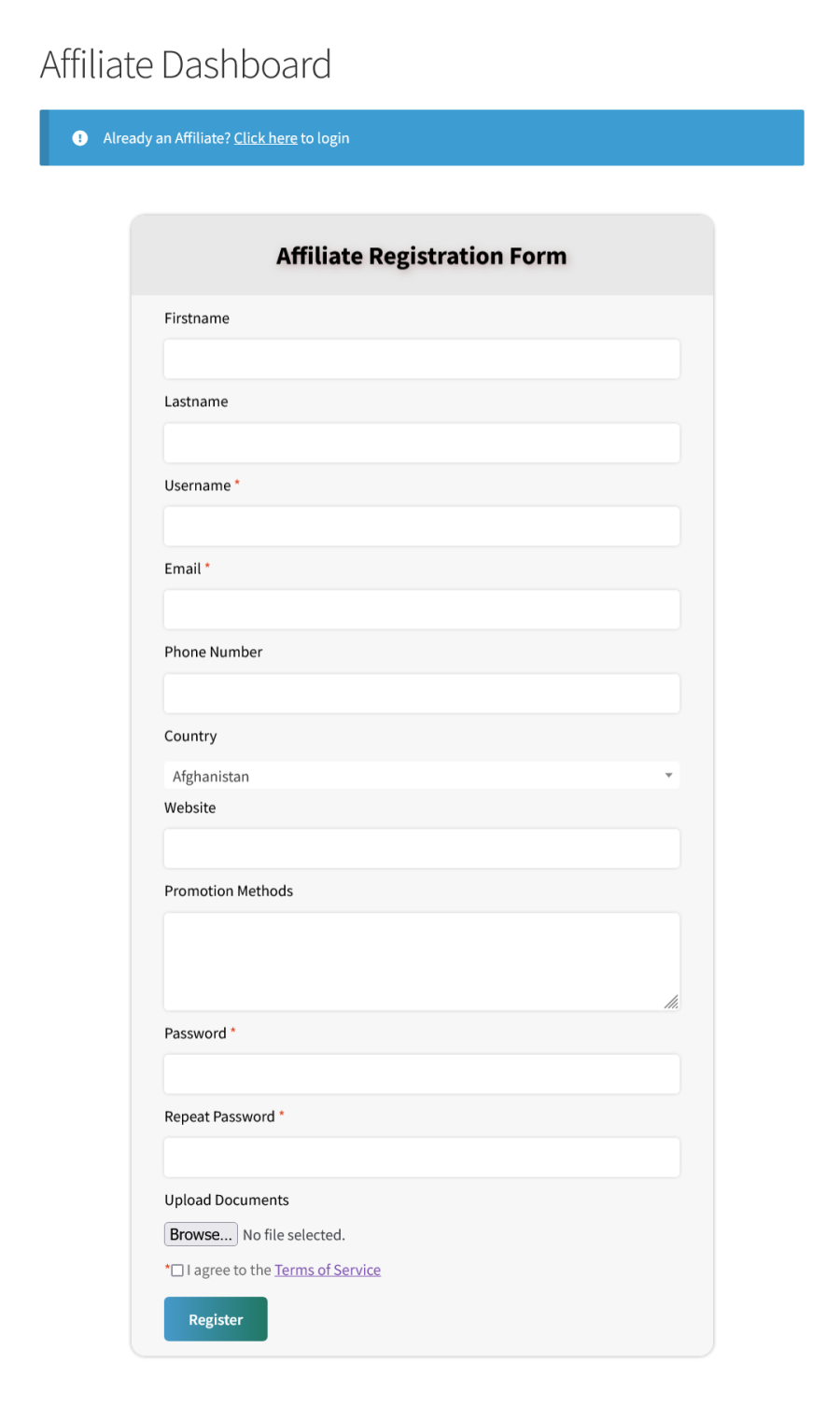
After you install and activate the plugin for the first time, a page for the Affiliate Application form automatically builds.
Affiliate Registration Form
Affiliate Registration Form
After a user applies to be an affiliate, the site admin receives a notification by email. They can review the application, set the commission rate, and approve the application.
After admins approve an application, users receive notification of their approvals by email.
WooCommerce Account Management
You can allow your users to submit the affiliate application in the following places,
My Account Page
WooCommerce Signup Form
WooCommerce Checkout Form
Affiliate Promotion Tools
The following promotion tools are available for affiliates on the Affiliate dashboard.
Affiliate Link Generator
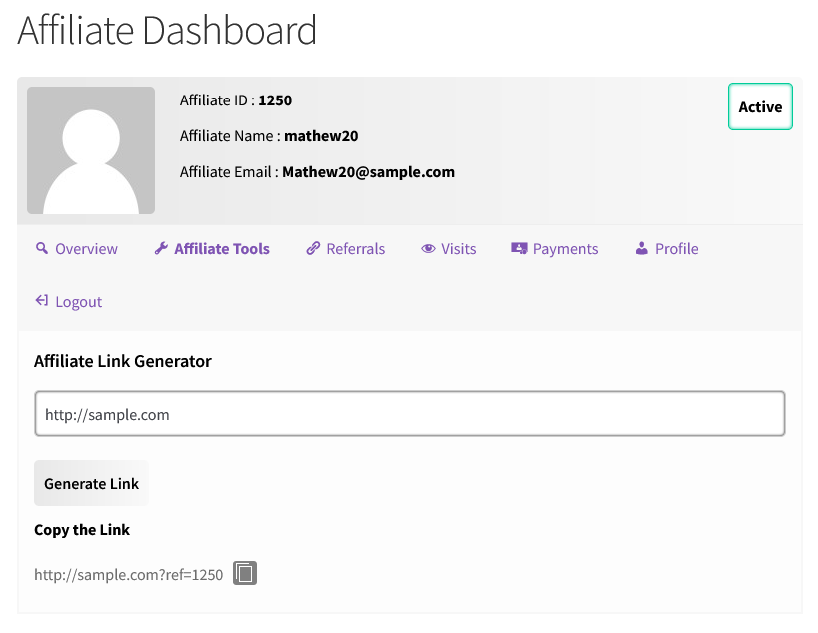
Affiliate Suite creates unique affiliate links for each affiliate.
Affiliate Link Generator
Refer-a-Friend Form
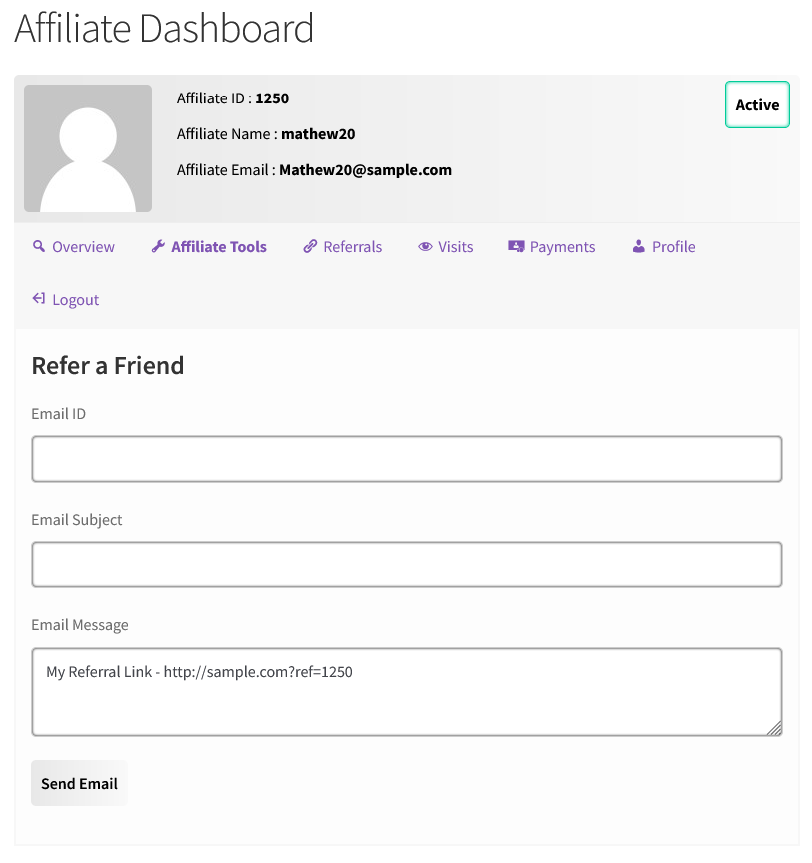
Affiliates can send Affiliate links to other users using the Refer-a-Friend form.
Refer a Friend Form
Creatives
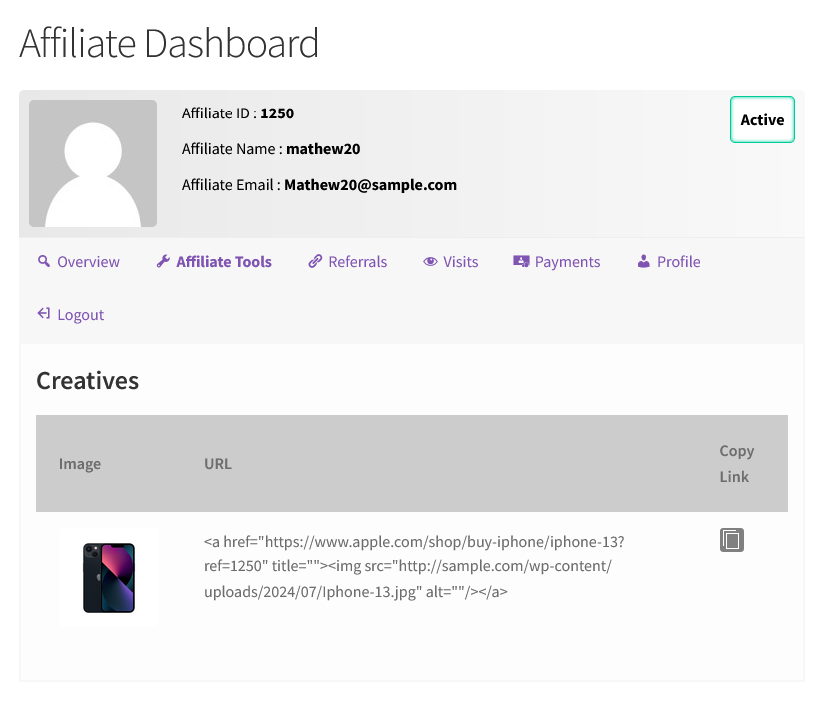
Affiliates can embed their affiliate links inside creatives.
Creatives
Conversion using Affiliate Links
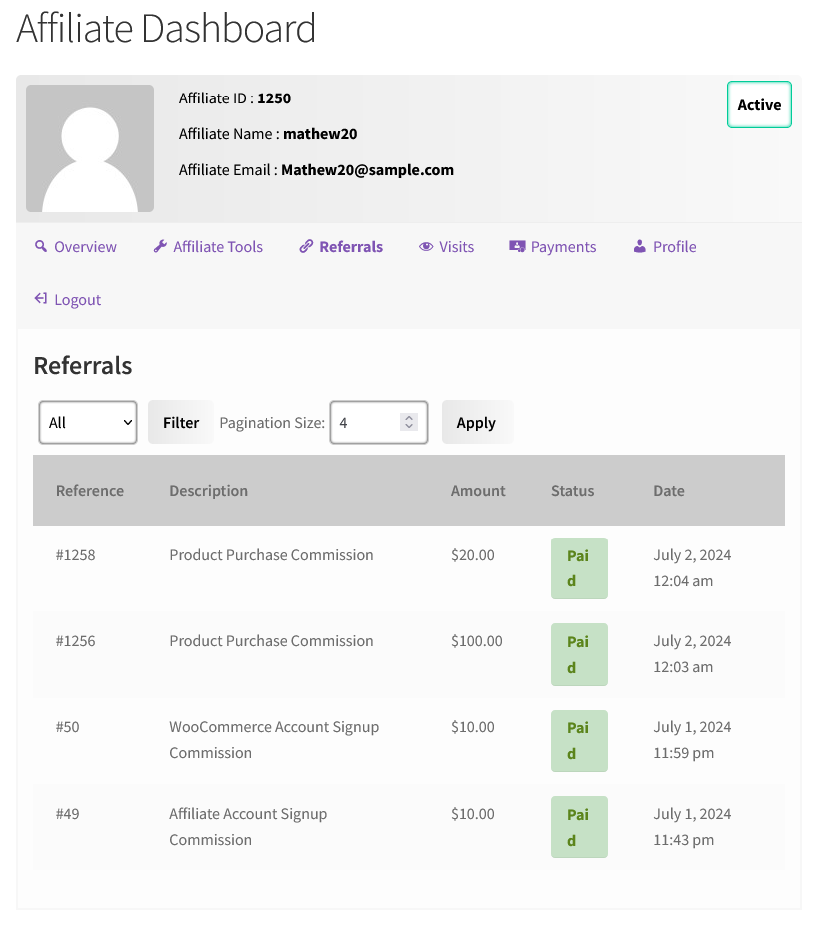
Once the user accesses the site using an affiliate link or code, creates an account, and completes a product purchase, they count as a referral for the affiliate.
Affiliate Referrals via Product Purchases and Account Signups
Referrals
Users Receiving Commissions
Admins must approve referral activity before Affiliate Suite adds any earning activity to an affiliate’s account as a commission.
Site admins can pay affiliates with the integrated PayPal Payouts API or built-in Wallet system. Admins can also manually export information about unpaid affiliates and make payments outside the site.
Reports
Site admins can review reports to gain insights into Affiliate activities on their sites.
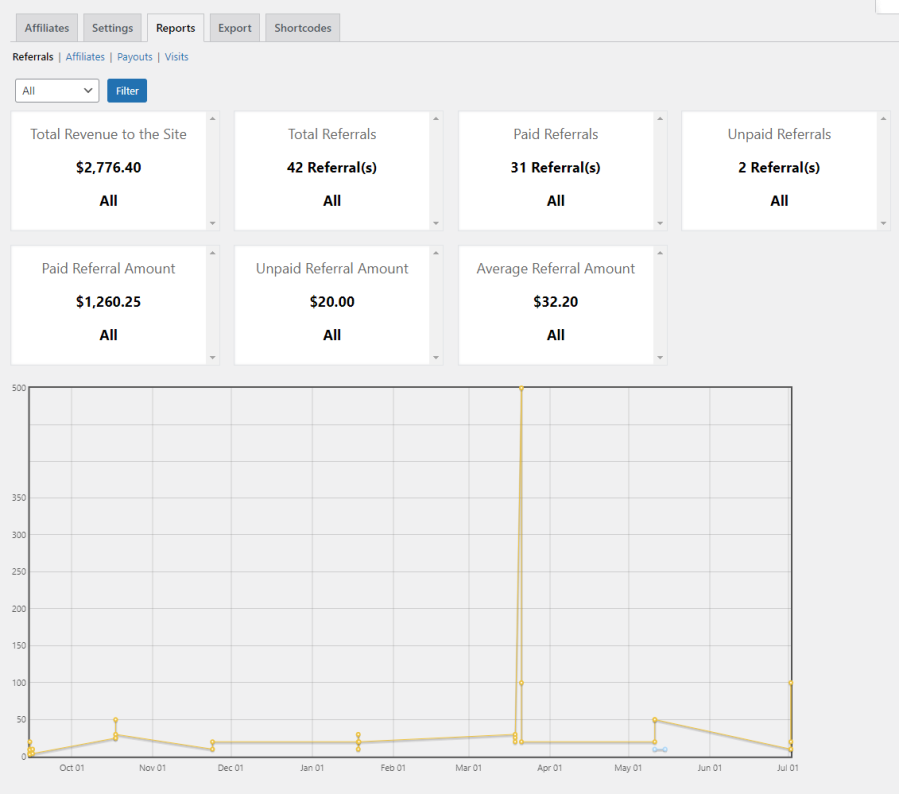
Referrals reports
Referral Reports
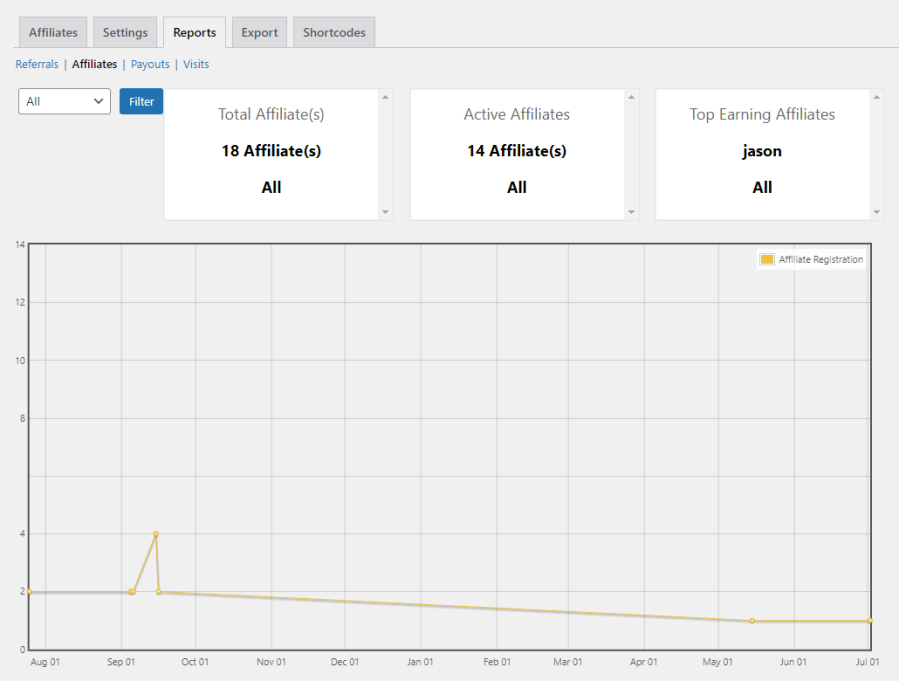
Affiliates Reports
Affiliate Reports
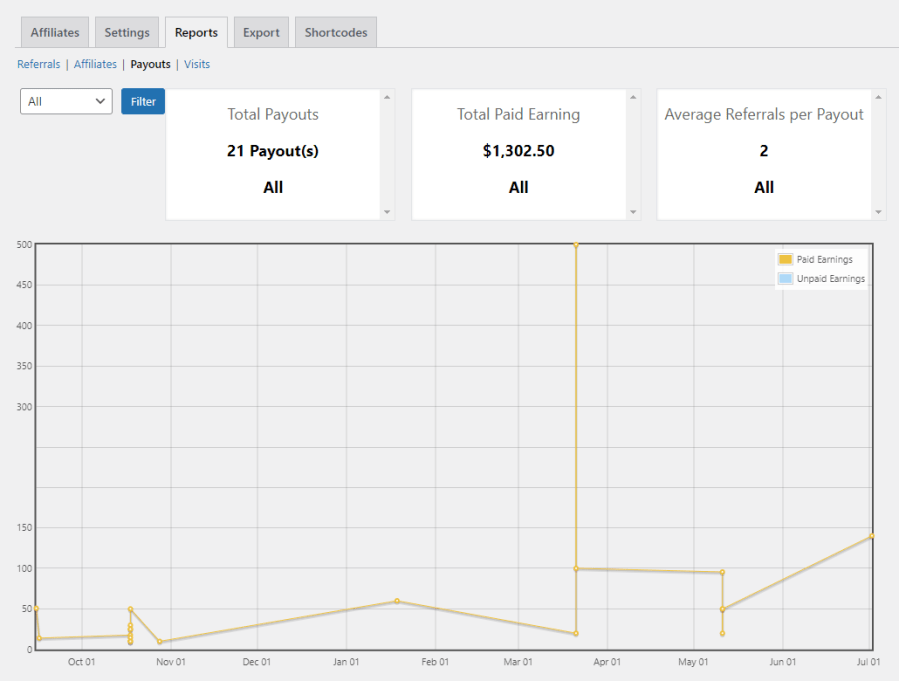
Payouts Reports
Payout Reports
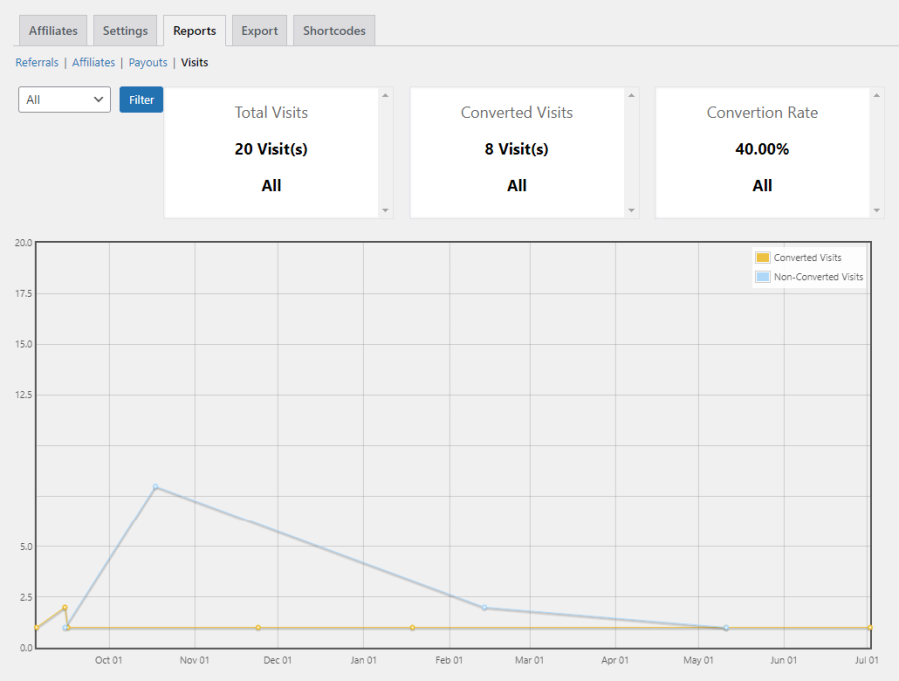
Visits Reports
Visits Reports
Popular Features
1. Affiliate Registration
Users can register as an Affiliate on the My Account page, Affiliate Signup form, and the Checkout page.
Admins can mark users as affiliates in bulk using admin settings.
Admins can display the additional fields in Affiliate Registration Form if needed.
2. Commission for Affiliates
Affiliates can earn commission for the following actions,
Product Purchase Commission – Commissions can be calculated based on the following criteria,
Products
Order Total
Order Total Range
WooCommerce Signup Commission – Affiliates can earn commission when a user creates an account using the affiliate link.
Affiliate Signup Commission – Users can earn commission when they successfully become an affiliate on your site.
Affiliate Signup Bonus Commission – Affiliates can earn commission when the user has become an affiliate using the affiliate link.
MLM[Multi Level Marketing] – Parent affiliates can get the commission from the buyer’s purchase made through the child affiliate’s link.
3. Affiliate Fees
Sites can charge users a fee to register as affiliates.
4. Referral Codes
Affiliates can refer new users to sites using referral codes instead of affiliate links.
5. Creatives
Affiliates can promote their affiliate links using creatives.
6. Referral Cookie Validity
The validity of the referral links can be decided based on the cookie validity & it can be customized.
7. Refer-a-Friend Form
Affiliates can refer new users directly to your site using the Refer-a-Friend form.
8. Social Share
Affiliates can promote their link on social networks & bring more sales to the site. Following social networks are supported,
Facebook Share
Twitter Tweet
VK.com Share
Whatsapp Share
9. Product-based Affiliate Links
Admins can generate an affiliate link for specific products on the Affiliate Dashboard.
10. Affiliate-level Product Commissions
Set custom commission rates for each affiliate.
11. WooCommerce Coupon Linking
Site admin can link the coupons & affiliates so that affiliates can get the commission when a buyer makes a purchase using the linked coupon & buyer can get the discount as well.
12. Checkout Affiliate
Users will be able to select affiliates on the checkout page.
13. Credit Last Referrer
If the buyer makes a purchase using multiple affiliate links, then a commission will be awarded to the affiliate whose link has been used at last.
14. Manual Referral Linking
Site admin can manually link the Affiliate & Buyer.
15. Slug Modification
Affiliates will be able to modify their identification.
16. Readable URL Affiliate Links
Admins can create affiliate URLs as readable affiliate links.
17. Affiliate Signup Bonuses
When affiliates register, they can receive a bonus commission.
18. Product Commissions
Affiliates can see the commission rates for configured products from their dashboards.
19. Bulk Update
Product Purchase commission can be set to all products at once.
20. Restriction
Product Purchase Commission can be restricted for Sale Items.
Product Purchase Commission can be restricted based on Quantity.
You can restrict awarding commissions to your affiliates based on the following purchase history,
Number of Successful Orders.
Total Amount Spent on Site.
Amount Spent on Current Order.
21. Product Sales Report
Product Sales Report can be shown to both Affiliates & Admin.
22. Referral Order Details
Affiliates can see order details of buyers (Order ID, Order Amount, Order Date, Customer Name, Customer Email, etc.).
23. Commission Payouts
Admins can pay affiliate commissions directly from the site using the following methods:
PayPal Payouts[Commissions can be paid to affiliates manually & automatically].
Affiliate Suite’s built-in wallet system[Option for affiliates to transfer their unpaid commission to Inbuilt Wallet].
24. Generate Payout
Site admin can pay the commission to affiliates in bulk using payment methods.
25. Payout Requests
Affiliates can send payout requests to site admins.
26. Lifetime Commission
Affiliates will receive commissions for a lifetime.
27. Leaderboard
Admins can list top-performing affiliates on a leaderboard.
28. Export Plugin Data
Admin can export the following data,
Affiliates
Referrals
Visits
Payouts
29. Email Notifications
Users receive email notifications for all important affiliate activities.
30. Shortcodes
An extensive list of shortcodes is given for the Affiliate Dashboard Menu.
31. Compatibility
Provided compatibility with Checkout Blocks.
Affiliate Commission can be restricted for Renewal Orders[Compatibility given with WooCommerce Subscriptions].
Extensive Features List
Create and manage a complete affiliate program within WooCommerce.
Allow customers to register as affiliates through a customizable affiliate registration form.
Configure affiliate registration approval workflows and email verification.
Support Google reCAPTCHA protection for affiliate registration forms to prevent spam and automated registrations.
Approve, reject, activate, or deactivate affiliate accounts from the admin panel.
Restrict affiliate access based on purchase history requirements.
Allow affiliates to select a parent affiliate during registration.
Customize affiliate application forms with additional fields.
Expand or collapse application form sections for better user experience.
Tanto nosotros como nuestros socios procesamos tus datos personales (como los datos de navegación, las direcciones IP, la información sobre las cookies y otros identificadores únicos) en función de tu consentimiento o en nuestro interés legítimo para optimizar nuestra web, las actividades de marketing y tu experiencia como usuario.