


Instalaciones activas
3K+
La suscripción incluye
Ayuda y soporte

El plugin Amazon S3 Storage for WooCommerce te permite ofrecer productos digitales a través del servicio Amazon AWS S3. Amazon S3 Storage está completamente automatizado, lo que te permite especificar sencillamente el contenedor y el nombre del objeto del archivo mediante shortcodes en las rutas del archivo de descarga, y cuando un cliente descarga su compra, la extensión lo traducirá a una URL de Amazon S3 y proporcionará ese archivo como descarga.
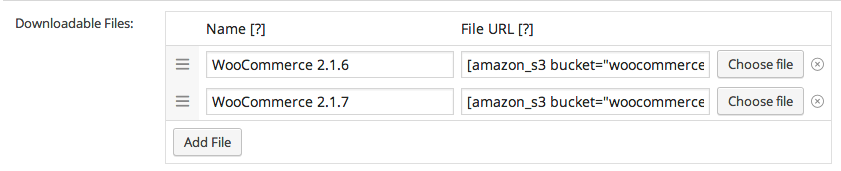
El uso del almacenamiento Amazon S3 a disposición de tus productos digitales te proporciona espacio para disfrutar de una mejor escalabilidad, y ofrece una mayor fiabilidad, especialmente cuando se entregan archivos grandes, y mayores velocidades de descarga para tus clientes.
La extensión de Amazon S3 para WooCommerce también admite varios contenedores dentro de un producto, por lo que puedes proporcionar fácilmente acceso de descarga a archivos almacenados en diferentes contenedores de Amazon al comprar un producto.
Creado por 
Only if you want to use Amazon S3. If you'd rather use Cloudflare R2 — which has no egress fees — you'll need a Cloudflare account with R2 enabled instead. Alternatively, you can use a provider like Wasabi or Backblaze, as long as they support the S3 API.
Amazon S3 and Cloudflare R2 are supported natively, with first-class settings in the extension. Wasabi, Backblaze B2, DigitalOcean Spaces, and other S3-compatible providers are supported experimentally through a configuration snippet — support can walk you through it if needed. You don't need both AWS and R2; pick whichever fits your goals.
There's no practical ceiling imposed by the extension itself — Amazon S3 supports objects up to 5 TB, and Cloudflare R2 up to 4.995 TB. WooCommerce's built-in Force Download method tops out around 500 MB on most shared hosts; Amazon S3 Storage replaces that streaming path with a direct cloud redirect, so the host's PHP limits stop mattering.
Every download is delivered through a signed URL that expires after a configurable period. Customers can't share a working link with others past the expiry, and the underlying file path is never exposed. WooCommerce's existing download permissions, download count limits, and expiry dates continue to apply on top of the signed URL layer.
Yes — uploads run through Action Scheduler in the background, so you can offload existing products without any issue. Add an existing file to a product and let it queue. This also allows files to be uploaded from behind basic auth and staging sites without issue.
Yes. Subscription products with downloadable files deliver through S3 or R2 the same way one-time products do. Memberships' access gating runs before the signed URL is generated, so members get their files and non-members don't. The three extensions complement each other when you're building a digital subscription or membership store.
Categorías
Información de la extensión
Comprobaciones de calidad
Compatibilidad
Países





