

La suscripción incluye
Ayuda y soporte
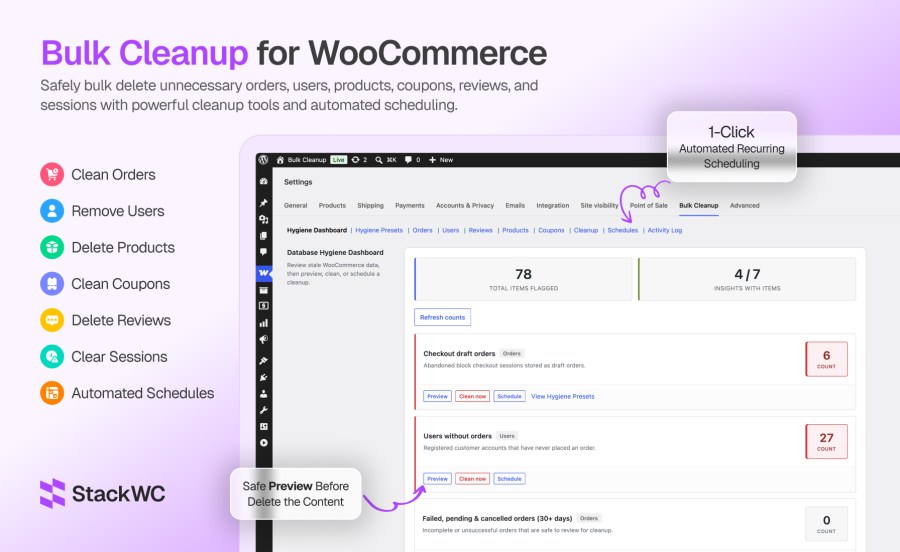
Bulk delete orders, customers, products, coupons, and reviews with advanced filters, live hygiene insights, and automated schedules. Preview everything first. Export a CSV backup. Trash before you permanently delete. Bulk Cleanup for WooCommerce helps store owners remove stale orders, unused coupons, inactive customers, and database bloat — with filters, scheduling, preview, and CSV export built in.
Bulk delete WooCommerce orders, users, products, coupons & reviews. Live hygiene dashboard, scheduled cleanup, preview & CSV export. HPOS compatible.
WooCommerce stores accumulate data fast — abandoned checkout drafts, failed orders, expired cart sessions, unused coupons, and customer accounts that never placed an order. Over time, that bloat slows admin screens, inflates backups, and makes your database harder to manage. Bulk Cleanup gives you one place to see what’s piling up, remove it safely, and automate recurring maintenance — so you’re not deleting things one by one from the admin.
See what needs cleanup before you delete anything:
Ready-made recurring cleanup policies. Applying a preset creates a scheduled job:
Quick operations with configurable options:
stackwc_bcfw_manage, administrators by default)Create one-time or recurring jobs from any tab. Choose hourly, twice daily, daily, weekly, or monthly intervals. Pause, resume, run now, or delete schedules from one dashboard. Email notifications tell you when a job finishes.
For a first-time cleanup:
Yes. Bulk Cleanup includes preview before delete, confirmation prompts, optional move-to-trash (reversible), CSV export up to 5,000 rows, batch processing for large stores, and a full Activity Log. Always preview and export a CSV before permanent deletion — that cannot be undone.
Yes. Create one-time or recurring jobs from any tab using Schedule this deletion. Intervals include hourly, twice daily, daily, weekly, and monthly. Hygiene Presets also create recurring schedules automatically. Manage, pause, resume, and run jobs from the Schedules tab.
Yes. Use the Users tab with Only users without orders enabled, the Delete Users Without Orders tool under Cleanup, or the Hygiene Dashboard insight for users without orders. You can also schedule this cleanup to run automatically. Administrators and your logged-in account are always protected.
Yes. The Products tab lets you filter by status, type, category, stock status, featured flag, SKU, and date range. Preview matches, export CSV, move products to trash, or delete permanently. Trash gives you a recovery window before permanent removal.
Open the Coupons tab and enable Expired coupons only and/or Unused coupons only. Filter further by discount type, coupon code, or date. Preview, export CSV, then trash or permanently delete. The Monthly Expired Coupon Cleanup preset automates this on a schedule.
Categorías
Comprobaciones de calidad
Países







