

La suscripción incluye
Ayuda y soporte
Trendyol Integration for WooCommerce connects your online store with Trendyol International — one of the fastest-growing marketplaces in Southeast Europe and the Middle East. Export your entire WooCommerce product catalog to Trendyol, import marketplace orders in real time, and keep stock and prices synchronized automatically. Whether you sell in Romania, Greece, the UAE, or Saudi Arabia, this plugin gives you full marketplace control without ever leaving your WordPress dashboard.
Trendyol Integration for WooCommerce brings the entire Trendyol selling experience into your WordPress admin. From initial product export and category mapping to real-time order processing, stock synchronization, and invoice management — everything runs inside WooCommerce. Expand your reach across Romania, Greece, the United Arab Emirates, and Saudi Arabia without juggling multiple dashboards or manual data entry. Connect your API credentials, map your catalog, and start selling on Trendyol in minutes.
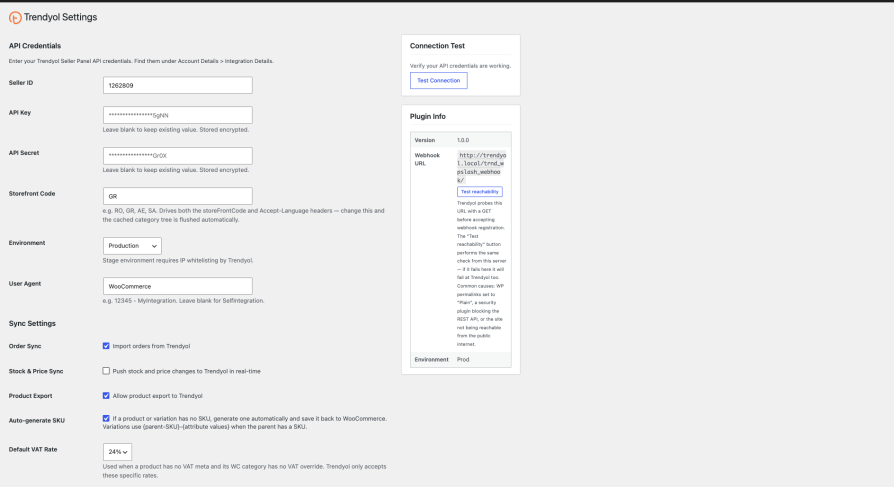
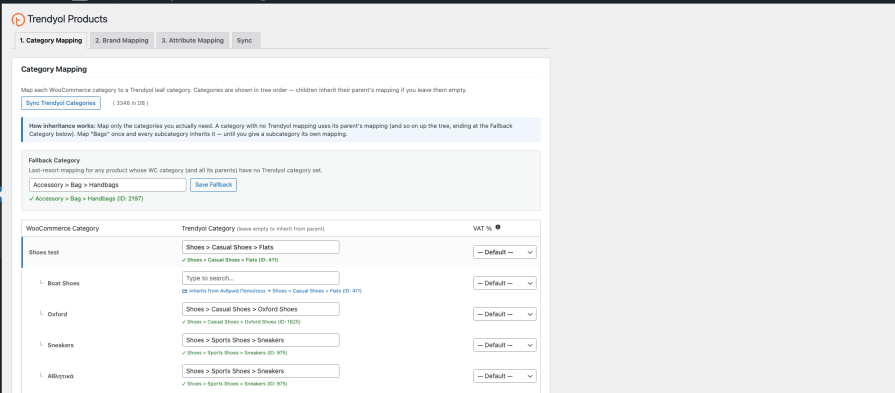
Trendyol Integration for WooCommerce handles product export, order synchronization, stock management, invoice delivery, and XML feed generation — everything you need to sell on Trendyol International from a single WooCommerce plugin.
The plugin supports all Trendyol International storefronts including Romania, Greece, United Arab Emirates, and Saudi Arabia. You select your storefront code during setup and the plugin handles the correct API endpoints and language headers automatically.
Yes. You need an active Trendyol International seller account with API credentials (Seller ID, API Key, and API Secret). These are available in your Trendyol Seller Panel under Account Details, Integration Details section.
No. Product sync is one-directional from WooCommerce to Trendyol. You manage your catalog in WooCommerce and export it to Trendyol. Orders flow in the opposite direction — from Trendyol into WooCommerce
Orders arrive in real time via webhooks. The plugin automatically registers a webhook with Trendyol when you save your API credentials. As a safety net, it also polls the Trendyol API every 30 minutes to catch any missed orders.
Yes. Trendyol requires a publicly accessible HTTPS URL to deliver webhook notifications. If your site is behind a firewall or reverse proxy, you can configure a custom webhook URL in the settings.
Yes. The plugin fully supports High-Performance Order Storage (custom order tables) and declares HPOS compatibility on activation. It works with both the legacy post-based storage and the new HPOS system.
If stock and price sync is enabled, the updated values are automatically pushed to Trendyol within seconds. Changes are debounced and batched to avoid hitting API rate limits.
Yes. Trendyol requires every product to have a valid Trendyol category and brand. The plugin provides a mapping interface where you assign your WooCommerce categories and brand terms to their Trendyol equivalents. You can also set defaults for unmapped items.
Yes. Each Trendyol order includes action buttons to update its status (Picking, Invoiced, Shipped), add tracking information, cancel items, and print shipping vouchers — all from the WooCommerce order edit screen.
The plugin integrates with WooCommerce PDF Invoices and Packing Slips, WPO WooCommerce PDF Invoices, Billingo, and Germanized for WooCommerce. If you use a different invoicing plugin, you can specify a custom meta key. Invoices can be sent to Trendyol automatically or manually.
All plugin activity is logged through the WooCommerce logger. Go to WooCommerce, Status, Logs and filter by source trendyol-woocommerce. Logs are retained for 30 days. For export-specific errors, use the Check Batch Status tool on the Export tab to see Trendyol's rejection messages.
Información de la extensión
Comprobaciones de calidad
Países







